Route navigation - strange behaviour

Quote from TigerOnTour on 19.08.2024, 23:31Hi, I’ve been using Scenic during the last months for a number of trips. My normal behaviour is to define a route with 10 to 30 waypoints (stops) and sometimes a few via-Points in between to force a particular route. That working quite well. In some cases I want to drive routes where for example the stop #9 is quite close to #3, but I want to take a circle between the two (4,5,…8). In such cases I have observed the following behaviour:
When arriving at #3 but not immediately continuing in direction of #4 (but parking.a few meters ahead in direction of #9) the navigation kind of assumes that my next waypoint is #9 instead of #4. In the list of waypoints, it grays out numbers 4 to 8 and displays #9 as the next “active” waypoint. However, the navigation continues on the original route as long as I don’t add additional points on the fly. Even more confusing, on the main navigation screen, the next stop is displayed as #9, but the time and distance are the ones to #4. When continuing and approaching Stop #4 ist is displayed as #9 in the small window, but the distance and time are the ones of #4.
When I first discovered this, I tried to add additional waypoints to get the system back in order - that was a bad idea, because it immediately cause the app to recalculate the complete route directly to the new waypoint and them directly to #9 - in this case #4 to #8 were not on the route anymore.
Second time I discovered that the route was still followed and I just ignored the wrong number, but could not modify the route until I reached #9 - after that it all went well.
Third time there was a short detour just before arriving at #6 because of roadworks, and magically when I left the navigation route and #6 was closest - everything went back to “normal” and #6 was displayed as the correct new next Stop and subsequently #7 and so on…
From the observed behaviour I think the problem happens when you “leave” the navigation route - even if it’s just 50 meters to make a turn or park. Then it somehow picks the wrong next Stop for the display and also marks the Stops in between as “visited”.
Would be interesting to know if anybody else has observed such behaviour and can contribute with strategies to deal with it.
Kind regards
Thomas
Hi, I’ve been using Scenic during the last months for a number of trips. My normal behaviour is to define a route with 10 to 30 waypoints (stops) and sometimes a few via-Points in between to force a particular route. That working quite well. In some cases I want to drive routes where for example the stop #9 is quite close to #3, but I want to take a circle between the two (4,5,…8). In such cases I have observed the following behaviour:
When arriving at #3 but not immediately continuing in direction of #4 (but parking.a few meters ahead in direction of #9) the navigation kind of assumes that my next waypoint is #9 instead of #4. In the list of waypoints, it grays out numbers 4 to 8 and displays #9 as the next “active” waypoint. However, the navigation continues on the original route as long as I don’t add additional points on the fly. Even more confusing, on the main navigation screen, the next stop is displayed as #9, but the time and distance are the ones to #4. When continuing and approaching Stop #4 ist is displayed as #9 in the small window, but the distance and time are the ones of #4.
When I first discovered this, I tried to add additional waypoints to get the system back in order - that was a bad idea, because it immediately cause the app to recalculate the complete route directly to the new waypoint and them directly to #9 - in this case #4 to #8 were not on the route anymore.
Second time I discovered that the route was still followed and I just ignored the wrong number, but could not modify the route until I reached #9 - after that it all went well.
Third time there was a short detour just before arriving at #6 because of roadworks, and magically when I left the navigation route and #6 was closest - everything went back to “normal” and #6 was displayed as the correct new next Stop and subsequently #7 and so on…
From the observed behaviour I think the problem happens when you “leave” the navigation route - even if it’s just 50 meters to make a turn or park. Then it somehow picks the wrong next Stop for the display and also marks the Stops in between as “visited”.
Would be interesting to know if anybody else has observed such behaviour and can contribute with strategies to deal with it.
Kind regards
Thomas

Quote from Guido on 20.08.2024, 08:08Hi Thomas,
You are not the first mentioning this. There are a few forum topics on this as well. Like you correctly concluded... it happens when the route overlaps itself or crosses itself, and you deviate from the route close to an overlapping stretch.
I'm working on a big update for October, where this will be addressed.
Meanwhile, knowing that this typically occurs with round trips, if the route overlaps / crosses itself, I recommend to create 2 sperated routes. One for the way to go, and one for the way back. Not ideals, but perhaps a workable solution until this is adressed.
Best regards,
Guido
Hi Thomas,
You are not the first mentioning this. There are a few forum topics on this as well. Like you correctly concluded... it happens when the route overlaps itself or crosses itself, and you deviate from the route close to an overlapping stretch.
I'm working on a big update for October, where this will be addressed.
Meanwhile, knowing that this typically occurs with round trips, if the route overlaps / crosses itself, I recommend to create 2 sperated routes. One for the way to go, and one for the way back. Not ideals, but perhaps a workable solution until this is adressed.
Best regards,
Guido
Quote from TigerOnTour on 21.08.2024, 06:48Hi Guido,
thanks for the quick response. October sounds great - I’ll wait for that update. In the meantime I’ll live with my workaround. Splitting into multiple routes is not what I want to do because I like the 1-Route = 1-day planning - so I always have a predicted arrival time for the day on my screen while driving.
Kind regards
Thomas
Hi Guido,
thanks for the quick response. October sounds great - I’ll wait for that update. In the meantime I’ll live with my workaround. Splitting into multiple routes is not what I want to do because I like the 1-Route = 1-day planning - so I always have a predicted arrival time for the day on my screen while driving.
Kind regards
Thomas

Quote from Mex on 22.08.2024, 00:08Hi TigerOnTour,
i read your post twice.
„My normal behaviour is to define a route with 10 to 30 waypoints (stops) and sometimes a few via-Points in between to force a particular route.“
Stops are used to force Scenic to reach this location and are announced in my headset.
Vias are used to have the direction you like to go and may be skipped in case of closures and/or deviations.
My routes have up to 20 vias, a startpoint, a target and may be 1 stop for gasstation or a rest; coffee or lunch.
Maybe this is the reason in your case.
Just my 2 cents, Mex
Hi TigerOnTour,
i read your post twice.
„My normal behaviour is to define a route with 10 to 30 waypoints (stops) and sometimes a few via-Points in between to force a particular route.“
Stops are used to force Scenic to reach this location and are announced in my headset.
Vias are used to have the direction you like to go and may be skipped in case of closures and/or deviations.
My routes have up to 20 vias, a startpoint, a target and may be 1 stop for gasstation or a rest; coffee or lunch.
Maybe this is the reason in your case.
Just my 2 cents, Mex
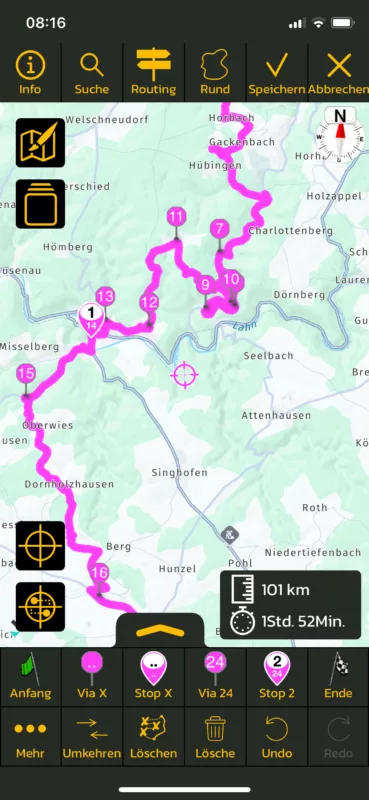

Quote from ryder_hook on 24.08.2024, 10:56I noticed the same phenomenon today. But I don't have any viapoints next to each other. I took a screenshot especially for this reason. Is there another way to avoid this rerouting?I have also noticed that the screen is not reactivated despite the branching displayed in battery-saving mode.
ciao
ryder
I noticed the same phenomenon today. But I don't have any viapoints next to each other. I took a screenshot especially for this reason. Is there another way to avoid this rerouting?I have also noticed that the screen is not reactivated despite the branching displayed in battery-saving mode.
ciao
ryder
Quote from Mex on 24.08.2024, 15:20Hi ryder_hook.
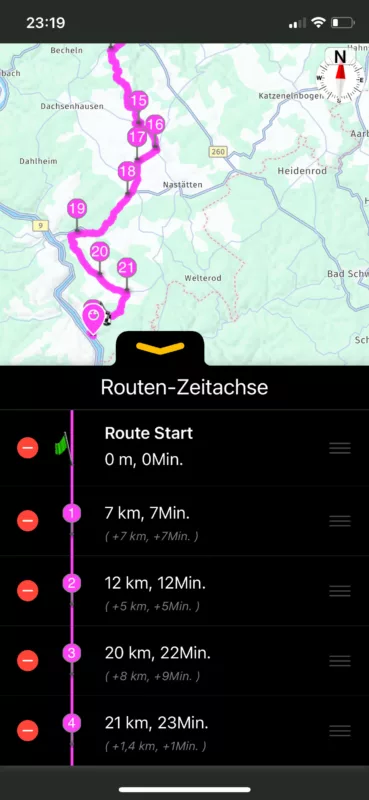
Had this issue too, while planning a tour. Maybe you need to change the via‘s in the timeline of your route. Looks like it will go to via 18 and afterwards, 19, 20, and so on. Check the timeline while you plan and maybe slide the via‘s in to the correct order.
Ride safe , Mex
Hi ryder_hook.
Had this issue too, while planning a tour. Maybe you need to change the via‘s in the timeline of your route. Looks like it will go to via 18 and afterwards, 19, 20, and so on. Check the timeline while you plan and maybe slide the via‘s in to the correct order.
Ride safe , Mex
Quote from ryder_hook on 25.08.2024, 04:05For me, it looks good or any comments from your side?
For me, it looks good or any comments from your side?
Quote from Mex on 25.08.2024, 13:38Hi Ryder,
so the dark magenta is what you already travelled, right?
Looks like a loop. When you set a via on the wrong side of the road, that may happen, while leading you back to the left road.
Would be helpful to see the whole track. Or share it to have a look at it.
Kind regards, Mex
Hi Ryder,
so the dark magenta is what you already travelled, right?
Looks like a loop. When you set a via on the wrong side of the road, that may happen, while leading you back to the left road.
Would be helpful to see the whole track. Or share it to have a look at it.
Kind regards, Mex
Quote from ryder_hook on 27.08.2024, 06:10Hi Mex,
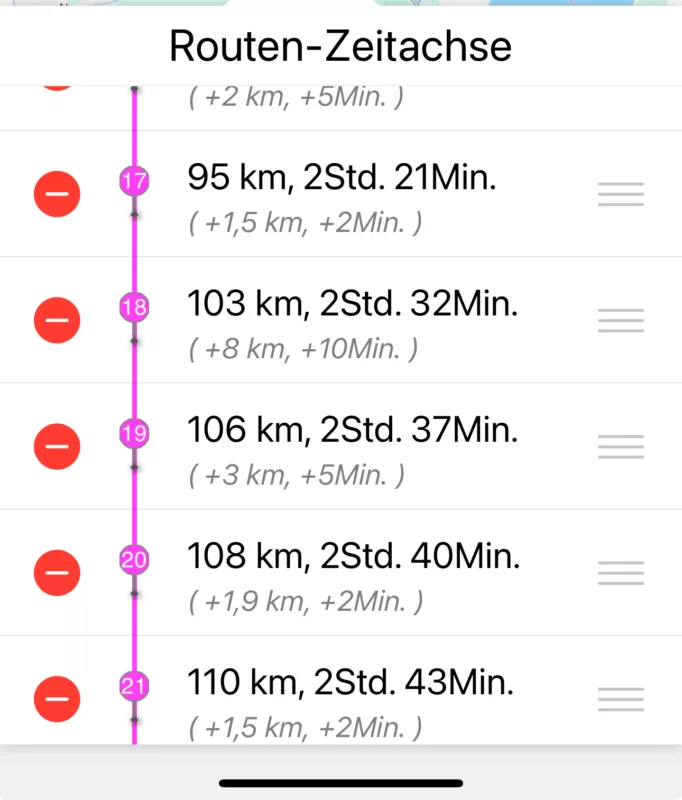
I don't understand your question. It is complicated. I had a GPX file that I had imported. Unfortunately, this was only a track. That's why I manually created a route from it. So that the navigation works. Because I realised that there is no navigation for tracks. I sent the screenshot above because your assumption was that the points are not in the correct chronological order. That's why I only included the part between points 17 to 21. This should prove that the points are in the correct chronological order. The dark magenta is always the color I have when I have a route and not a track.
However, here is the tour, the diversions from the first screenshot is logically not included.
https://scenicapp.space/viewRoute.php?rid=XJoFaZjc
Wishes
ryder
Hi Mex,
I don't understand your question. It is complicated. I had a GPX file that I had imported. Unfortunately, this was only a track. That's why I manually created a route from it. So that the navigation works. Because I realised that there is no navigation for tracks. I sent the screenshot above because your assumption was that the points are not in the correct chronological order. That's why I only included the part between points 17 to 21. This should prove that the points are in the correct chronological order. The dark magenta is always the color I have when I have a route and not a track.
However, here is the tour, the diversions from the first screenshot is logically not included.
https://scenicapp.space/viewRoute.php?rid=XJoFaZjc
Wishes
ryder
Quote from Guido on 27.08.2024, 12:05Hi @ryder_hook,
I believe you are experiencing a different issue than described above.
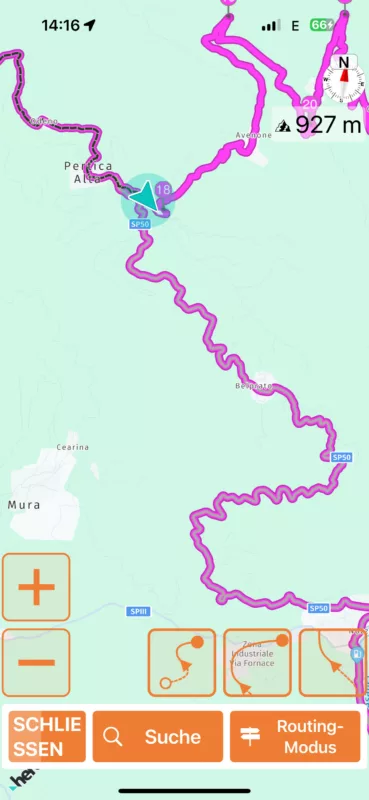
Going from your screenshot and your route, what I think happened is, when you reached the road split here (see screenshot), Scenic thought for a moment, that you went straight onto the the SP50 instead of bearing left, and it recalculated the route for you. In the recalculation, it made you continue onto SP50, making you turn around again (at a point where it's possible/allowed) to reach via point 18.
I also see that Scenic corrected itself quite fast. After Scenic realized you were back on track (and not on SP50), it marked the SP50 stretch it added previously gray (meaning that stretch was already travelled or skipped)
Hope this helps/explains. If not, please let me know if you have other questions. Happy to help.
Best regards and ride safe,
Guido
Hi @ryder_hook,
I believe you are experiencing a different issue than described above.
Going from your screenshot and your route, what I think happened is, when you reached the road split here (see screenshot), Scenic thought for a moment, that you went straight onto the the SP50 instead of bearing left, and it recalculated the route for you. In the recalculation, it made you continue onto SP50, making you turn around again (at a point where it's possible/allowed) to reach via point 18.
I also see that Scenic corrected itself quite fast. After Scenic realized you were back on track (and not on SP50), it marked the SP50 stretch it added previously gray (meaning that stretch was already travelled or skipped)
Hope this helps/explains. If not, please let me know if you have other questions. Happy to help.
Best regards and ride safe,
Guido