
Route Folders Bug

Quote from Paul_Guertin on 16.12.2024, 14:02Hello Guido
The folder management is not working properly. Moving and copying routes is resulting in unexpected outcomes. Sometimes a route will move and sometimes it won’t. Last night I moved a route from one folder to another and this morning when I looked it was back in its original folder again! 😵💫 I’ve attached a screen recording of this behaviour as recorded on iPad.
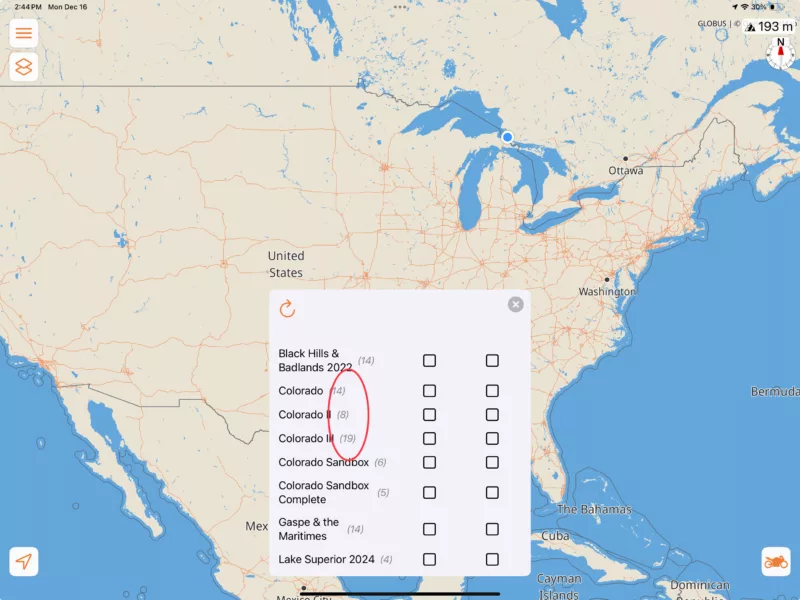
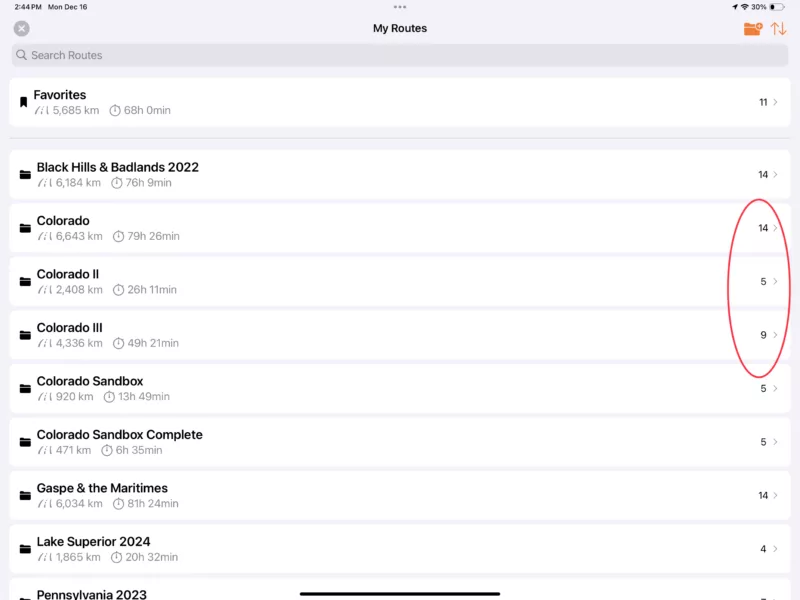
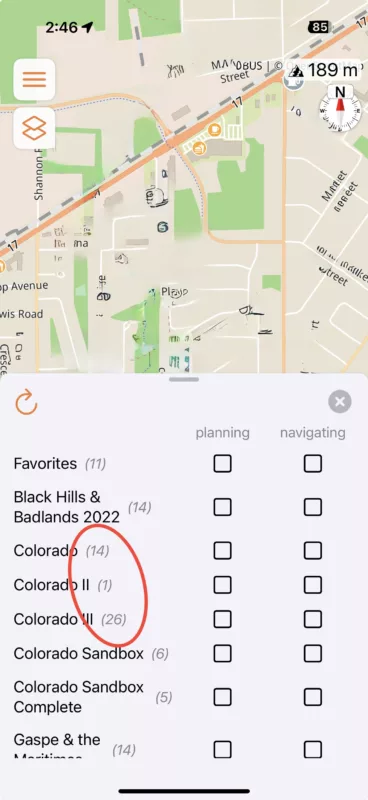
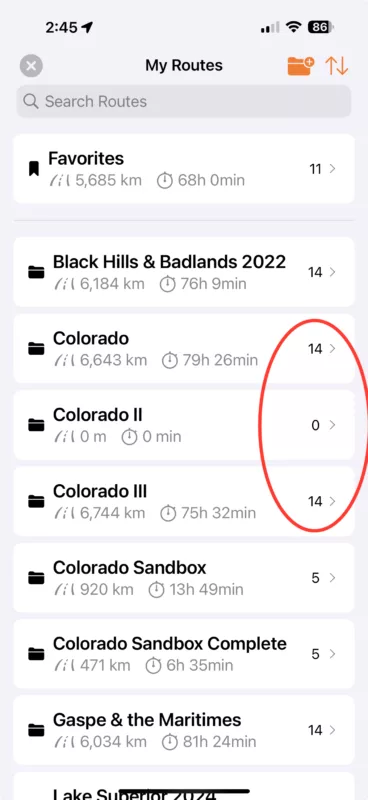
Also, the folder synch between devices is not working properly either. Both pulling down to refresh the folder screen and killing the app and re-launching it reveals unsynchronized folders between devices (iPad & iPhone). The attached screenshots were all taken at the time when the devices were both refreshed and should have been synched. As you can see, the route counts are different, both in the folder view as well as in the overlay popup.
I am afraid to delete routes and folders because I can’t be certain what is actually where!
Moving routes not working: https://scenic.app/wp-content/uploads/ScreenRecording_12-16-2024-14-34-57_1.mp4
Paul
Hello Guido
The folder management is not working properly. Moving and copying routes is resulting in unexpected outcomes. Sometimes a route will move and sometimes it won’t. Last night I moved a route from one folder to another and this morning when I looked it was back in its original folder again! 😵💫 I’ve attached a screen recording of this behaviour as recorded on iPad.
Also, the folder synch between devices is not working properly either. Both pulling down to refresh the folder screen and killing the app and re-launching it reveals unsynchronized folders between devices (iPad & iPhone). The attached screenshots were all taken at the time when the devices were both refreshed and should have been synched. As you can see, the route counts are different, both in the folder view as well as in the overlay popup.
I am afraid to delete routes and folders because I can’t be certain what is actually where!
Moving routes not working: https://scenic.app/wp-content/uploads/ScreenRecording_12-16-2024-14-34-57_1.mp4
Paul
Quote from Paul_Guertin on 16.12.2024, 16:41Hi Guido
I have also noted that, if I edit a route that is saved in a specific folder and then select the ‘save’ button and confirm to save the changes, the route gets automatically moved to my Favorites folder instead of being saved back where it was opened from.
Paul
Hi Guido
I have also noted that, if I edit a route that is saved in a specific folder and then select the ‘save’ button and confirm to save the changes, the route gets automatically moved to my Favorites folder instead of being saved back where it was opened from.
Paul

Quote from Guido on 17.12.2024, 06:06Hi Paul,
I'll have a look. Some of this could also be a result of a very old bug, where routes were not deleted and completed. I'll have a look after the holidays and report back.
Best regards,
Guido
Hi Paul,
I'll have a look. Some of this could also be a result of a very old bug, where routes were not deleted and completed. I'll have a look after the holidays and report back.
Best regards,
Guido
Quote from Paul_Guertin on 04.01.2025, 13:53Hi Guido
Just a heads up that I am still experiencing this issue.
- I have a route saved in folder ‘B’.
- I open the route and edit it.
- I select the save button and confirm save changes to the route.
- The route mysteriously moves to the Favourites folder.
Paul
Hi Guido
Just a heads up that I am still experiencing this issue.
- I have a route saved in folder ‘B’.
- I open the route and edit it.
- I select the save button and confirm save changes to the route.
- The route mysteriously moves to the Favourites folder.
Paul
Quote from Guido on 05.01.2025, 10:12Hi Paul,
I've had more reports. I'm looking into it.
Thanks,
Guido
Hi Paul,
I've had more reports. I'm looking into it.
Thanks,
Guido
Quote from windingroad38 on 11.01.2025, 11:16same here...v4.09
same here...v4.09
Quote from Guido on 12.01.2025, 08:38v4.10 with a fix is in beta now. Will be released after the weekend.
v4.10 with a fix is in beta now. Will be released after the weekend.
Quote from windingroad38 on 14.01.2025, 15:27Hi Guido,
moving routes to different folders seems to work now. But the sync issue still exists with 4.10. On my Ipad I have 8 routes in one folder, on my iphone there are only 6 of theses routes inside the same folder. The missing two are in systemfolder 'favorites'. I did not try to move them manually yet because I wanted to see if they sync correctly, which they dont...
btw, I planned these 8 routes totally on the Ipad and created this folder on the ipad for them, did not touch them on the phone yet.
Hi Guido,
moving routes to different folders seems to work now. But the sync issue still exists with 4.10. On my Ipad I have 8 routes in one folder, on my iphone there are only 6 of theses routes inside the same folder. The missing two are in systemfolder 'favorites'. I did not try to move them manually yet because I wanted to see if they sync correctly, which they dont...
btw, I planned these 8 routes totally on the Ipad and created this folder on the ipad for them, did not touch them on the phone yet.
Quote from Guido on 14.01.2025, 15:41Can you give it another try? This issue was caused by duplicates that were created whenever a route was edited and saved. The route list however only showed one copy, which could be randomly any of those copies. That's why on some devices it showed in folder X and on another device on folder Y, and also why deleting didn't work (a duplicate would simpy take it's place). I ran a script to remove all the duplicates before 4.10 was released with a fix... but since then duplicates might have still been created by those running 4.09. I've run the "remove duplicates" script again. Please close Scenic completely on all your devices (swipe up through app switcher). Make sure you are running v4.10 on all devices (check if update is availabe on app store: https://apps.apple.com/app/id1089668246 ) and then reopen. Issue should be gone.
Can you give it another try? This issue was caused by duplicates that were created whenever a route was edited and saved. The route list however only showed one copy, which could be randomly any of those copies. That's why on some devices it showed in folder X and on another device on folder Y, and also why deleting didn't work (a duplicate would simpy take it's place). I ran a script to remove all the duplicates before 4.10 was released with a fix... but since then duplicates might have still been created by those running 4.09. I've run the "remove duplicates" script again. Please close Scenic completely on all your devices (swipe up through app switcher). Make sure you are running v4.10 on all devices (check if update is availabe on app store: https://apps.apple.com/app/id1089668246 ) and then reopen. Issue should be gone.
Quote from windingroad38 on 14.01.2025, 16:14no, still not in sync. I mean to swipe them away I had to touch the app and the app was not closed before. But now swiped the apps out and also switched off both devices completely!
See following screens, and I confirm, both are on V4.10
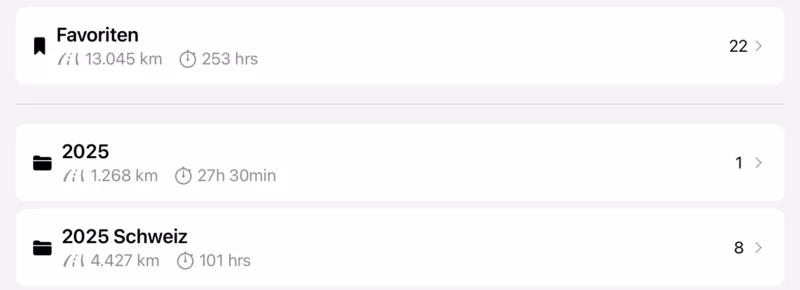

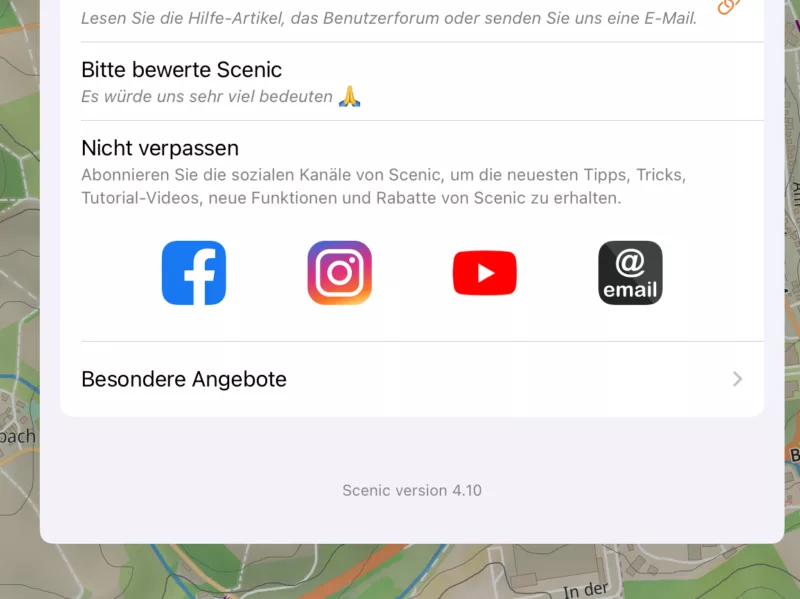
no, still not in sync. I mean to swipe them away I had to touch the app and the app was not closed before. But now swiped the apps out and also switched off both devices completely!
See following screens, and I confirm, both are on V4.10
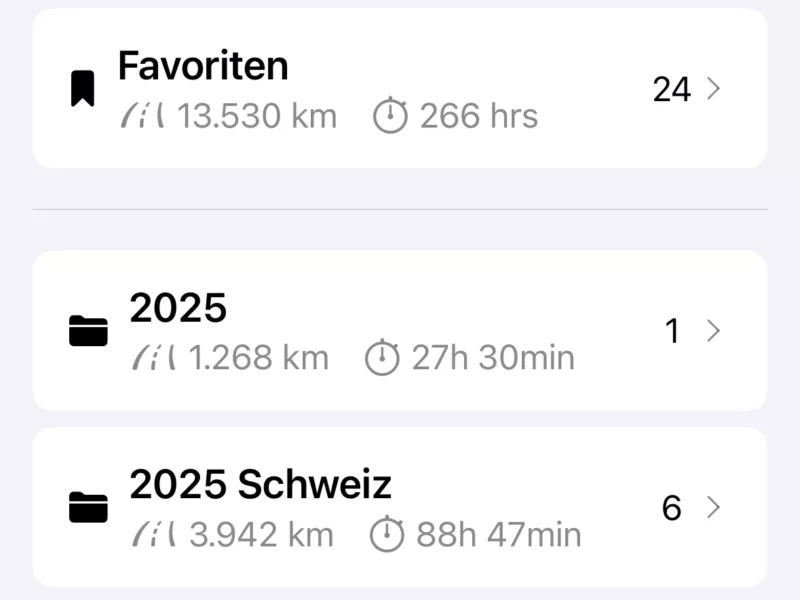
Quote from Guido on 14.01.2025, 16:36On the server I see 23 routes in favorites (including 03_Dienstag... and 04_Mittwoch...) and 6 in 2025 Schweiz (excluding 03_ and 04_) 🤷♂️.
So... looks like your device of the bottom screenshot is most in line with the server. Some data local on your device is causing the differences. What I recommend is to logout of Scenic on both devices and then login again one by one (first let login finish on one device and then login on other device).
Very sorry about this. After this... the devices should be (and stay) in sync.
On the server I see 23 routes in favorites (including 03_Dienstag... and 04_Mittwoch...) and 6 in 2025 Schweiz (excluding 03_ and 04_) 🤷♂️.
So... looks like your device of the bottom screenshot is most in line with the server. Some data local on your device is causing the differences. What I recommend is to logout of Scenic on both devices and then login again one by one (first let login finish on one device and then login on other device).
Very sorry about this. After this... the devices should be (and stay) in sync.
Quote from windingroad38 on 15.01.2025, 03:51so, I logged out on both devices. On the phone it was no problem, but on the ipad the confirmation button for this was somehow hidden (on the very top of the screen). So the GUI on the Ipad behaves strange when it comes to logout. Anyway I managed that.
EDIT: just to clarify: I am talking of the logout confirmation dialogue, which comes up and says "Are you sure you want to logout?"
After login on the Ipad again, I had 24 routes in favourites (not 23 as you mentioned to be on the server).
After logon on the phone I had also 24 routes in favorites there.
Using the phone I then moved two of them from favourites to 2025 Schweiz, and after reloading the page on the Ipad, it was the same on the Ipad, so it looks like they are in sync now. I just wonder why you had only 23 in favourites on the server...Should I not only logout but also uninstall the app on both devices to traces this down? Or leave it as it is?
By the way: I just saw it on the Ipad, I have a little red dot on the edge of my profile picture, where in the iphone there is no such a red dot. What does that mean? Both devices are logged in and show the same status.
so, I logged out on both devices. On the phone it was no problem, but on the ipad the confirmation button for this was somehow hidden (on the very top of the screen). So the GUI on the Ipad behaves strange when it comes to logout. Anyway I managed that.
EDIT: just to clarify: I am talking of the logout confirmation dialogue, which comes up and says "Are you sure you want to logout?"
After login on the Ipad again, I had 24 routes in favourites (not 23 as you mentioned to be on the server).
After logon on the phone I had also 24 routes in favorites there.
Using the phone I then moved two of them from favourites to 2025 Schweiz, and after reloading the page on the Ipad, it was the same on the Ipad, so it looks like they are in sync now. I just wonder why you had only 23 in favourites on the server...
Should I not only logout but also uninstall the app on both devices to traces this down? Or leave it as it is?
By the way: I just saw it on the Ipad, I have a little red dot on the edge of my profile picture, where in the iphone there is no such a red dot. What does that mean? Both devices are logged in and show the same status.
Quote from Guido on 15.01.2025, 08:12Should I not only logout but also uninstall the app on both devices to traces this down? Or leave it as it is?
Leave as is. Probably my query was a bit stricter. Good to hear all seems to sync now.
The red dot is when some of your profile info is not filled out. It only shows until you visit tmyour profile (which is remembered per device). To get rid of it, go to your profile, change something, save.
Cheers,
Guido
Should I not only logout but also uninstall the app on both devices to traces this down? Or leave it as it is?
Leave as is. Probably my query was a bit stricter. Good to hear all seems to sync now.
The red dot is when some of your profile info is not filled out. It only shows until you visit tmyour profile (which is remembered per device). To get rid of it, go to your profile, change something, save.
Cheers,
Guido
Quote from Paul_Guertin on 15.01.2025, 08:23Hi Guido
For the record (and in case it helps anyone else)…
- I killed the Scenic app on each of my three devices (iPad and 2 iPhones)
- I updated each device to 4.10
- When I launched Scenic on each device, all three still had a different count of routes in the Favourites folder.
- On the iPad, I moved routes to where I wanted them and deleted others.
- When I was done things were synced up properly across all three devices
Thank you for correcting this issue and I’ll advise if I notice any other anomalies with it.
Cheers,
Paul
Hi Guido
For the record (and in case it helps anyone else)…
- I killed the Scenic app on each of my three devices (iPad and 2 iPhones)
- I updated each device to 4.10
- When I launched Scenic on each device, all three still had a different count of routes in the Favourites folder.
- On the iPad, I moved routes to where I wanted them and deleted others.
- When I was done things were synced up properly across all three devices
Thank you for correcting this issue and I’ll advise if I notice any other anomalies with it.
Cheers,
Paul


