
Route duration change after last map update

Quote from Tangent on 13.04.2023, 11:32Planning a trip from Baie-Comeau, QC to Station Uapishka - monts Groulx, Km 336, Route 389, TNO Rivière-aux-Outardes, Quebec G5C 2S9 and prior to the update the time was around 4 hours to cover the 337km for a saved route.
After updating the maps the last time, the time jumped to 7 hours and 30 minutes.
I verified (two devices, same saved route) that it happened as a result of the map upgrade and compared to Google seems to have jumped by 3 hours.
Quebec's road information - No major issues - https://www.quebec511.info/en/Diffusion/EtatReseau/Route.aspx?id=389
Tried Recalculating with different settings but the time remained the same.
Any hints? I do want to add some detours but for planning I need the time to be accurate and to understand why there is a discrepancy.
Thanks,
Planning a trip from Baie-Comeau, QC to Station Uapishka - monts Groulx, Km 336, Route 389, TNO Rivière-aux-Outardes, Quebec G5C 2S9 and prior to the update the time was around 4 hours to cover the 337km for a saved route.
After updating the maps the last time, the time jumped to 7 hours and 30 minutes.
I verified (two devices, same saved route) that it happened as a result of the map upgrade and compared to Google seems to have jumped by 3 hours.
Quebec's road information - No major issues - https://www.quebec511.info/en/Diffusion/EtatReseau/Route.aspx?id=389
Tried Recalculating with different settings but the time remained the same.
Any hints? I do want to add some detours but for planning I need the time to be accurate and to understand why there is a discrepancy.
Thanks,

Quote from Guido on 13.04.2023, 12:04This sounds like an error in the new map data, specifically the max speed / avg speed data of roads.
Or perhaps the route became slightly different with the new map update... taking different roads.Could you perhaps post the share link to the route here (select route from your list and then tap the 'share' button at the bottom). Then I'll have a detailed look and also check if this is still the case in the big update that I'm working on now. (The big update switches to the new HERE map framework and has slightly different routing algorithm).
Best regards,
Guido
This sounds like an error in the new map data, specifically the max speed / avg speed data of roads.
Or perhaps the route became slightly different with the new map update... taking different roads.
Could you perhaps post the share link to the route here (select route from your list and then tap the 'share' button at the bottom). Then I'll have a detailed look and also check if this is still the case in the big update that I'm working on now. (The big update switches to the new HERE map framework and has slightly different routing algorithm).
Best regards,
Guido
Quote from Guido on 13.04.2023, 12:16The new version I'm working on shows offroad/unpaved stretches. According to HERE maps the yellow stretches are offroad/unpaved. Is this correct? Unpaved stretches typically have a very low avg speed. If these are not unpaved there's an error in the map data. You can report these directly to HERE maps in two ways: https://scenic.app/help/roads-not-on-the-map-errors-in-the-map-data/
The new version I'm working on shows offroad/unpaved stretches. According to HERE maps the yellow stretches are offroad/unpaved. Is this correct? Unpaved stretches typically have a very low avg speed. If these are not unpaved there's an error in the map data. You can report these directly to HERE maps in two ways: https://scenic.app/help/roads-not-on-the-map-errors-in-the-map-data/
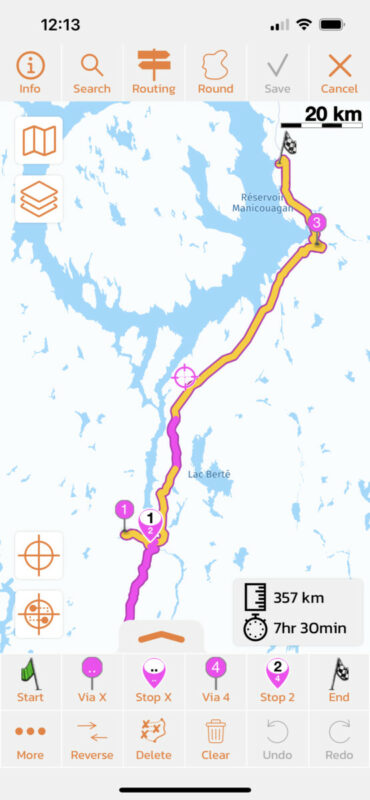
Quote from Tangent on 13.04.2023, 12:27Thank you sir, I think I can work with that. There is a significant stretch (70km) that is gravel, roughly where your map indicates unpaved.
How do I see this HERE data in Scenic? I guess I have to wait for the update and verify basic routing against Google for rough timing.
At a 7okm speed limit (vs 70-90 for the paved sections) I'm surprised it would almost double the time taken unless Scenic or the HERE maps use a more conservative speed limit.
Taken from https://en.wikipedia.org/wiki/Quebec_Route_389
Dirk
Thank you sir, I think I can work with that. There is a significant stretch (70km) that is gravel, roughly where your map indicates unpaved.
How do I see this HERE data in Scenic? I guess I have to wait for the update and verify basic routing against Google for rough timing.
At a 7okm speed limit (vs 70-90 for the paved sections) I'm surprised it would almost double the time taken unless Scenic or the HERE maps use a more conservative speed limit.
Taken from https://en.wikipedia.org/wiki/Quebec_Route_389
Dirk
Quote from Guido on 13.04.2023, 12:50Scenic uses HERE maps, so basically the map you see is provided by HERE.
You can't see the raw map data in Scenic though. For that you have to use one of the two ways to report map errors. I recommend the second one although that requires you to create an account with HERE.
Scenic uses HERE maps, so basically the map you see is provided by HERE.
You can't see the raw map data in Scenic though. For that you have to use one of the two ways to report map errors. I recommend the second one although that requires you to create an account with HERE.
Quote from Tangent on 13.04.2023, 13:31Thanks, I created the account but it's a bit of a challenge to use. I think the most immediate feature request I could see is to let me roll back to older map versions, I know that may be confusing but I've had many confusions with other navigation systems (long closed roads etc) so it's par for the course. Not a serious request (Long career in software development here) since I understand all the edges cases that spring from that.
My trip is a few months out and the core day planning was done with the previous travel time estimates so maybe I'll just wait it out 🙂
Thanks for your help, I understand things a lot better now.
Thanks, I created the account but it's a bit of a challenge to use. I think the most immediate feature request I could see is to let me roll back to older map versions, I know that may be confusing but I've had many confusions with other navigation systems (long closed roads etc) so it's par for the course. Not a serious request (Long career in software development here) since I understand all the edges cases that spring from that.
My trip is a few months out and the core day planning was done with the previous travel time estimates so maybe I'll just wait it out 🙂
Thanks for your help, I understand things a lot better now.
Quote from Guido on 13.04.2023, 15:16I understand the request. Unfortunately the HERE framework doesn't support rolling back to previous map versions.
You are not the first one with an issue regarding map updates 'breaking' the map. It's a never ending struggle to be honest. HERE brings out new map versions very frequently, but sometimes they 'fix' something that didn't need fixing. On the other hand, this does mean that new roads or changes to roads are available in HERE maps fast as well.
I understand the request. Unfortunately the HERE framework doesn't support rolling back to previous map versions.
You are not the first one with an issue regarding map updates 'breaking' the map. It's a never ending struggle to be honest. HERE brings out new map versions very frequently, but sometimes they 'fix' something that didn't need fixing. On the other hand, this does mean that new roads or changes to roads are available in HERE maps fast as well.
Quote from Tangent on 29.07.2023, 14:35Well, I rode QC-389, NL-500, NL-510 over the last couple of days and can say the HERE data for these roads has some major mistakes. Most of NL-500 going east is marked as a 50 zone when it’s in fact 80. Just east of Labrador City there are 2-3 intersections where the limit drops to 50 around the intersection, guessing someone put that in and forgot to put the speed limit back to 80.
The stretch of gravel at Fire Lake to short of Labrador City is marked as 70 and the quality of the road is good enough to support that easily.
Coming south on NL-510 today, I was getting 70 on Scenic when again, the limit was 80 for most of the road. Scenic tried to tell me that the stretch from Red Bay, NL to the Oceanview Resort was going to take 2.4 hours (It’s 34km on a mostly 70/80 road.
Adding to that, the map point kept moving but the “Next Turn” at 39km was stuck at 39km until I made the turn based on the map. Guess that’s a bug.
Any chance for paid map option using a verified vendor? I was fine doing my overall planning with Google Maps and Navigation with Scenic but now I’m having some glitches in the Navigation side of things too 🙁
Dirk
Well, I rode QC-389, NL-500, NL-510 over the last couple of days and can say the HERE data for these roads has some major mistakes. Most of NL-500 going east is marked as a 50 zone when it’s in fact 80. Just east of Labrador City there are 2-3 intersections where the limit drops to 50 around the intersection, guessing someone put that in and forgot to put the speed limit back to 80.
The stretch of gravel at Fire Lake to short of Labrador City is marked as 70 and the quality of the road is good enough to support that easily.
Coming south on NL-510 today, I was getting 70 on Scenic when again, the limit was 80 for most of the road. Scenic tried to tell me that the stretch from Red Bay, NL to the Oceanview Resort was going to take 2.4 hours (It’s 34km on a mostly 70/80 road.
Adding to that, the map point kept moving but the “Next Turn” at 39km was stuck at 39km until I made the turn based on the map. Guess that’s a bug.
Any chance for paid map option using a verified vendor? I was fine doing my overall planning with Google Maps and Navigation with Scenic but now I’m having some glitches in the Navigation side of things too 🙁
Dirk
Quote from Guido on 29.07.2023, 14:59Hi Dirk,
Sorry for the bad experience. Unfortunately I can’t change the map data issue things. You can report those directly to HERE. Typically they address those within 1 or 2 months. Here’s how to report: https://scenic.app/help/roads-not-on-the-map-errors-in-the-map-data/
The stuck turn instructions is indeed a bug. Will be addressed in the big update.
Sorry I can’t be of any immediately help in this.
Best regards,
Guido
Hi Dirk,
Sorry for the bad experience. Unfortunately I can’t change the map data issue things. You can report those directly to HERE. Typically they address those within 1 or 2 months. Here’s how to report: https://scenic.app/help/roads-not-on-the-map-errors-in-the-map-data/
The stuck turn instructions is indeed a bug. Will be addressed in the big update.
Sorry I can’t be of any immediately help in this.
Best regards,
Guido
Quote from Tangent on 29.07.2023, 15:37Hi Guido,
Thanks for the speedy response, I guess with proof in hand I’ll try the HERE route again.
As for the big update, I’m looking forward to it! Lots of good new stuff I’m sure and a fix for that bug that I think I’ve only seen twice. Seems to only happen when I do more than 500km in a single route maybe?
This is the best level of support I get with any service where I’ve gone for support, appreciate it.
Dirk
Hi Guido,
Thanks for the speedy response, I guess with proof in hand I’ll try the HERE route again.
As for the big update, I’m looking forward to it! Lots of good new stuff I’m sure and a fix for that bug that I think I’ve only seen twice. Seems to only happen when I do more than 500km in a single route maybe?
This is the best level of support I get with any service where I’ve gone for support, appreciate it.
Dirk


