Quote from
Guido on 16.07.2024, 08:17
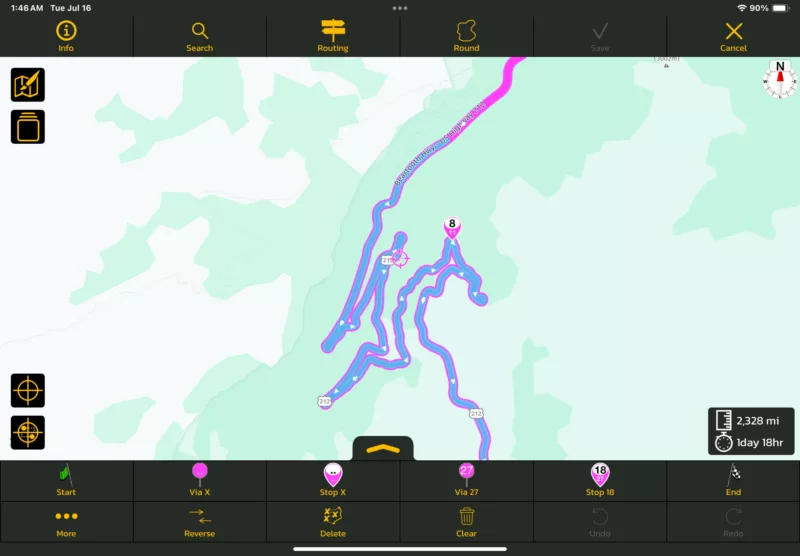
The magenta line is "normal" road. It's not necessarily magenta. It's the color you set in Settings > Color & Style.
The blue you see in the screenshot is a seasonally closed road. If it's brown, it's offroad. If it's mint (green/blue-ish) it's a private road. Those are the colors a route can have.
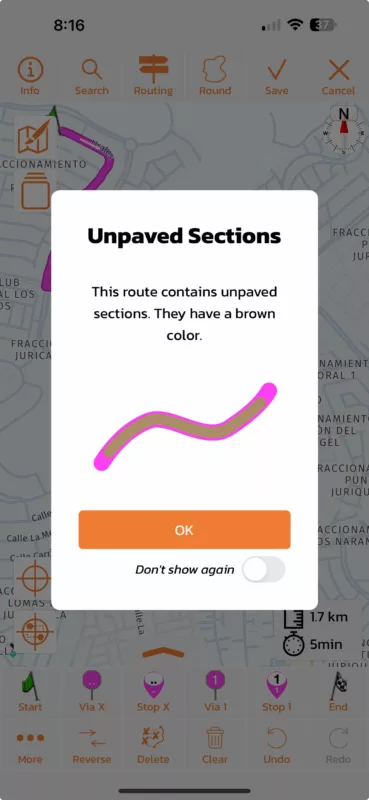
When you calculate a route with offroad, private, or seasonal closures stretches in it, Scenic will give you a warning like the one below (which you can deactivate) telling you what the colors mean. You can turn them back on again if you like through Settings > Finetuning > Re-enable Tips.
The magenta line is "normal" road. It's not necessarily magenta. It's the color you set in Settings > Color & Style.
The blue you see in the screenshot is a seasonally closed road. If it's brown, it's offroad. If it's mint (green/blue-ish) it's a private road. Those are the colors a route can have.
When you calculate a route with offroad, private, or seasonal closures stretches in it, Scenic will give you a warning like the one below (which you can deactivate) telling you what the colors mean. You can turn them back on again if you like through Settings > Finetuning > Re-enable Tips.
CuttingIron has reacted to this post.