
Route changes

Quote from GB on 04.06.2024, 13:14Hi
Just planned my euro trip in basecamp, 95% road (I know scenic won't route off road so I will just use the track for that) now I have sent the GPX files to my phone and they are saved in a folder in files. Now if I open those routes will scenic change the route from what I created on basecamp and If it does how do I prevent it from happening?
Hi
Just planned my euro trip in basecamp, 95% road (I know scenic won't route off road so I will just use the track for that) now I have sent the GPX files to my phone and they are saved in a folder in files. Now if I open those routes will scenic change the route from what I created on basecamp and If it does how do I prevent it from happening?

Quote from Guido on 04.06.2024, 13:21I understand you used the "Save blue line as track" button, correct? If so, Scenic won't change the route. It will simply draw the line on the map for you to visually follow. (Tracks don't get turn by turn navigation).
More info here: https://scenic.app/help/routes-vs-tracks-and-save-blue-line-as-track-during-import/
I understand you used the "Save blue line as track" button, correct? If so, Scenic won't change the route. It will simply draw the line on the map for you to visually follow. (Tracks don't get turn by turn navigation).
More info here: https://scenic.app/help/routes-vs-tracks-and-save-blue-line-as-track-during-import/
Quote from GB on 04.06.2024, 13:25I want turn by turn navigation but I want it from the route I sent it not what scenic thinks I should do.
I want turn by turn navigation but I want it from the route I sent it not what scenic thinks I should do.
Quote from Guido on 04.06.2024, 13:30In that case, when you import the track from the GPX, check if the magenta line (that's what Scenic makes of it) matches the blue dotted line. If it doesn't, move/delete or place additional via points to make it match.
It's explained in detail in the help article... and the articles that it links too.
If you have any questions after that, please let me know. Happy to help.
In that case, when you import the track from the GPX, check if the magenta line (that's what Scenic makes of it) matches the blue dotted line. If it doesn't, move/delete or place additional via points to make it match.
It's explained in detail in the help article... and the articles that it links too.
If you have any questions after that, please let me know. Happy to help.
Quote from Guido on 04.06.2024, 13:33A little background information as to why Scenic sometimes makes a different route.
Basically, it's because Basecamp uses different maps and a different routing algorithm than Scenic. In other words, it's possible that Scenic takes different roads between two points compared to basecamp. Scenic tries to resolve this by leaving key via points in the garmin track, but this is not always enough, so you might need to place additional via points.
A little background information as to why Scenic sometimes makes a different route.
Basically, it's because Basecamp uses different maps and a different routing algorithm than Scenic. In other words, it's possible that Scenic takes different roads between two points compared to basecamp. Scenic tries to resolve this by leaving key via points in the garmin track, but this is not always enough, so you might need to place additional via points.
Quote from GB on 04.06.2024, 13:42I am really struggling with the app changing routes. I sent this route with the shaping and via points and it’s added another 100+ mile loop via Innsbruck??
I am really struggling with the app changing routes. I sent this route with the shaping and via points and it’s added another 100+ mile loop via Innsbruck??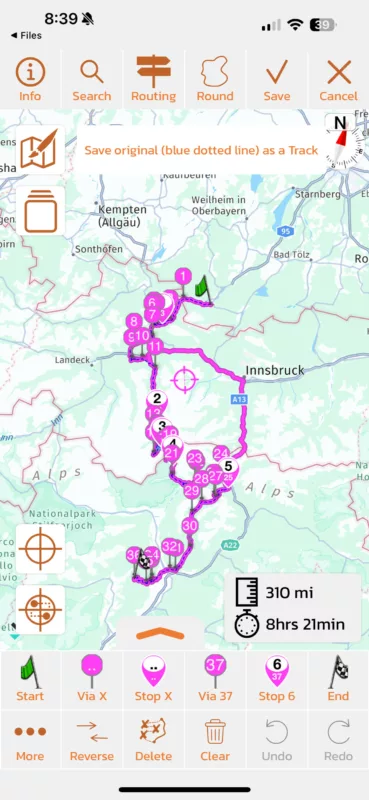
Quote from Guido on 04.06.2024, 13:43Can you send me the GPX? Then I'll have a look.
Can you send me the GPX? Then I'll have a look.
Quote from GB on 04.06.2024, 13:47If this is going to be the case every time I build a route I have to alter it to get it where I want it its going to become very tedious.
If this is going to be the case every time I build a route I have to alter it to get it where I want it its going to become very tedious.
Quote from Guido on 04.06.2024, 14:25In this case, I have to admit that it looks a bit daunting, but in the end, it was an easy fix. No doubt it was easy for me, because I know what's going on in the background and I have more experience in this. I hope by sharing my approach here, you (and others) will get more experience with this too.
The problem was in this area:
Scenic did not "want" you to take this pass and was sending you back around to get from stop 3 to stop 4.
There can be several reasons for that, amonst others seasonal road closures, or Scenic thinks it's faster to go around.To resolve this, I did 3 things:
1. First, make sure you have the offline maps installed for the regions (in this case Germany, Austria and Italy). Offline maps are less sensitive to seasonal road closures.
2. Change the routing mode to "Short" through the routing button at the top. (Your via points will be removed at this point, but that's OK)
3. Place a via point on the blue dotted line. To do this, tap and hold the via X button, then, when it asks you to select the marker before the new via, tap the Stop 3 marker.Here's the result:
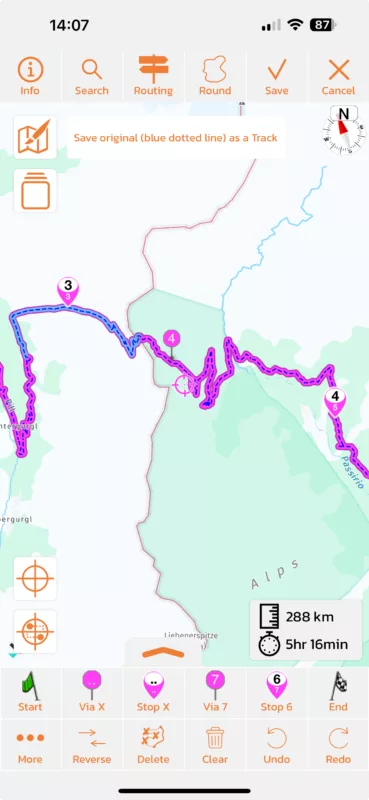
There is still a small discrepancy near Imst, but that is easily resolved by placing a via point on the blue dotted line:
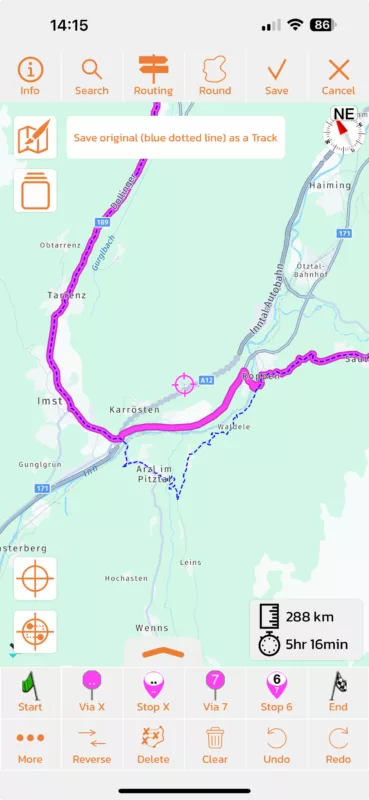
Here is the completely corrected route. Through this link you can add it to your Scenic account directly: https://scenicapp.space/route/TijwCvlu
Again, I have to admit, that these passes with seasonal road closures can be problematic for Scenic at the moment. I'm working on a bigger update to resolve this, but that won't be ready until fall I'm afraid. Until that time, this would be the approach to follow.
There is another way to get around this, and that is to plan in Scenic instead of other software. The reason why this happens is that the planning software (basecamp in this case) uses different maps and different routing algoritm than Scenic. I realize that this means planning on a small iPhone (or bigger iPad or Mac) screen. I'm working on adding a planner to the Scenic WebApp to get around this, but, this too, will not be for this season.
If you have any further questions / remarks, please let me know.
Best regards,
Guido
In this case, I have to admit that it looks a bit daunting, but in the end, it was an easy fix. No doubt it was easy for me, because I know what's going on in the background and I have more experience in this. I hope by sharing my approach here, you (and others) will get more experience with this too.
The problem was in this area:
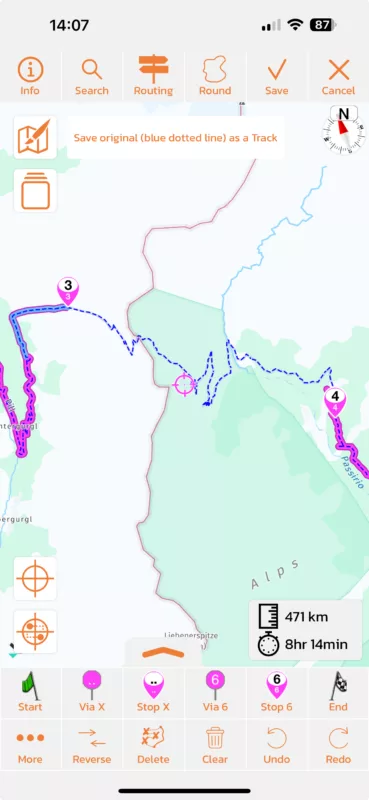
Scenic did not "want" you to take this pass and was sending you back around to get from stop 3 to stop 4.
There can be several reasons for that, amonst others seasonal road closures, or Scenic thinks it's faster to go around.
To resolve this, I did 3 things:
1. First, make sure you have the offline maps installed for the regions (in this case Germany, Austria and Italy). Offline maps are less sensitive to seasonal road closures.
2. Change the routing mode to "Short" through the routing button at the top. (Your via points will be removed at this point, but that's OK)
3. Place a via point on the blue dotted line. To do this, tap and hold the via X button, then, when it asks you to select the marker before the new via, tap the Stop 3 marker.
Here's the result:
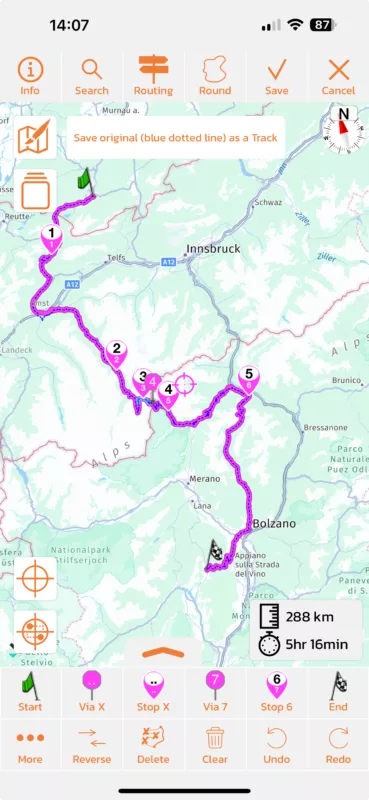
There is still a small discrepancy near Imst, but that is easily resolved by placing a via point on the blue dotted line:
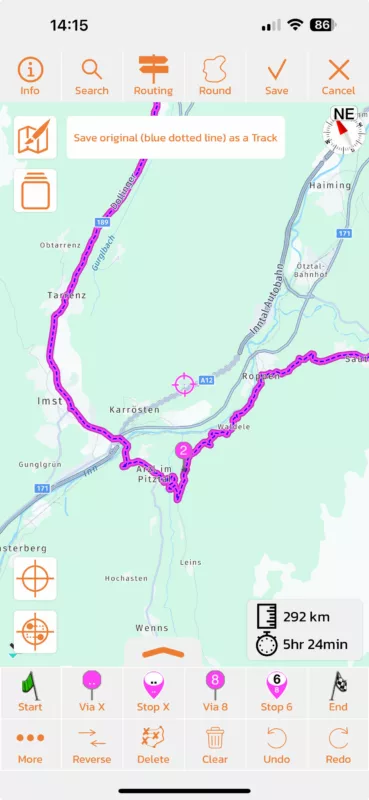
Here is the completely corrected route. Through this link you can add it to your Scenic account directly: https://scenicapp.space/route/TijwCvlu
Again, I have to admit, that these passes with seasonal road closures can be problematic for Scenic at the moment. I'm working on a bigger update to resolve this, but that won't be ready until fall I'm afraid. Until that time, this would be the approach to follow.
There is another way to get around this, and that is to plan in Scenic instead of other software. The reason why this happens is that the planning software (basecamp in this case) uses different maps and different routing algoritm than Scenic. I realize that this means planning on a small iPhone (or bigger iPad or Mac) screen. I'm working on adding a planner to the Scenic WebApp to get around this, but, this too, will not be for this season.
If you have any further questions / remarks, please let me know.
Best regards,
Guido
Quote from GB on 04.06.2024, 14:40Thanks Guido, but I have to say these passes are what you want to ride “discover the scenic route” is how it is advertised but it doesn’t want to unfortunately. If I was in the area and didn’t know the area and put a route or destination in scenic from what you are saying scenic would actually avoid the scenic route?! I love the interface and how the speed cameras work and lots of other things it does, but I think it’s far from discovering off the beaten track. Sorry rant over.
Thanks Guido, but I have to say these passes are what you want to ride “discover the scenic route” is how it is advertised but it doesn’t want to unfortunately. If I was in the area and didn’t know the area and put a route or destination in scenic from what you are saying scenic would actually avoid the scenic route?! I love the interface and how the speed cameras work and lots of other things it does, but I think it’s far from discovering off the beaten track. Sorry rant over.
Quote from GB on 04.06.2024, 14:51Well not quite, I downloaded the gpx file from the link you posted and it was exactly the same with the extra loop?
Well not quite, I downloaded the gpx file from the link you posted and it was exactly the same with the extra loop?
Quote from Guido on 04.06.2024, 14:59Don’t download the GPX. Choose the Add to Scenic button. That will add the route directly into your favorites folder.
And make sure you have the offline maps installed.
Don’t download the GPX. Choose the Add to Scenic button. That will add the route directly into your favorites folder.
And make sure you have the offline maps installed.
Quote from GB on 04.06.2024, 15:11I have all the offline maps installed for the trip. I tried what you said but it isn’t showing up in imports or anywhere else on my phone. So I tried the gpx file. Also when in my files I press the open link square which brings up what app to open the gpx file with and I select scenic and nothing is in the import section??
I have all the offline maps installed for the trip. I tried what you said but it isn’t showing up in imports or anywhere else on my phone. So I tried the gpx file. Also when in my files I press the open link square which brings up what app to open the gpx file with and I select scenic and nothing is in the import section??
Quote from Guido on 04.06.2024, 15:18What tapping the “add to scenic” button it will not go to the import queue. It will go directly to your routes. Try a pull to refresh if it doesn’t show immediately.
What tapping the “add to scenic” button it will not go to the import queue. It will go directly to your routes. Try a pull to refresh if it doesn’t show immediately.
Quote from GB on 04.06.2024, 15:18Update, didn’t look in my favourites folder as was expecting it to be in imports. Was in favourites.
Update, didn’t look in my favourites folder as was expecting it to be in imports. Was in favourites.
Quote from GB on 04.06.2024, 15:20Quote from Guido on 04.06.2024, 15:18What tapping the “add to scenic” button it will not go to the import queue. It will go directly to your routes. Try a pull to refresh if it doesn’t show immediately.
nope nothing
Quote from Guido on 04.06.2024, 15:18What tapping the “add to scenic” button it will not go to the import queue. It will go directly to your routes. Try a pull to refresh if it doesn’t show immediately.
nope nothing
Quote from Guido on 04.06.2024, 15:27Ok. Then follow the same steps I did for import.
Ok. Then follow the same steps I did for import.
Quote from GB on 04.06.2024, 15:49So I now have all my routes in my files on my phone but I can’t import them into scenic? Press the squared arrow, press scenic, scenic opens but no files to import??
So I now have all my routes in my files on my phone but I can’t import them into scenic? Press the squared arrow, press scenic, scenic opens but no files to import??
Quote from Guido on 04.06.2024, 16:01Open scenic first. Then press the squared arrow in the files app. This is a bug I need to resolve.
Open scenic first. Then press the squared arrow in the files app. This is a bug I need to resolve.
Quote from GB on 05.06.2024, 00:16That seems to work ok, downloading the rest of the gpx files to scenic and I haven’t had the issue I had with day one, I think this is because when I created these routes on basecamp I had to put a lot of via points in to keep it on the pass I wanted to travel and some of these are unpaved as well which is good.
That seems to work ok, downloading the rest of the gpx files to scenic and I haven’t had the issue I had with day one, I think this is because when I created these routes on basecamp I had to put a lot of via points in to keep it on the pass I wanted to travel and some of these are unpaved as well which is good.

Quote from Marts on 06.06.2024, 23:21Not sure whether to create a new thread or add to this. Chose this, instead.
Looking at the other discussion about Stops v Vias when planning routes, I decided to see how I'd go with a route that I'm having problems with.
I planned a route starting at a town, then down the road to the end of it, turn left, then turn right onto another road about 300m away from the left turn.
For some reason, the Power Planner has its route going up the road, then turning around, heading back down the road and turning left into the final road.
I tried using vias, via x, Stops and Stop x to force it to simply turn right rather than head north, then turn around and head back down to the intersection where I want to go.
Please have a look at the screen grabs that I've posted.
Thanks.
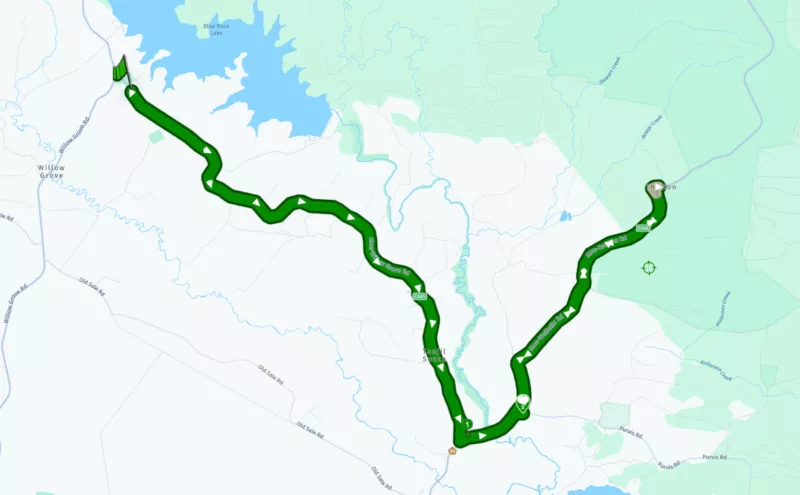
Not sure whether to create a new thread or add to this. Chose this, instead.
Looking at the other discussion about Stops v Vias when planning routes, I decided to see how I'd go with a route that I'm having problems with.
I planned a route starting at a town, then down the road to the end of it, turn left, then turn right onto another road about 300m away from the left turn.
For some reason, the Power Planner has its route going up the road, then turning around, heading back down the road and turning left into the final road.
I tried using vias, via x, Stops and Stop x to force it to simply turn right rather than head north, then turn around and head back down to the intersection where I want to go.
Please have a look at the screen grabs that I've posted.
Thanks.
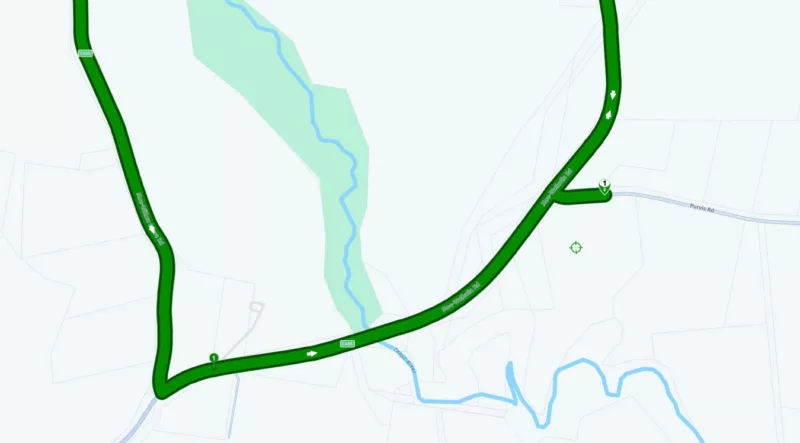
Quote from Guido on 07.06.2024, 06:39I'm afraid this is a map error. Somehow it thinks it's not allowed to take a right onto purvis road, so it sends you further down, make a u-turn, to make a left turn from the other side. I've reported the error to HERE maps.
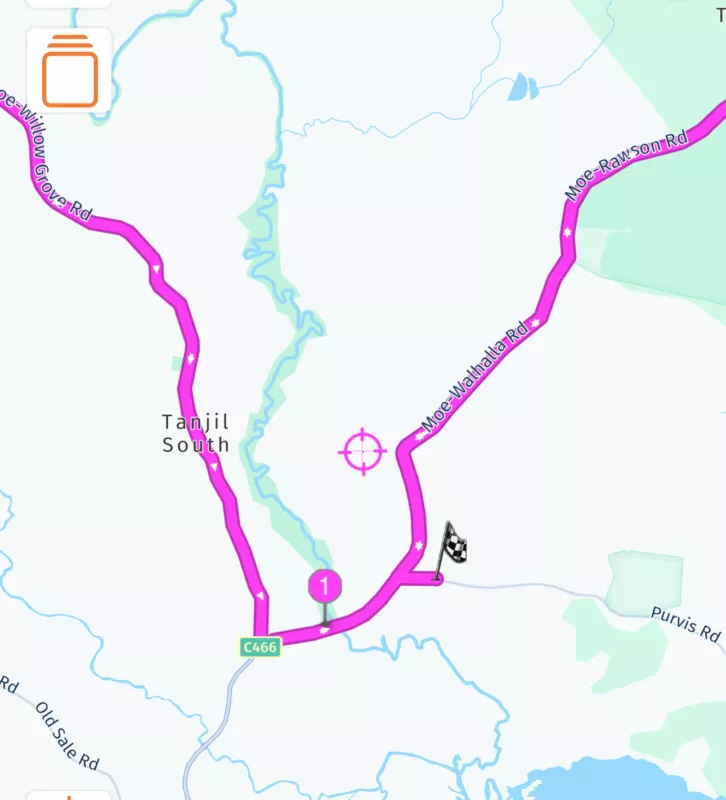
For now, I would just leave the route as-is. Scenic will correct after you take a right turn there.
I'm afraid this is a map error. Somehow it thinks it's not allowed to take a right onto purvis road, so it sends you further down, make a u-turn, to make a left turn from the other side. I've reported the error to HERE maps.
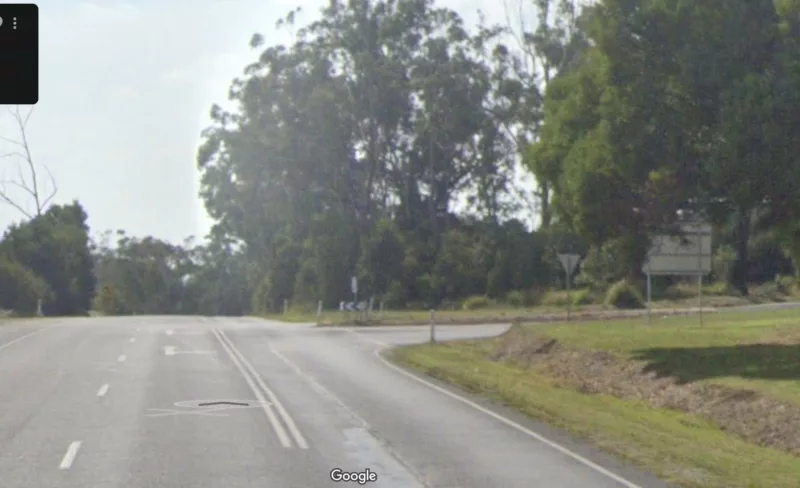
For now, I would just leave the route as-is. Scenic will correct after you take a right turn there.
Quote from Marts on 07.06.2024, 19:01Thanks Guido.
I just tested this with google maps and it worked fine with it.
Talking about maps and map data, there seems to be a lot of duplication. You have HERE, Google Maps and others. Must be expensive to duplicate such massive amounts of data.
Thanks Guido.
I just tested this with google maps and it worked fine with it.
Talking about maps and map data, there seems to be a lot of duplication. You have HERE, Google Maps and others. Must be expensive to duplicate such massive amounts of data.


