
Route Calculation Error

Quote from Chaos on 02.01.2025, 09:43First time using the forum. Huge thanks to Guido for making my favorite moto navigation app.
I started working on creating a route and the app keeps giving me this error message.
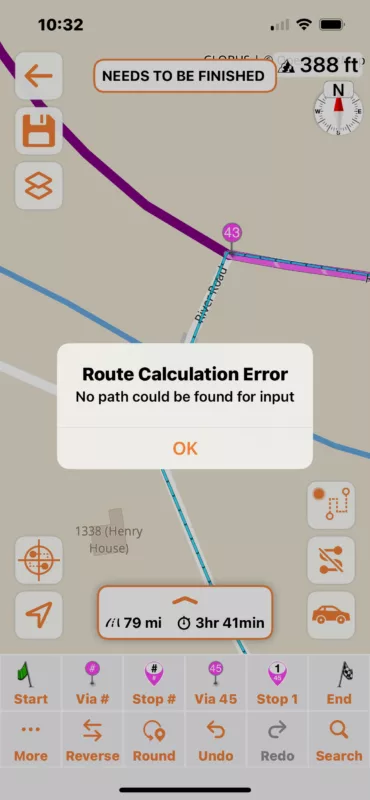
However, it looks like it adds the points, even when they aren't showing on the map. The pins don't show on the map and the line doesn't continue.
What am I doing wrong? I have tried putting the points closer together, but it just seems to not want to go beyond this point.
First time using the forum. Huge thanks to Guido for making my favorite moto navigation app.
I started working on creating a route and the app keeps giving me this error message. 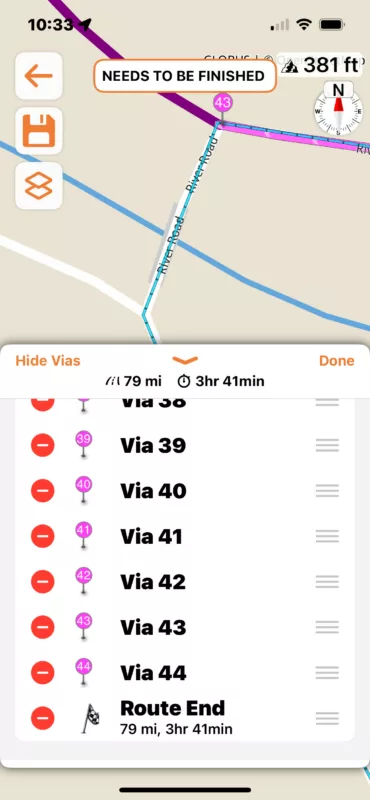
However, it looks like it adds the points, even when they aren't showing on the map. The pins don't show on the map and the line doesn't continue.
What am I doing wrong? I have tried putting the points closer together, but it just seems to not want to go beyond this point.

Quote from Guido on 02.01.2025, 14:04That looks like a bug. It should not add the via point in the timeline if it couldn't be added to the route due to calculation error. I'll take a look at that. I suspect that you keep getting the error because that point is somehow still considered each next calculation. Could you try tapping the undo button after you get that message, then check if the via point has also been removed from the timeline. Then, you can drop a new via point at a different locaiton.
Also... more of a tip / recommendation: use as few via points as possible. Try removing some via points along the route. If it doesn't change the route with the via removed, that via point wasn't really necessary.
That looks like a bug. It should not add the via point in the timeline if it couldn't be added to the route due to calculation error. I'll take a look at that. I suspect that you keep getting the error because that point is somehow still considered each next calculation. Could you try tapping the undo button after you get that message, then check if the via point has also been removed from the timeline. Then, you can drop a new via point at a different locaiton.
Also... more of a tip / recommendation: use as few via points as possible. Try removing some via points along the route. If it doesn't change the route with the via removed, that via point wasn't really necessary.
Quote from Chaos on 03.01.2025, 15:40Gotcha. Thanks for looking into this, Guido. I thought it was me.
"Undo" removes the point from the timeline and I can place it on a different point in the map.
Also, to my credit, I only have this many route points because it kept giving me this error. I hadn't gone back to delete the excessive ones yet. I've never had this many points on one of my routes.
Gotcha. Thanks for looking into this, Guido. I thought it was me.
"Undo" removes the point from the timeline and I can place it on a different point in the map.
Also, to my credit, I only have this many route points because it kept giving me this error. I hadn't gone back to delete the excessive ones yet. I've never had this many points on one of my routes.


