
Route calculation does not match planner

Quote from mt86 on 15.04.2024, 12:08Hi Guido,
I’ve been having various issues with scenic since the 3.5 release (I think? The big update/revamp early this year). Most of the time I’m not really sure how to report these issues, as they come and go unpredictably. Here is one where I can at least point to an example though (it is not the only time this happens, it is only one example that is easy to point to).
I have created a route in power planner. Well, it’s been through some transformations since then, but the important part is that I have created and edited it only using the iOS Scenic app. It has been edited and saved since the 3.5 update.
The trouble is that the route calculated when editing the route, and the route calculated when navigating the route, are not the same.
The saved route (which is the same during editing):
The route calculated for navigation:
You can see that navigation wants to take me down the interstate to via 1, instead of the state highway that is shown during route planning. Of course, I can constrain the route with additional vias, but that is not always very practical. Additionally, the behavior is simply surprising and unwanted: it is as if two different routing methods are being used. I do have the offline map downloaded; could that be related?
Here is the route link: https://scenicapp.space/route/wzfUuJdU
Hi Guido,
I’ve been having various issues with scenic since the 3.5 release (I think? The big update/revamp early this year). Most of the time I’m not really sure how to report these issues, as they come and go unpredictably. Here is one where I can at least point to an example though (it is not the only time this happens, it is only one example that is easy to point to).
I have created a route in power planner. Well, it’s been through some transformations since then, but the important part is that I have created and edited it only using the iOS Scenic app. It has been edited and saved since the 3.5 update.
The trouble is that the route calculated when editing the route, and the route calculated when navigating the route, are not the same.
The saved route (which is the same during editing):

The route calculated for navigation:

You can see that navigation wants to take me down the interstate to via 1, instead of the state highway that is shown during route planning. Of course, I can constrain the route with additional vias, but that is not always very practical. Additionally, the behavior is simply surprising and unwanted: it is as if two different routing methods are being used. I do have the offline map downloaded; could that be related?
Here is the route link: https://scenicapp.space/route/wzfUuJdU

Quote from Guido on 15.04.2024, 12:12What route do you see when you open the route in the power planner (select route from your list, and tap the "edit points" button)?
What route do you see when you open the route in the power planner (select route from your list, and tap the "edit points" button)?
Quote from mt86 on 15.04.2024, 12:30I see the route in the first screenshot, down the state highway, as I would expect. Not the interstate route from navigation.
I see the route in the first screenshot, down the state highway, as I would expect. Not the interstate route from navigation.
Quote from Guido on 15.04.2024, 12:33That's really weird. If you have the offline maps installed it will always use the offline maps first.
The only other reason I can think of that might cause it in this case, is that your current location is added to the route. What happens when you tap the "Guidance to route" button and then select "None (I'll find my own way)"?
Btw. what Scenic version are you on? (You can see version number at the bottom of Settings).
That's really weird. If you have the offline maps installed it will always use the offline maps first.
The only other reason I can think of that might cause it in this case, is that your current location is added to the route. What happens when you tap the "Guidance to route" button and then select "None (I'll find my own way)"?
Btw. what Scenic version are you on? (You can see version number at the bottom of Settings).
Quote from mt86 on 15.04.2024, 12:48Aha! If I tell it I'll find my own way, navigation selects the original route. This still seems strange, since:
- I am virtually on top of the start point (see screenshot)
- Navigation to start of route should, well, take me to start of route. Logically, I would not expect it to affect calculation of the route itself, past the starting point.
So I guess we have a bug?
Btw. what Scenic version are you on? (You can see version number at the bottom of Settings).
Oh, sorry. I guess I expect that my iOS apps are always up to date, but I suppose that may not be the case. My current scenic version is 3.58.
Aha! If I tell it I'll find my own way, navigation selects the original route. This still seems strange, since:
- I am virtually on top of the start point (see screenshot)
- Navigation to start of route should, well, take me to start of route. Logically, I would not expect it to affect calculation of the route itself, past the starting point.
So I guess we have a bug?
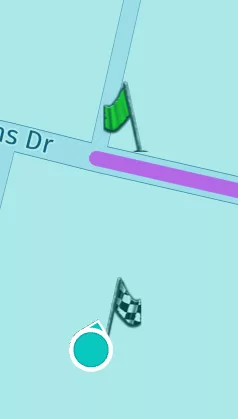
Btw. what Scenic version are you on? (You can see version number at the bottom of Settings).
Oh, sorry. I guess I expect that my iOS apps are always up to date, but I suppose that may not be the case. My current scenic version is 3.58.
Quote from Guido on 15.04.2024, 13:06Yes. Most likely a bug in this case. There is currently a bug where certain locations that are not on a road, can't be calculated by the offline routing engine. If that happens it will defer to the online routing engine. Perhaps your home location is causing it to defer to the online routing engine. This bug will probably be fixed in the upcoming Scenic version. v3.59. (3.58 is the latest version at the moment).
I'm saying probably because the bug is in the HERE framework, so HERE needs to fix this, which it seems like they did now, and I will incorporate that fix in 3.59.
Yes. Most likely a bug in this case. There is currently a bug where certain locations that are not on a road, can't be calculated by the offline routing engine. If that happens it will defer to the online routing engine. Perhaps your home location is causing it to defer to the online routing engine. This bug will probably be fixed in the upcoming Scenic version. v3.59. (3.58 is the latest version at the moment).
I'm saying probably because the bug is in the HERE framework, so HERE needs to fix this, which it seems like they did now, and I will incorporate that fix in 3.59.
Quote from mt86 on 15.04.2024, 13:45Okay, thanks for all of that, Guido. I'll keep an eye out to see if it continues in 3.59, and also to see if it happens in any additional circumstances that might be important to report.
Okay, thanks for all of that, Guido. I'll keep an eye out to see if it continues in 3.59, and also to see if it happens in any additional circumstances that might be important to report.

Quote from Mex on 15.04.2024, 14:03Hi MT86.
Another suggestion is to set the starting point 500 meters or even 5 kilometers away from your location on a public road. Scenic will alway guide you to the start of the route.
Yesterday my buddies and me met at a gasoline station nearby, so i set the starting point behind the gasoline station, roundabout 500 meters.
Scenic sents you to the starting point of each route and annouces this. But make sure its on a public road.
Regards, Mex
Hi MT86.
Another suggestion is to set the starting point 500 meters or even 5 kilometers away from your location on a public road. Scenic will alway guide you to the start of the route.
Yesterday my buddies and me met at a gasoline station nearby, so i set the starting point behind the gasoline station, roundabout 500 meters.
Scenic sents you to the starting point of each route and annouces this. But make sure its on a public road.
Regards, Mex


