
Road block not accepted - Scenic insisted to route through road block

Quote from TotalEgal on 21.07.2023, 02:42Setup:
iPhone 14pro latest iOS, latest Scenic Version, New BMW Z4, Apple CarPlay.
I planned a route from:
Lindengarten 3, Gründau-Lieblos (Germany)
to
Badezentrum Ringallee Gießen
on the iPhone using:
- extra kurvig (powered by kurviger.de)
- vermeide Autobahnen
- vermeide unbefestigte Straßen
I made this route public as "Route mit blockierter Straße". I do not know how to share a route link using the Mac version of Scenic. I started the route on the iPhone and used Apple CarPlay to navigate. So far so good:
First roadblock:
I ran into a first roadblock after a small village called Witzkirchen on the way towards another small village called Wenings. The roadblock started at a t-section. I blocked the road in Scenic CarPlay and Scenic immediately rerouted to Wenings via Kefenrod which was the right choice and best solution. See 1st screenshot from Google Maps. So far so good:
Second roadblock:
I ran into a second roadblock at the end of a small village called Steinberg on the way to the next small village called Glashütten. Google Maps does confirm that roadblock too. There was no section at the road block at all. There was only one road into Steinberg (the one I came from) and one out (the one which was blocked). I blocked the road in the CarPlay frontend and turned around. This time Scenic did not reroute correctly. Instead it insisted on leading me into the road block over and over again. I was not able to zoom out enough of the map to get my bearings and decide where to go next. So I went back the way I came from and decided to turn left (direction Gedern) while it would have obviously been the better option to turn right (via Hirzenhain). See 2nd screenshot from Google Maps.
So this is a bug report and a feature request as well. Bug report, because Scenic didn't reroute although I added the roadblock. Maybe the cause is, that it had to turn around completely for some kilometers?
Festure request:
Please add a zoom out functionality to the Scenic CarPlay version so that I could take a look at the situation and decide by myself where to go, to get back on the route.
Setup:
iPhone 14pro latest iOS, latest Scenic Version, New BMW Z4, Apple CarPlay.
I planned a route from:
Lindengarten 3, Gründau-Lieblos (Germany)
to
Badezentrum Ringallee Gießen
on the iPhone using:
- extra kurvig (powered by kurviger.de)
- vermeide Autobahnen
- vermeide unbefestigte Straßen
I made this route public as "Route mit blockierter Straße". I do not know how to share a route link using the Mac version of Scenic. I started the route on the iPhone and used Apple CarPlay to navigate. So far so good:
First roadblock:
I ran into a first roadblock after a small village called Witzkirchen on the way towards another small village called Wenings. The roadblock started at a t-section. I blocked the road in Scenic CarPlay and Scenic immediately rerouted to Wenings via Kefenrod which was the right choice and best solution. See 1st screenshot from Google Maps. So far so good:

Second roadblock:
I ran into a second roadblock at the end of a small village called Steinberg on the way to the next small village called Glashütten. Google Maps does confirm that roadblock too. There was no section at the road block at all. There was only one road into Steinberg (the one I came from) and one out (the one which was blocked). I blocked the road in the CarPlay frontend and turned around. This time Scenic did not reroute correctly. Instead it insisted on leading me into the road block over and over again. I was not able to zoom out enough of the map to get my bearings and decide where to go next. So I went back the way I came from and decided to turn left (direction Gedern) while it would have obviously been the better option to turn right (via Hirzenhain). See 2nd screenshot from Google Maps.

So this is a bug report and a feature request as well. Bug report, because Scenic didn't reroute although I added the roadblock. Maybe the cause is, that it had to turn around completely for some kilometers?
Festure request:
Please add a zoom out functionality to the Scenic CarPlay version so that I could take a look at the situation and decide by myself where to go, to get back on the route.

Quote from Guido on 21.07.2023, 05:54Ok. Thanks. Will have a look at the bug as part of the big update. Could also be a map data issue.
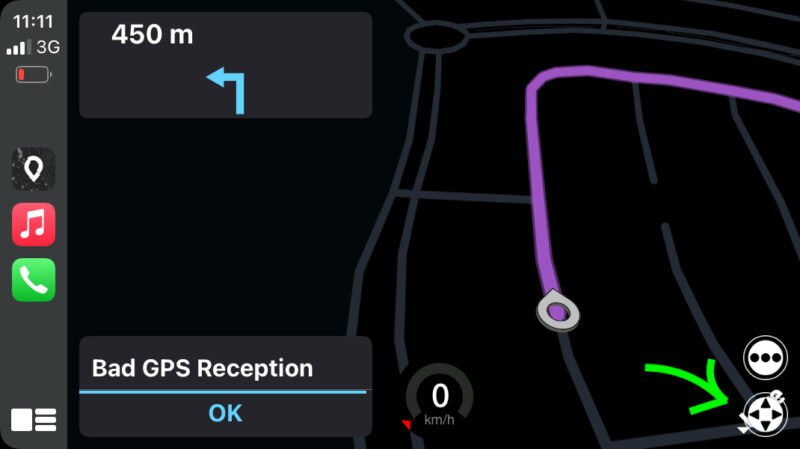
Zooming is possible in CarPlay. You have to push the button with the 4 arrows bottom right:
Ok. Thanks. Will have a look at the bug as part of the big update. Could also be a map data issue.
Zooming is possible in CarPlay. You have to push the button with the 4 arrows bottom right:
Quote from TotalEgal on 21.07.2023, 12:04Zooming worked. Thank you. As for the road block bug. Here is a link to the route used:
https://scenicapp.space/route/hjceNvrs
I was able to reproduce the same behavior today using the following route:
https://scenicapp.space/route/NllZxorP
I left the smack town called Wettenberg and followed the route straight through the wood. After some kilometers I stopped and added a road block. Same situation as above. When I turn around Scenic tries to route me back into the road block. It will reroute until the next spot where it can turn and come back to spot where I left the road block. Consistent behavior. Road block on an only one way in and one way out type of road. It looks like as if, Scenic is forgetting that there has been added a road block. Even though it color codes the road block section of the street in bright red when reaching the block again. It is just ignoring the block. Maybe it is the, you have to drive back where you came from for some kilometers which causes that behavior. Hope that helps to find the bug.
Zooming worked. Thank you. As for the road block bug. Here is a link to the route used:
https://scenicapp.space/route/hjceNvrs
I was able to reproduce the same behavior today using the following route:
https://scenicapp.space/route/NllZxorP
I left the smack town called Wettenberg and followed the route straight through the wood. After some kilometers I stopped and added a road block. Same situation as above. When I turn around Scenic tries to route me back into the road block. It will reroute until the next spot where it can turn and come back to spot where I left the road block. Consistent behavior. Road block on an only one way in and one way out type of road. It looks like as if, Scenic is forgetting that there has been added a road block. Even though it color codes the road block section of the street in bright red when reaching the block again. It is just ignoring the block. Maybe it is the, you have to drive back where you came from for some kilometers which causes that behavior. Hope that helps to find the bug.


