
Ride Distance, Time, Break and Total Time Calculated Wrong

Quote from blackhawk1618 on 24.02.2025, 00:29Hello Guido,
I recorded a ride using Scenic and found discrepancies in the Scenic app calculations for ride distance, time, break time, and total ride duration. I started the ride around 9:48 AM and ended the ride at approximately 9:25 PM (a duration of nearly 12 hours), but the app showing a total time of more than 28 hours, which seems quite strange.
Also with Google maps estimated the ride distance was around 587 km but Scenic recorded it as 661 km.
Hello Guido,
I recorded a ride using Scenic and found discrepancies in the Scenic app calculations for ride distance, time, break time, and total ride duration. I started the ride around 9:48 AM and ended the ride at approximately 9:25 PM (a duration of nearly 12 hours), but the app showing a total time of more than 28 hours, which seems quite strange.
Also with Google maps estimated the ride distance was around 587 km but Scenic recorded it as 661 km.
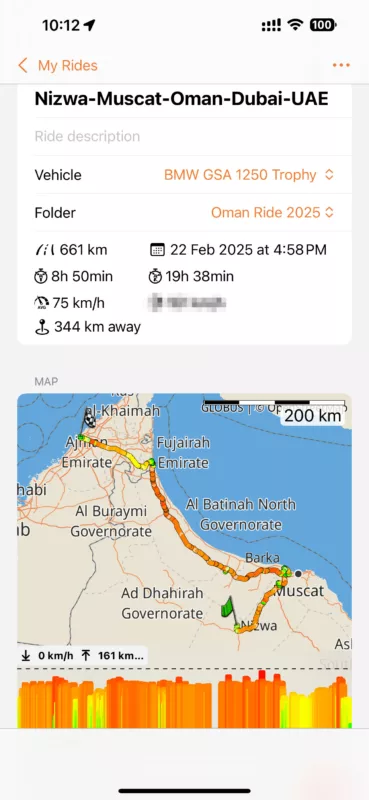

Quote from Guido on 24.02.2025, 11:14The registered start time is 22 feb 4:58 PM. Did you perhaps tap the "Ride" button at that time, and then did not move anymore until you started riding the day after at 9:48? That's a difference of almost 15 hours, and would also explain the long break time of 19h 38 minutes.
The distance difference can be caused by jumping coordinates while you had bad GPS reception (typically when you are inside). It's related to starting the ride the day before. I imagine you went inside (or were inside). It takes a while for Scenic to realize you are not moving and pause the ride (especially if coordinates are jumping implying movement). I'll have a look at that and see if I can filter those out in a more reliable way.
The registered start time is 22 feb 4:58 PM. Did you perhaps tap the "Ride" button at that time, and then did not move anymore until you started riding the day after at 9:48? That's a difference of almost 15 hours, and would also explain the long break time of 19h 38 minutes.
The distance difference can be caused by jumping coordinates while you had bad GPS reception (typically when you are inside). It's related to starting the ride the day before. I imagine you went inside (or were inside). It takes a while for Scenic to realize you are not moving and pause the ride (especially if coordinates are jumping implying movement). I'll have a look at that and see if I can filter those out in a more reliable way.
Quote from blackhawk1618 on 24.02.2025, 11:43Exactly, the registered start date and time are incorrect. I also noticed that a ride I recorded the day before had the same issue, where the date and time were incorrectly registered.
For instance, on February 23, I started recording a ride at approximately 9:48 AM and ended it the same day around 9:25 PM. However, the app has logged an incorrect timestamp. If you need look further, I can export and share both the ride data and the corresponding GPX files separately with you.
Similarly, I observed another discrepancy with a ride I recorded on Saturday, February 22. I started the recording at around 8:32 AM, but the app has registered it with a different date and timestamp and this seems to be a recurring issue.
Exactly, the registered start date and time are incorrect. I also noticed that a ride I recorded the day before had the same issue, where the date and time were incorrectly registered.
For instance, on February 23, I started recording a ride at approximately 9:48 AM and ended it the same day around 9:25 PM. However, the app has logged an incorrect timestamp. If you need look further, I can export and share both the ride data and the corresponding GPX files separately with you.
Similarly, I observed another discrepancy with a ride I recorded on Saturday, February 22. I started the recording at around 8:32 AM, but the app has registered it with a different date and timestamp and this seems to be a recurring issue.

Quote from Guido on 24.02.2025, 12:29If I remember correctly, you are originally not from Oman, correct? Is your iPhone on the local time there? Or is it still on your home timezone?
If I remember correctly, you are originally not from Oman, correct? Is your iPhone on the local time there? Or is it still on your home timezone?
Quote from blackhawk1618 on 24.02.2025, 13:01Quote from Guido on 24.02.2025, 12:29If I remember correctly, you are originally not from Oman, correct? Is your iPhone on the local time there? Or is it still on your home timezone?
Yes, I am not originally from Oman but the timezone is same as my local region.
Quote from Guido on 24.02.2025, 12:29If I remember correctly, you are originally not from Oman, correct? Is your iPhone on the local time there? Or is it still on your home timezone?
Yes, I am not originally from Oman but the timezone is same as my local region.
Quote from Guido on 24.02.2025, 13:43I double checked the code.
The tripStartTime is saved at the moment you tap the "Ride" button. When the start time is displayed, it's displayed in whatever timezone your iPhone is at. So... if you are in Oman when starting the trip at 9:28... when you display this ride when you are home in a different timezone, it will not display 9:28, but it will display the time it was at your home timezone when you started the ride in Oman. This could be interpreted as a bug, or a feature. Depends... do you want to see the start time in the timezone where you started the route, or in the timezone you are currently in.
The duration is saved at the moment you stop and save the ride. The total duration is determined by the difference between tripStartTime and the time of saving. The only way I can explain the large duration is that you tapped the ride button the day before. Then closed Scenic, and started actually riding the day after. Could that be the case?
Are you using CarPlay? I'm asking because if so, I need to investigate if there is a bug where a ride gets automatically started when connecting to CarPlay. I don't think so, otherwise I would have gotten more feedback, but you never know.
I double checked the code.
The tripStartTime is saved at the moment you tap the "Ride" button. When the start time is displayed, it's displayed in whatever timezone your iPhone is at. So... if you are in Oman when starting the trip at 9:28... when you display this ride when you are home in a different timezone, it will not display 9:28, but it will display the time it was at your home timezone when you started the ride in Oman. This could be interpreted as a bug, or a feature. Depends... do you want to see the start time in the timezone where you started the route, or in the timezone you are currently in.
The duration is saved at the moment you stop and save the ride. The total duration is determined by the difference between tripStartTime and the time of saving. The only way I can explain the large duration is that you tapped the ride button the day before. Then closed Scenic, and started actually riding the day after. Could that be the case?
Are you using CarPlay? I'm asking because if so, I need to investigate if there is a bug where a ride gets automatically started when connecting to CarPlay. I don't think so, otherwise I would have gotten more feedback, but you never know.
Quote from Guido on 24.02.2025, 15:04Thinking about it more...it could also be a combination of two things:
- You started the riding when you tapped the ride button - When displaying the ride summary in another timezone, the ride start time is shifted (you can easily check this by calculating the time difference between Oman and your current location. Does that add up to the displayed ride start time?
- You forgot to stop and finish the ride when you stopped riding, and only found out the next time you opened Scenic. The total duration will keep counting (but it will count towards break time).
Thinking about it more...it could also be a combination of two things:
- You started the riding when you tapped the ride button - When displaying the ride summary in another timezone, the ride start time is shifted (you can easily check this by calculating the time difference between Oman and your current location. Does that add up to the displayed ride start time?
- You forgot to stop and finish the ride when you stopped riding, and only found out the next time you opened Scenic. The total duration will keep counting (but it will count towards break time).
Quote from blackhawk1618 on 25.02.2025, 03:22Unfortunately it is none of the above reason or combination. I recently did 3 day tour in Oman, and manually started and stopped (saved) the ride each day. For your reference I will be sending you the email separately with export of all three days rides. You may be able to verify on your server the exact date and time when each ride was originally started and saved.
It is important to note that I mentioned in my previous response, both Oman and my local region are in the same timezone (GMT+4) so there is no possibility of a time zone change affecting the recorded timestamps.
Even if I had forgotten to stop the ride and it had continued into the next day the ride timeline should have reflected inconsistencies, and I would have noticed the GPS tracking the minor movements (none recorded in the GPX files). However, that is not the case here, indicating that something else possibly a bug within the app causing the incorrect recording.
Yes my iPhone was connected to CarPlay all the time during the ride.
Unfortunately it is none of the above reason or combination. I recently did 3 day tour in Oman, and manually started and stopped (saved) the ride each day. For your reference I will be sending you the email separately with export of all three days rides. You may be able to verify on your server the exact date and time when each ride was originally started and saved.
It is important to note that I mentioned in my previous response, both Oman and my local region are in the same timezone (GMT+4) so there is no possibility of a time zone change affecting the recorded timestamps.
Even if I had forgotten to stop the ride and it had continued into the next day the ride timeline should have reflected inconsistencies, and I would have noticed the GPS tracking the minor movements (none recorded in the GPX files). However, that is not the case here, indicating that something else possibly a bug within the app causing the incorrect recording.
Yes my iPhone was connected to CarPlay all the time during the ride.
Quote from Guido on 25.02.2025, 09:53You are right. Sorry. There is a bug, or rather two bugs. Both are related to CarPlay.
Start time and duration:
Whenever CarPlay is started, that's the ride start time it takes, even if you actually start navigating a long time after that. Even disconnecting and reconnecting from CarPlay does not reset the ride start time. I'll fix that for the next update.
Until then, as a workaround: Before you start a navigation on CarPlay, quicly start a tracking sessions and stop it again. That will reset the ride start time.Distance:
A list of between 1 to 30 coordinates are sometimes repeated, causing the track line to go back and forth overlapping itself. This causes the increase in distance. Because of this, other GPX viewers like Basecamp, indicate the same distance that Scenic indicates. If you open the GPX of the Nizwa ride in a text editor, go to line 33318 and compare that timestamp with the next one. The "double logging" of this can happen when you switch to another app on CarPlay, or disconnect and reconnect to CarPlay.I have corrected start time, duration and distance for the Niswa ride, and start time and duration for the 2nd ride you sent. Please check if that's OK. Unfortunately, I can't correct the list of coordinates themselves without a LOT of manual work.
You are right. Sorry. There is a bug, or rather two bugs. Both are related to CarPlay.
Start time and duration:
Whenever CarPlay is started, that's the ride start time it takes, even if you actually start navigating a long time after that. Even disconnecting and reconnecting from CarPlay does not reset the ride start time. I'll fix that for the next update.
Until then, as a workaround: Before you start a navigation on CarPlay, quicly start a tracking sessions and stop it again. That will reset the ride start time.
Distance:
A list of between 1 to 30 coordinates are sometimes repeated, causing the track line to go back and forth overlapping itself. This causes the increase in distance. Because of this, other GPX viewers like Basecamp, indicate the same distance that Scenic indicates. If you open the GPX of the Nizwa ride in a text editor, go to line 33318 and compare that timestamp with the next one. The "double logging" of this can happen when you switch to another app on CarPlay, or disconnect and reconnect to CarPlay.
I have corrected start time, duration and distance for the Niswa ride, and start time and duration for the 2nd ride you sent. Please check if that's OK. Unfortunately, I can't correct the list of coordinates themselves without a LOT of manual work.
Quote from blackhawk1618 on 25.02.2025, 12:52Quote from Guido on 25.02.2025, 09:53You are right. Sorry. There is a bug, or rather two bugs. Both are related to CarPlay.
Start time and duration:
Whenever CarPlay is started, that's the ride start time it takes, even if you actually start navigating a long time after that. Even disconnecting and reconnecting from CarPlay does not reset the ride start time. I'll fix that for the next update.
Until then, as a workaround: Before you start a navigation on CarPlay, quicly start a tracking sessions and stop it again. That will reset the ride start time.Distance:
A list of between 1 to 30 coordinates are sometimes repeated, causing the track line to go back and forth overlapping itself. This causes the increase in distance. Because of this, other GPX viewers like Basecamp, indicate the same distance that Scenic indicates. If you open the GPX of the Nizwa ride in a text editor, go to line 33318 and compare that timestamp with the next one. The "double logging" of this can happen when you switch to another app on CarPlay, or disconnect and reconnect to CarPlay.I have corrected start time, duration and distance for the Niswa ride, and start time and duration for the 2nd ride you sent. Please check if that's OK. Unfortunately, I can't correct the list of coordinates themselves without a LOT of manual work.
Thanks for identifying the bug within the app. I appreciate your efforts and hope this issue will be fixed soon.
I noticed that while you have corrected the start time and duration for my rides on Day 2 and 3, it seems that adjustment inadvertently has altered the date and time stamp of the entire timeline and it no longer correctly aligned.
Additionally, I am planning to complete the LDR (Long Distance Riders) 1500 miles in 36 hours challenge in a few months, and having my rides recorded accurately is crucial for qualification. The ride logs serve by a reliable and known app and speedometer reading must be presented as an official proof to validate my achievement, so any inaccuracies in the recorded time or distance could impact my eligibility. The "double logging" of GPS lines, causing back and forth of track to overlap is affecting the increase of the recorded distance. Please let me know when a fix can be expected for this issue.
Quote from Guido on 25.02.2025, 09:53You are right. Sorry. There is a bug, or rather two bugs. Both are related to CarPlay.
Start time and duration:
Whenever CarPlay is started, that's the ride start time it takes, even if you actually start navigating a long time after that. Even disconnecting and reconnecting from CarPlay does not reset the ride start time. I'll fix that for the next update.
Until then, as a workaround: Before you start a navigation on CarPlay, quicly start a tracking sessions and stop it again. That will reset the ride start time.Distance:
A list of between 1 to 30 coordinates are sometimes repeated, causing the track line to go back and forth overlapping itself. This causes the increase in distance. Because of this, other GPX viewers like Basecamp, indicate the same distance that Scenic indicates. If you open the GPX of the Nizwa ride in a text editor, go to line 33318 and compare that timestamp with the next one. The "double logging" of this can happen when you switch to another app on CarPlay, or disconnect and reconnect to CarPlay.I have corrected start time, duration and distance for the Niswa ride, and start time and duration for the 2nd ride you sent. Please check if that's OK. Unfortunately, I can't correct the list of coordinates themselves without a LOT of manual work.
Thanks for identifying the bug within the app. I appreciate your efforts and hope this issue will be fixed soon.
I noticed that while you have corrected the start time and duration for my rides on Day 2 and 3, it seems that adjustment inadvertently has altered the date and time stamp of the entire timeline and it no longer correctly aligned.
Additionally, I am planning to complete the LDR (Long Distance Riders) 1500 miles in 36 hours challenge in a few months, and having my rides recorded accurately is crucial for qualification. The ride logs serve by a reliable and known app and speedometer reading must be presented as an official proof to validate my achievement, so any inaccuracies in the recorded time or distance could impact my eligibility. The "double logging" of GPS lines, causing back and forth of track to overlap is affecting the increase of the recorded distance. Please let me know when a fix can be expected for this issue.
Quote from Guido on 25.02.2025, 13:14I already implemented the fix. It will be in the next version... in the App Store by end of next week the latest.
I already implemented the fix. It will be in the next version... in the App Store by end of next week the latest.
Quote from blackhawk1618 on 25.02.2025, 13:20Quote from Guido on 25.02.2025, 13:14I already implemented the fix. It will be in the next version... in the App Store by end of next week the latest.
I noticed that while you have corrected the start time and duration for my rides on Day 2 and 3, it seems that adjustment inadvertently has altered the date and time stamp of the entire timeline and it no longer correctly aligned.
Quote from Guido on 25.02.2025, 13:14I already implemented the fix. It will be in the next version... in the App Store by end of next week the latest.
I noticed that while you have corrected the start time and duration for my rides on Day 2 and 3, it seems that adjustment inadvertently has altered the date and time stamp of the entire timeline and it no longer correctly aligned.
Quote from Guido on 25.02.2025, 13:24I can't fix that easily. The database doesn't store timestamps, but rather time-elapsed since the ride start. So, indeed, moving the ride start, will move all "timestamps".
I can't fix that easily. The database doesn't store timestamps, but rather time-elapsed since the ride start. So, indeed, moving the ride start, will move all "timestamps".
Quote from blackhawk1618 on 25.02.2025, 13:27Quote from Guido on 25.02.2025, 13:24I can't fix that easily. The database doesn't store timestamps, but rather time-elapsed since the ride start. So, indeed, moving the ride start, will move all "timestamps".
That's sad. I hope this issue will be permanently fixed in the next update.
Thanks for all your efforts !
Quote from Guido on 25.02.2025, 13:24I can't fix that easily. The database doesn't store timestamps, but rather time-elapsed since the ride start. So, indeed, moving the ride start, will move all "timestamps".
That's sad. I hope this issue will be permanently fixed in the next update.
Thanks for all your efforts !


