
Rerouting problems

Quote from LolaKeeper on 10.06.2024, 20:36I am having a recurrent problem with the recalculate function. If I diverge from the route instead of taking me back to the route at the nearest point to my current location it will skip large portions and take me back to what appears to be the fastest route. This results in most of the curvy sections of the ride being eliminated. Is there a way to tell scenic to take me back to the route in a way that preserves the maximum amount of the original route. I guess that one solution would be to turn off the recalculate function totally but I would like to avoid that if possible.
I am having a recurrent problem with the recalculate function. If I diverge from the route instead of taking me back to the route at the nearest point to my current location it will skip large portions and take me back to what appears to be the fastest route. This results in most of the curvy sections of the ride being eliminated. Is there a way to tell scenic to take me back to the route in a way that preserves the maximum amount of the original route. I guess that one solution would be to turn off the recalculate function totally but I would like to avoid that if possible. 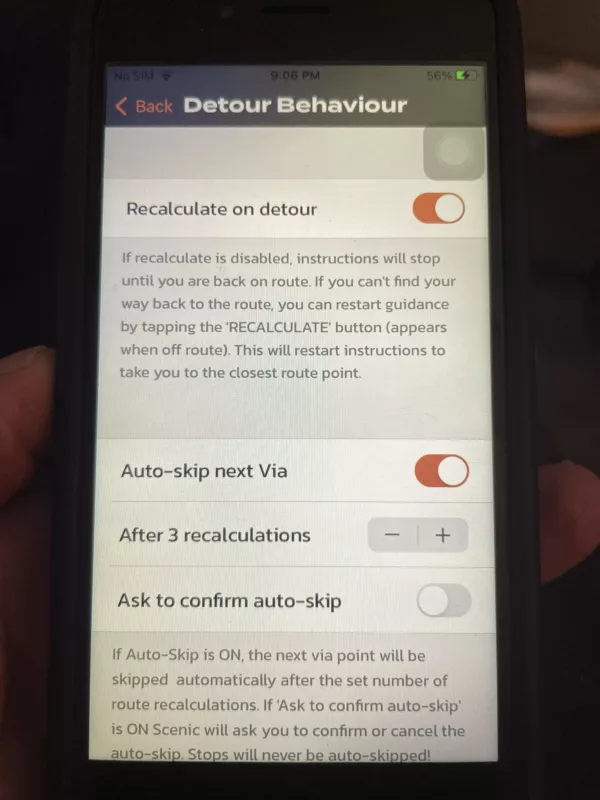

Quote from Guido on 11.06.2024, 01:03Try turning off auto-skip. Here is a help article with short videos to show you what the detour behaviour options do: https://scenic.app/help/detour-behaviour-scenic-v3-5-and-higher/
Try turning off auto-skip. Here is a help article with short videos to show you what the detour behaviour options do: https://scenic.app/help/detour-behaviour-scenic-v3-5-and-higher/
Quote from LolaKeeper on 11.06.2024, 20:21The videos and explanations are excellent and explain 90% of my issue but there is still one question:
in the explanation it says: "When you tap that button, Scenic will calculate the route to guide you from your current position to the closest route waypoint. How does is define "closest route waypoint. Suppose you have a long route that only has 3 Via's in the whole route. Is it going to take you to the next Via or what waypoint if there are none defined.
If you have recalculate on and auto delete off you get a similar explanation: When you tap that button, Scenic will calculate the route to guide you from your current position to the closest route waypoint. What is the "closest route waypoint"
Finally, if the closest route waypoint is a significant distance away does it try to get you there the fastest way or curvy or what?
Thanks very much for your help.
The videos and explanations are excellent and explain 90% of my issue but there is still one question:
in the explanation it says: "When you tap that button, Scenic will calculate the route to guide you from your current position to the closest route waypoint. How does is define "closest route waypoint. Suppose you have a long route that only has 3 Via's in the whole route. Is it going to take you to the next Via or what waypoint if there are none defined.
If you have recalculate on and auto delete off you get a similar explanation: When you tap that button, Scenic will calculate the route to guide you from your current position to the closest route waypoint. What is the "closest route waypoint"
Finally, if the closest route waypoint is a significant distance away does it try to get you there the fastest way or curvy or what?
Thanks very much for your help.
Quote from Guido on 11.06.2024, 21:13In this case, the closest route waypoint, is the first unreached via or stop. It will guide you there the fastest or shortest depending on the original routing mode of the route:
If original route was calculated with short or extra curvy it will use shortest. In all other routing modes it will use fastest.
In this case, the closest route waypoint, is the first unreached via or stop. It will guide you there the fastest or shortest depending on the original routing mode of the route:
If original route was calculated with short or extra curvy it will use shortest. In all other routing modes it will use fastest.

Quote from Melbara on 12.06.2024, 05:33Would it not be more logical to have the recalculation using the original routing? Here I'm wondering what others think?
Or is it possible to give Scenic my disired routing for the recalculation, if I want?
Would it not be more logical to have the recalculation using the original routing? Here I'm wondering what others think?
Or is it possible to give Scenic my disired routing for the recalculation, if I want?
Quote from Guido on 12.06.2024, 08:32Besides that the curvy and beauty routing modes require an internet connection, it doesn't really make sense to recalculate with curvy routing. Why? I'll try to explain:
- Curvy routes are "generated", not calculated. I.e. Scenic contacts Kurviger to generate the curvy routes. Kurviger sends back the geometry of the route. Scenic then takes key points along that geometry (those key points become via points), and then calculates the route with the "normal" routing Short or Fast between all those via points. This needs to be done like this, because (1) Scenic's main map provider does not have curvy routing modes, and (2) HERE maps needs to calculate the route to make turn by turn navigation possible. Because of the key/via points, the route that HERE calculates is the same as the geometry that is received from Kurviger.
- So, because the route contains this many via points, those via points will make sure your route stays "curvy", even if you deviate from the route and the route is recalculated with the short/fast mode.
Best regards,
Guido
Besides that the curvy and beauty routing modes require an internet connection, it doesn't really make sense to recalculate with curvy routing. Why? I'll try to explain:
- Curvy routes are "generated", not calculated. I.e. Scenic contacts Kurviger to generate the curvy routes. Kurviger sends back the geometry of the route. Scenic then takes key points along that geometry (those key points become via points), and then calculates the route with the "normal" routing Short or Fast between all those via points. This needs to be done like this, because (1) Scenic's main map provider does not have curvy routing modes, and (2) HERE maps needs to calculate the route to make turn by turn navigation possible. Because of the key/via points, the route that HERE calculates is the same as the geometry that is received from Kurviger.
- So, because the route contains this many via points, those via points will make sure your route stays "curvy", even if you deviate from the route and the route is recalculated with the short/fast mode.
Best regards,
Guido
Quote from LolaKeeper on 12.06.2024, 08:58I really appreciate your providing all the technical info. Helps me a lot.
Given all the information I think I see where my problem stems from. Some of my routes have a very minimal number of Vias. Some only 3. It makes sense given your description that if I go off route that if scenic takes me back to the closest via that is in front of me, some time that might mean that it would skip a sizable part of the original route. Do you agree with that?Also I am just curious. It seems to me that most times when I go to start a ride and it asks me where to and I chose a route that I have created I get a message on the screen that lasts for a second or 2 that says “calculating route”. I always assumed that it would just pull up the route from the phones memory and off we would go. What is it doing when it is calculating route.Keep up the good work. You have a great product. It has motivated me to try and find a bike to rent next time we go to France.
I really appreciate your providing all the technical info. Helps me a lot.
Quote from Guido on 12.06.2024, 09:12some time that might mean that it would skip a sizable part of the original route.
Theoretically yes, in practice, it depends 🙂.
If you don't have a lot of via points, you calculated a fast or short route, (curvy routes have many more via points), and Scenic calculates the fastest or shortest route between the via points. If you deviate, the recalculation takes place almost immediately upon detection of the deviation, and it will then calculate the shortest/fastest route from where you are, to the first unreached via/stop. Since you are not very far away from the original route, the new route will very likely be similar and use a lot of the same roads. If you keep ignoring the recalculated route, and keep moving away from the original route, initiating recalculation upon recalculation, then yes, the route can become significantly different.and I chose a route that I have created I get a message on the screen that lasts for a second or 2 that says “calculating route”
That is correct. Scenic stores start, destination, via points, stops and the routing mode of a route in its database. Whenever you select a route for navigation, Scenic will calculate the route again based on that info. This calculation generates turn by turn instructions and many more information required for navigation. Information that's not stored with the route in the database. That's why this calculation is required again when you start a navigation. Additionally, per default, Scenic will add navigation from your current location to the route start as well. This stretch was not saved with the route, and can be different every time you select the route.
some time that might mean that it would skip a sizable part of the original route.
Theoretically yes, in practice, it depends 🙂.
If you don't have a lot of via points, you calculated a fast or short route, (curvy routes have many more via points), and Scenic calculates the fastest or shortest route between the via points. If you deviate, the recalculation takes place almost immediately upon detection of the deviation, and it will then calculate the shortest/fastest route from where you are, to the first unreached via/stop. Since you are not very far away from the original route, the new route will very likely be similar and use a lot of the same roads. If you keep ignoring the recalculated route, and keep moving away from the original route, initiating recalculation upon recalculation, then yes, the route can become significantly different.
and I chose a route that I have created I get a message on the screen that lasts for a second or 2 that says “calculating route”
That is correct. Scenic stores start, destination, via points, stops and the routing mode of a route in its database. Whenever you select a route for navigation, Scenic will calculate the route again based on that info. This calculation generates turn by turn instructions and many more information required for navigation. Information that's not stored with the route in the database. That's why this calculation is required again when you start a navigation. Additionally, per default, Scenic will add navigation from your current location to the route start as well. This stretch was not saved with the route, and can be different every time you select the route.


