Recalculate tone

Quote from GB on 25.02.2024, 02:14Done a good 200miles yesterday, was following an imported route from google maps and while I was riding I was hearing the recalculation tone when I couldn’t see it being recalculated, is it recalculating further up where I can’t see on the map, I currently have detour recalculate on but think I will turn it off as I never want it to recalculate any routes I import that I have pre-made in either google or basecamp.
Done a good 200miles yesterday, was following an imported route from google maps and while I was riding I was hearing the recalculation tone when I couldn’t see it being recalculated, is it recalculating further up where I can’t see on the map, I currently have detour recalculate on but think I will turn it off as I never want it to recalculate any routes I import that I have pre-made in either google or basecamp.

Quote from Guido on 25.02.2024, 04:10It starts a recalculation when you get further away then X meters from the route. This might happen due to map inaccuracy (location of road on map slightly different than reality) and/or inaccuracy of GPS location. I’ll see if I can tweak this a bit more.
It starts a recalculation when you get further away then X meters from the route. This might happen due to map inaccuracy (location of road on map slightly different than reality) and/or inaccuracy of GPS location. I’ll see if I can tweak this a bit more.
Quote from GB on 25.02.2024, 04:21Thanks Guido, had a weird nav issue which I’ve never had before yesterday, approaching a roundabout and the exit number in the circle of the roundabout icon was 1 but the exit was the 3rd and showing 3rd on the magenta route line and announced 3rd on the voice, wasn’t a issue as I knew where I was going.
Thanks Guido, had a weird nav issue which I’ve never had before yesterday, approaching a roundabout and the exit number in the circle of the roundabout icon was 1 but the exit was the 3rd and showing 3rd on the magenta route line and announced 3rd on the voice, wasn’t a issue as I knew where I was going.
Quote from Guido on 25.02.2024, 04:25Ok. Weird. Do you know/remember if the next turn instruction was a roundabout where you had to take the first exit? In other words… was it perhaps showing you the next-next instruction?
Ok. Weird. Do you know/remember if the next turn instruction was a roundabout where you had to take the first exit? In other words… was it perhaps showing you the next-next instruction?
Quote from GB on 25.02.2024, 05:26No it just had the number 1 in the round icon but instructed me to 3rd, the only thing wrong was the number in the icon.
No it just had the number 1 in the round icon but instructed me to 3rd, the only thing wrong was the number in the icon.

Quote from clarkml72 on 14.03.2024, 22:04Lately with the new version 3.54 I’ll have a route all planned out and will be at our starting point and I’ll say go while I’m sitting there getting ready it’s just constantly making the recalculate noise over and over and over until I finally get moving is that because I’m just far away from the start point And likely my detour settings I can change those and see
Lately with the new version 3.54 I’ll have a route all planned out and will be at our starting point and I’ll say go while I’m sitting there getting ready it’s just constantly making the recalculate noise over and over and over until I finally get moving is that because I’m just far away from the start point And likely my detour settings I can change those and see
Quote from Guido on 15.03.2024, 09:49You not being near the road could have something to do with it. Especially if you are inside with limited GPS Reception. It's because, if your GPS reception is "bad" the received locations can "jump around" quite a bit. Scenic sees that as you are moving from one location to another, which could cause a recalculation.
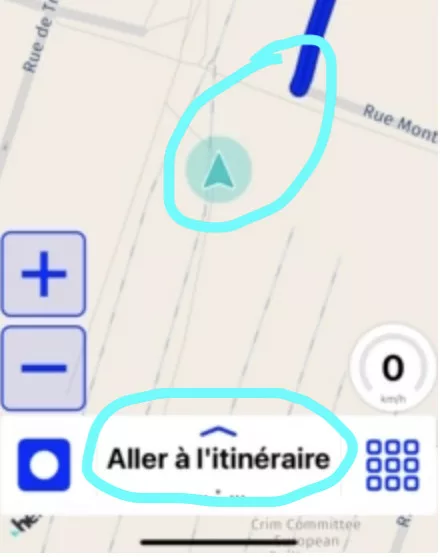
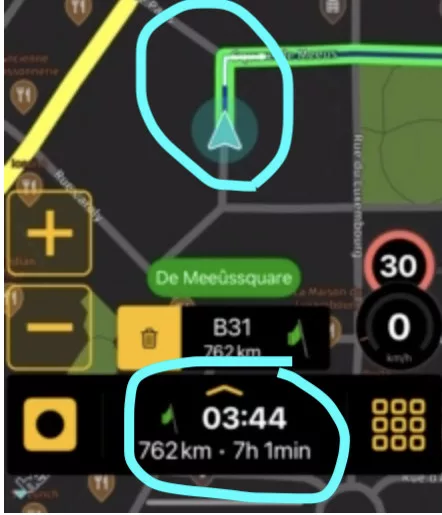
Is this on CarPlay or on iPhone? If on iPhone, do you see "Go to route" at the bottom? Or is there already a time and distance to destination listed?
You not being near the road could have something to do with it. Especially if you are inside with limited GPS Reception. It's because, if your GPS reception is "bad" the received locations can "jump around" quite a bit. Scenic sees that as you are moving from one location to another, which could cause a recalculation.
Is this on CarPlay or on iPhone? If on iPhone, do you see "Go to route" at the bottom? Or is there already a time and distance to destination listed?