
Question about route-calculation

Quote from RichardW71 on 13.04.2024, 05:34Hi,
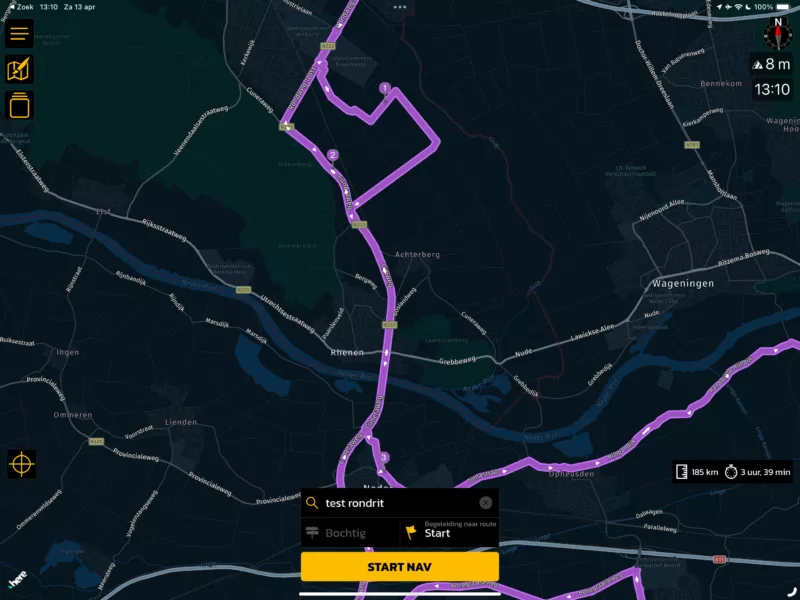
I’ve installed the 3.57 version on my iPad, no offline maps. When I generate a roundtrip (curvy) Scenic calculates the waypoints, which I think are ok. But when showing the route that connects the waypoints, it seems that it uses another way of calculating the route. Is that by intention? For me, it is not a logic route anymore. See screenprint, from waypoint 1 to 2 there is a strange detour- and I know it is possible to go from 1 to 2 directly. This is an example, it happends more. If I open the route on my iPhone (also 3.57, with offline maps)the same detour is shown.
Am I doing something wrong?
Richard
[edit] The route to wp 1 is also strange, it would be more logical to use the “wageningse laan” to get there - as intented by the roundtrip planner i think
Hi,
I’ve installed the 3.57 version on my iPad, no offline maps. When I generate a roundtrip (curvy) Scenic calculates the waypoints, which I think are ok. But when showing the route that connects the waypoints, it seems that it uses another way of calculating the route. Is that by intention? For me, it is not a logic route anymore. See screenprint, from waypoint 1 to 2 there is a strange detour- and I know it is possible to go from 1 to 2 directly. This is an example, it happends more. If I open the route on my iPhone (also 3.57, with offline maps)the same detour is shown.
Am I doing something wrong?
Richard
[edit] The route to wp 1 is also strange, it would be more logical to use the “wageningse laan” to get there - as intented by the roundtrip planner i think

Quote from Guido on 13.04.2024, 08:35Hi Richard,
There are several reasons this can happen. Here is a help article on why this can happen and what you can do about it: https://scenic.app/help/strange-loops-while-importing/
The help article discusses imported routes, but, since curvy generate routes also come from a 3rd party source (Kurviger) the process is the same.
Let me know if you have any other questions after this,
Best regards,
Guido
Hi Richard,
There are several reasons this can happen. Here is a help article on why this can happen and what you can do about it: https://scenic.app/help/strange-loops-while-importing/
The help article discusses imported routes, but, since curvy generate routes also come from a 3rd party source (Kurviger) the process is the same.
Let me know if you have any other questions after this,
Best regards,
Guido
Quote from RichardW71 on 13.04.2024, 09:21Hi Guido,
Ok, so different methods and maps are used. Then I have to check the route manually before I start to drive when using the ‘curvy’ routes - it is not what I expected but it is what it is.
tnx
Richard
Hi Guido,
Ok, so different methods and maps are used. Then I have to check the route manually before I start to drive when using the ‘curvy’ routes - it is not what I expected but it is what it is.
tnx
Richard


