Problem with wunderlinq integration

Quote from Runningback81 on 02.06.2023, 05:58Hey,
i am using wunderlinq with scenic for some years now.
i am having a R1200 GS ADV K51 2016, wunderlingq 1 and a Ipad mini 5
Really happy with it and never had a real problem.
This year i startetd the season a bit late and updatet eveything to the newest version.
In wunderlinq app all works great. up and down, left an right, longpress .
In scenci only the longress left and right works. The strange thing is that with longpress right i come to the temporary menu.
And there is the timeout bar. the war always starts new when i use the wheel up down right left. so there ist input but scenic does not recognize it.
Is there a way to debug?
Thanks
Justus
Hey,
i am using wunderlinq with scenic for some years now.
i am having a R1200 GS ADV K51 2016, wunderlingq 1 and a Ipad mini 5
Really happy with it and never had a real problem.
This year i startetd the season a bit late and updatet eveything to the newest version.
In wunderlinq app all works great. up and down, left an right, longpress .
In scenci only the longress left and right works. The strange thing is that with longpress right i come to the temporary menu.
And there is the timeout bar. the war always starts new when i use the wheel up down right left. so there ist input but scenic does not recognize it.
Is there a way to debug?
Thanks
Justus

Quote from Guido on 02.06.2023, 06:47Strange. No other reports on this so far, and Bluetooth code for Scenic didn’t change for over a year. Could be that a new iOS changed Bluetooth handeling.
Unfortunately there is no way to debug in the current version. I could give you access to the beta version if you want. It’s still quite buggy from navigation perspective, but the Bluetooth code was updated there.
If you’d like that please send me an email through the ‘email’ button at the bottom of the help page.
Strange. No other reports on this so far, and Bluetooth code for Scenic didn’t change for over a year. Could be that a new iOS changed Bluetooth handeling.
Unfortunately there is no way to debug in the current version. I could give you access to the beta version if you want. It’s still quite buggy from navigation perspective, but the Bluetooth code was updated there.
If you’d like that please send me an email through the ‘email’ button at the bottom of the help page.
Quote from Runningback81 on 13.06.2023, 07:57Ok Strange
i just resetet the iPad But nothing changed. All Standard Settings.
scrolling in WunderLINQ and iPad configurarion Works Perfect.
Hmm the i just Need to get another navigation App for my french alps Tour. 🙁
I habe Senf you an email for the Beta App
Thanks
justus
Ok Strange
i just resetet the iPad But nothing changed. All Standard Settings.
scrolling in WunderLINQ and iPad configurarion Works Perfect.
Hmm the i just Need to get another navigation App for my french alps Tour. 🙁
I habe Senf you an email for the Beta App
Thanks
justus
Quote from Guido on 13.06.2023, 08:47Hi Justus,
Only just noticed your email. It ended up in my spam folder. But I have responded now.
Thanks & regards,
Guido
Hi Justus,
Only just noticed your email. It ended up in my spam folder. But I have responded now.
Thanks & regards,
Guido
Quote from Runningback81 on 13.06.2023, 14:52Hey Guido.
Bad News. Same Result.
Strange Thing After Some testing Even the long press does Not work Any more.
had to reinstall the App.i will Test it with the iPad from my wife.
Thanks
Justus
Hey Guido.
Bad News. Same Result.
Strange Thing After Some testing Even the long press does Not work Any more.
had to reinstall the App.
i will Test it with the iPad from my wife.
Thanks
Justus
Quote from Guido on 13.06.2023, 15:11This is starting to sound like a hardware issue. Is the WunderLINQ app itself still working OK? What iOS version are you running?
This is starting to sound like a hardware issue. Is the WunderLINQ app itself still working OK? What iOS version are you running?
Quote from Guido on 13.06.2023, 17:13Correction: I just was re-reading and only now noticed you are on an iPad. My apologies. Indeed there is a bug in the App Store version that prevents WunderLINQ correct behaviour. This bug is only present for iPads running iOS16 (not for iPads running iOS15 and not for iPhones at all). The Scenic beta was supposed to resolve this, but, I just noticed I only implemented the fix partially. I'm releasing a new beta version by the end of this week with, hopefully, a full fix. Sorry for the confusion.
Correction: I just was re-reading and only now noticed you are on an iPad. My apologies. Indeed there is a bug in the App Store version that prevents WunderLINQ correct behaviour. This bug is only present for iPads running iOS16 (not for iPads running iOS15 and not for iPhones at all). The Scenic beta was supposed to resolve this, but, I just noticed I only implemented the fix partially. I'm releasing a new beta version by the end of this week with, hopefully, a full fix. Sorry for the confusion.
Quote from Runningback81 on 14.06.2023, 02:06Hey Guido,
ok then everything is right. So it seems i am the only one with iPad and wunderlinq and newest Ios 🙂
Since there is no option to downgrad iOS i hope i can deal with the beta bugs.
Any chance of a beta version based on the stable 3.19 and the wunderlinq fix?
Thanks
Justus
Hey Guido,
ok then everything is right. So it seems i am the only one with iPad and wunderlinq and newest Ios 🙂
Since there is no option to downgrad iOS i hope i can deal with the beta bugs.
Any chance of a beta version based on the stable 3.19 and the wunderlinq fix?
Thanks
Justus
Quote from Mike on 01.08.2023, 03:52Hello Guido,
I have the same problem as Runningback81, I have a mini iPad 4 and WunderLINQ on the motorcycle,(Gsa 1250) but the wheel does not work. Only one function. ( long press left)
Just to know if the problem will be solved soon?
I have a question, are scenic updates automatic? If not, what is the procedure to follow?
Thank you and good day.
Mike
Hello Guido,
I have the same problem as Runningback81, I have a mini iPad 4 and WunderLINQ on the motorcycle,(Gsa 1250) but the wheel does not work. Only one function. ( long press left)
Just to know if the problem will be solved soon?
I have a question, are scenic updates automatic? If not, what is the procedure to follow?
Thank you and good day.
Mike
Quote from Guido on 01.08.2023, 07:41A beta version with a fix for this will be available by the end of August. This version will go to the App Store in the fall (depending on beta test results). If you'd like to be added as a beta tester, you can send me a direct email via the 'email me' button at the bottom of the help page.
A beta version with a fix for this will be available by the end of August. This version will go to the App Store in the fall (depending on beta test results). If you'd like to be added as a beta tester, you can send me a direct email via the 'email me' button at the bottom of the help page.
Quote from GravelnTar on 16.09.2023, 02:19Hi Guido,
Just confirming that there is still an issue with the wheel up/down function on iPad mini 6 and Wunderlinq. It's not just zooming that's the issue in my case.
Oddly, I also have the same issue in the Osmand app...
regards,
Hi Guido,
Just confirming that there is still an issue with the wheel up/down function on iPad mini 6 and Wunderlinq. It's not just zooming that's the issue in my case.
Oddly, I also have the same issue in the Osmand app...
regards,
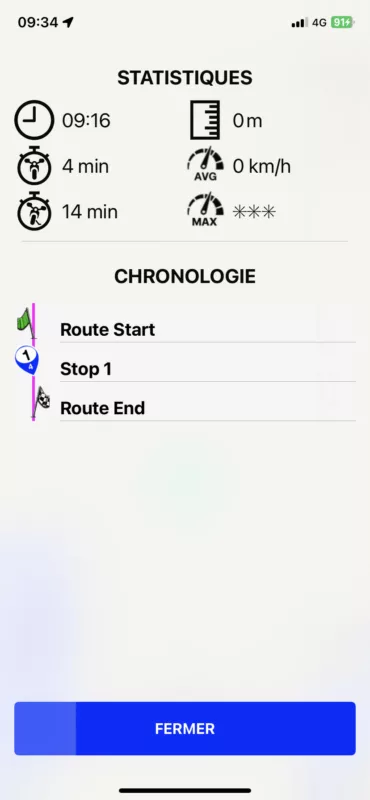
Quote from Mike on 12.02.2024, 02:37Hello Guido, since update 3.52 the app works very well with the handlebar wheel (1250 gsa 2020 and mini iPad 4) thank you. But there is a problem since the new version that was not there before, when I have finished a route, I cannot always see the driving time in relation to the start and the first stop or all the others stop (chronology). It's quite disturbing to obtain an exact timing of the route. One day it works, the other not.
Can you please look at this?
Thanks
Mike
Hello Guido, since update 3.52 the app works very well with the handlebar wheel (1250 gsa 2020 and mini iPad 4) thank you. But there is a problem since the new version that was not there before, when I have finished a route, I cannot always see the driving time in relation to the start and the first stop or all the others stop (chronology). It's quite disturbing to obtain an exact timing of the route. One day it works, the other not.
Can you please look at this?
Thanks
Mike
Quote from Guido on 12.02.2024, 10:18OK. Thanks Mike. I'll take a look at that.
OK. Thanks Mike. I'll take a look at that.
Quote from Mike on 13.02.2024, 04:55Hello Guido, I put a screenshot where the timeline appears. Today it works but it’s random!
Good day.
Mike
Hello Guido, I put a screenshot where the timeline appears. Today it works but it’s random!
Good day.
Mike 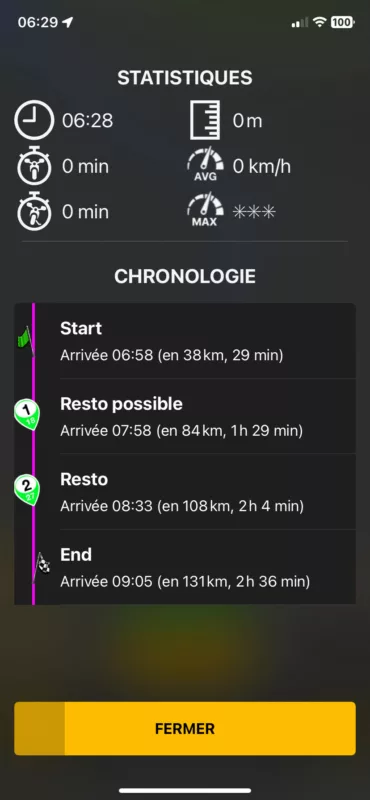
Quote from Guido on 13.02.2024, 09:06Thanks Mike. Do you perpahs remember if this could be related to a route recalcultion haven taken place?
Thanks Mike. Do you perpahs remember if this could be related to a route recalcultion haven taken place?
Quote from Guido on 06.03.2024, 10:07Hi @mike,
I've looked into this. This happens when you are not on the route yet.
So, why are you not on the route when you are starting a route?
This can happen when you are not close enough to a road when you start the route. For example, when you are in your house, and your house is far away from the road, then Scenic will ask you to "Go to route". Once you are on the route, then the Route Timeline (Chronologie) will start to contain time.Why did you not have the problem with the previous version?
Probably the old version had a higher tolerance for distance from the road. In other words, it assumed you were on the road if you were closer than X meters from the road. I'll try and increase this value a little bit for the next 3.5 update.Hope this helps/explains. If not, please let me know if you have other questions. Happy to help.
Best regards and ride safe,
Guido
Hi @mike,
I've looked into this. This happens when you are not on the route yet.
So, why are you not on the route when you are starting a route?
This can happen when you are not close enough to a road when you start the route. For example, when you are in your house, and your house is far away from the road, then Scenic will ask you to "Go to route". Once you are on the route, then the Route Timeline (Chronologie) will start to contain time.
Why did you not have the problem with the previous version?
Probably the old version had a higher tolerance for distance from the road. In other words, it assumed you were on the road if you were closer than X meters from the road. I'll try and increase this value a little bit for the next 3.5 update.
Hope this helps/explains. If not, please let me know if you have other questions. Happy to help.
Best regards and ride safe,
Guido
Quote from Mike on 08.03.2024, 10:42Hello Guido, I don't think it's a question of proximity to the road.
Look, I am in Brussels and I am preparing my trip to the Black Forest (D) in July, once I start the navigation (from my living room), I still have the chronology and yet I am 500 km away. (my route is ready, I just check the route)
Another time I start it again and nothing more. It may work on the iPad 4 mini and not on the iPhone XR at the same time.
What can also happen is if I start the navigation always from my living room, and I don't have the timeline, I put overview, come back to the navigation and the timeline can appear but not systematically.
If I do a recalculation as sometimes it asks me, the chronology can also appear. This always from my living room, I just control the stop points.
I also have another problem as well as other bikers but it is probably not due to your application, but I am reporting it anyway. The connection with the WunderLINQ can cut out at the start of the ride and either resolves itself, or I have to stop the bike, turn off the engine and restart. But it is not guaranteed that it always works. The device is securely attached and connected to Scenic. I have this with iPad mini 4 and a friend with iPhone above 12.
I hope this is understandable because I use Google translate 😉
Thank you
Have a nice weekend.
Mike
Hello Guido, I don't think it's a question of proximity to the road.
Look, I am in Brussels and I am preparing my trip to the Black Forest (D) in July, once I start the navigation (from my living room), I still have the chronology and yet I am 500 km away. (my route is ready, I just check the route)
Another time I start it again and nothing more. It may work on the iPad 4 mini and not on the iPhone XR at the same time.
What can also happen is if I start the navigation always from my living room, and I don't have the timeline, I put overview, come back to the navigation and the timeline can appear but not systematically.
If I do a recalculation as sometimes it asks me, the chronology can also appear. This always from my living room, I just control the stop points.
I also have another problem as well as other bikers but it is probably not due to your application, but I am reporting it anyway. The connection with the WunderLINQ can cut out at the start of the ride and either resolves itself, or I have to stop the bike, turn off the engine and restart. But it is not guaranteed that it always works. The device is securely attached and connected to Scenic. I have this with iPad mini 4 and a friend with iPhone above 12.
I hope this is understandable because I use Google translate 😉
Thank you
Have a nice weekend.
Mike
Quote from Guido on 08.03.2024, 11:38Hi Mike,
When you select a route for navigation, and "Guidance to route" is set to "Start" like in the screenshot, the Scenic will add a section to the route (from the nearest road to your current position, to the route start point). When I said "route" in my post above, I meant the route you saved, including that added section.
In the above screenshot, my current location is very close to the actual road, and guidance will start almost immediately. However, when you are not so close to the road, Scenic will start navigation yet. In stead, it will say "Go to route" (like screenshot below). As long as it says "go to route" your timeline will be empty, as Scenic does not know where you will join the route yet.
Now, as new coordinates come in (typically every second), it is possible that one of those coordinates is close enough to the route to start the navigation. In the current version this is 25 meters. So, if you get closer than 25 meters to the route, the "Go to route" will go away, and guidance instructions will start, and your timeline will also contain values. Before that time (as long as "Go to route" is there) it will not. It's possible that when you first start navigation, the GPS accuracy is not so good, and maybe the reported coordinate is further away than 25 meters. However the longer the GPS is on, the more precise the coordinates will get, and perhaps after a while, one of those coordinates comes within the 25 meter threshold, and the route guidance will start.
For the next version I will increase the threshold to 35 meters. I believe that will make a difference in your case.
Regarding your WunderLINQ problem. Indeed I believe this is not a Scenic issue. In fact, Scenic continuously checks for the precense of the WunderLINQ. If you turn off your WunderLINQ Scenic will give you a message "Remote Controller Disconnected". If you turn it on again, Scenic will give you a message "Remote Controller Connected". You can do this as many times as you want. In your case, it sounds like the WunderLINQ is turning off (or disconnected from power) and is not turning on again automatically. What happens with the WunderLINQ app? When the connection with the WunderLINQ cuts out, does the WunderLINQ app still show it as connected? Or also as disconnected?
Best regards,
Guido
Hi Mike,
When you select a route for navigation, and "Guidance to route" is set to "Start" like in the screenshot, the Scenic will add a section to the route (from the nearest road to your current position, to the route start point). When I said "route" in my post above, I meant the route you saved, including that added section.
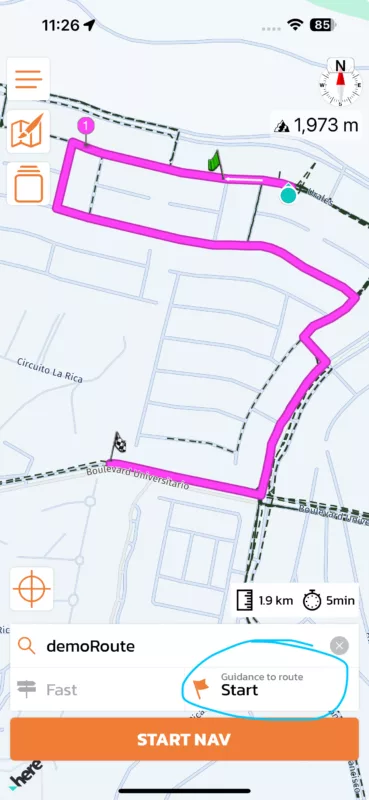
In the above screenshot, my current location is very close to the actual road, and guidance will start almost immediately. However, when you are not so close to the road, Scenic will start navigation yet. In stead, it will say "Go to route" (like screenshot below). As long as it says "go to route" your timeline will be empty, as Scenic does not know where you will join the route yet.
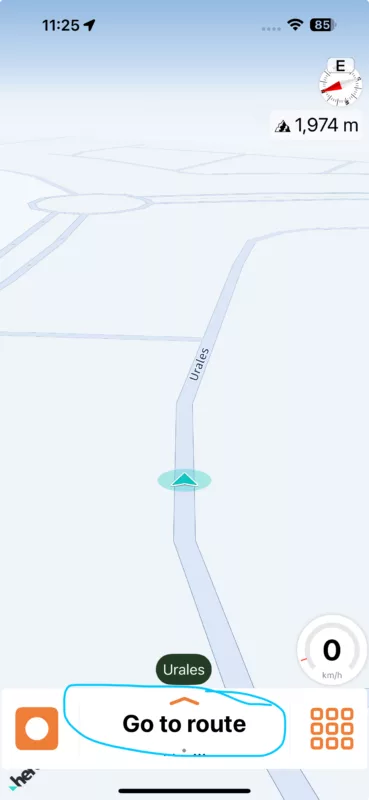
Now, as new coordinates come in (typically every second), it is possible that one of those coordinates is close enough to the route to start the navigation. In the current version this is 25 meters. So, if you get closer than 25 meters to the route, the "Go to route" will go away, and guidance instructions will start, and your timeline will also contain values. Before that time (as long as "Go to route" is there) it will not. It's possible that when you first start navigation, the GPS accuracy is not so good, and maybe the reported coordinate is further away than 25 meters. However the longer the GPS is on, the more precise the coordinates will get, and perhaps after a while, one of those coordinates comes within the 25 meter threshold, and the route guidance will start.
For the next version I will increase the threshold to 35 meters. I believe that will make a difference in your case.
Regarding your WunderLINQ problem. Indeed I believe this is not a Scenic issue. In fact, Scenic continuously checks for the precense of the WunderLINQ. If you turn off your WunderLINQ Scenic will give you a message "Remote Controller Disconnected". If you turn it on again, Scenic will give you a message "Remote Controller Connected". You can do this as many times as you want. In your case, it sounds like the WunderLINQ is turning off (or disconnected from power) and is not turning on again automatically. What happens with the WunderLINQ app? When the connection with the WunderLINQ cuts out, does the WunderLINQ app still show it as connected? Or also as disconnected?
Best regards,
Guido
Quote from Mike on 09.03.2024, 09:10Hello Guido, regarding the first screenshot, this is the method that I use every time.
As for the second screenshot, I don't think that's the reason. I will send two video screens by email. (I will be in Bxl and I am checking a trip to Austria, far from the road)
For wunderlinq, the connection problem is between the button on the handlebar switch. (to switch between TFT and navigation) Probably not from your application.
But I never had that with the BMW Navigator 5.
I wrote to wunderlinq, I will see the response given.
Thanks for the quick answer !
Hello Guido, regarding the first screenshot, this is the method that I use every time.
As for the second screenshot, I don't think that's the reason. I will send two video screens by email. (I will be in Bxl and I am checking a trip to Austria, far from the road)
For wunderlinq, the connection problem is between the button on the handlebar switch. (to switch between TFT and navigation) Probably not from your application.
But I never had that with the BMW Navigator 5.
I wrote to wunderlinq, I will see the response given.
Thanks for the quick answer !
Quote from Guido on 15.03.2024, 10:16Hi @mike,
I already answered you over email, but I'll also answer here so that it can help other people.
So, when you start a route while you are not close to a road (for example if you are inside or on private property with unmapped roads), it will say "Go to route", until you get within 25 meters (35 meters from Scenic v3.55) of the road.
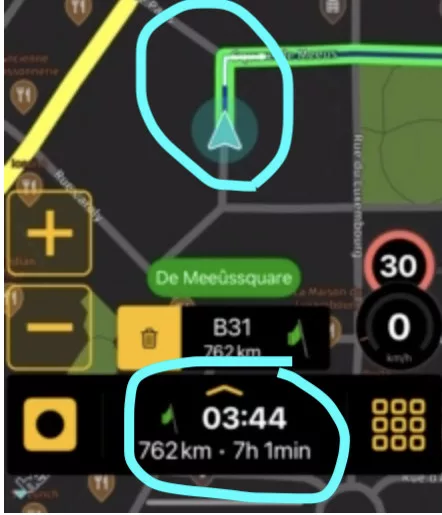
As long as it says "Go to route" at the bottom, you will not get time and distance to destination and stops. This is because you are not on the route yet, so Scenic does not know when and where you will join the route, so it can not calculate the time and distance to destination:
Only when you are ON the route, you will see time and distance to destination and stops:
Hi @mike,
I already answered you over email, but I'll also answer here so that it can help other people.
So, when you start a route while you are not close to a road (for example if you are inside or on private property with unmapped roads), it will say "Go to route", until you get within 25 meters (35 meters from Scenic v3.55) of the road.
As long as it says "Go to route" at the bottom, you will not get time and distance to destination and stops. This is because you are not on the route yet, so Scenic does not know when and where you will join the route, so it can not calculate the time and distance to destination:
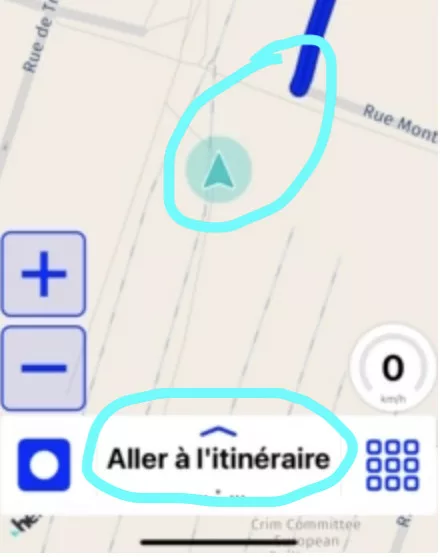
Only when you are ON the route, you will see time and distance to destination and stops: