
Problem with CarPlay

Quote from BONES on 17.03.2024, 21:35

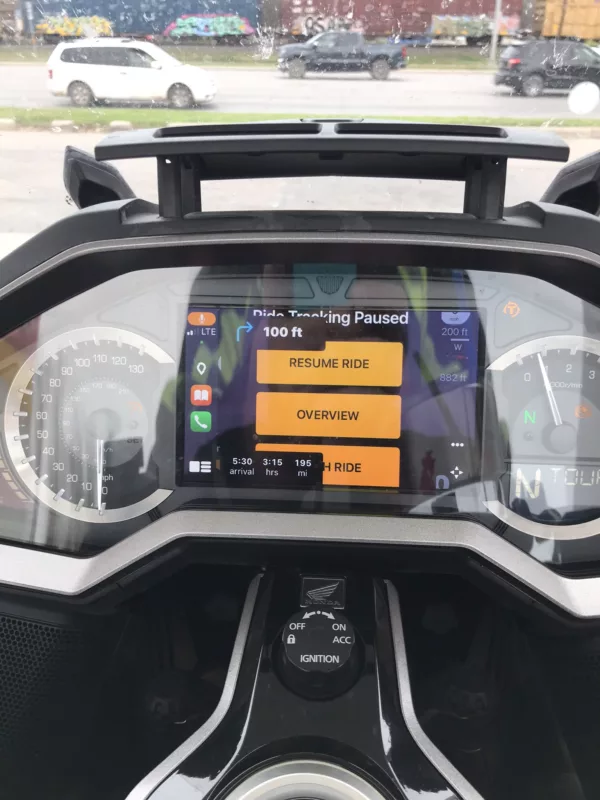
Hello. Really liking the big update but I am having a problem sometimes.
if we stop for food, fuel, or whatever wheel I start the bike my Carplay screen is exploded with large icons.
the only way I have found to clear it is to finish the ride and save it then start it again and it will pick up from where we left off.
couple of photos. I’m normally in dark mode day and night but I even changed it to light mode a few times just to see if it made a difference. Help! Not sure what to do.
Hello. Really liking the big update but I am having a problem sometimes.
if we stop for food, fuel, or whatever wheel I start the bike my Carplay screen is exploded with large icons.
the only way I have found to clear it is to finish the ride and save it then start it again and it will pick up from where we left off.
couple of photos. I’m normally in dark mode day and night but I even changed it to light mode a few times just to see if it made a difference. Help! Not sure what to do.

Quote from Guido on 18.03.2024, 09:05OK. I'll take a look. Could you answer following questions please? They will help me in analysing the bug:
- Where do you select the route/destination and start the navigation? On iPhone? Or on CarPlay?
- If on CarPlay... was Scenic already opened on your iPhone before connecting to CarPlay? Or you just connect to CarPlay and never look at phone again?
- During your break... do you disconnect from CarPlay?
Thanks and best regards,
Guido
OK. I'll take a look. Could you answer following questions please? They will help me in analysing the bug:
- Where do you select the route/destination and start the navigation? On iPhone? Or on CarPlay?
- If on CarPlay... was Scenic already opened on your iPhone before connecting to CarPlay? Or you just connect to CarPlay and never look at phone again?
- During your break... do you disconnect from CarPlay?
Thanks and best regards,
Guido
Quote from Guido on 19.03.2024, 09:33Also... what version of Scenic do you have installed? You can see the version number at the bottom of Settings.
Also... what version of Scenic do you have installed? You can see the version number at the bottom of Settings.
Quote from BONES on 19.03.2024, 09:57Good morning. I am on 3.55 version.
I open and select the route on Scenic on my phone and then plug it into the bike after I hit "Start Navigation".
When I stopped, I did not disconnect the phone and I get the map messed up, Then I unplug the phone and plug it back in, sometimes I restart my phone, or just cancel Scenic and restart the app. The only way I have found that workes every time is to finnish the ride, save the ride and then restart the ride.
Thanks
Michael "BONES" T.
Good morning. I am on 3.55 version.
I open and select the route on Scenic on my phone and then plug it into the bike after I hit "Start Navigation".
When I stopped, I did not disconnect the phone and I get the map messed up, Then I unplug the phone and plug it back in, sometimes I restart my phone, or just cancel Scenic and restart the app. The only way I have found that workes every time is to finnish the ride, save the ride and then restart the ride.
Thanks
Michael "BONES" T.

Quote from Marts on 19.03.2024, 16:25What happens if you start Scenic in the Carplay on your motorbike? That is, don't touch the phone at all?
This is how I operate Scenic (it auto opens on the carplay unit as soon as it's connected to the phone on startup.
The only problems that I have with CarPlay are in my two cars, a Ford and a Kia, so both distinctly different systems. Works fine on the Chigee CarPlay unit.
What happens if you start Scenic in the Carplay on your motorbike? That is, don't touch the phone at all?
This is how I operate Scenic (it auto opens on the carplay unit as soon as it's connected to the phone on startup.
The only problems that I have with CarPlay are in my two cars, a Ford and a Kia, so both distinctly different systems. Works fine on the Chigee CarPlay unit.
Quote from Guido on 19.03.2024, 18:14What happens if you start Scenic in the Carplay on your motorbike? That is, don't touch the phone at all?
This should work. Scenic will start “hidden” on your iPhone and run the app on CarPlay.
At the moment there are a few problems with CarPlay that I’m hoping to address with the next update (like the one @bones is having).
The difficulty with CarPlay is that every CarPlay manufacturer seems to implement the CarPlay protocol a bit different. So what works with one system might not necessarily work with another system. This is especially the case when it comes to connecting and disconnecting to/from CarPlay, wether it’s wired or wireless CarPlay, wether Scenic was running on the iPhone before connecting or not, wether navigation was already started or not.
Having said that, I realize this is not your concern as users. I just want to mention it here to give a bit of background on the CarPlay problems.
What happens if you start Scenic in the Carplay on your motorbike? That is, don't touch the phone at all?
This should work. Scenic will start “hidden” on your iPhone and run the app on CarPlay.
At the moment there are a few problems with CarPlay that I’m hoping to address with the next update (like the one @bones is having).
The difficulty with CarPlay is that every CarPlay manufacturer seems to implement the CarPlay protocol a bit different. So what works with one system might not necessarily work with another system. This is especially the case when it comes to connecting and disconnecting to/from CarPlay, wether it’s wired or wireless CarPlay, wether Scenic was running on the iPhone before connecting or not, wether navigation was already started or not.
Having said that, I realize this is not your concern as users. I just want to mention it here to give a bit of background on the CarPlay problems.
Quote from Marts on 19.03.2024, 18:45Quote from Guido on 19.03.2024, 18:14What happens if you start Scenic in the Carplay on your motorbike? That is, don't touch the phone at all?
This should work. Scenic will start “hidden” on your iPhone and run the app on CarPlay.
At the moment there are a few problems with CarPlay that I’m hoping to address with the next update (like the one @bones is having).
The difficulty with CarPlay is that every CarPlay manufacturer seems to implement the CarPlay protocol a bit different. So what works with one system might not necessarily work with another system. This is especially the case when it comes to connecting and disconnecting to/from CarPlay, wether it’s wired or wireless CarPlay, wether Scenic was running on the iPhone before connecting or not, wether navigation was already started or not.
Having said that, I realize this is not your concern as users. I just want to mention it here to give a bit of background on the CarPlay problems.
I can attest to all of this. CarPlay with Scenic is fine with the Chigee on the bike, but the screen does funny things in both the Kia and Ford cars. The Chigee is a wireless connection and the cars are wired.
In all cases I just plug the phone in (or it auto-connects wirelessly) and Scenic will either auto-open in the case of the Chigee wireless unit, or I tap on its icon on the CarPlay screen in the cars to open it.
The thing to remember is that I use Scenic for motorcycle navigation. This is for route planning and ride recording. In the car I usually use Google Maps or if I don't connect the phone to the car, I will use the car's built in navigation app.
So, as far as Scenic and the Chigee combination goes, it works perfectly for me.
Quote from Guido on 19.03.2024, 18:14What happens if you start Scenic in the Carplay on your motorbike? That is, don't touch the phone at all?
This should work. Scenic will start “hidden” on your iPhone and run the app on CarPlay.
At the moment there are a few problems with CarPlay that I’m hoping to address with the next update (like the one @bones is having).
The difficulty with CarPlay is that every CarPlay manufacturer seems to implement the CarPlay protocol a bit different. So what works with one system might not necessarily work with another system. This is especially the case when it comes to connecting and disconnecting to/from CarPlay, wether it’s wired or wireless CarPlay, wether Scenic was running on the iPhone before connecting or not, wether navigation was already started or not.
Having said that, I realize this is not your concern as users. I just want to mention it here to give a bit of background on the CarPlay problems.
I can attest to all of this. CarPlay with Scenic is fine with the Chigee on the bike, but the screen does funny things in both the Kia and Ford cars. The Chigee is a wireless connection and the cars are wired.
In all cases I just plug the phone in (or it auto-connects wirelessly) and Scenic will either auto-open in the case of the Chigee wireless unit, or I tap on its icon on the CarPlay screen in the cars to open it.
The thing to remember is that I use Scenic for motorcycle navigation. This is for route planning and ride recording. In the car I usually use Google Maps or if I don't connect the phone to the car, I will use the car's built in navigation app.
So, as far as Scenic and the Chigee combination goes, it works perfectly for me.
Quote from Guido on 25.03.2024, 12:33v3.56 was just approved. Should become available in the App Stores around the world in the next few hours. Here's the direct link so you can check for the update: https://apps.apple.com/app/id1089668246
v3.56 was just approved. Should become available in the App Stores around the world in the next few hours. Here's the direct link so you can check for the update: https://apps.apple.com/app/id1089668246
Quote from Marts on 31.03.2024, 20:40Today I had a play with Scenic in the car (Ford Ranger). The display is now working correctly.
And after the issues that I had with navigation recalcs, I went out shopping. At the other end of town I punched in Home in the "where to" field to see how it performed as I wouldn't be taking a direct route home.
Then I set off.
The display is now showing on the car's infotainment screen perfectly. No elements are crunched up or overlapping each other. And each time I turned down a different street it immediately recalculated a new route (and the correct way).
Of course, this is only a 4km route. Tomorrow we head off on a holiday to the far east of our state, a 400 km drive. It'll be interesting to see how it all goes.
Today I had a play with Scenic in the car (Ford Ranger). The display is now working correctly.
And after the issues that I had with navigation recalcs, I went out shopping. At the other end of town I punched in Home in the "where to" field to see how it performed as I wouldn't be taking a direct route home.
Then I set off.
The display is now showing on the car's infotainment screen perfectly. No elements are crunched up or overlapping each other. And each time I turned down a different street it immediately recalculated a new route (and the correct way).
Of course, this is only a 4km route. Tomorrow we head off on a holiday to the far east of our state, a 400 km drive. It'll be interesting to see how it all goes.
Quote from BONES on 03.04.2024, 15:26Okay, did a 500-mile day Saturday and started off really well. Made a fuel stop and I record all things done to the bike on another app. Unplugged the phone to have better control, input my data and then plugged the phone back in and all was good. Next stop was for a coffee and unplugged the phone and stuck it into my pocket. Leaving time and I started the bike and let the headset connect, plugged in the phone and the view was exploded like the pictures earlier.
The voice works and the upper left of the screen where the turn by turn works well but the map is not visible. power chord.
I am using (don't laugh) iPhone 7 with the original power chord. Everything worked flawlessly before the update, so this is all new to me.
Any ideas?
Anyone?
Okay, did a 500-mile day Saturday and started off really well. Made a fuel stop and I record all things done to the bike on another app. Unplugged the phone to have better control, input my data and then plugged the phone back in and all was good. Next stop was for a coffee and unplugged the phone and stuck it into my pocket. Leaving time and I started the bike and let the headset connect, plugged in the phone and the view was exploded like the pictures earlier.
The voice works and the upper left of the screen where the turn by turn works well but the map is not visible. power chord.
I am using (don't laugh) iPhone 7 with the original power chord. Everything worked flawlessly before the update, so this is all new to me.
Any ideas?
Anyone?
Quote from Guido on 04.04.2024, 08:23I'll have another look at this. Did you lock your iPhone during the first stop? Where it did work?
Did you start Scenic on your phone before connecting to CarPlay? Or did you connect to CarPlay and selected Scenic from there?
I'll have another look at this. Did you lock your iPhone during the first stop? Where it did work?
Did you start Scenic on your phone before connecting to CarPlay? Or did you connect to CarPlay and selected Scenic from there?
Quote from BONES on 17.04.2024, 13:38Sorry, late to the party.
I unlocked my phone and then plugged it into the data chord, after CarPlay was launched I opened Scenic and chose my route from the bike, then it opened up my route flawlessly. Later in the ride we stopped for fuel and when I get ready to go the screen is back to oversized windows. I have uninstalled Scenic and reinstalled it and the only time it does it is when we stop for food of fuel, then resume the ride. It seems to be when I restart the bike.
If I finish the ride and save it, then I can restart the route and it's all good. We have a + mile ride planned next week so we will have a few stops. I'll keep trying.
Thank you...
Sorry, late to the party.
I unlocked my phone and then plugged it into the data chord, after CarPlay was launched I opened Scenic and chose my route from the bike, then it opened up my route flawlessly. Later in the ride we stopped for fuel and when I get ready to go the screen is back to oversized windows. I have uninstalled Scenic and reinstalled it and the only time it does it is when we stop for food of fuel, then resume the ride. It seems to be when I restart the bike.
If I finish the ride and save it, then I can restart the route and it's all good. We have a + mile ride planned next week so we will have a few stops. I'll keep trying.
Thank you...
Quote from Guido on 17.04.2024, 19:10I have a strong suspicion this is iOS15 related (max iOS that runs on an iPhone 7) and/or performance/timing related. Let me try to find an old iPhone 7 so I can try to reproduce this myself here.
Okay, did a 500-mile day Saturday and started off really well. Made a fuel stop and I record all things done to the bike on another app. Unplugged the phone to have better control, input my data and then plugged the phone back in and all was good. Next stop was for a coffee and unplugged the phone and stuck it into my pocket. Leaving time and I started the bike and let the headset connect, plugged in the phone and the view was exploded like the pictures earlier.
This seems to suggest that it doesn't happen all the time, right? The only difference between blue and red situation is that red was a bit longer stop, and you locked your phone. I imagine in the blue situation, you also turned off your bike (since this was during a fuel stop).
I have a strong suspicion this is iOS15 related (max iOS that runs on an iPhone 7) and/or performance/timing related. Let me try to find an old iPhone 7 so I can try to reproduce this myself here.
Okay, did a 500-mile day Saturday and started off really well. Made a fuel stop and I record all things done to the bike on another app. Unplugged the phone to have better control, input my data and then plugged the phone back in and all was good. Next stop was for a coffee and unplugged the phone and stuck it into my pocket. Leaving time and I started the bike and let the headset connect, plugged in the phone and the view was exploded like the pictures earlier.
This seems to suggest that it doesn't happen all the time, right? The only difference between blue and red situation is that red was a bit longer stop, and you locked your phone. I imagine in the blue situation, you also turned off your bike (since this was during a fuel stop).
Quote from BONES on 23.04.2024, 13:43I had a 500 mile day yesterday and the app started off great. After a fuel stop or picture stop, I again get the exploded view. I am going to buy a new data cable to see if that makes a difference. I have another ride planned for this coming Saturday.
If I click "Finish Ride" and save it. the screen goes back to the way it should, but I had a route planned with six stops, not counting food and fuel. I can then restart the app but it takes me back to the very beginning and i have to go through and delete all the stops and Via points already made and it takes a while.
Hoping the new data cable will work. The one I have is when I bought my brand new iPhone 6 years ago.
I had a 500 mile day yesterday and the app started off great. After a fuel stop or picture stop, I again get the exploded view. I am going to buy a new data cable to see if that makes a difference. I have another ride planned for this coming Saturday.
If I click "Finish Ride" and save it. the screen goes back to the way it should, but I had a route planned with six stops, not counting food and fuel. I can then restart the app but it takes me back to the very beginning and i have to go through and delete all the stops and Via points already made and it takes a while.
Hoping the new data cable will work. The one I have is when I bought my brand new iPhone 6 years ago.
Quote from Guido on 24.04.2024, 09:44I don't think a new cable will help. But, worth a shot though. I've not been able to reproduce it here, but for the moment, I'm assuming this is a performance problem.
When CarPlay is re-connected, and a navigation was in progress on the phone, Scenic moves the navigation screen from the iPhone to the CarPlay screen. In that process, it also removes elements from the iPhone user interface. My guess is that the removing of the elements is done before the screen is actually being displayed on CarPlay (because performance is slower on your older iPhone), and therefore it fails and the elements remain visible.
I'm releasing an update hopefully before the weekend in which I added a very small delay, giving the iPhone time to move the screen to CarPlay. Perhaps that will resolve it.
I don't think a new cable will help. But, worth a shot though. I've not been able to reproduce it here, but for the moment, I'm assuming this is a performance problem.
When CarPlay is re-connected, and a navigation was in progress on the phone, Scenic moves the navigation screen from the iPhone to the CarPlay screen. In that process, it also removes elements from the iPhone user interface. My guess is that the removing of the elements is done before the screen is actually being displayed on CarPlay (because performance is slower on your older iPhone), and therefore it fails and the elements remain visible.
I'm releasing an update hopefully before the weekend in which I added a very small delay, giving the iPhone time to move the screen to CarPlay. Perhaps that will resolve it.
Quote from TonicTrinker on 28.04.2024, 11:48Hello, I have a similar problem too on my Honda NT1100.
If I'm switching off the bike for a break, Carplay is disconnected while tracking or routing is still active.
If I start again it remains like that:
Reconnecting helps sometimes.
Or I have the option as shown at the beginning at the thread(resume, overview...) but I'm not able to touch at this menu.
Current version is 3.59.
Great app, thanks a lot Guido.
Hello, I have a similar problem too on my Honda NT1100.
If I'm switching off the bike for a break, Carplay is disconnected while tracking or routing is still active.
If I start again it remains like that:
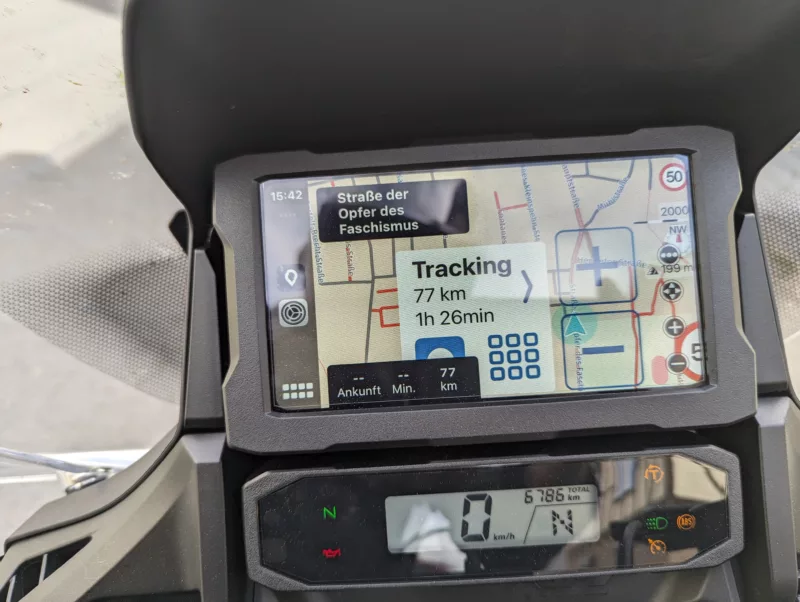
Reconnecting helps sometimes.
Or I have the option as shown at the beginning at the thread(resume, overview...) but I'm not able to touch at this menu.
Current version is 3.59.
Great app, thanks a lot Guido.
Quote from Marts on 29.04.2024, 01:14Hey guys,
This isn't necessarily a problem with Scenic and CarPlay but I don't know where else to post it. Here goes, anyway...
Today in the Ford Ranger I had CarPlay going with the iphone connected. I opened Scenic via CarPlay. I didn't plot a route or ask it where to go or to "start riding". It was purely in tracking mode.
I noticed a couple of things.
- the map display is in 2D and is zoomed out with no + or - icons on which to change map zoom
- the speedo doesn't show up on the display. It only appears when I start a new route to somewhere
- the settings option (three dots or ...) doesn't display
Is this normal for any CarPlay map? ie. can the above be implemented when in tracking mode?
Thanks.
Hey guys,
This isn't necessarily a problem with Scenic and CarPlay but I don't know where else to post it. Here goes, anyway...
Today in the Ford Ranger I had CarPlay going with the iphone connected. I opened Scenic via CarPlay. I didn't plot a route or ask it where to go or to "start riding". It was purely in tracking mode.
I noticed a couple of things.
- the map display is in 2D and is zoomed out with no + or - icons on which to change map zoom
- the speedo doesn't show up on the display. It only appears when I start a new route to somewhere
- the settings option (three dots or ...) doesn't display
Is this normal for any CarPlay map? ie. can the above be implemented when in tracking mode?
Thanks.
Quote from Guido on 29.04.2024, 08:32@tonictrinker. Apparently the delay I added in 3.59 did not fix this problem. I'll have another look at this. For you also the question... during your break when you disconnect from CarPlay... did you open Scenic on your phone at all? Is the NT1100 carplay system wireless or wired, or both?
@marts. In the CarPlay start screen you are not actually in tracking mode. This start screen is comparable to the start screen on the phone (which doesn't have speedometer and map only 2D mode too). To go to tracking mode, tap the "Start Ride" button (without selecting a route or destination for navigation). Then everything will show up as you described it.
@tonictrinker. Apparently the delay I added in 3.59 did not fix this problem. I'll have another look at this. For you also the question... during your break when you disconnect from CarPlay... did you open Scenic on your phone at all? Is the NT1100 carplay system wireless or wired, or both?
@marts. In the CarPlay start screen you are not actually in tracking mode. This start screen is comparable to the start screen on the phone (which doesn't have speedometer and map only 2D mode too). To go to tracking mode, tap the "Start Ride" button (without selecting a route or destination for navigation). Then everything will show up as you described it.
Quote from TonicTrinker on 29.04.2024, 11:47@guidomm
Hi, it's wired only for NT110 and the Africa Twin (same system).
I let the phone connected and switch off the Honda. Then I switch on the ignition again.
Edit: If the ignition is switched off, the system needs only a few seconds to go to sleep. After that a full restart is performed.
Hi, it's wired only for NT110 and the Africa Twin (same system).
I let the phone connected and switch off the Honda. Then I switch on the ignition again.
Edit: If the ignition is switched off, the system needs only a few seconds to go to sleep. After that a full restart is performed.
Quote from Guido on 29.04.2024, 11:54Did you open Scenic on your phone during the break? Did you open Scenic on your phone to start the navigation? Or did you start navigation on CarPlay (I.e. never used/opened Scenic on your phone?
Did you open Scenic on your phone during the break? Did you open Scenic on your phone to start the navigation? Or did you start navigation on CarPlay (I.e. never used/opened Scenic on your phone?
Quote from TonicTrinker on 29.04.2024, 14:53@guidomm
No I didn't open Senic during the break.
Use cases:
Pre: phone disconnected and routing active, Honda system is running
Act1: connect phone
Res1: phone interface is visible but not usable
Act2: stop routing at carplay and restart routing via carplay
Res2: Scenic is working wellPre: phone is connected and carplay running, no navigation or tracking active
Act: start navigation via carplay
Res: Scenic is working well
Act2.1: switch off the ignition
Act2.2: wait a few seconds
Act2.3: switch on ignition
Res: phone interface is visible but not usablePre: phone is connected and carplay running, no navigation or tracking active
Act: start tracking via carplay
Res: Scenic is working well
Act2.1: switch off the ignition
Act2.2: wait a few seconds
Act2.3: switch on ignition
Res: phone interface is visible but not usableHere a video. 🙂
0429
(It don't want to embed the player)
No I didn't open Senic during the break.
Use cases:
Pre: phone disconnected and routing active, Honda system is running
Act1: connect phone
Res1: phone interface is visible but not usable
Act2: stop routing at carplay and restart routing via carplay
Res2: Scenic is working well
Pre: phone is connected and carplay running, no navigation or tracking active
Act: start navigation via carplay
Res: Scenic is working well
Act2.1: switch off the ignition
Act2.2: wait a few seconds
Act2.3: switch on ignition
Res: phone interface is visible but not usable
Pre: phone is connected and carplay running, no navigation or tracking active
Act: start tracking via carplay
Res: Scenic is working well
Act2.1: switch off the ignition
Act2.2: wait a few seconds
Act2.3: switch on ignition
Res: phone interface is visible but not usable
Here a video. 🙂
0429
(It don't want to embed the player)
Quote from Guido on 29.04.2024, 14:55Awesome. This is already very useable. Thank you so much. I will keep you posted.
Awesome. This is already very useable. Thank you so much. I will keep you posted.
Quote from Marts on 29.04.2024, 18:44Quote from Guido on 29.04.2024, 08:32@marts. In the CarPlay start screen you are not actually in tracking mode.
Sorry, poor choice of words. I meant that you see the map and the dot shows your progress as you ride/drive.
Quote from Guido on 29.04.2024, 08:32@marts. In the CarPlay start screen you are not actually in tracking mode.
Sorry, poor choice of words. I meant that you see the map and the dot shows your progress as you ride/drive.


