
Problem in new calculation

Quote from Helge-Kiel on 19.02.2024, 06:12If i ride another way Scenic 3.5 do not skip waypoints but always tries to navigate back to the waypoints. In settings at navigation and tracking I activated auto skip of waypoints after 3 re calculations but Scenic do not skip them. I had the same problem at old 3.0 version. But at old version it was possible to set the distance to waypoints to skip them. With this setting it was possible to change the behavior.
If i ride another way Scenic 3.5 do not skip waypoints but always tries to navigate back to the waypoints. In settings at navigation and tracking I activated auto skip of waypoints after 3 re calculations but Scenic do not skip them. I had the same problem at old 3.0 version. But at old version it was possible to set the distance to waypoints to skip them. With this setting it was possible to change the behavior.

Quote from Barkinmadd on 29.02.2024, 08:31I found I had to first select the 'Fastest' mode which seemed to clear the way-points and then select back to curvy or fast curvy, etc. Does this address what you are describing? I'm a new user so I'm still trying to work through the nuances of this great app. Cheers.
I found I had to first select the 'Fastest' mode which seemed to clear the way-points and then select back to curvy or fast curvy, etc. Does this address what you are describing? I'm a new user so I'm still trying to work through the nuances of this great app. Cheers.

Quote from Guido on 29.02.2024, 08:46Hi Helge... sorry I missed your message earlier.
It's pretty strange that the auto-skip does not work for you. I did not have other reports about this so far. Are you sure you heard the "recalculation" sound 3 times before reaching that waypoint you wanted to skip?
Please note that Stops are NEVER auto-skipped. Only via points can be auto-skipped. To skip a stop, you need to do that manually.
Hi Helge... sorry I missed your message earlier.
It's pretty strange that the auto-skip does not work for you. I did not have other reports about this so far. Are you sure you heard the "recalculation" sound 3 times before reaching that waypoint you wanted to skip?
Please note that Stops are NEVER auto-skipped. Only via points can be auto-skipped. To skip a stop, you need to do that manually.
Quote from Helge-Kiel on 01.03.2024, 04:06Thanks for answers. In old scenic version 3.1.x there was a setting in which is was possible to define the area in which all waypoints shall be skipped in recalculation. With change of this setting the behavior of Scenic was very good. Now if I drive another route than Scenic calculated Scenic will go back to the old waypoints also if I nearly reached the destination.
I just reduced the recalculation to one time instead of three times before skipping a waypoint. Will check again using this setting. If it do not works well I will record a sample of the problem and will describe it here again.
Thanks for answers. In old scenic version 3.1.x there was a setting in which is was possible to define the area in which all waypoints shall be skipped in recalculation. With change of this setting the behavior of Scenic was very good. Now if I drive another route than Scenic calculated Scenic will go back to the old waypoints also if I nearly reached the destination.
I just reduced the recalculation to one time instead of three times before skipping a waypoint. Will check again using this setting. If it do not works well I will record a sample of the problem and will describe it here again.
Quote from Guido on 01.03.2024, 06:24Hi Helge,
I believe I understand. I might bring the “auto-skip-in-radius” back, but not sure yet.
Be careful with the auto-skip after 1 recalculation. As that will remove the next waypoint even if you deviate very slightly. E.g. to take gasoline.
Best regards,
Guido
Hi Helge,
I believe I understand. I might bring the “auto-skip-in-radius” back, but not sure yet.
Be careful with the auto-skip after 1 recalculation. As that will remove the next waypoint even if you deviate very slightly. E.g. to take gasoline.
Best regards,
Guido
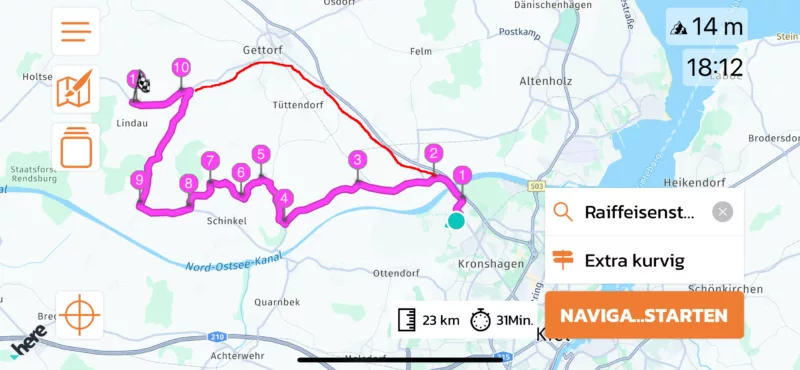
Quote from Helge-Kiel on 01.03.2024, 11:24Below there is an example. Scenic calculated the way from start to destination as "curvy way" with 11 waypoints. Now I decide to ride another way, shown with the red line at screenshot. If I reach waypoint 10 by this "red marked" way I like that Scenic shows the way to destination, means waypoint 11. This means I like that Scenic skips all waypoints 3 to 9. But Scenic don't do. Scenic to not navigate the way to destination but tries to navigate me back to the other waypoints 3 to 9.
If you bring back the old “auto-skip-in-radius” setting used at Scenic up to version 3.1 in further version this will be great. It will solved my problems and I think problem of some other users. But because it as optional setting it will not change behavior for all users.
Thanks in advance for your great support 🙂
Below there is an example. Scenic calculated the way from start to destination as "curvy way" with 11 waypoints. Now I decide to ride another way, shown with the red line at screenshot. If I reach waypoint 10 by this "red marked" way I like that Scenic shows the way to destination, means waypoint 11. This means I like that Scenic skips all waypoints 3 to 9. But Scenic don't do. Scenic to not navigate the way to destination but tries to navigate me back to the other waypoints 3 to 9.
If you bring back the old “auto-skip-in-radius” setting used at Scenic up to version 3.1 in further version this will be great. It will solved my problems and I think problem of some other users. But because it as optional setting it will not change behavior for all users.
Thanks in advance for your great support 🙂
Quote from Guido on 01.03.2024, 13:33I understand what you mean.
The reason why I removed this was because it was causing quite some misunderstandings. Users would put the radius at 15km or so, and then their entire route would become completely different after even a small detour. They would "miss" very big parts of their routes and sometimes even be angry about that.
In your case above, I assume you are familiar with the area, perhaps you ran out of time, and decided to "take a shortcut". I understand that the auto-skip in radius would help in that case.
But other times, you might want to keep the route as you designed it. Maybe because you are unfamiliar with the area, and you really want to take that nice road you heard about. In that case you would not want Scenic to automatic remove many via points, possibly completely skipping that nice road.
That's why I initially decided to remove the auto-skip in radius, and only auto-skip one waypoint at a time. If you really want to skip many via points, there are still two options to do this.
- Go into overview/edit mode and remove them by tapping on the via points.
- Tap the "skip next waypoint" button a couple of times in a row.
I agree that these two options require manual actions, while the auto-skip in radius does not.
I guess it could not hurt to bring this option back. Perhaps with some further explanation and warnings around it. I've placed it on the feature request list.
I understand what you mean.
The reason why I removed this was because it was causing quite some misunderstandings. Users would put the radius at 15km or so, and then their entire route would become completely different after even a small detour. They would "miss" very big parts of their routes and sometimes even be angry about that.
In your case above, I assume you are familiar with the area, perhaps you ran out of time, and decided to "take a shortcut". I understand that the auto-skip in radius would help in that case.
But other times, you might want to keep the route as you designed it. Maybe because you are unfamiliar with the area, and you really want to take that nice road you heard about. In that case you would not want Scenic to automatic remove many via points, possibly completely skipping that nice road.
That's why I initially decided to remove the auto-skip in radius, and only auto-skip one waypoint at a time. If you really want to skip many via points, there are still two options to do this.
- Go into overview/edit mode and remove them by tapping on the via points.
- Tap the "skip next waypoint" button a couple of times in a row.
I agree that these two options require manual actions, while the auto-skip in radius does not.
I guess it could not hurt to bring this option back. Perhaps with some further explanation and warnings around it. I've placed it on the feature request list.
Quote from Adlopa on 10.03.2024, 02:42This happened to me yesterday (I came to the forum looking for an explanation and found this post). This was the first time I’d used v3.5 to navigate a fast curvy route (weather too poor here to ride since 3.5 was released).
There are two short ways out of my road onto the main road the route was going to use and I took the opposite one to the one Scenic chose to avoid roadworks. For the rest of the 15 mile journey, Scenic wanted me to return to my house to hit that first missed waypoint.
This seemed like new behaviour to me – my recollection is that way points were previously only for manually created routes. I did eventually work out what was happening and tried skipping that first waypoint (not easy in winter gloves or at all, really, while riding), but then the same issue cropped up for all the other subsequent waypoints I’d ‘missed’.
At the destination, I checked the app’s settings and found the ‘auto skip via points’ option. I hope enabling this will solve this issue, but I’ve yet to ride to try it.
This happened to me yesterday (I came to the forum looking for an explanation and found this post). This was the first time I’d used v3.5 to navigate a fast curvy route (weather too poor here to ride since 3.5 was released).
There are two short ways out of my road onto the main road the route was going to use and I took the opposite one to the one Scenic chose to avoid roadworks. For the rest of the 15 mile journey, Scenic wanted me to return to my house to hit that first missed waypoint.
This seemed like new behaviour to me – my recollection is that way points were previously only for manually created routes. I did eventually work out what was happening and tried skipping that first waypoint (not easy in winter gloves or at all, really, while riding), but then the same issue cropped up for all the other subsequent waypoints I’d ‘missed’.
At the destination, I checked the app’s settings and found the ‘auto skip via points’ option. I hope enabling this will solve this issue, but I’ve yet to ride to try it.
Quote from Guido on 10.03.2024, 03:46I created a new help article with demo videos on the detour behaviour settings:
https://scenic.app/help/detour-behaviour-scenic-v3-5-and-higher/
German version: https://scenic.app/hilfe/umleitungsverhalten-scenic-v3-5-und-hoher/
I created a new help article with demo videos on the detour behaviour settings:
German version: https://scenic.app/hilfe/umleitungsverhalten-scenic-v3-5-und-hoher/
Quote from ipro on 10.03.2024, 07:08Hello Guido,
I have the same problem. Yesterday I created a route using the Power Planner and the “curvy” setting. After I briefly left the route he kept trying to send me back to the last VIA point although i‘m driving further to the next STOP and careless how many recalculations are done. When I then stopped and changed the routing settings to „curvy fast“, the route was recalculated but then skipping the via points also worked. Maybe there is another general problem here?
If it helps, I can help you troubleshooting…
Regards
Ingo
Hello Guido,
I have the same problem. Yesterday I created a route using the Power Planner and the “curvy” setting. After I briefly left the route he kept trying to send me back to the last VIA point although i‘m driving further to the next STOP and careless how many recalculations are done. When I then stopped and changed the routing settings to „curvy fast“, the route was recalculated but then skipping the via points also worked. Maybe there is another general problem here?
If it helps, I can help you troubleshooting…
Regards
Ingo
Quote from Guido on 10.03.2024, 07:47Hi Ingo,
There is always a chance there is a bug
Just to clarify, you had “auto-skip via points” turned ON? And wats your setting for the number of recalculations?
Cheers,
Guido
Hi Ingo,
There is always a chance there is a bug
Just to clarify, you had “auto-skip via points” turned ON? And wats your setting for the number of recalculations?
Cheers,
Guido
Quote from ipro on 10.03.2024, 08:58Hi Guido,
yes i know and we all want scenic to become more perfect 🙂
auto-skip is on and number of recalcs are 2
cheers ingo
Hi Guido,
yes i know and we all want scenic to become more perfect 🙂
auto-skip is on and number of recalcs are 2
cheers ingo
Quote from Guido on 10.03.2024, 09:03OK. Thanks guys. Sounds like a bug indeed.
One more question... if you remember... did you hear the recalculation tone sound 2 or 3 times and/or see the route actually recalculate 2 or 3 times?
OK. Thanks guys. Sounds like a bug indeed.
One more question... if you remember... did you hear the recalculation tone sound 2 or 3 times and/or see the route actually recalculate 2 or 3 times?
Quote from ipro on 10.03.2024, 09:11Sorry i can‘t remember that. Perhaps it was more than 2 times but i‘m not sure. The sorrounding was too beautiful 🙂
Sorry i can‘t remember that. Perhaps it was more than 2 times but i‘m not sure. The sorrounding was too beautiful 🙂
Quote from ipro on 07.04.2024, 15:30Hello Guido,
I figure out what the problem is. Scenic recalculates and says it skips the VIA but he doesn't do it. He always takes you back to the „skipped“ points. Did you find the reason an can you fix this ?
Cheers Ingo
Hello Guido,
I figure out what the problem is. Scenic recalculates and says it skips the VIA but he doesn't do it. He always takes you back to the „skipped“ points. Did you find the reason an can you fix this ?
Cheers Ingo
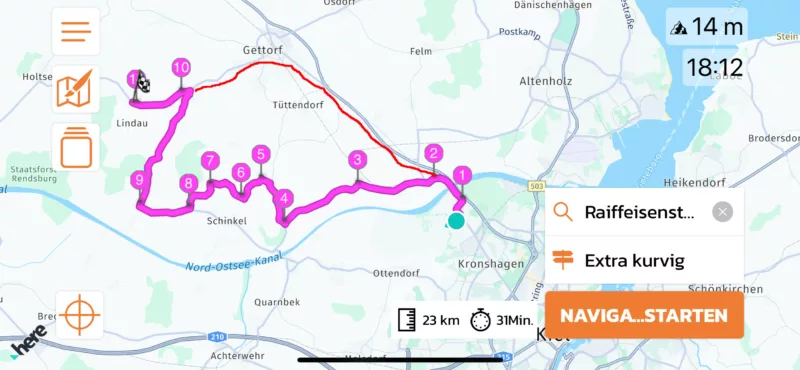
Quote from Helge-Kiel on 08.04.2024, 03:49Again I like to describe what happens: At attached picture see the route from start to destination which Scenic calculated. If you drive another way, shown at the picture as red line) and you come to Via Point 10, Scenic maybe deleted one or two via points (I can recheck if senseful) but do NOT delete all waypoints, in this example Via 2 to Via 9. So if the driver reach at via 10 Scenic will not guide to the destination (via 11) but will guide the driver back to the old calculated route, means back in direction to start instead of to direction of destination.
I recheck the same route with Scenic, Calimoto and TomTom Ride App. I think, Calimoto and TomTom Ride App starts a new calculation to destination if the rider goes another way. Scenic only calculates at start and try to ride exact this route, equal what rider do.
I know that is difficult for Scenic to do new calculations because, also if you use scenic offline with downloaded maps, it needs Internet connection for new calculation because the route is calculated by kurviger.de. But for this problem in old scenic 3.2 version the possibility to skip waypoint in a defined surrounding was a good work around. It's a pity that Scenic 3.5 do not supports it.
For my rides at the moment I changed back to Calimoto. But it is a pity because I do not like this App and my subscription is valid only up to May. Hope that there will be a solution for scenic.
If any tests are senseful I can do it any time.
Again I like to describe what happens: At attached picture see the route from start to destination which Scenic calculated. If you drive another way, shown at the picture as red line) and you come to Via Point 10, Scenic maybe deleted one or two via points (I can recheck if senseful) but do NOT delete all waypoints, in this example Via 2 to Via 9. So if the driver reach at via 10 Scenic will not guide to the destination (via 11) but will guide the driver back to the old calculated route, means back in direction to start instead of to direction of destination.
I recheck the same route with Scenic, Calimoto and TomTom Ride App. I think, Calimoto and TomTom Ride App starts a new calculation to destination if the rider goes another way. Scenic only calculates at start and try to ride exact this route, equal what rider do.
I know that is difficult for Scenic to do new calculations because, also if you use scenic offline with downloaded maps, it needs Internet connection for new calculation because the route is calculated by kurviger.de. But for this problem in old scenic 3.2 version the possibility to skip waypoint in a defined surrounding was a good work around. It's a pity that Scenic 3.5 do not supports it.
For my rides at the moment I changed back to Calimoto. But it is a pity because I do not like this App and my subscription is valid only up to May. Hope that there will be a solution for scenic.
If any tests are senseful I can do it any time.
Quote from Guido on 08.04.2024, 07:42I understand what you want Scenic to achieve in the above scenario.
At the moment, Scenic is working as I intended it to work. I have created a help article, including demo videos, to explain the new detour behaviour settings: https://scenic.app/help/detour-behaviour-scenic-v3-5-and-higher/ (german version: https://scenic.app/hilfe/umleitungsverhalten-scenic-v3-5-und-hoher/)
I have put it on the feature request list to add back the functionality like you described. In other words, if you follow the red line, and you arrive at via 10, for Scenic to auto-skip all the waypoints until via 10. I will look into this in the coming week / weeks.
Meanwhile, what you could do, is tap the "skip waypoint" button several times until waypoint 10 is the next waypoint.
I understand what you want Scenic to achieve in the above scenario.
At the moment, Scenic is working as I intended it to work. I have created a help article, including demo videos, to explain the new detour behaviour settings: https://scenic.app/help/detour-behaviour-scenic-v3-5-and-higher/ (german version: https://scenic.app/hilfe/umleitungsverhalten-scenic-v3-5-und-hoher/)
I have put it on the feature request list to add back the functionality like you described. In other words, if you follow the red line, and you arrive at via 10, for Scenic to auto-skip all the waypoints until via 10. I will look into this in the coming week / weeks.
Meanwhile, what you could do, is tap the "skip waypoint" button several times until waypoint 10 is the next waypoint.
Quote from Helge-Kiel on 04.09.2024, 04:02Are there any news in this function? For the daily use I switched to „Kurviger“ which do not have this problem. But at all like to return to Scenic. Did you made a change meanwhile?
Are there any news in this function? For the daily use I switched to „Kurviger“ which do not have this problem. But at all like to return to Scenic. Did you made a change meanwhile?
Quote from Guido on 04.09.2024, 06:51In October a big update will be released with new detour behaviour settings.
Keep an eye on our social channels in the coming weeks, for more news about this.
In October a big update will be released with new detour behaviour settings.
Keep an eye on our social channels in the coming weeks, for more news about this.
Quote from Jimmy999 on 20.01.2025, 22:39Hi, sorry to drag this up, but it seems like its still an issue.
Scenic used to skip the next waypoint once missed it by a certain number of km, then guide you the very next way point. I found this perfect because it auto skipped if i decide to take a small short cut. Now i have to preemptively pull over and press buttons on the screen or it seems to wipe all the waypoint to the next stop.
I use scenic for navigating the routes i plan, all i need scenic to do is help me get to the next waypoint and if i miss it, get me to the next one after that. But never to the next stop, as my stop might 6hours of carefully planned waypoints away.
Is there a way to use the current settings to force the old behaviour?
Many thanks, love your work.
EDIT: Is the answer to convert all vias to stops and start using stops instead of vias in route planning?
Hi, sorry to drag this up, but it seems like its still an issue.
Scenic used to skip the next waypoint once missed it by a certain number of km, then guide you the very next way point. I found this perfect because it auto skipped if i decide to take a small short cut. Now i have to preemptively pull over and press buttons on the screen or it seems to wipe all the waypoint to the next stop.
I use scenic for navigating the routes i plan, all i need scenic to do is help me get to the next waypoint and if i miss it, get me to the next one after that. But never to the next stop, as my stop might 6hours of carefully planned waypoints away.
Is there a way to use the current settings to force the old behaviour?
Many thanks, love your work.
EDIT: Is the answer to convert all vias to stops and start using stops instead of vias in route planning?
Quote from Guido on 21.01.2025, 07:15A few versions ago I added back the auto-skip vias feature. It’s off by default. Settings > Nav & Tracking > Detour behavior.
A few versions ago I added back the auto-skip vias feature. It’s off by default. Settings > Nav & Tracking > Detour behavior.


