
Problem importing Google Maps URL into Scenic Web

Quote from iSilentP on 14.10.2022, 21:25I am getting error trying to copy and paste URL from Google maps. I've tried the suggested fix but does not work. Can you provide any insight as to why?
The Google maps URL is:
https://www.google.com/maps/dir/Old+Trail+School,+2315+Ira+Rd,+Akron,+OH+44333/Mapleside+Farms/Brunswick+Eagles/Fraternal+Order+of+Eagles/S+Park+Dr,+Avon,+OH+44011/@41.308107,-81.9490076,87922m/data=!3m2!1e3!4b1!4m34!4m33!1m5!1m1!1s0x8830d96e89b7011d:0xd8cadf601506cd39!2m2!1d-81.5887643!2d41.1862324!1m5!1m1!1s0x8830c0f448d0dc9b:0xdf1610ab0e357a92!2m2!1d-81.8408435!2d41.2685343!1m5!1m1!1s0x8830c0f3eafc49b5:0x87476b485e2df6de!2m2!1d-81.8400813!2d41.2660266!1m5!1m1!1s0x8830bdfce5c30653:0xab4ce4a4a38d7b46!2m2!1d-81.9569378!2d41.3136879!1m5!1m1!1s0x883090914b412775:0x68fa2efd0951def3!2m2!1d-82.0283936!2d41.429141!2m1!1b1!3e0
I am getting error trying to copy and paste URL from Google maps. I've tried the suggested fix but does not work. Can you provide any insight as to why?
The Google maps URL is:


Quote from Guido on 14.10.2022, 21:42I can have a detailed look tomorrow.
Have you tried dragging the stops on the map until the stop description on the left pane becomes an address? (this also goes for the start and destination).
I can have a detailed look tomorrow.
Have you tried dragging the stops on the map until the stop description on the left pane becomes an address? (this also goes for the start and destination).
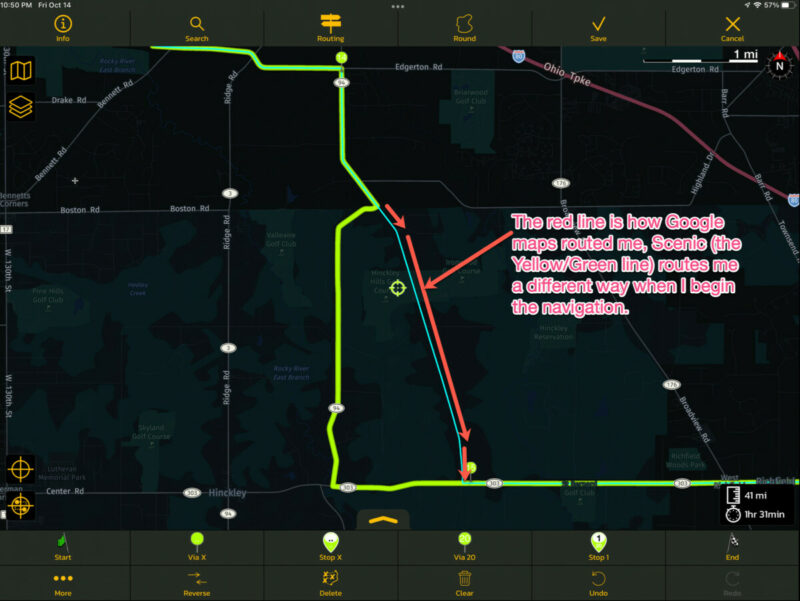
Quote from iSilentP on 14.10.2022, 22:08Thanks, Guido. No I have not tried that. I will tomorrow. Other times I have imported the Google URL it worked flawlessly, but maybe those times, all the points along the way were true addresses. After original post, however, I tried the other import option to convert the the Google URL to a GPS file (using mapstogpx.com) and that imported fine. However I noticed that after the import, the Scenic route was a little different than the actual Google route. Screenshots below.
I was expecting after import, starting the navigation would not changes anything. Maybe I'm missing a configuration item to tell Scenic to follow the route from the imported GPX file verbatim? I admit I have not read the manual completely, but plan on doing this this winter (non-riding) season that's heading our way quickly here in the northern USA.
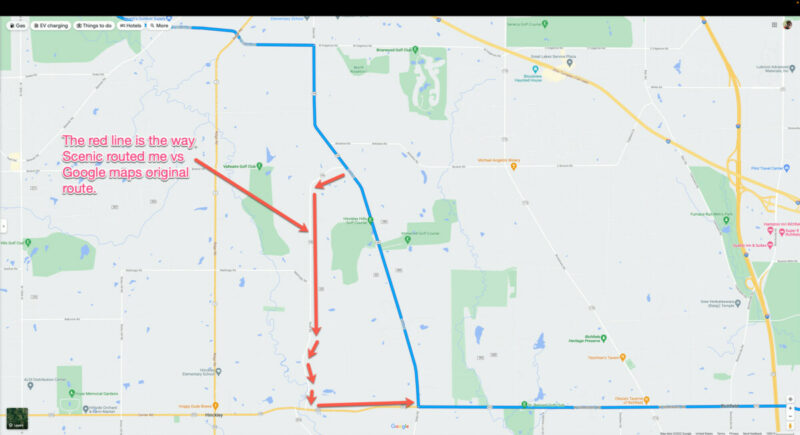
Thanks, Guido. No I have not tried that. I will tomorrow. Other times I have imported the Google URL it worked flawlessly, but maybe those times, all the points along the way were true addresses. After original post, however, I tried the other import option to convert the the Google URL to a GPS file (using mapstogpx.com) and that imported fine. However I noticed that after the import, the Scenic route was a little different than the actual Google route. Screenshots below.
I was expecting after import, starting the navigation would not changes anything. Maybe I'm missing a configuration item to tell Scenic to follow the route from the imported GPX file verbatim? I admit I have not read the manual completely, but plan on doing this this winter (non-riding) season that's heading our way quickly here in the northern USA.
Quote from Guido on 15.10.2022, 12:06I was able to get it to work by changing the points a little bit. This link works: https://www.google.com/maps/dir/41.1861308,-81.5889806/41.268498,-81.8405586/41.2660661,-81.839738/41.3136878,-81.9567945/S+Park+Dr,+Avon,+OH+44011/@41.3127846,-81.9572025,17z/data=!4m14!4m13!1m0!1m0!1m0!1m0!1m5!1m1!1s0x883090914b412775:0x68fa2efd0951def3!2m2!1d-82.0283936!2d41.429141!2m1!1b1!3e0
The names in the left hand pane don't necessarily need to be addresses, but if it's a name of a place it can get confusing, especially if there are more places in the world with that name. So, I always recommend changing them a little bit so they become addresses.
You might also want to check this area:
According to the left hand pane, it seems you visit 294 pearl road before 349 pearl road. If that's intentional never mind, but if not, try going to 349 first. Now there's a loop sending you up and down.
When you import the link above Scenic will copy the route as it should be, except for this area... you'll need to move via 3 to get it it to match:

As for the screenshots you posted above... I don't see that route in Google Maps either. At least not in the link you sent in the first post. Perhaps you changed the route somewhat after sending that link? In any case, I recommend to always check the route during import. The blue line is the exact Google Maps route, while the magenta line is what Scenic makes of it (or in your case the light green line). Because Google and Scenic have different routing algorithms, Scenic might take different roads between via points, and you might need to move some, or add some, or delete some via points, to make it match, like I did in the screenshots.
Here's a good post on that as well: https://scenic.app/forum/topic/imported-routes-from-kurviger-are-always-recalculated/#postid-4138
This post is about Kurviger import, but the same goes for Google import.Hope this helps/explains. If not or if you have other questions please let me know. Happy to help.
Best regards and ride safe,
Guido
P.S. I'm planning to improve the Google Import, so that this naming problem is no longer a problem. The difficulty is that Google does not provide documentation on their URL structure, so everyone is reverse engineering it. It seems that mapstogpx.com did a better job at this, so once I have some time I'm planning to revisit the Google URL import in the Scenic WebApp as well.
I was able to get it to work by changing the points a little bit. This link works: https://www.google.com/maps/dir/41.1861308,-81.5889806/41.268498,-81.8405586/41.2660661,-81.839738/41.3136878,-81.9567945/S+Park+Dr,+Avon,+OH+44011/@41.3127846,-81.9572025,17z/data=!4m14!4m13!1m0!1m0!1m0!1m0!1m5!1m1!1s0x883090914b412775:0x68fa2efd0951def3!2m2!1d-82.0283936!2d41.429141!2m1!1b1!3e0
The names in the left hand pane don't necessarily need to be addresses, but if it's a name of a place it can get confusing, especially if there are more places in the world with that name. So, I always recommend changing them a little bit so they become addresses.
You might also want to check this area:
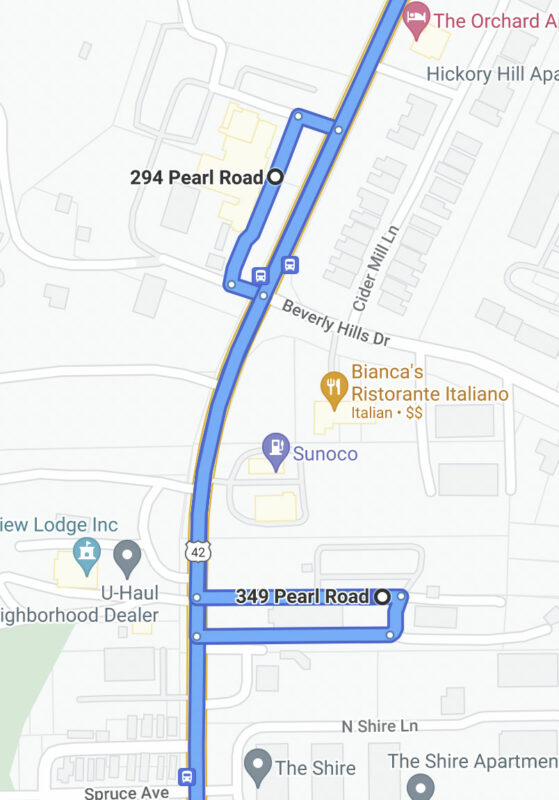
According to the left hand pane, it seems you visit 294 pearl road before 349 pearl road. If that's intentional never mind, but if not, try going to 349 first. Now there's a loop sending you up and down.
When you import the link above Scenic will copy the route as it should be, except for this area... you'll need to move via 3 to get it it to match:
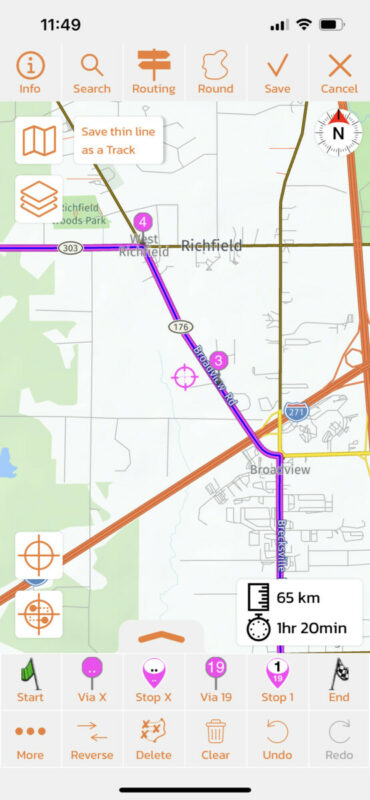
As for the screenshots you posted above... I don't see that route in Google Maps either. At least not in the link you sent in the first post. Perhaps you changed the route somewhat after sending that link? In any case, I recommend to always check the route during import. The blue line is the exact Google Maps route, while the magenta line is what Scenic makes of it (or in your case the light green line). Because Google and Scenic have different routing algorithms, Scenic might take different roads between via points, and you might need to move some, or add some, or delete some via points, to make it match, like I did in the screenshots.
Here's a good post on that as well: https://scenic.app/forum/topic/imported-routes-from-kurviger-are-always-recalculated/#postid-4138
This post is about Kurviger import, but the same goes for Google import.
Hope this helps/explains. If not or if you have other questions please let me know. Happy to help.
Best regards and ride safe,
Guido
P.S. I'm planning to improve the Google Import, so that this naming problem is no longer a problem. The difficulty is that Google does not provide documentation on their URL structure, so everyone is reverse engineering it. It seems that mapstogpx.com did a better job at this, so once I have some time I'm planning to revisit the Google URL import in the Scenic WebApp as well.


