Please or Register to create posts and topics.

Problem: "Ghost" Route shows up on map

Hi,


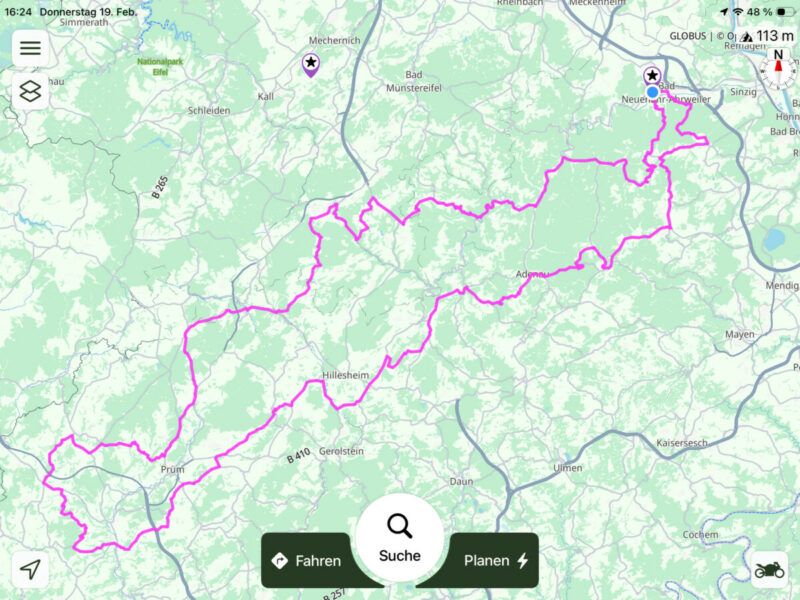
when starting scenic it shows always a route on the map(pink line), that I can't find in my "Routes" folder. I have deactivated the visibility of all routes/tracks/pois in map overlay, but I see this route on the map. I don't know how I get rid of this route, I have nothing in the import queue or in the other import options. I can't select the route to work on it in the power planner. It shows up on all my scenic devices Mac/iPhone/iPad. Where does this route come from and how can I remove it?


Regards

Marc-Antón

That sounds strange. Can you send me a picture?

If you're enjoying Scenic and are happy with the support, please leave a nice rating in the App Store. It would mean a lot to me ❤️

Really weird. Was this a route that was in your account at some point (and you deleted it?). If so, do you remember the name of the route? What's your Scenic nickname? I'll have a look in the database. Since it's showing on all three of your devices it must be in the database.

If you're enjoying Scenic and are happy with the support, please leave a nice rating in the App Store. It would mean a lot to me ❤️

I think I made this route some time ago, but I can't remember the name. My Scenic Nickname is RiaRio.

I think I found it but not 100% sure. This is a result of an older bug.

It involves your "W Treff 2025" route folder.
Can you close Scenic completely and then reopen and check if the folder shows up in the layers panel now? If it does, deactivate the folder there. Do this on all your devices. Once done, you can also delete that folder from your "My Routes" list if you'd like.

Let me know if it's still not showing up / still not working.


If you're enjoying Scenic and are happy with the support, please leave a nice rating in the App Store. It would mean a lot to me ❤️

Hi Guido,

unfortunenately the folder does not show on the layer panel and the route is just visible  on my iPad and my Mac, on my iPhone it's gone and the folder is not showing up on the layer panel.

Changes something else now. Can you give it another try? Close Scenic completely, and then reopen.

If you're enjoying Scenic and are happy with the support, please leave a nice rating in the App Store. It would mean a lot to me ❤️

After restarting my Mac and my iPad it's gone, thanks Guido!!