
PowerPlanner 4.06 - Strange behavior

Quote from thomas.k on 28.11.2024, 12:46Hi,
I was fiddling around with the power planner of v4.06, and found a strange behavior at creating routes. I took some screenshots to demonstrate.
After setting start point a first stop Scenic calculates a route with some via points. A second leg doesn't contains via points. (like the further rest of the route)
Then stop 3 added...
and stop 4 ...
but Scenic changes the order ...
After inserting stop 6 (no. 3 in the picture) it changes the direction...
Stop 7 was inserted as stop 1. (maybe my fault, I should add with a long press instead)
After setting the finish stop the created route was a funny 8 with some detours.
Changing the order of the stops is only possible when the via points are visible.
Not a big deal, but a little bit strange. 😉 My routing settings are:
Maybe this will help to improve the calculation algorithm.
Best regards,
Thomas
Hi,
I was fiddling around with the power planner of v4.06, and found a strange behavior at creating routes. I took some screenshots to demonstrate.
After setting start point a first stop Scenic calculates a route with some via points. A second leg doesn't contains via points. (like the further rest of the route)
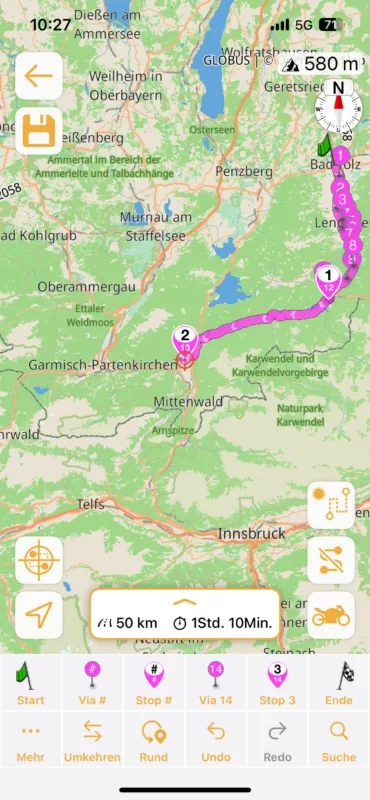
Then stop 3 added...
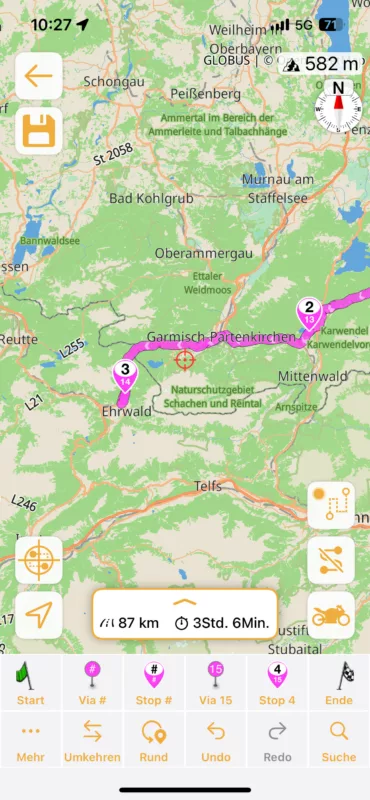
and stop 4 ...
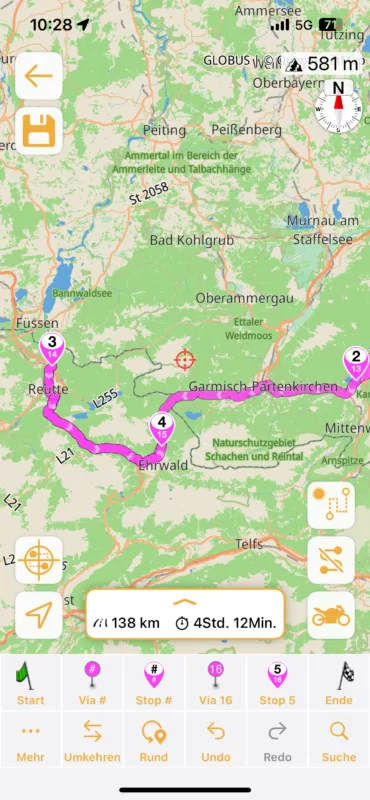
but Scenic changes the order ...
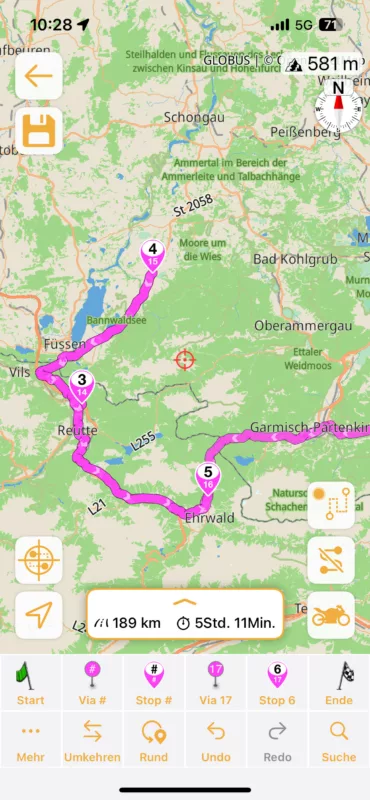
After inserting stop 6 (no. 3 in the picture) it changes the direction...
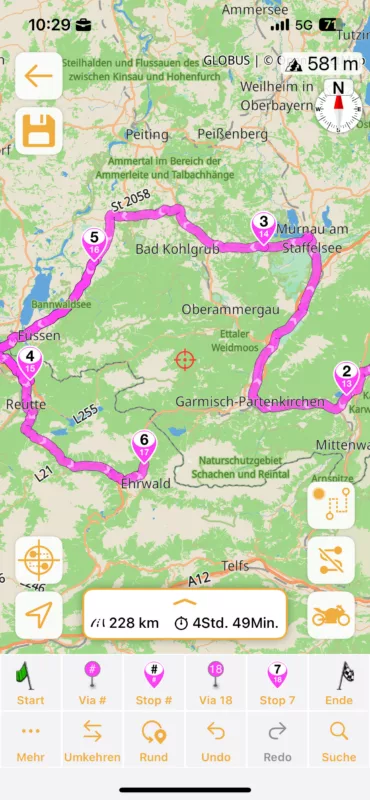
Stop 7 was inserted as stop 1. (maybe my fault, I should add with a long press instead)
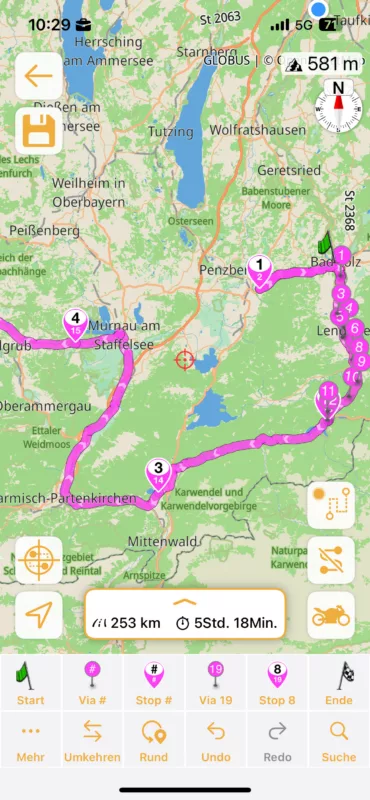
After setting the finish stop the created route was a funny 8 with some detours.
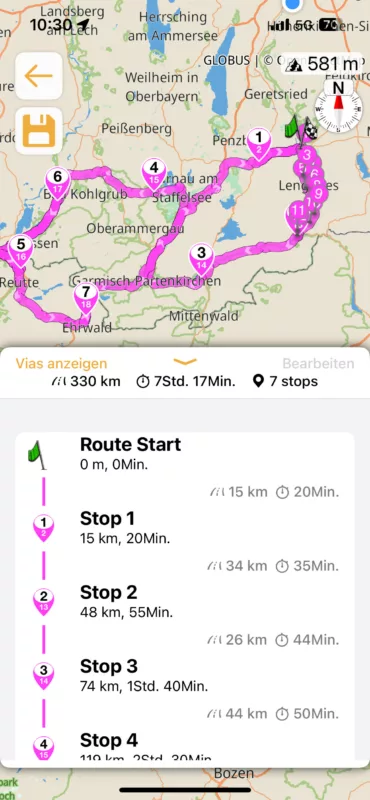
Changing the order of the stops is only possible when the via points are visible.
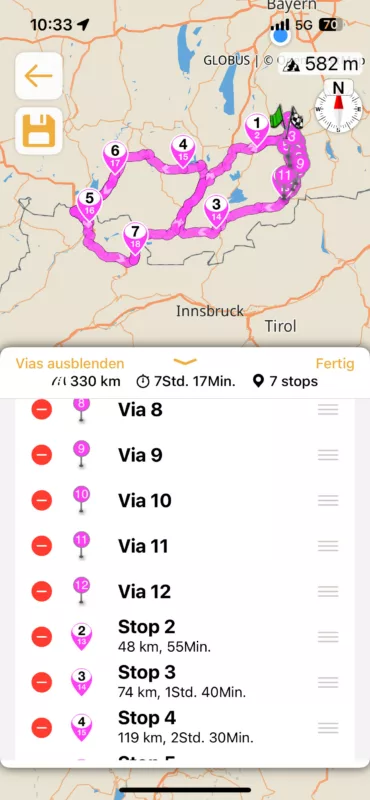
Not a big deal, but a little bit strange. 😉 My routing settings are:
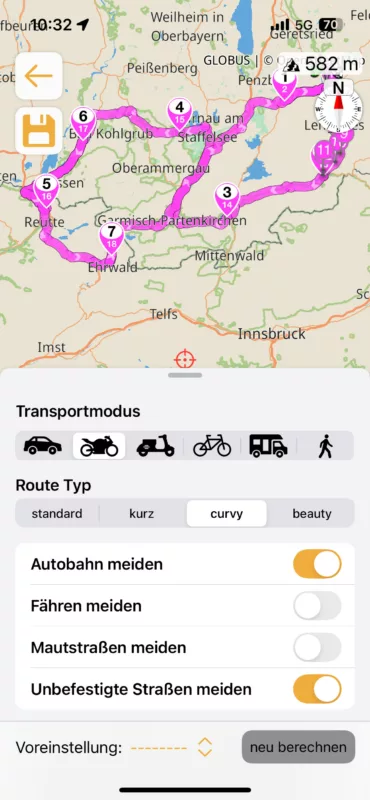
Maybe this will help to improve the calculation algorithm.
Best regards,
Thomas

Quote from Guido on 28.11.2024, 13:22Hi Thomas,
After setting start point a first stop Scenic calculates a route with some via points. A second leg doesn't contains via points. (like the further rest of the route)
This is a bug related to curvy routing. It currently only calculates curvy once (that's why it's adding the via points at first, but not after). For the moment, what I recommend is to first plan your route without curvy (put it on standard or short), and then, once you've placed all your stops, change the routing mode to curvy to generate a curvy route between all the stops.
Changing the order of the stops is only possible when the via points are visible.
This is meant to work that way. If the vias were hidden, and you move a stop, Scenic wouldn't know between which waypoints (via point or stop) you would like to place it.
but Scenic changes the order ...
If you tap the 'Via #' or 'Stop #' Scenic will try to 'guess' between which already existing waypoints the new waypoint should go. It does this by looking where the pink route line is closest. If you want to add a via or stop at the end, use the 'Via 3' or 'Stop 3' button (the 3 will be the number of the waypoint that will be added). If you do want to add a waypoint between two already existing waypoints, but Scenic chooses wrong, you can long-press the 'Via #' and 'Stop #' button, and then Scenic will manually let you select after which existing waypoint you want to add the new point. Here is a tutorial video of the power planner. It still displays the old Scenic 3 power planner, but Scenic 4 is very similar: https://scenic.app/help/power-planner-tutorial/?seq_no=2
Hope this helps/explains. If not, please let me know if you have other questions. Happy to help.
Best regards and ride safe,
Guido
Hi Thomas,
After setting start point a first stop Scenic calculates a route with some via points. A second leg doesn't contains via points. (like the further rest of the route)
This is a bug related to curvy routing. It currently only calculates curvy once (that's why it's adding the via points at first, but not after). For the moment, what I recommend is to first plan your route without curvy (put it on standard or short), and then, once you've placed all your stops, change the routing mode to curvy to generate a curvy route between all the stops.
Changing the order of the stops is only possible when the via points are visible.
This is meant to work that way. If the vias were hidden, and you move a stop, Scenic wouldn't know between which waypoints (via point or stop) you would like to place it.
but Scenic changes the order ...
If you tap the 'Via #' or 'Stop #' Scenic will try to 'guess' between which already existing waypoints the new waypoint should go. It does this by looking where the pink route line is closest. If you want to add a via or stop at the end, use the 'Via 3' or 'Stop 3' button (the 3 will be the number of the waypoint that will be added). If you do want to add a waypoint between two already existing waypoints, but Scenic chooses wrong, you can long-press the 'Via #' and 'Stop #' button, and then Scenic will manually let you select after which existing waypoint you want to add the new point. Here is a tutorial video of the power planner. It still displays the old Scenic 3 power planner, but Scenic 4 is very similar: https://scenic.app/help/power-planner-tutorial/?seq_no=2
Hope this helps/explains. If not, please let me know if you have other questions. Happy to help.
Best regards and ride safe,
Guido
Quote from thomas.k on 29.11.2024, 00:57Hi Guido,
thanks for your reply. I see my mistake. 😉
But the behavior at the third screenshot seems not matching the described 'guessing' algorithm.
If you tap the 'Via #' or 'Stop #' Scenic will try to 'guess' between which already existing waypoints the new waypoint should go. It does this by looking where the pink route line is closest.
The stop 4 was stop 3 before inserting the last stop. (which has become no. 3) Scenic has found the end of the pink route line correctly, but why it has changed the stop number 3 to 4? I would assume that this is not necessary.
Anyway, I would like to thank you for your hard work on the best motorcycle navigation and your helpful communication with the users. I look forward to map customizer and riding again with Scenic next season.
Best regards
Thomas
Hi Guido,
thanks for your reply. I see my mistake. 😉
But the behavior at the third screenshot seems not matching the described 'guessing' algorithm.
If you tap the 'Via #' or 'Stop #' Scenic will try to 'guess' between which already existing waypoints the new waypoint should go. It does this by looking where the pink route line is closest.
The stop 4 was stop 3 before inserting the last stop. (which has become no. 3) Scenic has found the end of the pink route line correctly, but why it has changed the stop number 3 to 4? I would assume that this is not necessary.
Anyway, I would like to thank you for your hard work on the best motorcycle navigation and your helpful communication with the users. I look forward to map customizer and riding again with Scenic next season.
Best regards
Thomas


