
Possible CarPlay bug with overview screen

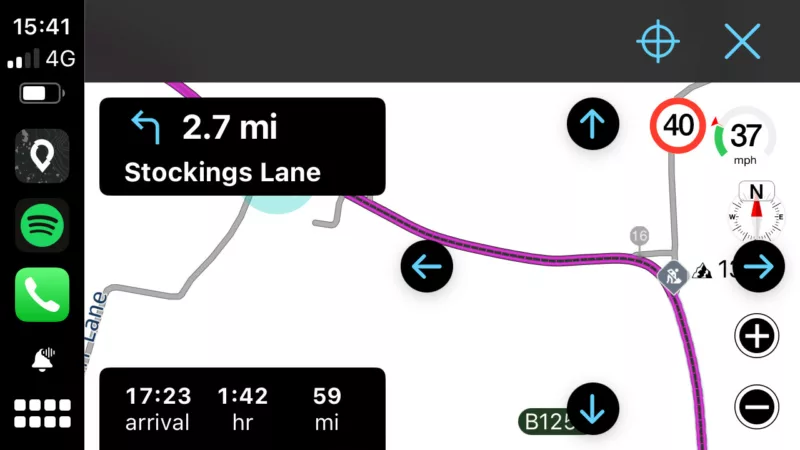
Quote from Dae on 27.05.2024, 10:51I use Scenic with a Chigee CarPlay device. I’m currently running version 3.61(1). When pressing the “overview” button whilst running on CarPlay (the button bottom right with 4 arrows) the overview screen shows the current position underneath the directional instructions. You can just make out part of the current position indicator below, underneath the word “Lane”. I was heading to the left of the picture too, meaning all the road shown in the right hand 2/3 of the screen was what I’d already travelled on and therefore wasn’t what I needed to look at.
I use Scenic with a Chigee CarPlay device. I’m currently running version 3.61(1). When pressing the “overview” button whilst running on CarPlay (the button bottom right with 4 arrows) the overview screen shows the current position underneath the directional instructions. You can just make out part of the current position indicator below, underneath the word “Lane”. I was heading to the left of the picture too, meaning all the road shown in the right hand 2/3 of the screen was what I’d already travelled on and therefore wasn’t what I needed to look at.

Quote from Guido on 27.05.2024, 13:14Hi Dae,
You can change what will be zoomed into then choosing the overview button. Settings > Navigation & Tracking > Overview button zooms.... (last row). Perhaps that will help?
Cheers,
Guido
Hi Dae,
You can change what will be zoomed into then choosing the overview button. Settings > Navigation & Tracking > Overview button zooms.... (last row). Perhaps that will help?
Cheers,
Guido
Quote from Dae on 27.05.2024, 13:17Mine is set to “around current location”, which is what I want. However, I expected my current location to be in the centre of the displayed area, not hidden behind the navigation instruction. It was hard to see it when doing 60mph with the sun shining on the screen😀
In my screenshot, all the purple route you can see is “behind” me. The only bit of road ahead that you can see in that screenshot is that tiny bit above the navigation instruction.
Mine is set to “around current location”, which is what I want. However, I expected my current location to be in the centre of the displayed area, not hidden behind the navigation instruction. It was hard to see it when doing 60mph with the sun shining on the screen😀
In my screenshot, all the purple route you can see is “behind” me. The only bit of road ahead that you can see in that screenshot is that tiny bit above the navigation instruction.
Quote from Guido on 27.05.2024, 13:21OK. That's a bug. With that setting the current location should be centered on the right side of the screen. I'll have a look for the upcoming update. Thanks!
OK. That's a bug. With that setting the current location should be centered on the right side of the screen. I'll have a look for the upcoming update. Thanks!
Quote from Dae on 27.05.2024, 13:22Quote from Guido on 27.05.2024, 13:21OK. That's a bug. With that setting the current location should be centered on the right side of the screen. I'll have a look for the upcoming update. Thanks!
That was my expectation - that my current position would be in the centre of the four directional “panning arrows”
Quote from Guido on 27.05.2024, 13:21OK. That's a bug. With that setting the current location should be centered on the right side of the screen. I'll have a look for the upcoming update. Thanks!
That was my expectation - that my current position would be in the centre of the four directional “panning arrows”


