
Points „change transport mode“ cannot be deleted

Quote from GruenesZimmerhuhn on 18.07.2024, 07:46Hey Guido,
during an import of a gpx file from kurviger (by the way, they do not support any more the direct export to scenic ), I noticed, the import was partially not as expected. The crossing of a river by ferry was shown at a completly other location. So I add the crossing at the original location but I am not able to delete the wrong ones. All other points can be deleted, so I guess it is because of the special fact that they are not waypoints but change points
Greetings Frank
Hey Guido,
during an import of a gpx file from kurviger (by the way, they do not support any more the direct export to scenic ), I noticed, the import was partially not as expected. The crossing of a river by ferry was shown at a completly other location. So I add the crossing at the original location but I am not able to delete the wrong ones. All other points can be deleted, so I guess it is because of the special fact that they are not waypoints but change points
Greetings Frank

Quote from Guido on 18.07.2024, 07:50Yes... HERE ads them automatically for ferry crossings. If your route changes so that you don't need/take the ferry anymore, the points should be removed automatically. Are they not?
Yes... Kurviger decided to remove the 'Send to Scenic' button. Only way to get Kurviger routes into Scenic now is through GPX export / import.
Yes... HERE ads them automatically for ferry crossings. If your route changes so that you don't need/take the ferry anymore, the points should be removed automatically. Are they not?
Yes... Kurviger decided to remove the 'Send to Scenic' button. Only way to get Kurviger routes into Scenic now is through GPX export / import.
Quote from GruenesZimmerhuhn on 18.07.2024, 12:48I try it again and will report in detail.
Greetings Frank
I try it again and will report in detail.
Greetings Frank
Quote from GruenesZimmerhuhn on 19.07.2024, 05:04Hey Guido, I try it again and the answer depends on the point of view 🙂
Step 1:
I imported the route, however I wand to change the ferry location So I add the new location. Left by point 29 is the initial ferry, a little to the right is the new ferry. You can see, the mess has started, as now there are much more routing lines. Originally it is just a round course, ans as I already mentioned in a previous post, I cannot read the white numbers in the waypoint and also not the white arrows on the lines.
In this situation, I cannot delete the old ferry location. Than I remember your words "if it not neccessary anymore" and delete the waypoints between the old and new ferry locatio0n (Point 29 and 30, can you read it?). And suddenly the old location was deleted.
So yes, it works but you have to be aware very clearly the mechanism behind scenic. Thats the little annoying point if you don't know it. And if you have a normal waypoint very close the the ferry point and you have a thick finger, you always hit the normal way point and therefore the old ferry point is not forced to be deleted:-(
Anyway, it works, thanks for the hint.
Greetings Frank
Hey Guido, I try it again and the answer depends on the point of view 🙂
Step 1:
I imported the route, however I wand to change the ferry location So I add the new location. Left by point 29 is the initial ferry, a little to the right is the new ferry. You can see, the mess has started, as now there are much more routing lines. Originally it is just a round course, ans as I already mentioned in a previous post, I cannot read the white numbers in the waypoint and also not the white arrows on the lines.
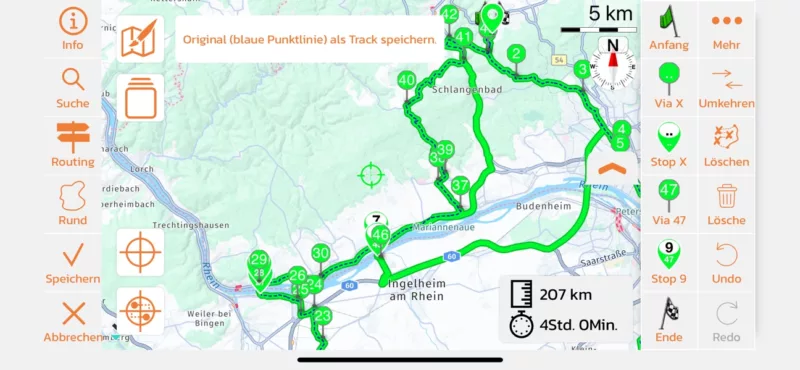
In this situation, I cannot delete the old ferry location. Than I remember your words "if it not neccessary anymore" and delete the waypoints between the old and new ferry locatio0n (Point 29 and 30, can you read it?). And suddenly the old location was deleted.
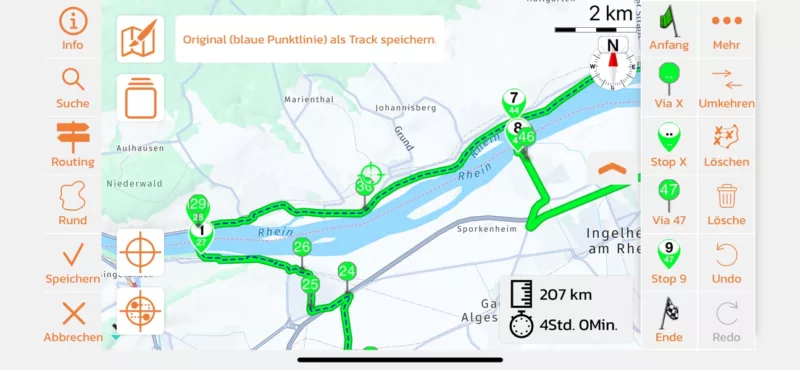
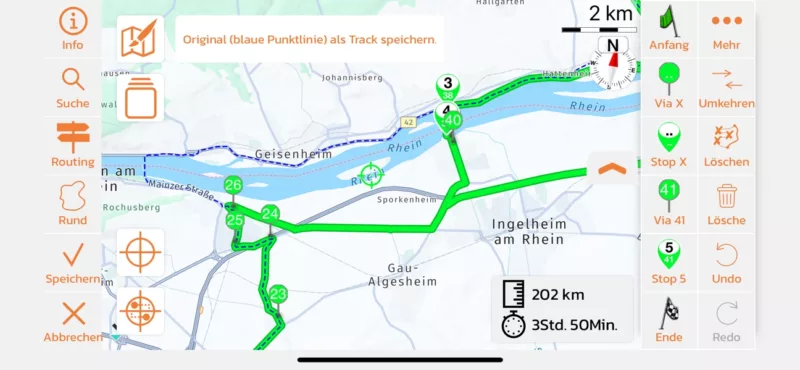
So yes, it works but you have to be aware very clearly the mechanism behind scenic. Thats the little annoying point if you don't know it. And if you have a normal waypoint very close the the ferry point and you have a thick finger, you always hit the normal way point and therefore the old ferry point is not forced to be deleted:-(
Anyway, it works, thanks for the hint.
Greetings Frank
Quote from Guido on 19.07.2024, 09:29Hi Frank,
I understand the confusion. It's weird that Scenic adds these addtional stops for ferry boarding and unboarding. In the fall this (with the update I'm working on), this will be better.
Now about not being able to read the numbers.... I recommend changing the route color in Settings > Colors & Style. I would set it to a bit darker color. Scenic does determine the color of the text inside the markers to black or white depending on the route color chosen, but this is not an exact science, and sometimes Scenic determines wrong. Changing the route color slightly should get the visibiliy of the numbers better.
Hope this helps.
Best regards,
Guido
Hi Frank,
I understand the confusion. It's weird that Scenic adds these addtional stops for ferry boarding and unboarding. In the fall this (with the update I'm working on), this will be better.
Now about not being able to read the numbers.... I recommend changing the route color in Settings > Colors & Style. I would set it to a bit darker color. Scenic does determine the color of the text inside the markers to black or white depending on the route color chosen, but this is not an exact science, and sometimes Scenic determines wrong. Changing the route color slightly should get the visibiliy of the numbers better.
Hope this helps.
Best regards,
Guido


