
POI bugs / feature suggestions

Quote from itchysnooks on 03.02.2024, 18:47Hi Guido - played around with 3.51 this week, really good stuff. Here's some bugs and feature suggestions related to POIs. Cheers!
Bugs:
Custom POI markers/colors are not working
- GPX file with some waypoints > Share > Choose Scenic. In Scenic, Import as a "POI Group". Set a custom marker + color > save.
result: on the small preview map, the custom marker and color is the default red pin. If you turn this POI group on as map layer, the custom markers are also the default red pin.
Some UI elements don't work if the iOS device uses an external keyboard
To be fair, most people won't hit this. I only found it because I control my iPad mini on my bike (and zoom controls in Scenic) using a small programmable bluetooth keyboard. In iOS Settings > Accessibility > Keyboards > Full keyboard access > Turn it on. As an example, now import a GPX file like above - the "select all" and "import" buttons do nothing. I suspect it might affect other areas of the UI too. Appreciate this is not a normal setup though!
POI/places suggestions
For tours I normally create some GPX files which contain dispersed campsites and good biking roads as POIs. These often have quite long descriptions with notes about the places. I then import these waypoints into various apps, including Scenic, for offline use.
When clicking my own location marker in Scenic, it would be nice to quickly see more of the description of the place. Most other apps I've used either show a longer description and trim it off after X characters, or have an icon/button to view more info in another window. In an ideal world, both are actually very useful - i.e. a setting to view longer descriptions on the map (which requires one less click), and also a button or tap of the marker icon which shows the view place dialog. That's useful for seeing the full description if it's really long - or deleting the place.
Related to the above, the only other niggle with POIs/places in Scenic is that neither one of them supports both a description and a custom marker. As an example, if I import two GPX files, one for campsites and another for good roads, ideally I would want different icons for both, but also to import their descriptions. At the moment this isn't possible - POIs in Scenic support custom markers, but not descriptions. And places support descriptions but not custom markers. All this to say, having one of them which supports all features would be really useful!
Hi Guido - played around with 3.51 this week, really good stuff. Here's some bugs and feature suggestions related to POIs. Cheers!
Bugs:
Custom POI markers/colors are not working
- GPX file with some waypoints > Share > Choose Scenic. In Scenic, Import as a "POI Group". Set a custom marker + color > save.
result: on the small preview map, the custom marker and color is the default red pin. If you turn this POI group on as map layer, the custom markers are also the default red pin.
Some UI elements don't work if the iOS device uses an external keyboard
To be fair, most people won't hit this. I only found it because I control my iPad mini on my bike (and zoom controls in Scenic) using a small programmable bluetooth keyboard. In iOS Settings > Accessibility > Keyboards > Full keyboard access > Turn it on. As an example, now import a GPX file like above - the "select all" and "import" buttons do nothing. I suspect it might affect other areas of the UI too. Appreciate this is not a normal setup though!
POI/places suggestions
For tours I normally create some GPX files which contain dispersed campsites and good biking roads as POIs. These often have quite long descriptions with notes about the places. I then import these waypoints into various apps, including Scenic, for offline use.
When clicking my own location marker in Scenic, it would be nice to quickly see more of the description of the place. Most other apps I've used either show a longer description and trim it off after X characters, or have an icon/button to view more info in another window. In an ideal world, both are actually very useful - i.e. a setting to view longer descriptions on the map (which requires one less click), and also a button or tap of the marker icon which shows the view place dialog. That's useful for seeing the full description if it's really long - or deleting the place.
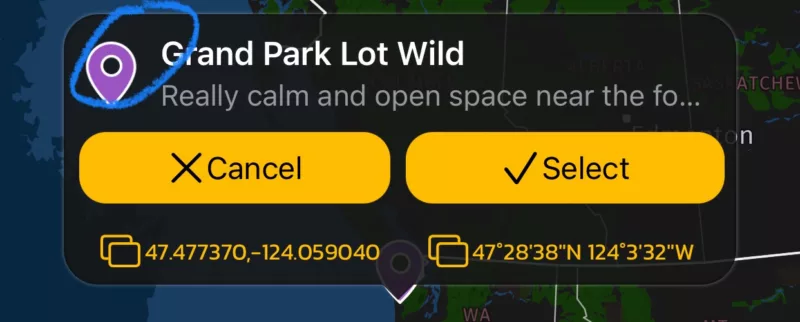
Related to the above, the only other niggle with POIs/places in Scenic is that neither one of them supports both a description and a custom marker. As an example, if I import two GPX files, one for campsites and another for good roads, ideally I would want different icons for both, but also to import their descriptions. At the moment this isn't possible - POIs in Scenic support custom markers, but not descriptions. And places support descriptions but not custom markers. All this to say, having one of them which supports all features would be really useful!

Quote from Guido on 04.02.2024, 08:59I’ll take a look at this for the next update. Thanks for the feedback.
I’ll take a look at this for the next update. Thanks for the feedback.


