Planning a Route - Not going along the normal route

Quote from Marts on 22.01.2025, 16:56Not sure how to explain what has happened here.
Today I'm planning my first ride using the current version of Scenic that is installed on my Mac Mini M4 Pro.
If you look at the attached screen shot you'll see where it's gone awry.
The route is to go to a place called Harrietville in Victoria's "High Country", here in the state of Victoria, Australia.
I have a number of stop and via points. I'm doing this to see how the planner functions and how it'll look on the screen when I'm actually riding. Note: I've done this ride dozens of times over the past 30 years so I know where to go.
Anyway, as you can see, I have Stop 4 at a carpark on Mount Hotham, a popular snow skiing resort. I then scrolled the map to find my destination of Harrietville which is a small town at the foothill of the mountains. It's about 50km north of Hotham.
Have a look at the route it generated. It takes us back down where we came to a small town call Omeo, then back out of Omeo onto a road that goes north of the town then up over the ranges via another ski resort called Falls Creek, down to Mount Beauty, a former hydro electricity town and across the ranges and into Harrietville.
Why do you think that it did this?
Too many vias, stops, perhaps?
I'll continue to play with it and see how it ends up.
Remember, this is my first planned trip using Scenic 4.
Not sure how to explain what has happened here.
Today I'm planning my first ride using the current version of Scenic that is installed on my Mac Mini M4 Pro.
If you look at the attached screen shot you'll see where it's gone awry.
The route is to go to a place called Harrietville in Victoria's "High Country", here in the state of Victoria, Australia.
I have a number of stop and via points. I'm doing this to see how the planner functions and how it'll look on the screen when I'm actually riding. Note: I've done this ride dozens of times over the past 30 years so I know where to go.
Anyway, as you can see, I have Stop 4 at a carpark on Mount Hotham, a popular snow skiing resort. I then scrolled the map to find my destination of Harrietville which is a small town at the foothill of the mountains. It's about 50km north of Hotham.
Have a look at the route it generated. It takes us back down where we came to a small town call Omeo, then back out of Omeo onto a road that goes north of the town then up over the ranges via another ski resort called Falls Creek, down to Mount Beauty, a former hydro electricity town and across the ranges and into Harrietville.
Why do you think that it did this?
Too many vias, stops, perhaps?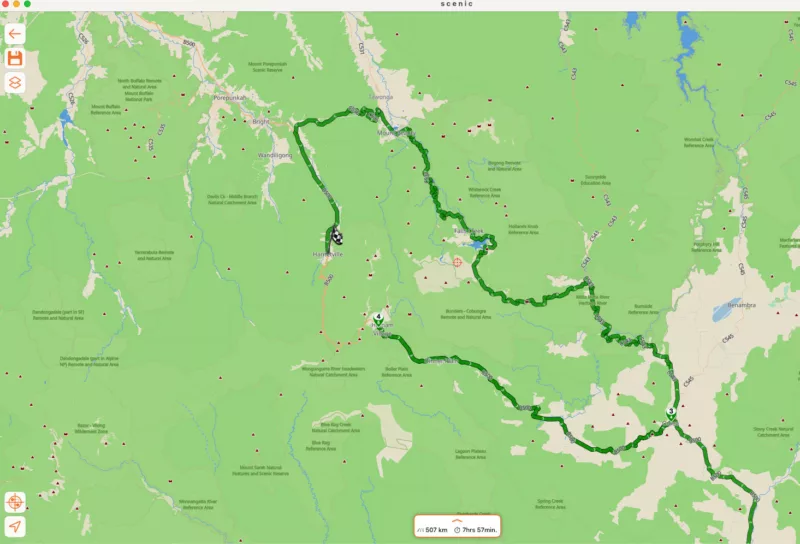
I'll continue to play with it and see how it ends up.
Remember, this is my first planned trip using Scenic 4.
Quote from Marts on 22.01.2025, 17:05Yep, definitely a problem with the maps, I think.
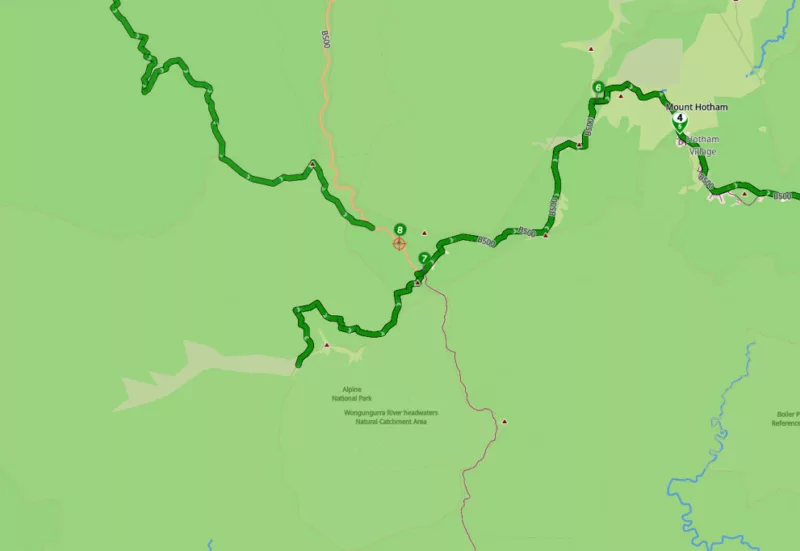
I deleted the destination point and started adding vias from Stop 4 onwards until it stopped generating the route along the Great Alpine Way (B500).
Have a look at the next screen shot. It generated a route that doesn't join in with the planned one at any point. Rather it's a short run along some dirt track west of B500 from Via 7.
I'll plan a route using Google Maps and import that and see how it goes.
Yep, definitely a problem with the maps, I think.
I deleted the destination point and started adding vias from Stop 4 onwards until it stopped generating the route along the Great Alpine Way (B500).
Have a look at the next screen shot. It generated a route that doesn't join in with the planned one at any point. Rather it's a short run along some dirt track west of B500 from Via 7.
I'll plan a route using Google Maps and import that and see how it goes.

Quote from Guido on 22.01.2025, 17:10Looks like a map error indeed. Can you share the link to this route? (the one with via point 8)? Then I'll investigate why it's not taking that road.
Have you tried different routing modes?
Looks like a map error indeed. Can you share the link to this route? (the one with via point 8)? Then I'll investigate why it's not taking that road.
Have you tried different routing modes?
Quote from Marts on 22.01.2025, 17:16Quote from Guido on 22.01.2025, 17:10Looks like a map error indeed. Can you share the link to this route? (the one with via point 8)? Then I'll investigate why it's not taking that road.
Have you tried different routing modes?How do I share the link?
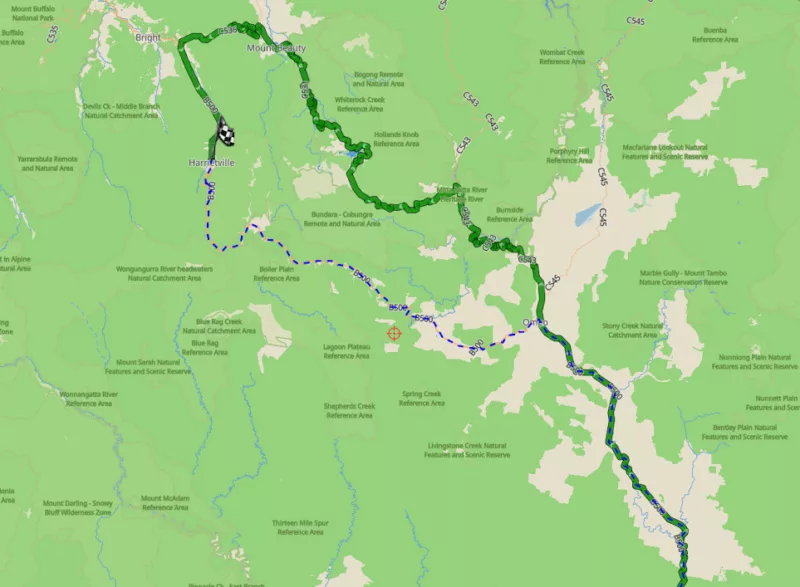
Anyway, here's a screen shot of the Google Maps route that I imported. Note the blue dotted lines that forms a part of that sector that the map is having problems with.
As for routing modes, no, I'm not that of an expert with Scenic just yet. What can you suggest?
Thing is, our ride has two options for this weekend. One is to go over Hotham, the other via Falls Creek, the route that Scenic wants to take me. I've saved that route so it'll be used if we go that way. Otherwise, if the lads want to go over Hotham then I'll switch to (yuk, spew) Google Maps if we can't sort this out.
Cheers
Martin
Quote from Guido on 22.01.2025, 17:10Looks like a map error indeed. Can you share the link to this route? (the one with via point 8)? Then I'll investigate why it's not taking that road.
Have you tried different routing modes?
How do I share the link?
Anyway, here's a screen shot of the Google Maps route that I imported. Note the blue dotted lines that forms a part of that sector that the map is having problems with.
As for routing modes, no, I'm not that of an expert with Scenic just yet. What can you suggest?
Thing is, our ride has two options for this weekend. One is to go over Hotham, the other via Falls Creek, the route that Scenic wants to take me. I've saved that route so it'll be used if we go that way. Otherwise, if the lads want to go over Hotham then I'll switch to (yuk, spew) Google Maps if we can't sort this out.
Cheers
Martin
Quote from Guido on 22.01.2025, 17:18OK. Send me the Google Maps URL. I'll work it out.
To send a link to a route (assuming you saved the route)... go to your route list, select the route, tap the 3 dots button top right > Share link.
OK. Send me the Google Maps URL. I'll work it out.
To send a link to a route (assuming you saved the route)... go to your route list, select the route, tap the 3 dots button top right > Share link.
Quote from Marts on 22.01.2025, 17:47When you suggested that there is a map error I wondered - are the maps up-to-date. So I checked. There was a download available for off-line maps so I downloaded and installed them.
I then exited Scenic, opened it up again and planned the route. This time it works, no issues.
Um, just tried to "share route" and using the Copy function from the drop-down list. It's not allowing me to paste it into here. When I do CMD-V nothing happens.
So I then sent it to Messages and copied the link from there.
https://scenicapp.space/route/ApBKZxdS
Anyway, when I opened the first route that wouldn't route properly I found that when it loaded after the map updates it's correct. Did it load itself and correct the route using new map data (from the newly downloaded maps)?
But, as you will see, it all looks good now. Wish that I did this before updating the maps.
And that brings up another question. My Mac is always connected and when I was scrolling around the map planning my route it was downloading data to fill the map as I went. Wouldn't that data be the most current?
Now that I have updated off-line maps on the Mac details are displayed instantly.
Finally, I'm in "Plan" mode looking at that route. I want to start a new one and I cannot work out how to clear the route and start afresh. How do I do that?
Thanks again.
Martin
When you suggested that there is a map error I wondered - are the maps up-to-date. So I checked. There was a download available for off-line maps so I downloaded and installed them.
I then exited Scenic, opened it up again and planned the route. This time it works, no issues.
Um, just tried to "share route" and using the Copy function from the drop-down list. It's not allowing me to paste it into here. When I do CMD-V nothing happens.
So I then sent it to Messages and copied the link from there.
https://scenicapp.space/route/ApBKZxdS
Anyway, when I opened the first route that wouldn't route properly I found that when it loaded after the map updates it's correct. Did it load itself and correct the route using new map data (from the newly downloaded maps)?
But, as you will see, it all looks good now. Wish that I did this before updating the maps.
And that brings up another question. My Mac is always connected and when I was scrolling around the map planning my route it was downloading data to fill the map as I went. Wouldn't that data be the most current?
Now that I have updated off-line maps on the Mac details are displayed instantly.
Finally, I'm in "Plan" mode looking at that route. I want to start a new one and I cannot work out how to clear the route and start afresh. How do I do that?
Thanks again.
Martin
Quote from Guido on 22.01.2025, 17:52OK. Happy to hear the map error was already resolved with the update. No need for me to investigate.
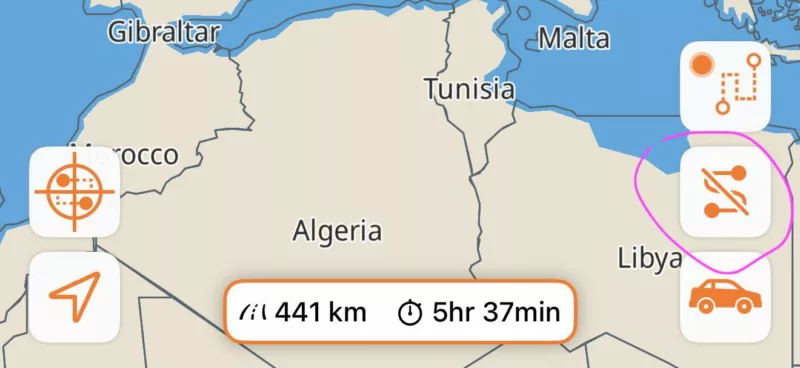
To clear the route on screen use this button:
OK. Happy to hear the map error was already resolved with the update. No need for me to investigate.
To clear the route on screen use this button:
Quote from Marts on 26.01.2025, 17:21Hey Guido. Home safe and sound after a great weekend up in the Victorian High Country.
I saw some issues with Scenic.
That route that I planned was doing all sorts of weird things to Scenic when I opened it and set it to guide me. It wanted me to turn down side roads and go back and other stuff.
I have no idea what it was doing. Finally, when I stopped for a break about an hour into the ride, I stopped the ride on the app. I then entered in the destination and it let do its stuff. That worked fine. Any changes, say, going down the back roads to avoid the highway, and it would recalculate the route correctly.
Now, that is what I did for the trip home. Instead of entering the saved route I just said for it to go home. Worked fine.
When I got home, I stopped the ride and saved it.
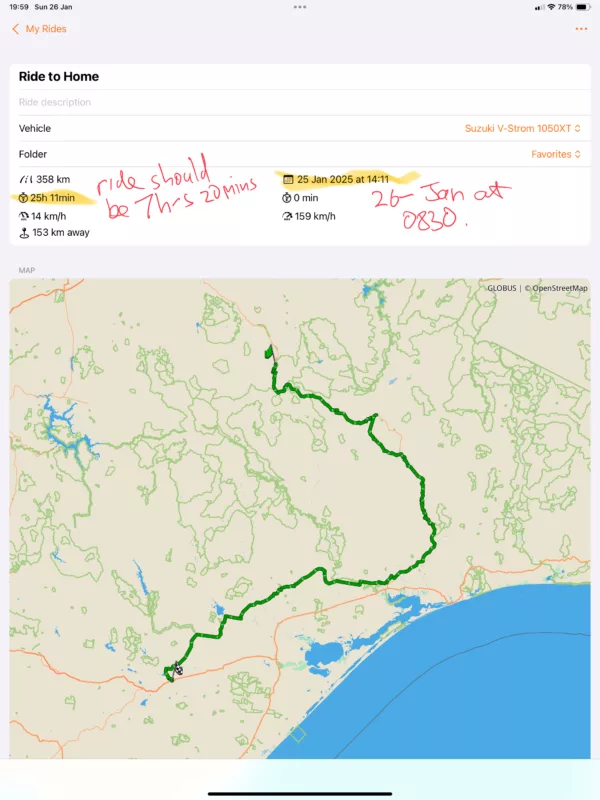
Attached is a screen shot of the ride summary.
Note the highlighted text and the comments. The ride home was yesterday, 26th Jan, leaving at around 0830. Yet the summary shows it starting at 14:11 on the 25th, or the day before.
The total distance is correct, and the average speed of 14 km/h is obviously based on the time of departure of 14:11 the day before til 15:30 (or thereabouts) the next day. The top speed is not correct - dunno what happened there. I once saw 450 km/h after one ride that the iPhone recorded (different app, not Scenic).
Anyway, yeah, planned route didn't navigate properly and that saved info from the "Ride Home".
Here's the link to the planned route that didn't work properly:
https://scenicapp.space/route/iTRrifvx
And the link to the recorded ride home.
https://scenicapp.space/ride/cgkiykPz
Hey Guido. Home safe and sound after a great weekend up in the Victorian High Country.
I saw some issues with Scenic.
That route that I planned was doing all sorts of weird things to Scenic when I opened it and set it to guide me. It wanted me to turn down side roads and go back and other stuff.
I have no idea what it was doing. Finally, when I stopped for a break about an hour into the ride, I stopped the ride on the app. I then entered in the destination and it let do its stuff. That worked fine. Any changes, say, going down the back roads to avoid the highway, and it would recalculate the route correctly.
Now, that is what I did for the trip home. Instead of entering the saved route I just said for it to go home. Worked fine.
When I got home, I stopped the ride and saved it.
Attached is a screen shot of the ride summary.
Note the highlighted text and the comments. The ride home was yesterday, 26th Jan, leaving at around 0830. Yet the summary shows it starting at 14:11 on the 25th, or the day before.
The total distance is correct, and the average speed of 14 km/h is obviously based on the time of departure of 14:11 the day before til 15:30 (or thereabouts) the next day. The top speed is not correct - dunno what happened there. I once saw 450 km/h after one ride that the iPhone recorded (different app, not Scenic).
Anyway, yeah, planned route didn't navigate properly and that saved info from the "Ride Home".
Here's the link to the planned route that didn't work properly:
https://scenicapp.space/route/iTRrifvx
And the link to the recorded ride home.
https://scenicapp.space/ride/cgkiykPz
Quote from Guido on 27.01.2025, 09:28Thanks @marts. I'll take a look at both issues. Strange that it's taking the start time of the previous ride.
Regarding max speed... what would you say was the max speed on this ride?
Thanks @marts. I'll take a look at both issues. Strange that it's taking the start time of the previous ride.
Regarding max speed... what would you say was the max speed on this ride?
Quote from Marts on 27.01.2025, 16:34Quote from Guido on 27.01.2025, 09:28Thanks @marts. I'll take a look at both issues. Strange that it's taking the start time of the previous ride.
Regarding max speed... what would you say was the max speed on this ride?
The start time of that ride is close to the end time from the previous day. Not sure exactly when I got into Harrietville.
As for top speed, I don't know, certainly not what was displayed. Might be simple GPS error given how mountainous the roads are up there (canyoning?).
Quote from Guido on 27.01.2025, 09:28Thanks @marts. I'll take a look at both issues. Strange that it's taking the start time of the previous ride.
Regarding max speed... what would you say was the max speed on this ride?
The start time of that ride is close to the end time from the previous day. Not sure exactly when I got into Harrietville.
As for top speed, I don't know, certainly not what was displayed. Might be simple GPS error given how mountainous the roads are up there (canyoning?).
Quote from Guido on 27.01.2025, 17:45The start time of that ride is close to the end time from the previous day. Not sure exactly when I got into Harrietville.
So it's not the start time of the previous day route? That makes it even more strange. Is it possible you accidentally already tapped the "Ride" button the day before at that 14:11? If so, there's still a bug because all that time should not count as riding time... most of it should be brake time (and thus your average speed will also be affected by that).
The start time of that ride is close to the end time from the previous day. Not sure exactly when I got into Harrietville.
So it's not the start time of the previous day route? That makes it even more strange. Is it possible you accidentally already tapped the "Ride" button the day before at that 14:11? If so, there's still a bug because all that time should not count as riding time... most of it should be brake time (and thus your average speed will also be affected by that).
Quote from Marts on 27.01.2025, 18:16Quote from Guido on 27.01.2025, 17:45The start time of that ride is close to the end time from the previous day. Not sure exactly when I got into Harrietville.
So it's not the start time of the previous day route? That makes it even more strange. Is it possible you accidentally already tapped the "Ride" button the day before at that 14:11? If so, there's still a bug because all that time should not count as riding time... most of it should be brake time (and thus your average speed will also be affected by that).
The ride started at around 0800 on Saturday morning, arriving at our destination at around 1409 according to the iPhone Location Services time stamp that went into my diary.
Looking at it I may have stopped the Saturday ride and somehow it restarted. You normally have to tap on "ride" or similar in the app itself. I'd stopped the bike, stopped the ride via the Chigee CarPlay turned the bike off which also shuts down the Chigee and then went into the hotel, got my room key, and hit the bar.
Yeah, who knows - may be I did accidentally start it again.
Quote from Guido on 27.01.2025, 17:45The start time of that ride is close to the end time from the previous day. Not sure exactly when I got into Harrietville.
So it's not the start time of the previous day route? That makes it even more strange. Is it possible you accidentally already tapped the "Ride" button the day before at that 14:11? If so, there's still a bug because all that time should not count as riding time... most of it should be brake time (and thus your average speed will also be affected by that).
The ride started at around 0800 on Saturday morning, arriving at our destination at around 1409 according to the iPhone Location Services time stamp that went into my diary.
Looking at it I may have stopped the Saturday ride and somehow it restarted. You normally have to tap on "ride" or similar in the app itself. I'd stopped the bike, stopped the ride via the Chigee CarPlay turned the bike off which also shuts down the Chigee and then went into the hotel, got my room key, and hit the bar.
Yeah, who knows - may be I did accidentally start it again.
Quote from Guido on 27.01.2025, 18:40Maybe not. Maybe it has something to do with the sequence of ending the ride and then turning off CarPlay. I'll investigate further. Thank you!
Maybe not. Maybe it has something to do with the sequence of ending the ride and then turning off CarPlay. I'll investigate further. Thank you!
Quote from Marts on 27.01.2025, 19:57Here is a bit more info.
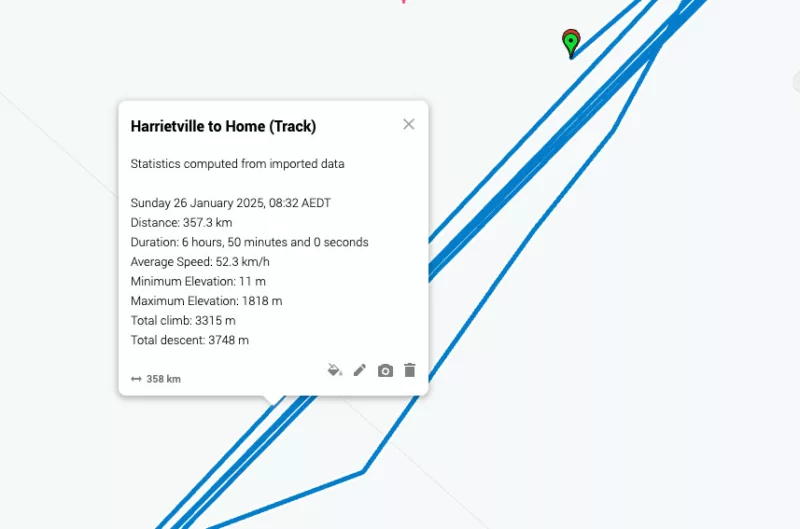
I exported the recorded ride to GPX then imported it into Google Maps as I can't zoom down far enough in Scenic to see more detail.
Here's a screen shot of the data that Google sees.
The figures there look correct. Start time of 0832, 6hr ride, average 52 km/h, etc..
But the track overlaid on the map doesn't look right. I got on the bike, started Scenic and entered in "Home" and set off.
The track (the blue lines) show me going back and forth like it's reading the GPS from the iPhone as I'm walking around).
What do you think, Guido?
Here is a bit more info.
I exported the recorded ride to GPX then imported it into Google Maps as I can't zoom down far enough in Scenic to see more detail.
Here's a screen shot of the data that Google sees.
The figures there look correct. Start time of 0832, 6hr ride, average 52 km/h, etc..
But the track overlaid on the map doesn't look right. I got on the bike, started Scenic and entered in "Home" and set off.
The track (the blue lines) show me going back and forth like it's reading the GPS from the iPhone as I'm walking around).
What do you think, Guido?