
Photos

Quote from thebritnickd on 16.04.2023, 23:19I must be missing a very basic understanding.
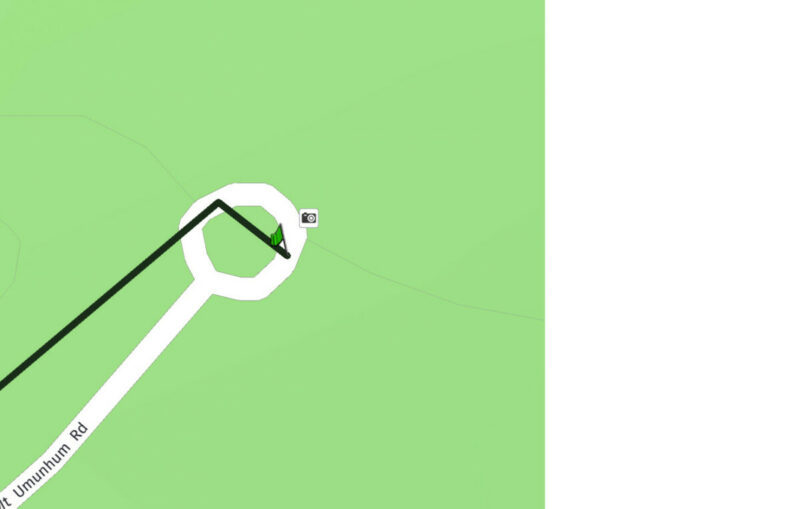
I had taken a few photos on the ride. The software sync'd and the map shows a photo taken (see image below), but the picture of the camera isn't a link to the photo, nor do I see a button to the photo else where.... Where do I see the photo other then looking at the date of the ride, heading off to the photo library of iOS and opening it there.... Is there no link to it in the software.
Normally there are some really good how to videos on Scenic but there doesn't appear to be any thing on this. I am sure this is user error but could do with a pointer or two...
I must be missing a very basic understanding.
I had taken a few photos on the ride. The software sync'd and the map shows a photo taken (see image below), but the picture of the camera isn't a link to the photo, nor do I see a button to the photo else where.... Where do I see the photo other then looking at the date of the ride, heading off to the photo library of iOS and opening it there.... Is there no link to it in the software.
Normally there are some really good how to videos on Scenic but there doesn't appear to be any thing on this. I am sure this is user error but could do with a pointer or two...

Quote from thebritnickd on 17.04.2023, 10:36You may be onto something, however, i am still a little lost. Typically an app asks you if you are willing to share files with it - I don't remember that happening.
With that said, if I
- (on iOS version 16.4.1), go to settings>privacy and security>photos there is no app called Scenic having requested access to photos
- (on the Mac (Ventura 13.3.1 running an iPad app)), go to About this mac>privacy and security>files and folders>Scenic> then only the option "other documents" is selected - again the app hasn't requested access to photos.
In other applications, e.g. Google Maps, you don't usually have to drill so far into the menus to enable photo access, usually its settings>(epic scroll)Google Maps>Photos><All Photos>.
This photo flow isn't there for Scenic. If you go settings>(epic scroll)Scenic>; then you only have options to give Scenic access to are.... Location, Siri and Cellular Data.
Likely I am still missing a fundamental step but still not quite there yet.
N
You may be onto something, however, i am still a little lost. Typically an app asks you if you are willing to share files with it - I don't remember that happening.
With that said, if I
- (on iOS version 16.4.1), go to settings>privacy and security>photos there is no app called Scenic having requested access to photos
- (on the Mac (Ventura 13.3.1 running an iPad app)), go to About this mac>privacy and security>files and folders>Scenic> then only the option "other documents" is selected - again the app hasn't requested access to photos.
In other applications, e.g. Google Maps, you don't usually have to drill so far into the menus to enable photo access, usually its settings>(epic scroll)Google Maps>Photos><All Photos>.
This photo flow isn't there for Scenic. If you go settings>(epic scroll)Scenic>; then you only have options to give Scenic access to are.... Location, Siri and Cellular Data.
Likely I am still missing a fundamental step but still not quite there yet.
N

Quote from Guido on 17.04.2023, 13:48Hi @thebritnickd,
The icon that you are seeing on the map is not a representation of the photo you took. My guess is that it's a built in POI for a nice picture location.
The best way to take a picture during a ride is to do that from within Scenic. There are two ways to do that:
- Tap the bottom bar (where you see the distance and time to destination). That will bring up a panel and in that panel there is a photo button.
- Enable the 'quick pic' button in Settings > Navigation & Tracking. This will add a picture button to the screen while you are navigating.
Through both ways, a camera screen will pop-up... and once you take a picture that way, that picture will show on the map like this:
After you take the first picture, it will also ask you if you want to save pictures taken in Scenic, to your camera roll:
I'm guessing you took the photo by opening the normal camera app (moving away from Scenic and opening the camera app)?? If so, then that picture won't be linked to your ride. Scenic doesn't know what's happening in other Apps and therefore doesn't know that the picture you took belongs to the ride. It doesn't even know a picture was taken if you take it with the camera app.
You can however add pictures from your camera roll to your ride afterwards. To do this, select the ride from your 'recorded ride' list, and tap the 'add picture' button at the bottom. Then you can choose to select from your camera roll and select the photo in question. If the photo has GPS data, it will also put it on the map on that location.
Hope this helps/explains. If not, or if you have other questions, please let me know. Happy to help.
Best regards and ride safe,
Guido
Hi @thebritnickd,
The icon that you are seeing on the map is not a representation of the photo you took. My guess is that it's a built in POI for a nice picture location.
The best way to take a picture during a ride is to do that from within Scenic. There are two ways to do that:
- Tap the bottom bar (where you see the distance and time to destination). That will bring up a panel and in that panel there is a photo button.
- Enable the 'quick pic' button in Settings > Navigation & Tracking. This will add a picture button to the screen while you are navigating.
Through both ways, a camera screen will pop-up... and once you take a picture that way, that picture will show on the map like this:
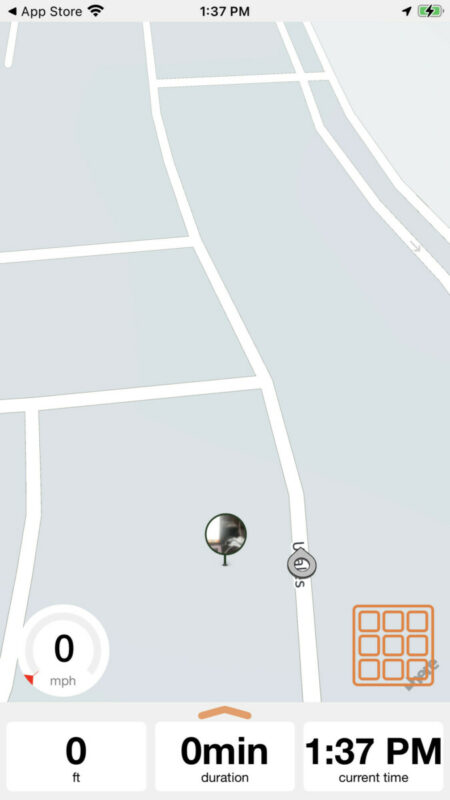
After you take the first picture, it will also ask you if you want to save pictures taken in Scenic, to your camera roll:
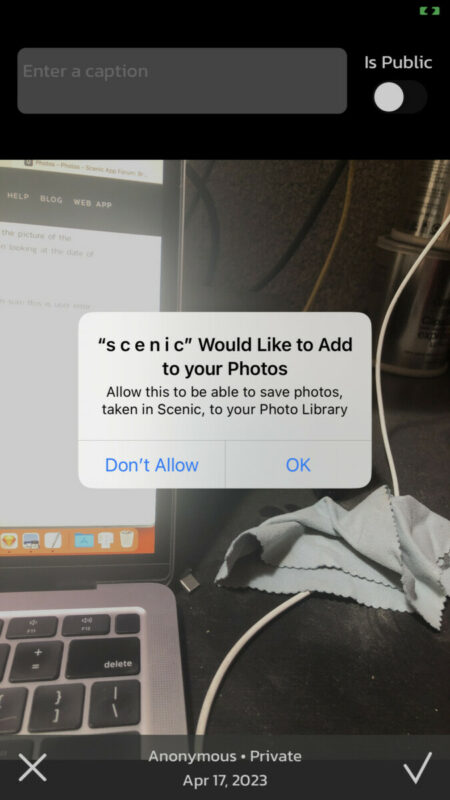
I'm guessing you took the photo by opening the normal camera app (moving away from Scenic and opening the camera app)?? If so, then that picture won't be linked to your ride. Scenic doesn't know what's happening in other Apps and therefore doesn't know that the picture you took belongs to the ride. It doesn't even know a picture was taken if you take it with the camera app.
You can however add pictures from your camera roll to your ride afterwards. To do this, select the ride from your 'recorded ride' list, and tap the 'add picture' button at the bottom. Then you can choose to select from your camera roll and select the photo in question. If the photo has GPS data, it will also put it on the map on that location.
Hope this helps/explains. If not, or if you have other questions, please let me know. Happy to help.
Best regards and ride safe,
Guido
Quote from thebritnickd on 17.04.2023, 17:31Totally explains it. Yes I took it in the camera app and made the assumption Scenic was looking at the photo reel time stamps and associating it to the ride (this is actually what happens in another app I use).
The reason I had thought the 'camera icon' was the photo was because that's actually where I took my photos and I associated the geolocation of the photo to be put on the track where it was taken. I can imagine a 1000mile ride and 300 photos, it would be great to have the appropriate photo reflected in the right place on the track. @guidomm If you would like to see this on the other software, let me know - we can take it offline.
So the quick photo button may not work for me as I use the Carplay implementation on the bike. I may have to experiment there to see how that will work in that scenario. If I can maintain the carplay connection but still use scenic on the phone for the phot it will work, but I recollect that Scenic on the phone offers basically a blank screen while carplay is active.
N
Totally explains it. Yes I took it in the camera app and made the assumption Scenic was looking at the photo reel time stamps and associating it to the ride (this is actually what happens in another app I use).
The reason I had thought the 'camera icon' was the photo was because that's actually where I took my photos and I associated the geolocation of the photo to be put on the track where it was taken. I can imagine a 1000mile ride and 300 photos, it would be great to have the appropriate photo reflected in the right place on the track. @guidomm If you would like to see this on the other software, let me know - we can take it offline.
So the quick photo button may not work for me as I use the Carplay implementation on the bike. I may have to experiment there to see how that will work in that scenario. If I can maintain the carplay connection but still use scenic on the phone for the phot it will work, but I recollect that Scenic on the phone offers basically a blank screen while carplay is active.
N
Quote from Guido on 17.04.2023, 17:39ah yes. I’m planning to add a photo button to that white screen. Ram into the same issue myself
ah yes. I’m planning to add a photo button to that white screen. Ram into the same issue myself
Quote from thebritnickd on 17.04.2023, 17:57@guidomm I added a paragraph to my previous forum entry before I saw your 2nd reply.
What I added was:
The reason I had thought the 'camera icon' was the photo was because that's actually where I took my photos and I associated the geolocation of the photo to be put on the track where it was taken. I can imagine a 1000mile ride and 300 photos, it would be great to have the appropriate photo reflected in the right place on the track. @guidomm If you would like to see this on the other software, let me know - we can take it offline.
>>>> and now another addition. The photos do appear on the track at the right place on the iPhone, but not on the iPad (under MacOS)
@guidomm I added a paragraph to my previous forum entry before I saw your 2nd reply.
What I added was:
The reason I had thought the 'camera icon' was the photo was because that's actually where I took my photos and I associated the geolocation of the photo to be put on the track where it was taken. I can imagine a 1000mile ride and 300 photos, it would be great to have the appropriate photo reflected in the right place on the track. @guidomm If you would like to see this on the other software, let me know - we can take it offline.
>>>> and now another addition. The photos do appear on the track at the right place on the iPhone, but not on the iPad (under MacOS)
Quote from Guido on 17.04.2023, 18:10That’s strange. Could you post a screenshot of your iPhone and macOS with / without the photos (and also the name of the ride) Then Incan take a look in the database if somehow the location is getting lost during sync.
That’s strange. Could you post a screenshot of your iPhone and macOS with / without the photos (and also the name of the ride) Then Incan take a look in the database if somehow the location is getting lost during sync.
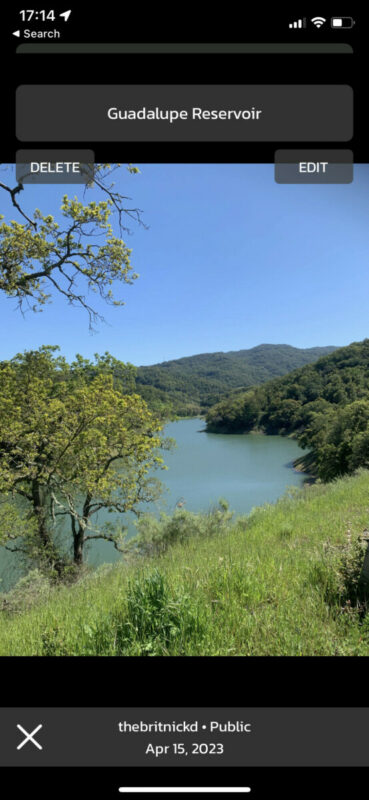
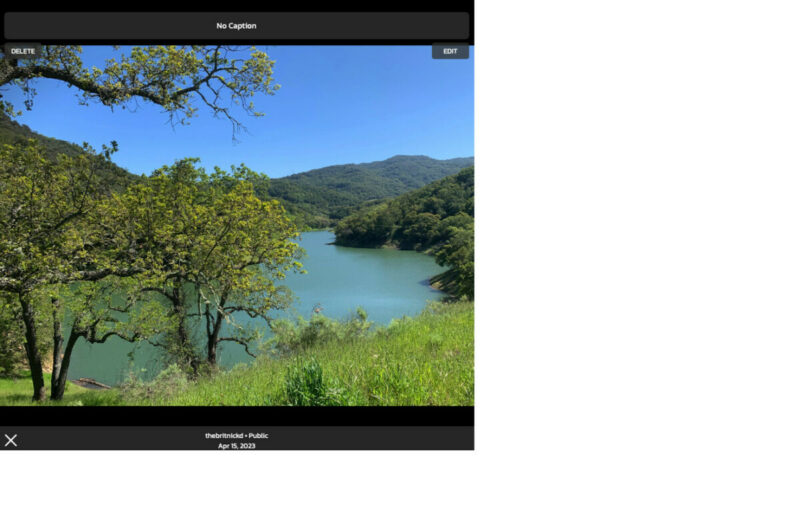
Quote from thebritnickd on 17.04.2023, 18:20So in between me sending the previous message and you asking for screen shots, I had shut down the iPad version (MAC) and reopened it. In doing this, the pictures arrived so that could have been a sync issue. HOWEVER, the captions didn't arrive only the photos. See below.
(btw, a sync button may be useful to force a sync if you are using multiple devices.
)
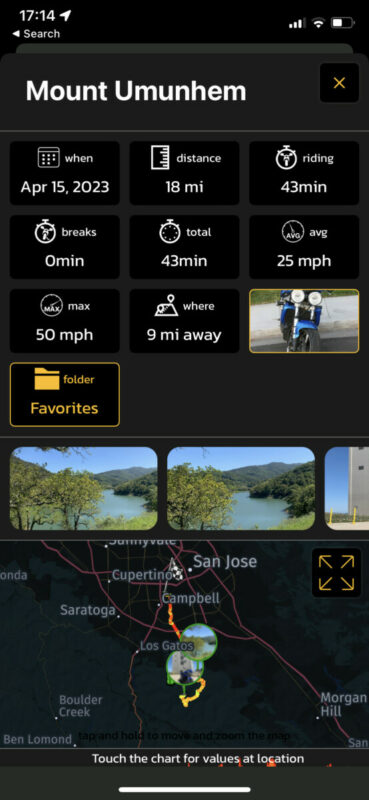
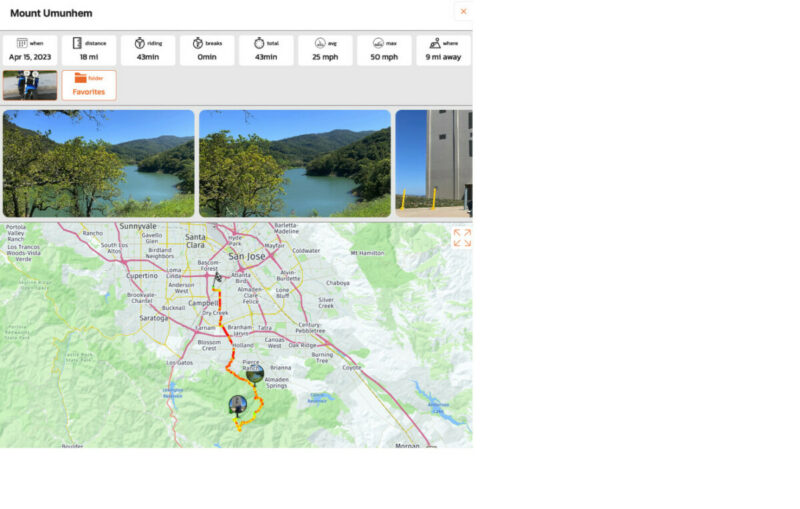
So in between me sending the previous message and you asking for screen shots, I had shut down the iPad version (MAC) and reopened it. In doing this, the pictures arrived so that could have been a sync issue. HOWEVER, the captions didn't arrive only the photos. See below.
(btw, a sync button may be useful to force a sync if you are using multiple devices.
)
Quote from Guido on 17.04.2023, 18:32Pull-to-refresh in various screen (including ride list) will initiate a sync. Also in Settings > Finetuning there is a way to sync pictures, but I doubt that will sync the captions. I’ll have a look at that.
Pull-to-refresh in various screen (including ride list) will initiate a sync. Also in Settings > Finetuning there is a way to sync pictures, but I doubt that will sync the captions. I’ll have a look at that.
Quote from thebritnickd on 17.04.2023, 19:45@guidomm I am blown away by how responsive you are, its such as a refreshing change to have a developer like you work on something with the passion you do.
Quick feedback:
- Settings > Finetuning> Photo Sync = yes this is good, however IMHO its in the wrong place. I feel that setting are something you config and if things are as you like, you never revisit. I think this button should be at the bottom of the specific ride page with share, export, etc. buttons. You are in a mode where you are working with a given ride, if the ride isn't update you want to fix it there, not back out to a settings menu.
- Captions - nope the sync didn't fix the captions. Maybe you may want to consider writing captions to the meta data of the jpg, then you can always re-read the captions directly from the photo at any time? (though that may change the architecture of what you are doing quite substantially.
N
@guidomm I am blown away by how responsive you are, its such as a refreshing change to have a developer like you work on something with the passion you do.
Quick feedback:
- Settings > Finetuning> Photo Sync = yes this is good, however IMHO its in the wrong place. I feel that setting are something you config and if things are as you like, you never revisit. I think this button should be at the bottom of the specific ride page with share, export, etc. buttons. You are in a mode where you are working with a given ride, if the ride isn't update you want to fix it there, not back out to a settings menu.
- Captions - nope the sync didn't fix the captions. Maybe you may want to consider writing captions to the meta data of the jpg, then you can always re-read the captions directly from the photo at any time? (though that may change the architecture of what you are doing quite substantially.
N
Quote from Guido on 17.04.2023, 20:06This sync picture thing in Finetuning is only meant for emergencies where the photo sync somehow got messed up (not all photos synced) due to, for example, connectivity issues during login (where all photos are downloaded). I actually added it because of an old bug where some pictures didn’t sync.
The ‘pull-to-refresh’ in the ride list will/should sync all trips and its pictures. Also going to the ride list will initiate a sync. When you are already in the ride list it doesn’t sync automatically. (Changes are not pushed… they are always pulled in from thebserver). Why it’s not syncing the captions is probably a bug indeed. I need to investigate this. Will report back here tomorrow.
This sync picture thing in Finetuning is only meant for emergencies where the photo sync somehow got messed up (not all photos synced) due to, for example, connectivity issues during login (where all photos are downloaded). I actually added it because of an old bug where some pictures didn’t sync.
The ‘pull-to-refresh’ in the ride list will/should sync all trips and its pictures. Also going to the ride list will initiate a sync. When you are already in the ride list it doesn’t sync automatically. (Changes are not pushed… they are always pulled in from thebserver). Why it’s not syncing the captions is probably a bug indeed. I need to investigate this. Will report back here tomorrow.
Quote from Guido on 17.04.2023, 20:15Good idea to store captions in the metadata. Should be easy to add. Will have a look at that while I’m at it.
Good idea to store captions in the metadata. Should be easy to add. Will have a look at that while I’m at it.
Quote from thebritnickd on 17.04.2023, 22:32news update, 9:30pm the captions look like they arrived on some of the photos.....
news update, 9:30pm the captions look like they arrived on some of the photos.....
Quote from thebritnickd on 25.04.2023, 15:22Now i have used the photos feature a lot more, since I understand it better, I'd like to recommend an enhancement.
A display photos overlay...
- Display only your photos from this ride
- Display all your photos taken along this route
- Display all photos taken along this route
1 - shows me any photos I took on the day I rode the ride
2 - show all the photos I have taken along a given stretch of road. This lets me compare how the road looked last year compared to this year - was the reservoir empty, was it full.... etc.. The full ride route isn't the trigger for this series of photos, it is the photo on that stretch of road.
3 - if I plan a route out from A>B, a route may be 1500 miles long, but I could switch on other people's photos to see if there are any good vistas along the way that I want to experience for myself. Often others that know a route know of some hidden gems I just wouldn't know about without that local knowledge, instead I'd likely blast past the vista (at exactly the speed limit) and missed that once-in-a-lifetime view.
While I am reluctant to say the next line.... 🙂
This could be a further enhanced premium feature allowing for further monetization opportunities.
Now i have used the photos feature a lot more, since I understand it better, I'd like to recommend an enhancement.
A display photos overlay...
- Display only your photos from this ride
- Display all your photos taken along this route
- Display all photos taken along this route
1 - shows me any photos I took on the day I rode the ride
2 - show all the photos I have taken along a given stretch of road. This lets me compare how the road looked last year compared to this year - was the reservoir empty, was it full.... etc.. The full ride route isn't the trigger for this series of photos, it is the photo on that stretch of road.
3 - if I plan a route out from A>B, a route may be 1500 miles long, but I could switch on other people's photos to see if there are any good vistas along the way that I want to experience for myself. Often others that know a route know of some hidden gems I just wouldn't know about without that local knowledge, instead I'd likely blast past the vista (at exactly the speed limit) and missed that once-in-a-lifetime view.
While I am reluctant to say the next line.... 🙂
This could be a further enhanced premium feature allowing for further monetization opportunities.
Quote from Guido on 25.04.2023, 15:37OK. Got it. 1 and 3 are already possible:
1: Select ride from your ride list. You'll see all fotos of the ride. If you tap this button you'll see them on the map.
3: Same if you select route from your route list. It will show all your photos and public photos of others, that were ever taken by anyone that has ridden that exact same route. Accent on public because people can also choose to not make pictures public.
2: Will add to feature request list.
OK. Got it. 1 and 3 are already possible:
1: Select ride from your ride list. You'll see all fotos of the ride. If you tap this button you'll see them on the map.
3: Same if you select route from your route list. It will show all your photos and public photos of others, that were ever taken by anyone that has ridden that exact same route. Accent on public because people can also choose to not make pictures public.
2: Will add to feature request list.
Quote from thebritnickd on 25.04.2023, 16:14Great that you'll look at #2 as a feature.
On #3, I am seeing no photos from 3rd parties at all on any of the routes I have created or ridden. So that leads me to a few more questions :).........
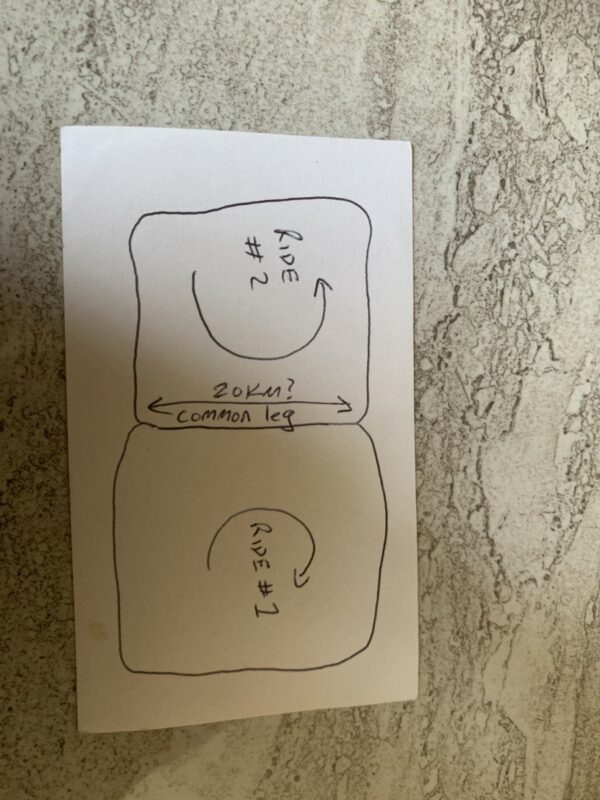
- You say, "taken by anyone that has ridden that exact same route." - is the key word here "exact"? If you assume 2 routes that share a common leg, will the 3rd party photos only show up if the entire route is the same or if that leg is the same?
Take this illustration as an example - 2 different rides (ride #1, ride #2 - both share a common leg of 20Km in my example..... Will the photos be shared with both routes along that common part?
Great that you'll look at #2 as a feature.
On #3, I am seeing no photos from 3rd parties at all on any of the routes I have created or ridden. So that leads me to a few more questions :).........
- You say, "taken by anyone that has ridden that exact same route." - is the key word here "exact"? If you assume 2 routes that share a common leg, will the 3rd party photos only show up if the entire route is the same or if that leg is the same?
Take this illustration as an example - 2 different rides (ride #1, ride #2 - both share a common leg of 20Km in my example..... Will the photos be shared with both routes along that common part?
Quote from Guido on 25.04.2023, 17:22At the moment, photos are linked to rides and routes. Photos in the same area, that are not linked to this exact route will not show.
So, in essence this means that you'll only could see photos of others who have added your (public) route to their routes (through the 'discover routes' feature...tap little + button in your route list), or other with whom you've shared a route link with and they've added it to their Scenic.But you raise an interesting point. Technically, a difficult one, though. If you would like to see all (public) photos in the route area, that's quite a resource and time consuming process. Basically would have to search the entire picture database for public photos that have coordinates that are close to the coordinates of the route. And once found, download those photos from the server to your device (could be thumbnail versions at first, to reduce load, but still). The searching of the photos in the database would last a long time and would put a big load on the database.
At the moment, photos are linked to rides and routes. Photos in the same area, that are not linked to this exact route will not show.
So, in essence this means that you'll only could see photos of others who have added your (public) route to their routes (through the 'discover routes' feature...tap little + button in your route list), or other with whom you've shared a route link with and they've added it to their Scenic.
But you raise an interesting point. Technically, a difficult one, though. If you would like to see all (public) photos in the route area, that's quite a resource and time consuming process. Basically would have to search the entire picture database for public photos that have coordinates that are close to the coordinates of the route. And once found, download those photos from the server to your device (could be thumbnail versions at first, to reduce load, but still). The searching of the photos in the database would last a long time and would put a big load on the database.

Quote from N-5Gunner on 09.05.2023, 16:47Hi Guido, I'm adding my related question to this relevant thread instead of starting a new thread entirely.I have just finished a long multi-day trip, and I have a number of photos that I have taken during the trip (outside of Scenic, using the iPhone camera app, so these photos are not currently linked to my rides). I would like to add these "external" photos to my recorded Scenic rides. I have found the "Add Picture" option that you mentioned below, but my question is: is there a way to upload/add multiple pictures to a recorded ride?The "Add Picture" button seems to only allow you to select a single photo, and I have dozens that I would like to add to each recorded ride, so selecting each individually is going to be tedious. I haven't been able to find a way to add multiple easily, so thought I'd ask.Thanks as always,N-5GunnerQuote from Guido on 17.04.2023, 13:48You can however add pictures from your camera roll to your ride afterwards. To do this, select the ride from your 'recorded ride' list, and tap the 'add picture' button at the bottom. Then you can choose to select from your camera roll and select the photo in question. If the photo has GPS data, it will also put it on the map on that location.
Quote from Guido on 17.04.2023, 13:48You can however add pictures from your camera roll to your ride afterwards. To do this, select the ride from your 'recorded ride' list, and tap the 'add picture' button at the bottom. Then you can choose to select from your camera roll and select the photo in question. If the photo has GPS data, it will also put it on the map on that location.
Quote from Guido on 09.05.2023, 16:50Unfortunately the only way to do this now is one-by-one. Sorry. I'll add it to the list to allow selecting multiple photos for import in one go. You are right...it's very tedious at the moment.
Unfortunately the only way to do this now is one-by-one. Sorry. I'll add it to the list to allow selecting multiple photos for import in one go. You are right...it's very tedious at the moment.
Quote from N-5Gunner on 09.05.2023, 16:51@guidomm Ok, no problem! Thanks for the quick response (as always!). I always try to exhaust all options before asking, so I figured there wasn't a way to do so, but wanted to confirm with you.
Thanks!
@guidomm Ok, no problem! Thanks for the quick response (as always!). I always try to exhaust all options before asking, so I figured there wasn't a way to do so, but wanted to confirm with you.
Thanks!


