
Overview

Quote from SuperGraupe on 09.06.2024, 15:00Hi,
on my last ride I had to leave the route to take fuel.
To reach the next useful via I selected the near overview.
After that , I select the fist obsolete via to delete. After the new route was calculated, the overview jumped to the hole route.
So I had to find my current position again, zoom manually in and delete the next via.
Same procedure again.
Is it possible to stay in the selcted zoom option?
Would be easier to handle.Or is there a better way to handle this?
Greetings,
Michael
Hi,
on my last ride I had to leave the route to take fuel.
To reach the next useful via I selected the near overview.
After that , I select the fist obsolete via to delete. After the new route was calculated, the overview jumped to the hole route.
So I had to find my current position again, zoom manually in and delete the next via.
Same procedure again.
Is it possible to stay in the selcted zoom option?
Would be easier to handle.
Or is there a better way to handle this?
Greetings,
Michael

Quote from Mex on 09.06.2024, 23:21Hi Michael
You can go to the big button menu, when your started a trip.
Lower right button: Zoom.
Hold it longer to change from turnbased zoom to speedbased zoom or: manual zoom.
With manual zoom you will see „+“ and „-„ on the map.
I guess this is what your looking for.
Regards, Mex
Hi Michael
You can go to the big button menu, when your started a trip.
Lower right button: Zoom.
Hold it longer to change from turnbased zoom to speedbased zoom or: manual zoom.
With manual zoom you will see „+“ and „-„ on the map.
I guess this is what your looking for.
Regards, Mex
Quote from SuperGraupe on 10.06.2024, 05:57Not at all.
Just show 2 pictures as example.
First: Overview (near)
For example when I delete VIA1 the screen switches to Second Overview hole route.
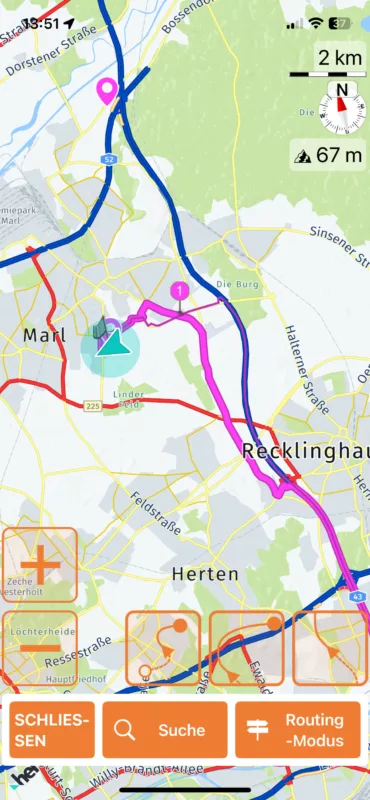
Not at all.
Just show 2 pictures as example.
First: Overview (near)
For example when I delete VIA1 the screen switches to Second Overview hole route.
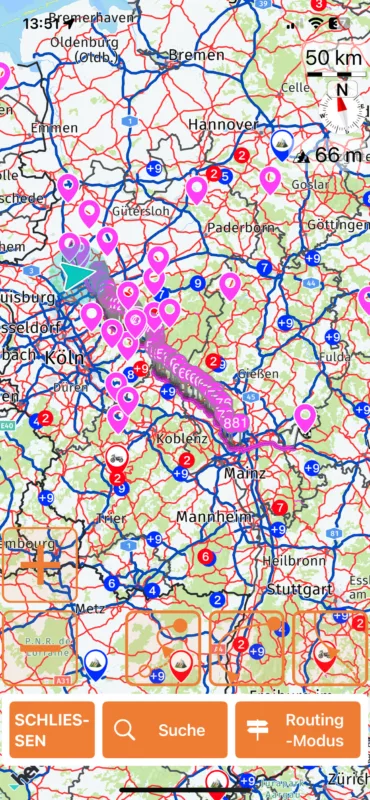

Quote from Guido on 10.06.2024, 11:51There is no easy way. The zoom out is done to show you how the route changes. At first there was no zoom out, but then someone requested to add this, so I did. To quickly zoom in again on your current location you can use the most right zoom button. Not easy to keep everyone happy 🙂
There is no easy way. The zoom out is done to show you how the route changes. At first there was no zoom out, but then someone requested to add this, so I did. To quickly zoom in again on your current location you can use the most right zoom button. Not easy to keep everyone happy 🙂
Quote from SuperGraupe on 10.06.2024, 15:57Your right😉.
2 people means at least 3 wishes.
It‘s ok for me.
Your right😉.
2 people means at least 3 wishes.
It‘s ok for me.


