
Overlay not visible while planning

Quote from uai on 26.02.2025, 04:08Hi Guido,
I am currently planning a large trip and have encountered following issue.
I am having a folder in my routes and have set show routes from this folder in map while planning.
However it doesn't work.
The routes I created manually with startpoint entering waypoints sequential and endpoint are being shown.
The ones where I set only startpoint and endpoint and let the system figure out (which adds too many waypoints inbetween btw.) are not shown.
I can add screenshots or share data as needed.
Also if I go to routes -> folder -> new route it is added in Favourites folder by default.
Cheers
Uli
Hi Guido,
I am currently planning a large trip and have encountered following issue.
I am having a folder in my routes and have set show routes from this folder in map while planning.
However it doesn't work.
The routes I created manually with startpoint entering waypoints sequential and endpoint are being shown.
The ones where I set only startpoint and endpoint and let the system figure out (which adds too many waypoints inbetween btw.) are not shown.
I can add screenshots or share data as needed.
Also if I go to routes -> folder -> new route it is added in Favourites folder by default.
Cheers
Uli

Quote from Guido on 26.02.2025, 08:59Hi Uli,
At the moment, there is a bug. The "layers" do not automatically update when you add a new route to a folder. For the new route to appear as part of the layer you need to open the layers panel and tap the button top left (the refresh) button. This will refresh the layers.
It's on the list to automate this (refresh automatically when new elements are added).
It's also on the list to prefill the folder field with the folder you actually tapped the "Add route" button. Indeed, at the moment, it's always "Favorites". I'll try to get that in for the upcoming update.
Adding waypoints / via points is done by the curvy routing (to force the route to take more curvy roads). I could reduce the number of via points added, but then it might happen that the route becomes less curvy. There is no way to know that in advance. So, I chose to be a little bit "carefull". Better too much via points and ensure the route is curvy enough, than too little. You can always remove some via points manually after the curvy route was generated.
Hope this explains. If not, or if you have other questions, pleaese let me know.
Cheers,
Guido
Hi Uli,
At the moment, there is a bug. The "layers" do not automatically update when you add a new route to a folder. For the new route to appear as part of the layer you need to open the layers panel and tap the button top left (the refresh) button. This will refresh the layers.
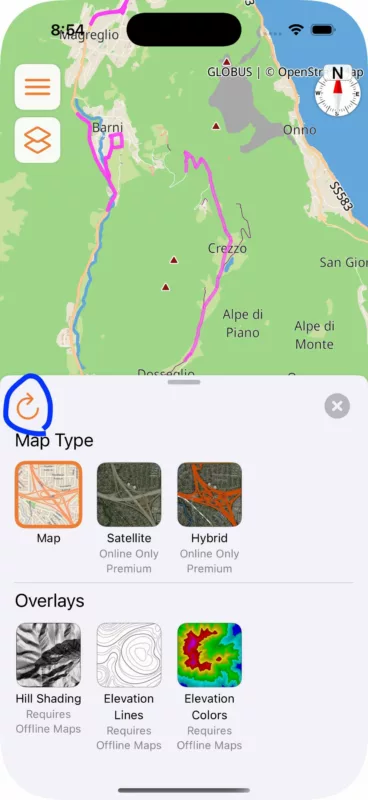
It's on the list to automate this (refresh automatically when new elements are added).
It's also on the list to prefill the folder field with the folder you actually tapped the "Add route" button. Indeed, at the moment, it's always "Favorites". I'll try to get that in for the upcoming update.
Adding waypoints / via points is done by the curvy routing (to force the route to take more curvy roads). I could reduce the number of via points added, but then it might happen that the route becomes less curvy. There is no way to know that in advance. So, I chose to be a little bit "carefull". Better too much via points and ensure the route is curvy enough, than too little. You can always remove some via points manually after the curvy route was generated.
Hope this explains. If not, or if you have other questions, pleaese let me know.
Cheers,
Guido


