
Option to increase contrast in map views

Quote from KapnEisbaer on 03.03.2024, 01:57Hi Guido
I am a long time Scenic user and these days Scenic has taken its place as my preferred Navigation tool (replacing dedicated GPS devices). Now I keep an old Iphone 8 Max specifically for the purpose of being my navigation unit on my bikes.
The customisation options for the maps seem to be more than enough, with one possible exception. What I would love to see is an option to increase the contrast of the selected map, so that the streets etc are easier to view (my eyes are getting older and I spent too much time on the computer screen especially in the Pandemic). I do have reading glasses now, but do not wear them when I ride. I have already turned on increased font and contrast in the OS (IOS 16). The screen is far enough away that I can read it, but a little extra contrast would improve the experience massively.
Keep up the good work!
Jonathan
Hi Guido
I am a long time Scenic user and these days Scenic has taken its place as my preferred Navigation tool (replacing dedicated GPS devices). Now I keep an old Iphone 8 Max specifically for the purpose of being my navigation unit on my bikes.
The customisation options for the maps seem to be more than enough, with one possible exception. What I would love to see is an option to increase the contrast of the selected map, so that the streets etc are easier to view (my eyes are getting older and I spent too much time on the computer screen especially in the Pandemic). I do have reading glasses now, but do not wear them when I ride. I have already turned on increased font and contrast in the OS (IOS 16). The screen is far enough away that I can read it, but a little extra contrast would improve the experience massively.
Keep up the good work!
Jonathan

Quote from mattsz on 03.03.2024, 05:34Hi Jonathan -
Apologies if you already know, but have you tried a customized map style? The previous version of Scenic introduced this feature, and it was a game-changer for me.(EDIT: Obviously you do know about the custom map styles, you said so right in your post! I should have read it again before posting! But the suggestion remains: you can really improve the contrast with careful custom choices)
I spent some time with colors, fonts and road widths to create a combination that really helps me to see things more clearly. Two samples images below, the exact same map screen... first one is the default map style, then my custom style:
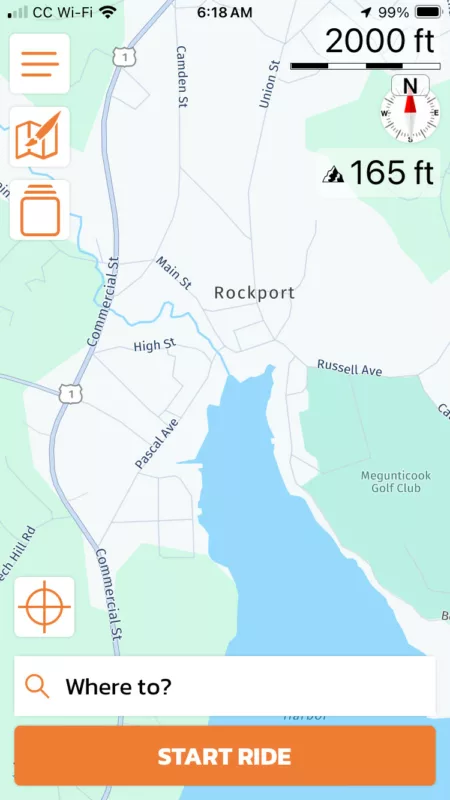
Some frustrations I have: some road names and items come and go at different zoom levels, and highway route numbers never change size (the old ones were much bigger and clearer; it's a HERE issue that Guido has said he is hoping to address with them somehow).
Hi Jonathan -
Apologies if you already know, but have you tried a customized map style? The previous version of Scenic introduced this feature, and it was a game-changer for me.
(EDIT: Obviously you do know about the custom map styles, you said so right in your post! I should have read it again before posting! But the suggestion remains: you can really improve the contrast with careful custom choices)
I spent some time with colors, fonts and road widths to create a combination that really helps me to see things more clearly. Two samples images below, the exact same map screen... first one is the default map style, then my custom style:
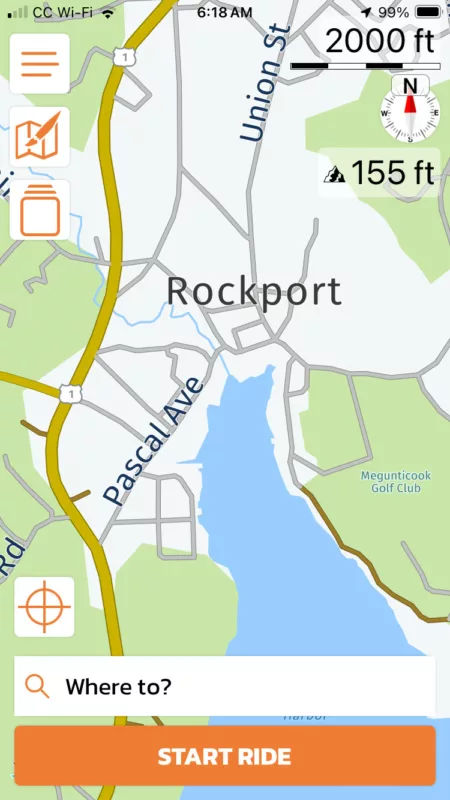
Some frustrations I have: some road names and items come and go at different zoom levels, and highway route numbers never change size (the old ones were much bigger and clearer; it's a HERE issue that Guido has said he is hoping to address with them somehow).

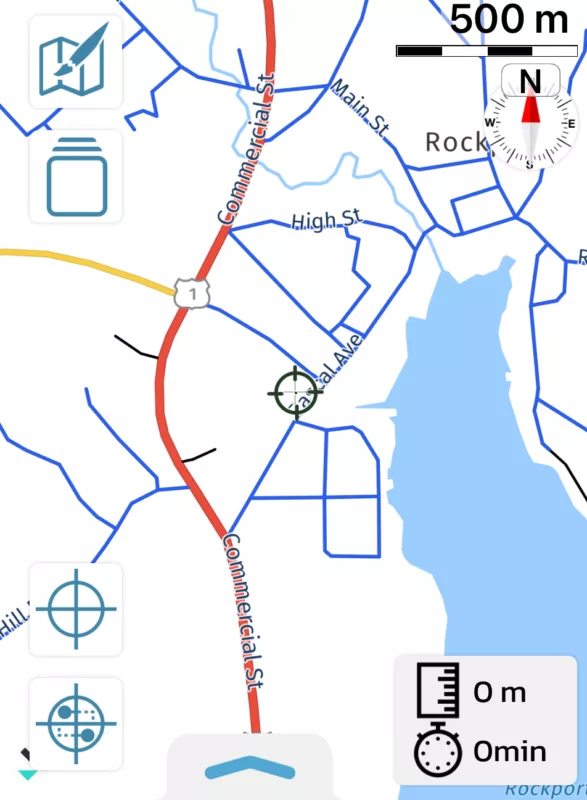
Quote from johansw on 03.03.2024, 05:52Or even more careful setting of colors..
Everything set to white here except the roads in different colors and blue water 🙂
Or even more careful setting of colors..
Everything set to white here except the roads in different colors and blue water 🙂

Quote from Guido on 03.03.2024, 19:10Hi @kapneisbaer. The two other posters are right. The best (and only 🙂) way to increase contrast is to change the colors of your custom map style. As very extreme you could set all area colors to white (except maybe water) and all road colors to black or dark gray. That will give you the most amount of contrast.
What also might help in general, is to turn off Night Shift and True Tone in iOS Settings > Display & Brightness.
Hi @kapneisbaer. The two other posters are right. The best (and only 🙂) way to increase contrast is to change the colors of your custom map style. As very extreme you could set all area colors to white (except maybe water) and all road colors to black or dark gray. That will give you the most amount of contrast.
What also might help in general, is to turn off Night Shift and True Tone in iOS Settings > Display & Brightness.


