
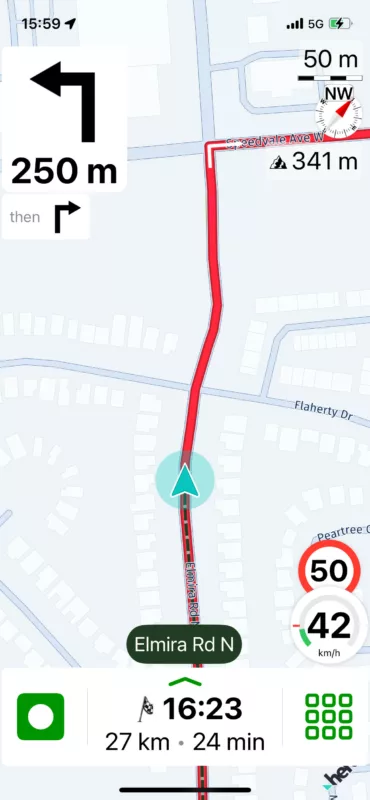
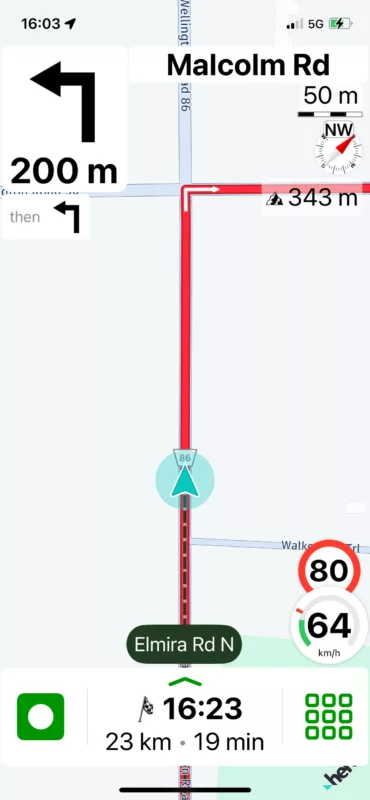
Next Turn Icon is often Indicating an Opposite Turn


Quote from Guido on 07.02.2024, 15:56Hi Mark,
Was this a pre-saved route? If so, could you send me the share-link? (Select route form route list and tap "share" button).
If it was just to a destination, would you mind giving me approximate location of your start location and destination?
If you prefer you can email it to me throug the "email me" button at the bottom of the HELP page.
Thanks,
Guido
Hi Mark,
Was this a pre-saved route? If so, could you send me the share-link? (Select route form route list and tap "share" button).
If it was just to a destination, would you mind giving me approximate location of your start location and destination?
If you prefer you can email it to me throug the "email me" button at the bottom of the HELP page.
Thanks,
Guido

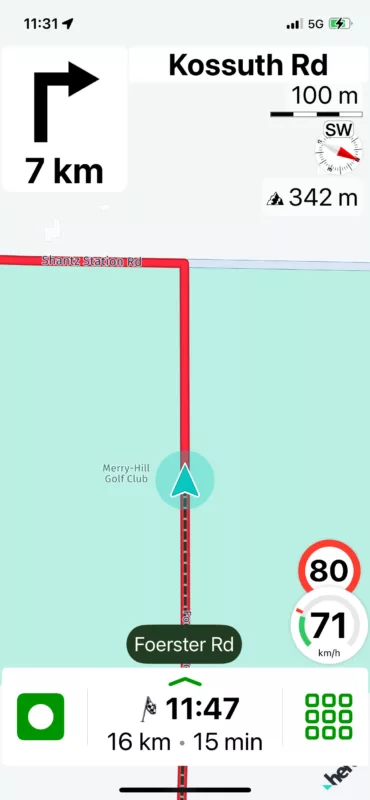
Quote from Barkinmadd on 01.03.2024, 08:09Odd that in the middle image, Scenic doesn't show the left hand turn onto Shantz Station road (Kossuth is much further along Shantz Station). It's as if a section of the route is ignored by the arrows...
Odd that in the middle image, Scenic doesn't show the left hand turn onto Shantz Station road (Kossuth is much further along Shantz Station). It's as if a section of the route is ignored by the arrows...
Quote from Guido on 01.03.2024, 08:58I'm not familiar in this area and don't know the route, but I suspect that the arrow and distance is the one to the NEXT turn. I still need to look into this. Difficult to reproduce.
I'm not familiar in this area and don't know the route, but I suspect that the arrow and distance is the one to the NEXT turn. I still need to look into this. Difficult to reproduce.
Quote from Barkinmadd on 01.03.2024, 09:14I tried this route in simulation mode where I set a right-hand turn onto Kossuth (I happen to live in this area so I recognized the names of these roads) and when on Foerster, I get an arrow telling me to make a left onto Shantz Station (which is correct) and then after this turn I get the 'Turn right" arrow in 7km onto Kossuth. So at least in simulation I don't see this issue. Btw - I happen to also have the map for this region downloaded (Ontario - Canada), if that makes any difference.
I tried this route in simulation mode where I set a right-hand turn onto Kossuth (I happen to live in this area so I recognized the names of these roads) and when on Foerster, I get an arrow telling me to make a left onto Shantz Station (which is correct) and then after this turn I get the 'Turn right" arrow in 7km onto Kossuth. So at least in simulation I don't see this issue. Btw - I happen to also have the map for this region downloaded (Ontario - Canada), if that makes any difference.
Quote from Guido on 01.03.2024, 09:28Mark came back to me over email, saying that this was a simple route with just a destination. I'm still looking into this. It's a weird issue, but it's not the only time this was reported, so there seems to be some scenarios where this happens. Just need to find what those scenarios are, then find what causes them, and then fix it 🙂.
Mark came back to me over email, saying that this was a simple route with just a destination. I'm still looking into this. It's a weird issue, but it's not the only time this was reported, so there seems to be some scenarios where this happens. Just need to find what those scenarios are, then find what causes them, and then fix it 🙂.
Quote from Barkinmadd on 01.03.2024, 09:36Smash those bugs!!! Lol
I wonder if Mark would see this in simulation mode? Also wonder if the presence of the offline map (in my test) changes the routing algorithm in this case? In other words, if I simulate the same route having first deleted my Ontario - Canada map, would I get a different result? If I get a chance, I'll give that a try but the real issue may be that the algorithm differs in live mode with just a destination... Something I can't try at the moment. Cheers.
Smash those bugs!!! Lol
I wonder if Mark would see this in simulation mode? Also wonder if the presence of the offline map (in my test) changes the routing algorithm in this case? In other words, if I simulate the same route having first deleted my Ontario - Canada map, would I get a different result? If I get a chance, I'll give that a try but the real issue may be that the algorithm differs in live mode with just a destination... Something I can't try at the moment. Cheers.
Quote from Guido on 01.03.2024, 09:40Don't believe it's related to offline maps vs online maps. I have a pretty good idea of where to look in the code, but I need a consistent way to reproduce the issue so that I also know when it's fixed 🙂.
Don't believe it's related to offline maps vs online maps. I have a pretty good idea of where to look in the code, but I need a consistent way to reproduce the issue so that I also know when it's fixed 🙂.


