
"Next Turn" Feature

Quote from jefflasher on 21.04.2024, 06:03While leading a ride yesterday, there were 2-3 instances where Scenic missed my next turn. It was apparently looking ahead to another turn beyond my next one and would note the street name (with the left turn or right turn icon) for a turn beyond my next one. I realized it after missing the actual next turn (and I would either see the route outline after I passed it), then turning around, getting back on the correct route, and pulling over to look at my app. My navigator (set to "Karen") missed it as well because she was likely scheduled for that turn beyond the next one.
Note: I also didn't realize my map download had been wiped out, leading to some frustrating turnarounds since roads have changed since the last time I rode. It seems every time there is an update to the app or my subscription renews, all of my settings reset and my downloads disappear. I don't ride often, so to have to re-program my app before every ride - honestly, it's about time to part ways with this app. I've really enjoyed it, but the time I spend re-programming and getting lost leading rides is frustrating and dangerous. Thanks for any tips, though.
While leading a ride yesterday, there were 2-3 instances where Scenic missed my next turn. It was apparently looking ahead to another turn beyond my next one and would note the street name (with the left turn or right turn icon) for a turn beyond my next one. I realized it after missing the actual next turn (and I would either see the route outline after I passed it), then turning around, getting back on the correct route, and pulling over to look at my app. My navigator (set to "Karen") missed it as well because she was likely scheduled for that turn beyond the next one.
Note: I also didn't realize my map download had been wiped out, leading to some frustrating turnarounds since roads have changed since the last time I rode. It seems every time there is an update to the app or my subscription renews, all of my settings reset and my downloads disappear. I don't ride often, so to have to re-program my app before every ride - honestly, it's about time to part ways with this app. I've really enjoyed it, but the time I spend re-programming and getting lost leading rides is frustrating and dangerous. Thanks for any tips, though.

Quote from Guido on 21.04.2024, 08:02Hi Jeff,
Sorry to hear about your bad experience. I'm aware of the issue with it sometimes skipping turn instructions. I'm looking into the issue. It happens when a via point is placed directly after a junction. Meanwhile, while I'm working on a fix, what you could do as a workaround, is during planning (in the power planner) make sure that via point are moved away from junctions.
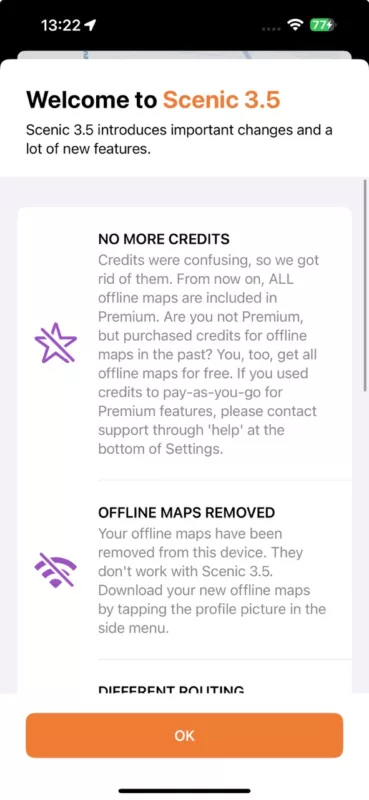
As for the removed offline maps. Scenic was update to version 3.5 in February. v3.5 uses a new map framework. Your old offline maps were removed at first launch of Scenic 3.5, because they don't work with the new map framework. You should have seen a "What's new" message about this:
With Scenic 3.5 some new configuration options were introduced, and some old ones were removed. This is probably why you had to reconfigure some options. The majority of options were not changed, though, and the way you configured them should still be in tact.
I hope this explains a bit further why this happened.
Best regards,
Guido
Hi Jeff,
Sorry to hear about your bad experience. I'm aware of the issue with it sometimes skipping turn instructions. I'm looking into the issue. It happens when a via point is placed directly after a junction. Meanwhile, while I'm working on a fix, what you could do as a workaround, is during planning (in the power planner) make sure that via point are moved away from junctions.
As for the removed offline maps. Scenic was update to version 3.5 in February. v3.5 uses a new map framework. Your old offline maps were removed at first launch of Scenic 3.5, because they don't work with the new map framework. You should have seen a "What's new" message about this:
With Scenic 3.5 some new configuration options were introduced, and some old ones were removed. This is probably why you had to reconfigure some options. The majority of options were not changed, though, and the way you configured them should still be in tact.
I hope this explains a bit further why this happened.
Best regards,
Guido
Quote from jefflasher on 21.04.2024, 20:56Thank you for the quick reply, Guido!
Thank you for the quick reply, Guido!


