
New maps don't find address.

Quote from Td5 on 22.03.2024, 01:38The maps in this new version are not good.We was riding in India and Nepal and when checking a hotel address thatgoogle maps found, none of the maps in Scenic could find the address.This happen in several cases.Also sometimes when you make a location, the screen goes blur and you cannot verify if the location is OK or not. It still make a location.I would like to have a way to open a map and make there a location, this isperhaps possible, but I just don’t know how. Sometimes it's easy to check howthe streets are in google maps and copy the location visually in Scenic if the programcan't find an address.

Quote from Guido on 22.03.2024, 11:54Thanks for your feedback.
Scenic uses HERE maps, Apple Maps (and also Google Maps if you choose so) for its searches. I can't really change the fact that HERE and Apple don't return any search results for your searches, as I don't manage the map data.
Having said that, in the upcoming update (probably Monday), I did make some changes to the search method of HERE maps. At the moment it's only searching in a 15km radius. With the upcoming update, it will also return results outside that radius.
Furthermore, Scenic has the ability to search Google. To do this, follow below steps:
- Enter your search term
- Tap "search" on the keyboard
- Now a list of search results appear (or an empty list if both HERE and Apple don't return any results).
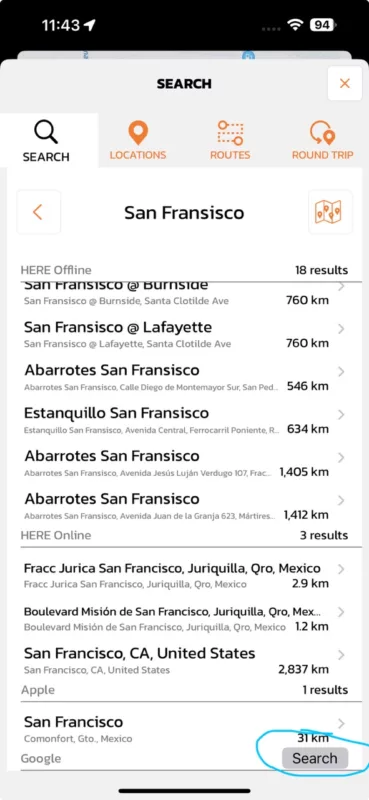
- At the bottom of this (possibly empty) list you'll find a "Google" row with a search button (see screenshots). If you tap that, Scenic will ask Google for search results.
If you want to add a location by choosing it on the map, there are two ways to do this:
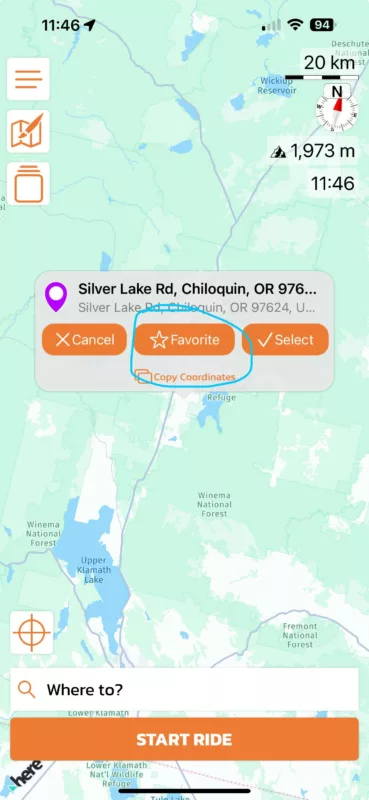
- In the main screen, tap and hold on the location on the map you want to add. Then choose the "star favorite" button (see screenshot) to add it as a location
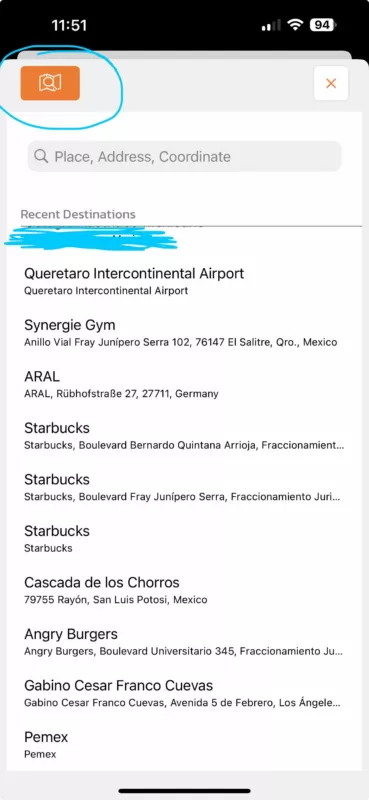
- Another way to add a location from the map is to go to the "Locations" list through the side menu, then tap the little + button and select "Add Location". Then tap the button top left (see screenshot), to select a location on the map.
I'm not sure when the "screen goes blur" for you. Perhaps next time this happens, could you make a screenshot and post it here?
Hope this helps/explains. If not, please let me know if you have other questions. Happy to help.
Best regards and ride safe,
Guido
Thanks for your feedback.
Scenic uses HERE maps, Apple Maps (and also Google Maps if you choose so) for its searches. I can't really change the fact that HERE and Apple don't return any search results for your searches, as I don't manage the map data.
Having said that, in the upcoming update (probably Monday), I did make some changes to the search method of HERE maps. At the moment it's only searching in a 15km radius. With the upcoming update, it will also return results outside that radius.
Furthermore, Scenic has the ability to search Google. To do this, follow below steps:
- Enter your search term
- Tap "search" on the keyboard
- Now a list of search results appear (or an empty list if both HERE and Apple don't return any results).
- At the bottom of this (possibly empty) list you'll find a "Google" row with a search button (see screenshots). If you tap that, Scenic will ask Google for search results.
If you want to add a location by choosing it on the map, there are two ways to do this:
- In the main screen, tap and hold on the location on the map you want to add. Then choose the "star favorite" button (see screenshot) to add it as a location
- Another way to add a location from the map is to go to the "Locations" list through the side menu, then tap the little + button and select "Add Location". Then tap the button top left (see screenshot), to select a location on the map.
I'm not sure when the "screen goes blur" for you. Perhaps next time this happens, could you make a screenshot and post it here?
Hope this helps/explains. If not, please let me know if you have other questions. Happy to help.
Best regards and ride safe,
Guido
Quote from Td5 on 23.03.2024, 01:02Thanks Guido,
The 15km radius is not practical, in my opinion. I made routes at home for India and Nepal. Now I'm making routes for our trip to Sweden and probably because of the 15km radius it won't find Stockholm. Very strange restriction.
Dataroaming in Nepal cost 2,5€Mb, so frugal me turned data roaming off. The screen blurring probably was because of no internet and the 15km radius. We're going to Scotland in May and again dataroaming is costly and iPhone suck constantly data if it's connected. This is why I want to use offline maps. I'll take a screenshot if it happen again.
Just for clarifying; when I down load a map in Scenic, it download only the Here map, the other maps need internet connection? Could it be possible to download also Google or Apple maps and Scenic could use them offline?
Thanks Guido,
The 15km radius is not practical, in my opinion. I made routes at home for India and Nepal. Now I'm making routes for our trip to Sweden and probably because of the 15km radius it won't find Stockholm. Very strange restriction.
Dataroaming in Nepal cost 2,5€Mb, so frugal me turned data roaming off. The screen blurring probably was because of no internet and the 15km radius. We're going to Scotland in May and again dataroaming is costly and iPhone suck constantly data if it's connected. This is why I want to use offline maps. I'll take a screenshot if it happen again.
Just for clarifying; when I down load a map in Scenic, it download only the Here map, the other maps need internet connection? Could it be possible to download also Google or Apple maps and Scenic could use them offline?
Quote from Guido on 23.03.2024, 05:49The 15km radius is not practical, in my opinion.
That’s why this is improving in the upcoming update.
Could it be possible to download also Google or Apple maps and Scenic could use them offline?
Unfortunately both Apple and Google maps do not have an option for 3rd party developers to download offline maps.
The 15km radius is not practical, in my opinion.
That’s why this is improving in the upcoming update.
Could it be possible to download also Google or Apple maps and Scenic could use them offline?
Unfortunately both Apple and Google maps do not have an option for 3rd party developers to download offline maps.


