
New features suggestion

Quote from Deleted user on 14.08.2021, 12:02Hi Guido,
I am new 2 months user and first, let me say, I really love your app, which reminds me a bit the discontinued Navigon I loved to use. Your app behaves much better though, just to name a few - I especially like that the ride can be resumed after unexpected shutdown or device overheat, the route planning is better than I ever saw anywhere, importing of POIs, the amount of roads (some of them are not even on google maps) and many others I wont name to not bore you. I just hope all these features will be preserved in the new version.
Second, I am not and never was a biker, I love roadtrips and recently discovered offroad passion with my wifes Wrangler (maybe its the age as in your case). My large online research brought me Scenic and I am not regretting purchasing it for lifetime (until some big company buys you off, which I hope wont be soon). Recently I returned from my first big 10 days off-road trip from Romania and suggestions follow.
a/ tiny (unmapped) roads - yes, some of them are not suitable for an offroad vehicle, some not even for a skilled offroad biker, but I still prefer to have them compared to not have them mapped (I do hope this will not change in Scenic 3). However, when I already plan a route and start navigating through, I dont see them anymore - not during navigation (this might be reasonable - cpu saving and/or prevent confusion), nor when I try to edit the on-going route by clicking "EDIT STOPS". Especially the latter forces me to either finish ongoing route (I dont want this, as I love my tracks to be completed in one piece) or use 2 devices e.g. in case a road proves to be unusable/dangerous and I would like to find another alternative. Suggestion is: seeing all roads also when editing stops
b/ pause/resume - I saw the topic in Help section, and yes, I did not notice the autoresume slider in tracking stats (which appears only if autopause is engaged), so some of my tracks have the unwanted straight line. While I know the workaround now, I would still suggest to add option in nerds section: do not autopause / set a time limit for autopause to engage (autopause was engaging even when moving very slowly through the rough terrain)
c/ estimated arrival times - obviously this is because I am driving a Wrangler and not a motorcycle. In any case, on some sections even when i was constantly violating speed limits, I was not able to keep up with the arrival time. Navigon had an option to set "lorry" instead of a car (had more implications, e.g. some roads/bridges were excluded). Suggestion: set either max speed and/or bike type - dual sport will probably have slower avg speed than adventure on highway
d/ Statistics - I am a bit autistic and into stats and in "Me" section and also in "Vehicles" section, I see only last 2 years (resp. last 2 months, weeks). Suggestion: is it possible to log at least the basic stats forever? Like e.g. no. of rides, riding time, distance, max/avg speed (if I am not mistaken these integers take marginal database space) *please, apologize if this is irrelevant and the years will add up once I will use Scenic longer
Many thanks if you managed to read it all 🙂
Best wishes and please keep up the good and perfectionistic work as this app really is one of its kind.
Andrej.
Hi Guido,
I am new 2 months user and first, let me say, I really love your app, which reminds me a bit the discontinued Navigon I loved to use. Your app behaves much better though, just to name a few - I especially like that the ride can be resumed after unexpected shutdown or device overheat, the route planning is better than I ever saw anywhere, importing of POIs, the amount of roads (some of them are not even on google maps) and many others I wont name to not bore you. I just hope all these features will be preserved in the new version.
Second, I am not and never was a biker, I love roadtrips and recently discovered offroad passion with my wifes Wrangler (maybe its the age as in your case). My large online research brought me Scenic and I am not regretting purchasing it for lifetime (until some big company buys you off, which I hope wont be soon). Recently I returned from my first big 10 days off-road trip from Romania and suggestions follow.
a/ tiny (unmapped) roads - yes, some of them are not suitable for an offroad vehicle, some not even for a skilled offroad biker, but I still prefer to have them compared to not have them mapped (I do hope this will not change in Scenic 3). However, when I already plan a route and start navigating through, I dont see them anymore - not during navigation (this might be reasonable - cpu saving and/or prevent confusion), nor when I try to edit the on-going route by clicking "EDIT STOPS". Especially the latter forces me to either finish ongoing route (I dont want this, as I love my tracks to be completed in one piece) or use 2 devices e.g. in case a road proves to be unusable/dangerous and I would like to find another alternative. Suggestion is: seeing all roads also when editing stops
b/ pause/resume - I saw the topic in Help section, and yes, I did not notice the autoresume slider in tracking stats (which appears only if autopause is engaged), so some of my tracks have the unwanted straight line. While I know the workaround now, I would still suggest to add option in nerds section: do not autopause / set a time limit for autopause to engage (autopause was engaging even when moving very slowly through the rough terrain)
c/ estimated arrival times - obviously this is because I am driving a Wrangler and not a motorcycle. In any case, on some sections even when i was constantly violating speed limits, I was not able to keep up with the arrival time. Navigon had an option to set "lorry" instead of a car (had more implications, e.g. some roads/bridges were excluded). Suggestion: set either max speed and/or bike type - dual sport will probably have slower avg speed than adventure on highway
d/ Statistics - I am a bit autistic and into stats and in "Me" section and also in "Vehicles" section, I see only last 2 years (resp. last 2 months, weeks). Suggestion: is it possible to log at least the basic stats forever? Like e.g. no. of rides, riding time, distance, max/avg speed (if I am not mistaken these integers take marginal database space) *please, apologize if this is irrelevant and the years will add up once I will use Scenic longer
Many thanks if you managed to read it all 🙂
Best wishes and please keep up the good and perfectionistic work as this app really is one of its kind.
Andrej.

Quote from Guido on 14.08.2021, 21:47Hi Andrej,
Thank you for the kinds words and thank you for the feedback and suggestions. I really appreciate you taking the time to write this all down! Here are my reactions:
a/ Do you mean there are some small roads you see during planning, but not during navigation? If so, perhaps this is zoom level related. Little roads only show on very high (close by) zoom level. Perhaps you could turn on 'show zoom buttons' (Settings > Navigation & Tracking) and see if you can make them appear by zooming in?
b/ OK. I will make sure Scenic 3 will have the auto-pause off setting. And thank you for digging through the help / forum for finding the answer yourself. Not everyone does that 🙂.
c/ In the current version you can try to switch from 'Efficient' mode to 'Fast' routing mode. In some countries (where speed limit data is not always correct/complete) the 'Efficient' mode takes higher average speeds than the 'Fast' mode. So, counter-intuitive, the 'Fast' route will actually be slower in those case. If you drop enough via points the route will take the same road in both modes. In Scenic 3, the speed limit data will be a lot more complete due to the new map provider. The new provider currently does not have options to switch vehicle type / speed profiles like you are suggesting ('lorry'). I have requested this to the provider, and hope they will pick this up in one of their future updates.
d/ The statistics of all your history are stored. It's just that the user interface does not have the possibility to show them at the moment. I have always been meaning to expand the statistics with some nice graphs, more history, etc. But somehow there are always other things more important, so I have not gotten around to that yet. But... it is still on the list and I won't forget it. I am a bit of a numbers nerd myself 🙂.
Best regards and thanks again,
Guido
Hi Andrej,
Thank you for the kinds words and thank you for the feedback and suggestions. I really appreciate you taking the time to write this all down! Here are my reactions:
a/ Do you mean there are some small roads you see during planning, but not during navigation? If so, perhaps this is zoom level related. Little roads only show on very high (close by) zoom level. Perhaps you could turn on 'show zoom buttons' (Settings > Navigation & Tracking) and see if you can make them appear by zooming in?
b/ OK. I will make sure Scenic 3 will have the auto-pause off setting. And thank you for digging through the help / forum for finding the answer yourself. Not everyone does that 🙂.
c/ In the current version you can try to switch from 'Efficient' mode to 'Fast' routing mode. In some countries (where speed limit data is not always correct/complete) the 'Efficient' mode takes higher average speeds than the 'Fast' mode. So, counter-intuitive, the 'Fast' route will actually be slower in those case. If you drop enough via points the route will take the same road in both modes. In Scenic 3, the speed limit data will be a lot more complete due to the new map provider. The new provider currently does not have options to switch vehicle type / speed profiles like you are suggesting ('lorry'). I have requested this to the provider, and hope they will pick this up in one of their future updates.
d/ The statistics of all your history are stored. It's just that the user interface does not have the possibility to show them at the moment. I have always been meaning to expand the statistics with some nice graphs, more history, etc. But somehow there are always other things more important, so I have not gotten around to that yet. But... it is still on the list and I won't forget it. I am a bit of a numbers nerd myself 🙂.
Best regards and thanks again,
Guido
Quote from Deleted user on 15.08.2021, 07:53Hi Guido,
many thanks for such a quick reply.
In regards to the first suggestion I think, the best thing would be to copy the actual route:
https://scenicapp.space/viewRoute.php?rid=dKdvBWpw
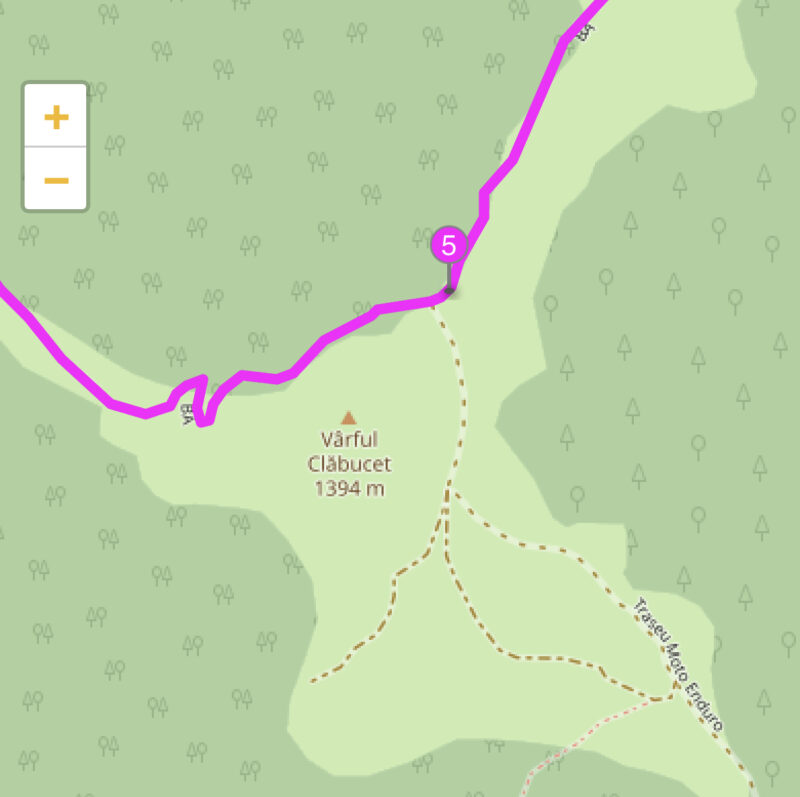
At waypoint 5, you can see various different roads. The original "BA" route proved to be dangerous/impossible with Wrangler (in good conditions would be probably "doable" with offroad motorcycle), so I tried to find alternatives by tapping EDIT STOPS during ongoing navigation. Later I found it is possible to edit the stops directly on map by double tapping, before I used the workaround to click Search, any POI type like Fuel, then the map icon which appears. However, using both approaches even when zoomed in to max all of the small roads which you see on the shared route around waypoint 5 are not visible - e.g. the route called "Traseu Moto Enduro" or the neighboring red and brown roads - these are exactly those roads, which most mainstream navigations dont have + you are truly offline in that area. Truth is not many conscious guys would use them, but if you have time, courage and a showel, with basic terraforming skills, they are actually passable 🙂 But more importantly, they are visible when planning the route.
For the record, it was a bit late for terraforming, so I called it mission failed and we returned the way we came 🙂
Many thanks again, and enjoy the weekend,
Andrej.
Hi Guido,
many thanks for such a quick reply.
In regards to the first suggestion I think, the best thing would be to copy the actual route:
https://scenicapp.space/viewRoute.php?rid=dKdvBWpw
At waypoint 5, you can see various different roads. The original "BA" route proved to be dangerous/impossible with Wrangler (in good conditions would be probably "doable" with offroad motorcycle), so I tried to find alternatives by tapping EDIT STOPS during ongoing navigation. Later I found it is possible to edit the stops directly on map by double tapping, before I used the workaround to click Search, any POI type like Fuel, then the map icon which appears. However, using both approaches even when zoomed in to max all of the small roads which you see on the shared route around waypoint 5 are not visible - e.g. the route called "Traseu Moto Enduro" or the neighboring red and brown roads - these are exactly those roads, which most mainstream navigations dont have + you are truly offline in that area. Truth is not many conscious guys would use them, but if you have time, courage and a showel, with basic terraforming skills, they are actually passable 🙂 But more importantly, they are visible when planning the route.
For the record, it was a bit late for terraforming, so I called it mission failed and we returned the way we came 🙂
Many thanks again, and enjoy the weekend,
Andrej.
Quote from Guido on 15.08.2021, 11:06I understand what you mean now. There is something else going on here though. The difference in roads being visible is not between planning and navigation mode, but between the web page that opens a shared route, and the app.
The web page that opens when you click a shared route uses a different (more detailed) map layer compared to the app. Unfortunately I can’t use that layer in the app itself as external layers are not supported by the framework.
Scenic 3 does not have such a detailed layer either, but the framework does have the option to add other 3rd party layers. I’ll investigate if I can add this in a later stage.
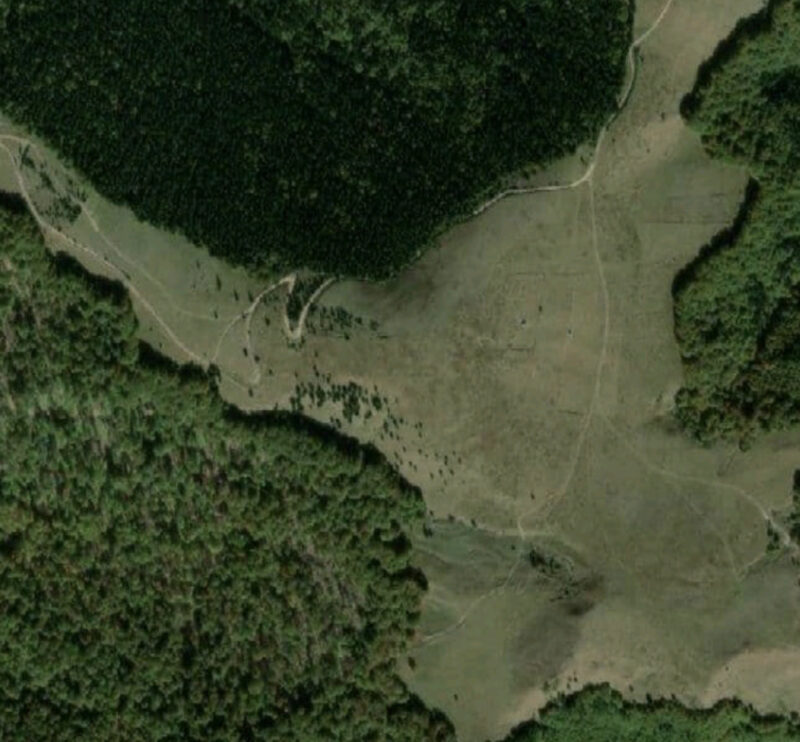
Scenic 3 does have a big advantage in this scenario. It offers satelite view which basically shows everything, mapped or not. E.g. this is the satelite map around waypoint 5 for Scenic 3.
Be aware though… even if the roads are visible on the map, it doesn’t mean that Scenic can calculate a route over it. Especially with those smaller dirt roads / single track trails, scenic will probably think you can not go there, or are not allowed to go there with your vehicle. Or sometimes these trails are just not known to scenic even though they are there in satelite view.
Cheers,
Guido
I understand what you mean now. There is something else going on here though. The difference in roads being visible is not between planning and navigation mode, but between the web page that opens a shared route, and the app.
The web page that opens when you click a shared route uses a different (more detailed) map layer compared to the app. Unfortunately I can’t use that layer in the app itself as external layers are not supported by the framework.
Scenic 3 does not have such a detailed layer either, but the framework does have the option to add other 3rd party layers. I’ll investigate if I can add this in a later stage.
Scenic 3 does have a big advantage in this scenario. It offers satelite view which basically shows everything, mapped or not. E.g. this is the satelite map around waypoint 5 for Scenic 3.
Be aware though… even if the roads are visible on the map, it doesn’t mean that Scenic can calculate a route over it. Especially with those smaller dirt roads / single track trails, scenic will probably think you can not go there, or are not allowed to go there with your vehicle. Or sometimes these trails are just not known to scenic even though they are there in satelite view.
Cheers,
Guido


