
Navigation Route differs from planned Route

Quote from David_G on 09.12.2021, 08:43Hi Guido,
I recently planned a Route with the Power Planner and wanted to navigate that route on the next day. To my surprise my route deviated from the planned route in some cases which I don't understand as the "new" route took me from the main road to smaller roads only to rejoin that same main road some turns later.
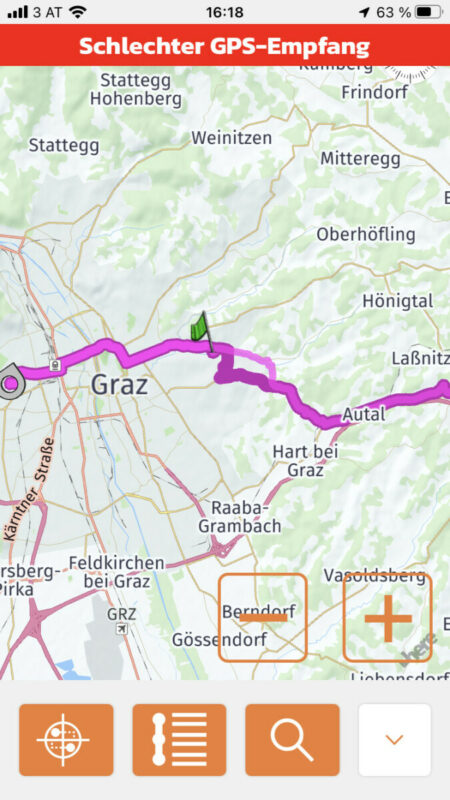
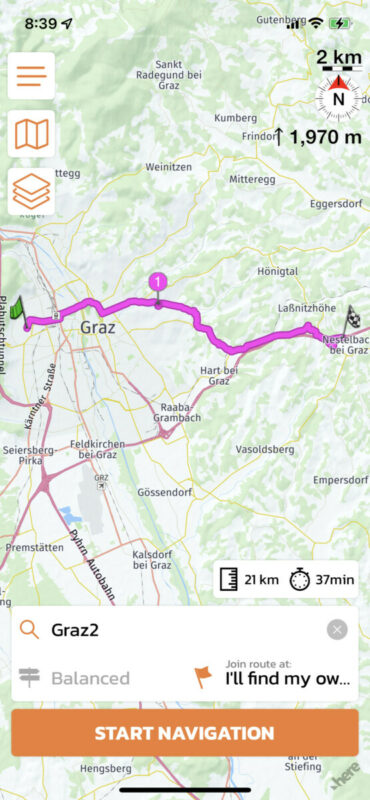
For testing purposes I started the navigation from that same planned route now, and the navigation is even more off now as you can see in the attached picture.
As you can see, instead of just moving along the planned route, Scenic recalculated me through the city to a motorway. But why is that? Does Scenic include Traffic data so it calculates differently each time?
Thanks and kind regards, David
Hi Guido,
I recently planned a Route with the Power Planner and wanted to navigate that route on the next day. To my surprise my route deviated from the planned route in some cases which I don't understand as the "new" route took me from the main road to smaller roads only to rejoin that same main road some turns later.
For testing purposes I started the navigation from that same planned route now, and the navigation is even more off now as you can see in the attached picture.
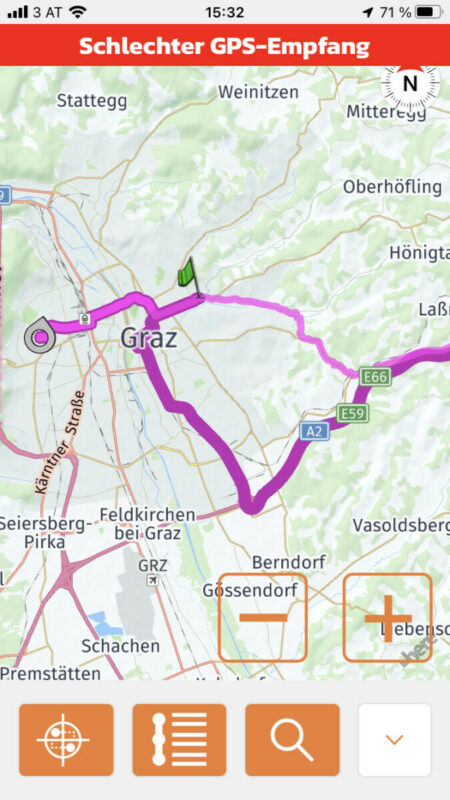
As you can see, instead of just moving along the planned route, Scenic recalculated me through the city to a motorway. But why is that? Does Scenic include Traffic data so it calculates differently each time?
Thanks and kind regards, David

Quote from Guido on 09.12.2021, 09:14That should definitely not happen. Perhaps it's because the route includes the stretch from your current location to the route start, but even than it should not happen. What happens if you open this route again in the power planner (select route from route list and then choose 'edit points')? How does the route look in there?
That should definitely not happen. Perhaps it's because the route includes the stretch from your current location to the route start, but even than it should not happen. What happens if you open this route again in the power planner (select route from route list and then choose 'edit points')? How does the route look in there?
Quote from David_G on 09.12.2021, 09:17In power planner, the route looks as it should. Only after starting the navigation, it might change depending on where I set my Vias/Stops.
I tried, changing the Vias, so I don't have to show you my addresses, but then it worked as it should. So it doesn't happen all the time, but it does happen.
In power planner, the route looks as it should. Only after starting the navigation, it might change depending on where I set my Vias/Stops.
I tried, changing the Vias, so I don't have to show you my addresses, but then it worked as it should. So it doesn't happen all the time, but it does happen.
Quote from David_G on 09.12.2021, 09:20The funny thing is, if I change some Vias/Stops further away (Starting point and first Via staying the same), also the route changes after starting navigation.
The funny thing is, if I change some Vias/Stops further away (Starting point and first Via staying the same), also the route changes after starting navigation.
Quote from Guido on 09.12.2021, 09:25I think I know what's wrong. When navigation starts, Scenic moves via points away from junctions (because via points exactly on junctions will mess with turn instructions), but this shouldn't change the routing though. Could you share this route with me please, so I can analyse further? (select route from list and use 'share' button.
I think I know what's wrong. When navigation starts, Scenic moves via points away from junctions (because via points exactly on junctions will mess with turn instructions), but this shouldn't change the routing though. Could you share this route with me please, so I can analyse further? (select route from list and use 'share' button.
Quote from David_G on 09.12.2021, 09:26For me, it seems like the route calculation method differs between power planner and actual navigation.
That leads me to ask why it is not possible to change the calculation method of a planned route directly when choosing a route?
For me, it seems like the route calculation method differs between power planner and actual navigation.
That leads me to ask why it is not possible to change the calculation method of a planned route directly when choosing a route?

Quote from Guido on 09.12.2021, 09:37For me, it seems like the route calculation method differs between power planner and actual navigation.
I don't think that's it. It's probably what I mentioned 2 posts up. But I'll double check anyway.
That leads me to ask why it is not possible to change the calculation method of a planned route directly when choosing a route?
This is a design decision from me. The route has been carefully created by you (or someone else). Choosing a different routing mode and/or changing avoidances can significantly change a route. And start screen doesn't offer advanced editing features to check and manually make adjustments.
For me, it seems like the route calculation method differs between power planner and actual navigation.
I don't think that's it. It's probably what I mentioned 2 posts up. But I'll double check anyway.
That leads me to ask why it is not possible to change the calculation method of a planned route directly when choosing a route?
This is a design decision from me. The route has been carefully created by you (or someone else). Choosing a different routing mode and/or changing avoidances can significantly change a route. And start screen doesn't offer advanced editing features to check and manually make adjustments.
Quote from David_G on 09.12.2021, 09:38Thats the original route with the small route deviation once I start navigation from my the west part of the City.
https://scenicapp.space/route/OaeKxWyr
Thats the shortened route, where Scenic leads me through the city and the motorway after starting navigation:
https://scenicapp.space/route/YczxkcCh
Both route deviations only occur if I choose "Join route on starting point". It does NOT change the route when choosing "I will find my own way"!
Thats the original route with the small route deviation once I start navigation from my the west part of the City.
https://scenicapp.space/route/OaeKxWyr
Thats the shortened route, where Scenic leads me through the city and the motorway after starting navigation:
https://scenicapp.space/route/YczxkcCh
Both route deviations only occur if I choose "Join route on starting point". It does NOT change the route when choosing "I will find my own way"!
Quote from Guido on 09.12.2021, 09:40OK. Thank you. I will analyse further.
OK. Thank you. I will analyse further.
Quote from David_G on 09.12.2021, 09:44Quote from Guido on 09.12.2021, 09:37
That leads me to ask why it is not possible to change the calculation method of a planned route directly when choosing a route?
This is a design decision from me. The route has been carefully created by you (or someone else). Choosing a different routing mode and/or changing avoidances can significantly change a route. And start screen doesn't offer advanced editing features to check and manually make adjustments.
Hm, I understand, I will have to adopt to that then. I often just include all my Stops, I HAVE to take and then decide the next day if I want to go there quickly with motorway of if I have more time and make it a curvy route. I relied on my navigation systems to do a good enough job to not send me where I didn't want to go at all. And everything else I just accepted 😉
Quote from Guido on 09.12.2021, 09:37
That leads me to ask why it is not possible to change the calculation method of a planned route directly when choosing a route?
This is a design decision from me. The route has been carefully created by you (or someone else). Choosing a different routing mode and/or changing avoidances can significantly change a route. And start screen doesn't offer advanced editing features to check and manually make adjustments.
Hm, I understand, I will have to adopt to that then. I often just include all my Stops, I HAVE to take and then decide the next day if I want to go there quickly with motorway of if I have more time and make it a curvy route. I relied on my navigation systems to do a good enough job to not send me where I didn't want to go at all. And everything else I just accepted 😉
Quote from Guido on 09.12.2021, 09:55OK. You make a good point 🙂. I will add to the list. I remember in an older version Scenic just gave a warning when you changed the routing mode.
OK. You make a good point 🙂. I will add to the list. I remember in an older version Scenic just gave a warning when you changed the routing mode.
Quote from Guido on 12.01.2022, 10:20Quote from David_G on 09.12.2021, 09:20The funny thing is, if I change some Vias/Stops further away (Starting point and first Via staying the same), also the route changes after starting navigation.
Hi David,
I've been looking into this in more detail. This is a bug in the routing framework. I have reported this to the framework provider.I'm guessing this is related to caching of the route. When calculating the route between the start and end flag, it takes route X... and X is then cached for some period of time (my guess is an app session or maybe even shorter). When calculating the route between your current location, start flag and end flag the route is Y (where X is the 2nd part of Y). If X is still cached it will use X. However if X is no longer cached is needs to calculate again, but now X becomes X' (X accent).
Why? I am not sure. Somehow when another point (your current location in this case) is added, the routing algorithm decides that the route after the start flag also should be different. If I would have to guess, I'd say that the routing algorithm takes the travel direction into account, and this, somehow, has this effect with this specific route.
The reverse is also true. If you open Scenic and then first calculate the route in the start screen, you will get Y (with X'). If you then open the route in the Power Planner, it will show X' (because that's the one that's cached).
Meanwhile, the only real workaround for this is to place some additional via points after the start flag. For what it's worth... I've not heard this before yet, so I'm guessing/hoping this is a sporadic occurrence.
Quote from David_G on 09.12.2021, 09:20The funny thing is, if I change some Vias/Stops further away (Starting point and first Via staying the same), also the route changes after starting navigation.
Hi David,
I've been looking into this in more detail. This is a bug in the routing framework. I have reported this to the framework provider.
I'm guessing this is related to caching of the route. When calculating the route between the start and end flag, it takes route X... and X is then cached for some period of time (my guess is an app session or maybe even shorter). When calculating the route between your current location, start flag and end flag the route is Y (where X is the 2nd part of Y). If X is still cached it will use X. However if X is no longer cached is needs to calculate again, but now X becomes X' (X accent).
Why? I am not sure. Somehow when another point (your current location in this case) is added, the routing algorithm decides that the route after the start flag also should be different. If I would have to guess, I'd say that the routing algorithm takes the travel direction into account, and this, somehow, has this effect with this specific route.
The reverse is also true. If you open Scenic and then first calculate the route in the start screen, you will get Y (with X'). If you then open the route in the Power Planner, it will show X' (because that's the one that's cached).
Meanwhile, the only real workaround for this is to place some additional via points after the start flag. For what it's worth... I've not heard this before yet, so I'm guessing/hoping this is a sporadic occurrence.
Quote from David_G on 18.01.2022, 04:24Hi Guido,
Thanks for looking into it!
I just had the time to think through what you wrote.What seems strange to me with your caching assumption, is that the route is being calculated differently as soon as I press "navigate". Prior to that, when I only chose the route and it shows me a preview of that route, everything is as I've planned. So its literally just seconds between that recalculation which shows different results.
If I include my current location in the power planner as starting point and make the prior starting point a VIA, the route stays the same in the power planner, the routing preview and in the navigation itself.
Hi Guido,
Thanks for looking into it!
I just had the time to think through what you wrote.
What seems strange to me with your caching assumption, is that the route is being calculated differently as soon as I press "navigate". Prior to that, when I only chose the route and it shows me a preview of that route, everything is as I've planned. So its literally just seconds between that recalculation which shows different results.
If I include my current location in the power planner as starting point and make the prior starting point a VIA, the route stays the same in the power planner, the routing preview and in the navigation itself.
Quote from Guido on 18.01.2022, 04:36the route is being calculated differently as soon as I press "navigate". Prior to that, when I only chose the route and it shows me a preview of that route, everything is as I've planned.
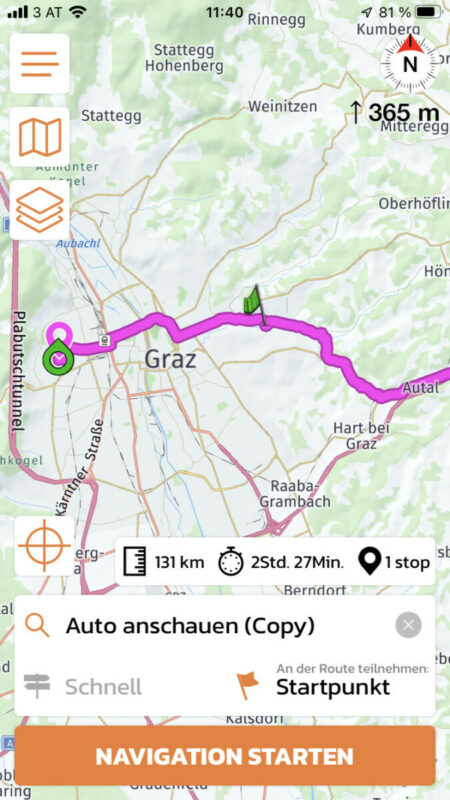
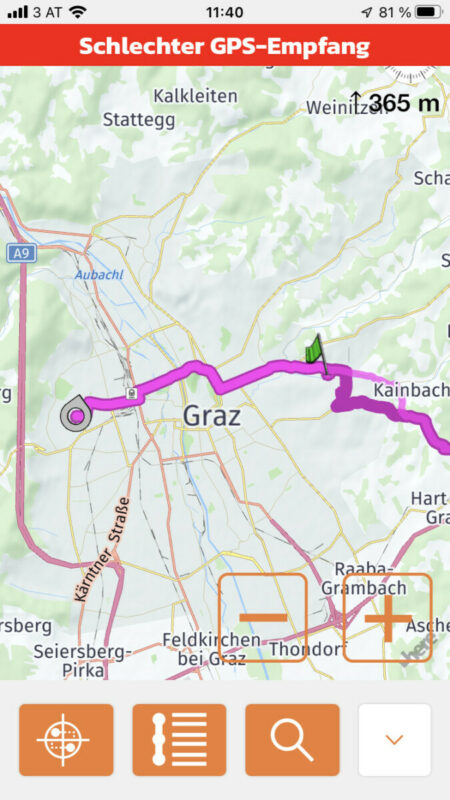
I didn’t have that behaviour in my tests. Just to verify: so, you select the route for navigation in the main/map screen and route is like you saved it in the power planner + the stretch from current location to route start. Then, when you tap the ‘start navigation’ button the route changes? If that’s the case then there’s something else going on.
Or do you mean it looks like designed in the list where you select the route for navigation / the thumbnail, and then changes when you select it from the list?
the route is being calculated differently as soon as I press "navigate". Prior to that, when I only chose the route and it shows me a preview of that route, everything is as I've planned.
I didn’t have that behaviour in my tests. Just to verify: so, you select the route for navigation in the main/map screen and route is like you saved it in the power planner + the stretch from current location to route start. Then, when you tap the ‘start navigation’ button the route changes? If that’s the case then there’s something else going on.
Or do you mean it looks like designed in the list where you select the route for navigation / the thumbnail, and then changes when you select it from the list?
Quote from David_G on 18.01.2022, 04:39Quote from Guido on 18.01.2022, 04:36I didn’t have that behaviour in my tests. Just so verify: so, you select the route for navigation in the main/map screen and route is like you saved it in the power planner + the stretch from current location to route start. Then, when you tap the ‘start navigation’ button the route changes? If that’s the case then there’s something else going on.
Exactly that!
Quote from Guido on 18.01.2022, 04:36I didn’t have that behaviour in my tests. Just so verify: so, you select the route for navigation in the main/map screen and route is like you saved it in the power planner + the stretch from current location to route start. Then, when you tap the ‘start navigation’ button the route changes? If that’s the case then there’s something else going on.
Exactly that!
Quote from Guido on 18.01.2022, 04:57Hmmm. I’ll have another look. Could you send me the coordinates of stop 1? (There is a setting under Finetuning > coordinates in callout bubble). When you turn that on and then open the route in the power planner (select route > edit points > tap the marker) you’ll see the coordinates.
And, a follow up question: when you select the route for navigation, while still in the start/map screen, is it always as you designed it? Or is it also different there?
Hmmm. I’ll have another look. Could you send me the coordinates of stop 1? (There is a setting under Finetuning > coordinates in callout bubble). When you turn that on and then open the route in the power planner (select route > edit points > tap the marker) you’ll see the coordinates.
And, a follow up question: when you select the route for navigation, while still in the start/map screen, is it always as you designed it? Or is it also different there?
Quote from David_G on 18.01.2022, 05:09Current Location: 47°4'1"N 15°23'52"E
Starting Point: 47°4'36"N 15°29'1"E
Via 1: 47°3'46"N 15°36'18"EYes, when I'm only selecting a planned route and see it on the map, its been always as planned upto now. Only after starting the navigation, it differs (only from time to time depending on the set waypoints/Vias).
edit:
If I delete all other waypoints but those 2 mentioned (Starting Point and Via1 being the new End Point), the route stays the same after starting the navigation!
Only after also including Stop2 as the new End Point, it follows my described behaviour.
Stop2: 47°13'25"N 15°54'28"E
Current Location: 47°4'1"N 15°23'52"E
Starting Point: 47°4'36"N 15°29'1"E
Via 1: 47°3'46"N 15°36'18"E
Yes, when I'm only selecting a planned route and see it on the map, its been always as planned upto now. Only after starting the navigation, it differs (only from time to time depending on the set waypoints/Vias).
edit:
If I delete all other waypoints but those 2 mentioned (Starting Point and Via1 being the new End Point), the route stays the same after starting the navigation!
Only after also including Stop2 as the new End Point, it follows my described behaviour.
Stop2: 47°13'25"N 15°54'28"E
Quote from Guido on 18.01.2022, 05:21Ok. Thanks. Will investigate later today / tomorrow and report back here.
Ok. Thanks. Will investigate later today / tomorrow and report back here.
Quote from Guido on 18.01.2022, 08:50After some further investigation, for now, I have to stick with my caching theory combined with different route when a waypoint is added. Additionally it seems there is some randomization in the route choice as I can't really discover a pattern.
While trying to reproduce it, I didn't even make it to the navigation screen. I already found differences between the power planner and the start/map screen, but not always. Here's what I did (apologies for the disorder in screenshots... I did this a few times):
- I created the route by first dropping start, then via 1, then destination. And I get most left screenshot as a result. I saved that route.
- Then I immediately opened it in the main/start screen and got second screenshot as a result.
- Then I opened the route again in the power planner (by going to route, selecting the route, and tapping 'edit points') and got most left screenshot again
- Then I went back to start screen, opened the route again, but now I got the separate screenshot.
- Then I restarted Scenic, opened route again in power planner, and got 3rd screenshot
- Then I removed the start flag and got the most right screenshot
Note that there is a difference between your situation and mine because my current position is not in Austria (I'm using a simulation mode), so that could explain why you see slightly different behaviour. But, in any case, there is something weird going on that I can not explain.
I triple checked the code and routing mode and avoidances is the same in all three screens (power planner, start/main and navigation screen), so that's definitely not it. Also, if that were the case, I would be able to see a pattern I suspect.
So, I'm afraid, the status stands. Wait for answer (and hopefully a fix) of provider and meanwhile add a bit more via points to reduce risk of route becoming different.
After some further investigation, for now, I have to stick with my caching theory combined with different route when a waypoint is added. Additionally it seems there is some randomization in the route choice as I can't really discover a pattern.
While trying to reproduce it, I didn't even make it to the navigation screen. I already found differences between the power planner and the start/map screen, but not always. Here's what I did (apologies for the disorder in screenshots... I did this a few times):
- I created the route by first dropping start, then via 1, then destination. And I get most left screenshot as a result. I saved that route.
- Then I immediately opened it in the main/start screen and got second screenshot as a result.
- Then I opened the route again in the power planner (by going to route, selecting the route, and tapping 'edit points') and got most left screenshot again
- Then I went back to start screen, opened the route again, but now I got the separate screenshot.
- Then I restarted Scenic, opened route again in power planner, and got 3rd screenshot
- Then I removed the start flag and got the most right screenshot
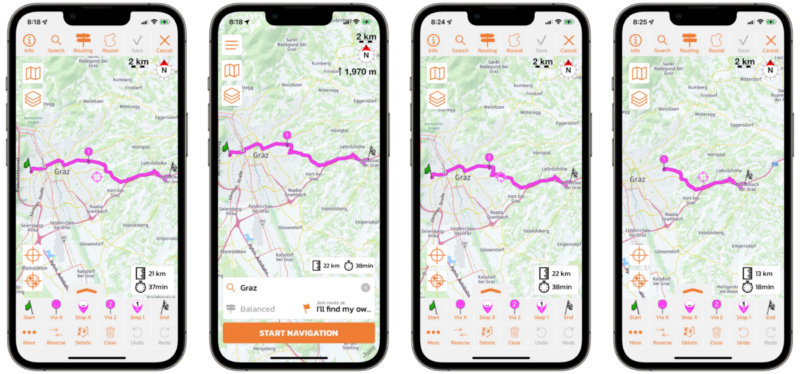
Note that there is a difference between your situation and mine because my current position is not in Austria (I'm using a simulation mode), so that could explain why you see slightly different behaviour. But, in any case, there is something weird going on that I can not explain.
I triple checked the code and routing mode and avoidances is the same in all three screens (power planner, start/main and navigation screen), so that's definitely not it. Also, if that were the case, I would be able to see a pattern I suspect.
So, I'm afraid, the status stands. Wait for answer (and hopefully a fix) of provider and meanwhile add a bit more via points to reduce risk of route becoming different.
Quote from Guido on 18.01.2022, 09:23One more follow up question... do you have the offline map for Austria installed?
One more follow up question... do you have the offline map for Austria installed?
Quote from David_G on 18.01.2022, 12:42Your findings are really interesting! Thats an even stranger behavior than those I have seen myself and I also can't seem to reproduce your findings.
Yes, I have the current offline map of Austria installed.
Your findings are really interesting! Thats an even stranger behavior than those I have seen myself and I also can't seem to reproduce your findings.
Yes, I have the current offline map of Austria installed.
Quote from Guido on 18.01.2022, 15:33OK. Getting a bit different results when I also download the offline map. With the offline map, indeed, the route seems to be consistent between the power planner and the start/map screen. Also when I start the navigation at first the route is the same (mind you, I have to simulate this as I'm not in Graz neighborhood). However, when I then go into edit mode while navigating (double tap the map) and then remove my start flag (so only via 1 and end flag remain), the route becomes different.
So, offline map on device has something to do with it. Perhaps this eliminates caching need. Still the problem remains though. My guess is, because you are not in simulation mode, and your real position jumps a bit when inside / leaving, this initiates a recalculation, resulting in a 'new' route. I could understand if route between current position and route start would change, but it's just very strange that the route between the start and via changes because of this.
Again... this is all guess work. The real answer has to come from the provider. Once I get an answer I'll post here.
OK. Getting a bit different results when I also download the offline map. With the offline map, indeed, the route seems to be consistent between the power planner and the start/map screen. Also when I start the navigation at first the route is the same (mind you, I have to simulate this as I'm not in Graz neighborhood). However, when I then go into edit mode while navigating (double tap the map) and then remove my start flag (so only via 1 and end flag remain), the route becomes different.
So, offline map on device has something to do with it. Perhaps this eliminates caching need. Still the problem remains though. My guess is, because you are not in simulation mode, and your real position jumps a bit when inside / leaving, this initiates a recalculation, resulting in a 'new' route. I could understand if route between current position and route start would change, but it's just very strange that the route between the start and via changes because of this.
Again... this is all guess work. The real answer has to come from the provider. Once I get an answer I'll post here.
Quote from Guido on 19.01.2022, 11:27OK. I found the issue and will be able to provide a fix in the next update.
It is a combination of two bugs:
- For this specific route, the offline routing engine gives a different route than the online routing engine. So, if you have the offline map installed you'll get a different route compared to if you would not have the offline map installed. This is a bug in the routing framework. I gave the provider all info and they are analyzing this further now.
- Now, you wouldn't even have noticed this if it weren't for an additional bug in the Scenic code. If the offline map is present on the device it should always use the offline routing engine. This check for installed maps worked in the Power Planner and in the Start/Map screen. However it didn't work in the Navigation screen. The Navigation screen always used the online engine.I will correct this for the upcoming update so you won't see these differences anymore.
Thanks very much for the detailed info you provided. This helped me get to the bottom of this!
Cheers,
Guido
OK. I found the issue and will be able to provide a fix in the next update.
It is a combination of two bugs:
- For this specific route, the offline routing engine gives a different route than the online routing engine. So, if you have the offline map installed you'll get a different route compared to if you would not have the offline map installed. This is a bug in the routing framework. I gave the provider all info and they are analyzing this further now.
- Now, you wouldn't even have noticed this if it weren't for an additional bug in the Scenic code. If the offline map is present on the device it should always use the offline routing engine. This check for installed maps worked in the Power Planner and in the Start/Map screen. However it didn't work in the Navigation screen. The Navigation screen always used the online engine.
I will correct this for the upcoming update so you won't see these differences anymore.
Thanks very much for the detailed info you provided. This helped me get to the bottom of this!
Cheers,
Guido
Quote from David_G on 20.01.2022, 01:12Wow, good job!
I would have never thought about that, but it makes total sense.Thanks for diving into it so deeply and for finding the solution!
Wow, good job!
I would have never thought about that, but it makes total sense.
Thanks for diving into it so deeply and for finding the solution!


