
Navigation menu: Audio play pause back en next issue
Quote from FJRCruizer on 14.10.2024, 05:09Hello,
I'm using an Iphone 15 Pro Max with IOS 18.
I've programmed an open app function under one of the programmable buttons that alow me to start Spotify or Flitsmeister while navigating and automaticly returning to Scenic navi after a few seconds.
I've also set music bottons to "All media-apps" in the settings menu that should allow me to Audio play/pause, back and next in the navigation menu.
The problem that i find is that when I activate one of the Audio play/pause, back and next in the navigation menu the Apple assignments app starts but doesn't do what it's suppose to do.
If I would have the Scenic navi output teksts of play/pause, back and next, for the dutch version of the Apple assignments app I could possibly program the desired functions.
Does anyone have the Scenic navi output teksts of play/pause, back and next, for the dutch version of the Apple assignments app? And willing to share these with me?
Thanks in advance.
Hello,
I'm using an Iphone 15 Pro Max with IOS 18.
I've programmed an open app function under one of the programmable buttons that alow me to start Spotify or Flitsmeister while navigating and automaticly returning to Scenic navi after a few seconds.
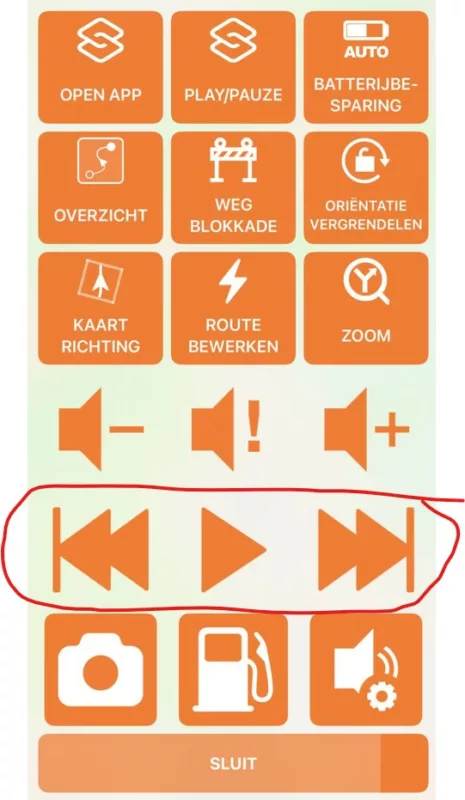
I've also set music bottons to "All media-apps" in the settings menu that should allow me to Audio play/pause, back and next in the navigation menu.
The problem that i find is that when I activate one of the Audio play/pause, back and next in the navigation menu the Apple assignments app starts but doesn't do what it's suppose to do.
If I would have the Scenic navi output teksts of play/pause, back and next, for the dutch version of the Apple assignments app I could possibly program the desired functions.
Does anyone have the Scenic navi output teksts of play/pause, back and next, for the dutch version of the Apple assignments app? And willing to share these with me?
Thanks in advance. 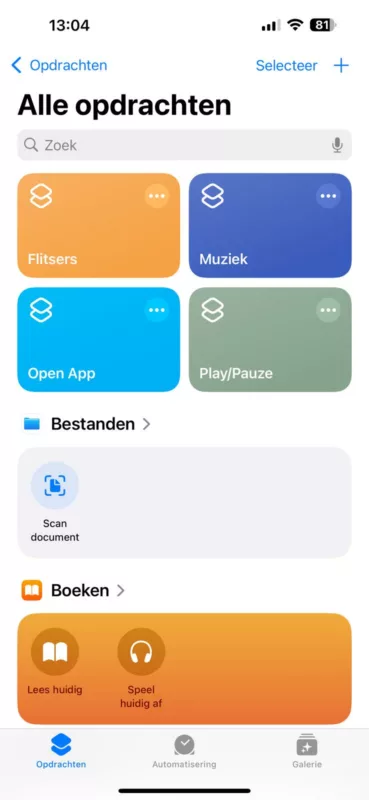
Quote from FJRCruizer on 14.10.2024, 05:52After a little puzzling it's solved by following the help page; https://scenic.app/help/control-music-playback-for-all-media-apps-not-just-apple-music/
Ik think i didn't look good enough to find the solution. And I might have under-estimated the greatness of this platvorm..
Never the less: I already was very happy with this navi system but now I'am even happier...
All good 🙂
After a little puzzling it's solved by following the help page; https://scenic.app/help/control-music-playback-for-all-media-apps-not-just-apple-music/
Ik think i didn't look good enough to find the solution. And I might have under-estimated the greatness of this platvorm..
Never the less: I already was very happy with this navi system but now I'am even happier...
All good 🙂


