
Missing parts of the Blue Ridge Parkway

Quote from dasherpr on 06.12.2025, 15:21Hi Guido,
I am planning a road trip down the Blue Ridge Parway in the spring of 2026. Using Google My Maps or Google Maps to plan it doesn’t work as right now some parts of the road are closed so the software reroutes you. So I thought I would just plan it in Scenic directly. Began adding Via points until I got to the intersection of the Blue Ridge and route 221 near Linville Falls, NC and then on the Scenic map… the Blue Ridge Parkway just disappears. Just north of Gurney Falls Road. Not there.
Coordinates: 35.965437,-81.949317
in Google Maps, you can see the Parkway, but it just disappears in the Scenic map.
Not sure why this happened. The Blue Ridge Parkway is a major route for road trips and should not just disappear from a map.
Hope this is useful. Look forward to your feedback.
Hi Guido,
I am planning a road trip down the Blue Ridge Parway in the spring of 2026. Using Google My Maps or Google Maps to plan it doesn’t work as right now some parts of the road are closed so the software reroutes you. So I thought I would just plan it in Scenic directly. Began adding Via points until I got to the intersection of the Blue Ridge and route 221 near Linville Falls, NC and then on the Scenic map… the Blue Ridge Parkway just disappears. Just north of Gurney Falls Road. Not there.
Coordinates: 35.965437,-81.949317
in Google Maps, you can see the Parkway, but it just disappears in the Scenic map.
Not sure why this happened. The Blue Ridge Parkway is a major route for road trips and should not just disappear from a map.
Hope this is useful. Look forward to your feedback.

Quote from HDFatboy on 06.12.2025, 21:26https://scenicapp.space/route/llJjosOe
https://scenicapp.space/route/kbLnQclt
https://scenicapp.space/route/llJjosOe
Quote from dasherpr on 07.12.2025, 06:22Thank you, HD, this is going to be very useful, and yet the mystery remains as to why I cannot see or use the whole BRP on my Scenic map.
Looking forward to next spring!
Thank you, HD, this is going to be very useful, and yet the mystery remains as to why I cannot see or use the whole BRP on my Scenic map.
Looking forward to next spring!
Quote from HDFatboy on 07.12.2025, 10:37I may be totally wrong here, but I believe it has to do with the hurricane that passed through western NC last year that closed many sections of the BRP because of the damage it caused.
I may be totally wrong here, but I believe it has to do with the hurricane that passed through western NC last year that closed many sections of the BRP because of the damage it caused.

Quote from Guido on 08.12.2025, 15:22The road is visible on the map, but because it's "under construction" (indeed due to Hurricane Helene) it shows differently:
Map at coordinate you posted:
Here is the link to the OpenStreetMap entry of this stretch of road: https://www.openstreetmap.org/way/131355964
As you can see access it set to "no" (that's why Scenic can't calculate a route using this stretch) and it's marked as "construction".
The road is visible on the map, but because it's "under construction" (indeed due to Hurricane Helene) it shows differently:
Map at coordinate you posted:
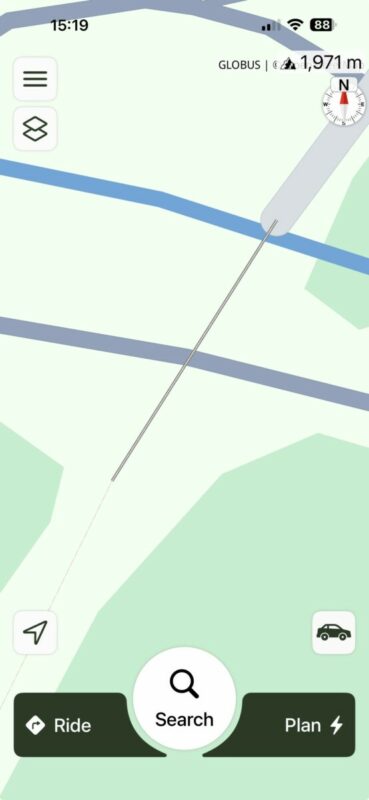
Here is the link to the OpenStreetMap entry of this stretch of road: https://www.openstreetmap.org/way/131355964
As you can see access it set to "no" (that's why Scenic can't calculate a route using this stretch) and it's marked as "construction".
Quote from dasherpr on 08.12.2025, 15:43As always, Guido, thank you so much for taking the time to look into this, and reply.
I understand now why this is not visible. I also understand that a navigation app cannot send people down a closed road, otherwise you'd be getting complaints about the opposite of what caused my question!
In my particular case, I am trying to plan a trip that will hopefully happen in about six months. I expect/hope the roads will be open by then (similar situations happen when roads are closed seasonally - in winter it becomes impossible to use Google Maps to plan routes for the summer if the roadways are closed... for the winter!). I was hoping for something a little bit "smarter" that could even tell you something like, "this is a closed road; however, if you click here and acknowledge this, you may plan a route using the closed segments".
That would be amazingly useful. It would allow me to better calculate times and overnight stops, etc. After all, what else can one do in winter... but plan great spring/summer rides?
Thanks again.
As always, Guido, thank you so much for taking the time to look into this, and reply.
I understand now why this is not visible. I also understand that a navigation app cannot send people down a closed road, otherwise you'd be getting complaints about the opposite of what caused my question!
In my particular case, I am trying to plan a trip that will hopefully happen in about six months. I expect/hope the roads will be open by then (similar situations happen when roads are closed seasonally - in winter it becomes impossible to use Google Maps to plan routes for the summer if the roadways are closed... for the winter!). I was hoping for something a little bit "smarter" that could even tell you something like, "this is a closed road; however, if you click here and acknowledge this, you may plan a route using the closed segments".
That would be amazingly useful. It would allow me to better calculate times and overnight stops, etc. After all, what else can one do in winter... but plan great spring/summer rides?
Thanks again.
Quote from Guido on 08.12.2025, 15:56I understand. I'll add "ignore construction" setting to the feature request list. Not sure if it's possible but I'll investigate once I get around to it.
Another thing that's already on the feature request list is to add a "trip start date". Obviously this only works if it's know in the map data when the road opens again.
I understand. I'll add "ignore construction" setting to the feature request list. Not sure if it's possible but I'll investigate once I get around to it.
Another thing that's already on the feature request list is to add a "trip start date". Obviously this only works if it's know in the map data when the road opens again.
Quote from LaszloK on 08.12.2025, 23:55Lieber Guido
Bitte dann unbedingt das ignorieren saisonaler Sperrungen (z.B. Wintersperre von Alpenpässen) gleich mitberücksichtigen.
László
Lieber Guido
Bitte dann unbedingt das ignorieren saisonaler Sperrungen (z.B. Wintersperre von Alpenpässen) gleich mitberücksichtigen.
László
Quote from dasherpr on 09.12.2025, 15:37As always, thank you, Lieber Guido!
no other app that I know of has this direct connection to the maker, which is very good and sets Scenic apart.
I see Laszlo has a similar request, same idea, so it would be a popular feature I think.
All the best to you.
As always, thank you, Lieber Guido!
no other app that I know of has this direct connection to the maker, which is very good and sets Scenic apart.
I see Laszlo has a similar request, same idea, so it would be a popular feature I think.
All the best to you.


