
Mac App Route Display

Quote from visiongrill on 02.01.2026, 09:09Hello!
I started seeing this problem recently where when I pull up a route on Mac, other routes I was working on from a previous time also show up. What you are seeing in the screen shot is a few different versions of one route (thinner blue line) and the route I want to edit (thicker line).
I deleted the app from the computer and started over but it still does it. It does not make scenic unusable but it's pretty annoying and can get confusing. I have not seen the same behavior on the phone app.
Any thoughts?
[caption id="attachment_9789" align="alignnone" width="800"]
Screenshot[/caption]
Hello!
I started seeing this problem recently where when I pull up a route on Mac, other routes I was working on from a previous time also show up. What you are seeing in the screen shot is a few different versions of one route (thinner blue line) and the route I want to edit (thicker line).
I deleted the app from the computer and started over but it still does it. It does not make scenic unusable but it's pretty annoying and can get confusing. I have not seen the same behavior on the phone app.
Any thoughts?
[caption id="attachment_9789" align="alignnone" width="800"] Screenshot[/caption]

Quote from Guido on 02.01.2026, 11:51I suspect you enabled showing some route folders on the map.
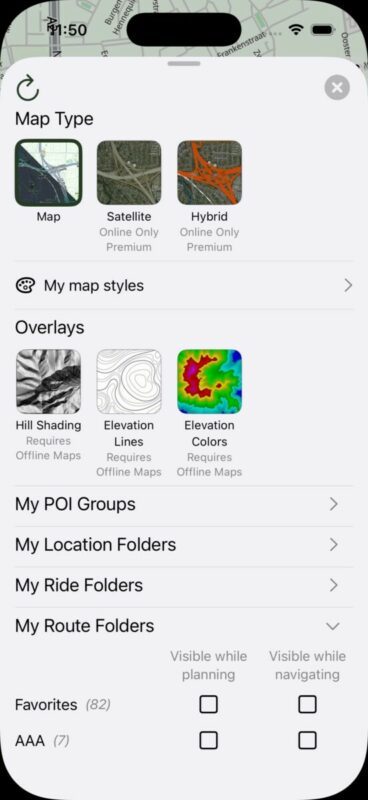
Tap the second button top left. In the panel that shows, scroll down and expand the My Routes section. Check if you placed a checkmark at one of the folders.
I suspect you enabled showing some route folders on the map.
Tap the second button top left. In the panel that shows, scroll down and expand the My Routes section. Check if you placed a checkmark at one of the folders.
Quote from visiongrill on 07.01.2026, 17:47Giudo,
Yes, that was it, thank you!
Giudo,
Yes, that was it, thank you!
Quote from pleasantone on 11.01.2026, 21:26For what it's worth (not a CarPlay issue!), when using my phone, occasionally I have to force restart Scenic to get rid of old routes or previous navigation points, if I have moved the route out from my Favorites (sent to display) folder or deleting the route. Minor issue. easy to work around. Also, given the reliability of the bug reporter, not going to bug you about it, but if you ever need some debugging, I can try again.
For what it's worth (not a CarPlay issue!), when using my phone, occasionally I have to force restart Scenic to get rid of old routes or previous navigation points, if I have moved the route out from my Favorites (sent to display) folder or deleting the route. Minor issue. easy to work around. Also, given the reliability of the bug reporter, not going to bug you about it, but if you ever need some debugging, I can try again.


