Locations vs Custom POIs

Quote from Gillyman on 23.08.2021, 21:00I'm not sure of the functionality differences between Locations and Custom POIs. When should I use a Location vs a Custom POI? I'm uploading a Google Map from My Places in Google and I have choice of "selecting all" and importing as Locations or Custom POIs using a POI Group. Will I get proximity alerts using locations or just with Custom POIs? I just need a rundown on the differences and purposes. If this is in a tutorial, I apologize in advance.
Long time Google My Places to Garmin Base Camp to Garmin Zumo user but so exited with the functionality of Scenic.
Thank you ...
I'm not sure of the functionality differences between Locations and Custom POIs. When should I use a Location vs a Custom POI? I'm uploading a Google Map from My Places in Google and I have choice of "selecting all" and importing as Locations or Custom POIs using a POI Group. Will I get proximity alerts using locations or just with Custom POIs? I just need a rundown on the differences and purposes. If this is in a tutorial, I apologize in advance.
Long time Google My Places to Garmin Base Camp to Garmin Zumo user but so exited with the functionality of Scenic.
Thank you ...

Quote from Guido on 23.08.2021, 22:21Hi Gillyman,
Locations are single locations that you’d typically save because you often navigate to them. Like your home, your work, a family member, etc. You do not get proximity alerts on locations, except if you include them in a route as a stop or destination. You can add locations by searching for a place or address or pointing on a map.
Custom POIs are meant for collections of similar type locations. (Similar to the ‘normal’ POIs like gas stations, restaurants, etc) You could use Custom POIs to save, for example, all speed cameras in a certain area, or all Starbucks in a certain area, etc. You do get proximity alerts for Custom POIs.
To add a Custom POI you need to know it’s coordinate (latitude and longitude). That’s why typically Custom POIs are imported and not added manually, although its technically possible.
In the tutorial video there is a section on how to import Custom POIs: https://scenic.app/help/scenic-detailed-tutorial-video/
Hope this helps/explains. If not or if you have other questions please let me know. Happy to help.
Best regards and ride safe,
Guido
Hi Gillyman,
Locations are single locations that you’d typically save because you often navigate to them. Like your home, your work, a family member, etc. You do not get proximity alerts on locations, except if you include them in a route as a stop or destination. You can add locations by searching for a place or address or pointing on a map.
Custom POIs are meant for collections of similar type locations. (Similar to the ‘normal’ POIs like gas stations, restaurants, etc) You could use Custom POIs to save, for example, all speed cameras in a certain area, or all Starbucks in a certain area, etc. You do get proximity alerts for Custom POIs.
To add a Custom POI you need to know it’s coordinate (latitude and longitude). That’s why typically Custom POIs are imported and not added manually, although its technically possible.
In the tutorial video there is a section on how to import Custom POIs: https://scenic.app/help/scenic-detailed-tutorial-video/
Hope this helps/explains. If not or if you have other questions please let me know. Happy to help.
Best regards and ride safe,
Guido
Quote from Gillyman on 25.08.2021, 15:24Thank you for the response.
So I've done three test runs now trying to use the Locations and Custom POI's. In both runs I imported custom POIs and placed them into a POI group. I created a customized route in My Google Maps and added several POIs. So my Google map had a directional layer and POI layer. I uploaded the map using the Scenic PC based App and copy-and-pasted the Google map URL into the appropriate field. I then went to the Scenic App on my Iphone and imported the data.
When I navigated the route, the application did not notify me of the POIs I created. By the way, I specified an alert distance of 5300 feet (1 mile). So my question is does the custom POI HAVE to be ON the route and Scenic notifies me of the POI? Or, is the alert distance a RADIAL proximity to the route line? I'm thinking its the ON the route only.
You see, what we are trying to do is have a bunch of POIs entered into Scenic and have Scenic notify us if the POI is within a radial alert distance specified.
When we imported to Scenic, we placed the POIs on the map using the overlay button when we imported. When we actually navigated we could see the POIs on the screen and they were represented by the Marker/Emoji that we specified. But Scenic didn't notify us if we were within the alert range of the POI and we couldn't touch the POI marker or Emoji on the screen to tell us what POI it represented. So, we are kind of riding blind in regards to nearby POIs that we might want to see but don't want to make the decision to go there until at the moment.
Does this make sense?
Thank you for the response.
So I've done three test runs now trying to use the Locations and Custom POI's. In both runs I imported custom POIs and placed them into a POI group. I created a customized route in My Google Maps and added several POIs. So my Google map had a directional layer and POI layer. I uploaded the map using the Scenic PC based App and copy-and-pasted the Google map URL into the appropriate field. I then went to the Scenic App on my Iphone and imported the data.
When I navigated the route, the application did not notify me of the POIs I created. By the way, I specified an alert distance of 5300 feet (1 mile). So my question is does the custom POI HAVE to be ON the route and Scenic notifies me of the POI? Or, is the alert distance a RADIAL proximity to the route line? I'm thinking its the ON the route only.
You see, what we are trying to do is have a bunch of POIs entered into Scenic and have Scenic notify us if the POI is within a radial alert distance specified.
When we imported to Scenic, we placed the POIs on the map using the overlay button when we imported. When we actually navigated we could see the POIs on the screen and they were represented by the Marker/Emoji that we specified. But Scenic didn't notify us if we were within the alert range of the POI and we couldn't touch the POI marker or Emoji on the screen to tell us what POI it represented. So, we are kind of riding blind in regards to nearby POIs that we might want to see but don't want to make the decision to go there until at the moment.
Does this make sense?
Quote from Guido on 25.08.2021, 16:00Something doesn't sound right indeed. Haven't received other reports on this, and just double checked myself. I just took the screenshot below during test.
When I navigated the route, the application did not notify me of the POIs I created.
I know you mention that you are seeing the markers, but, just to double check... you are seeing the markers similar to the screenshot below?
does the custom POI HAVE to be ON the route and Scenic notifies me of the POI? Or, is the alert distance a RADIAL proximity to the route line?
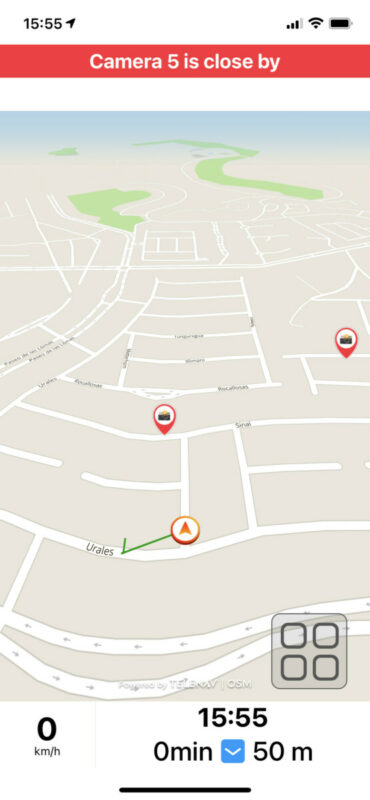
It's a radial distance from your current location. So, whenever you get within the radial / bee-line distance of a POI a message should appear at the top of the screen "Name of POI closeby" and you should also get an audible instruction saying this message. Here's an example:
But Scenic didn't notify us if we were within the alert range of the POI
I'm not sure why this is not working for you to be honest. Perhaps you can try and do a test with a smaller alert distance, just to see if that works. Perhaps like 1000 feet or even smaller.
and we couldn't touch the POI marker or Emoji on the screen to tell us what POI it represented.
The marker is only touchable when you are in 'edit' mode. You can get to edit mode by double tapping the map while navigating.
Something doesn't sound right indeed. Haven't received other reports on this, and just double checked myself. I just took the screenshot below during test.
When I navigated the route, the application did not notify me of the POIs I created.
I know you mention that you are seeing the markers, but, just to double check... you are seeing the markers similar to the screenshot below?
does the custom POI HAVE to be ON the route and Scenic notifies me of the POI? Or, is the alert distance a RADIAL proximity to the route line?
It's a radial distance from your current location. So, whenever you get within the radial / bee-line distance of a POI a message should appear at the top of the screen "Name of POI closeby" and you should also get an audible instruction saying this message. Here's an example:
But Scenic didn't notify us if we were within the alert range of the POI
I'm not sure why this is not working for you to be honest. Perhaps you can try and do a test with a smaller alert distance, just to see if that works. Perhaps like 1000 feet or even smaller.
and we couldn't touch the POI marker or Emoji on the screen to tell us what POI it represented.
The marker is only touchable when you are in 'edit' mode. You can get to edit mode by double tapping the map while navigating.
Quote from vonDrack on 08.05.2022, 04:15Hi all, I have the same problem. I do not get any Notification when approaching Custom POIs. Distance set to 500m. It use to work in Scenic 2.0, after ugrade is doesnt work. I can see the markes on the map, but no notification... Thanks a lot
Leos
Hi all, I have the same problem. I do not get any Notification when approaching Custom POIs. Distance set to 500m. It use to work in Scenic 2.0, after ugrade is doesnt work. I can see the markes on the map, but no notification... Thanks a lot
Leos
Quote from Guido on 08.05.2022, 06:59Quote from vonDrack on 08.05.2022, 04:15Hi all, I have the same problem. I do not get any Notification when approaching Custom POIs. Distance set to 500m. It use to work in Scenic 2.0, after ugrade is doesnt work. I can see the markes on the map, but no notification... Thanks a lot
Leos
Hi Leos. POI proximity alerts have not been implemented yet due to the related performance problems with bigger POI groups. I’m looking into this.
Quote from vonDrack on 08.05.2022, 04:15Hi all, I have the same problem. I do not get any Notification when approaching Custom POIs. Distance set to 500m. It use to work in Scenic 2.0, after ugrade is doesnt work. I can see the markes on the map, but no notification... Thanks a lot
Leos
Hi Leos. POI proximity alerts have not been implemented yet due to the related performance problems with bigger POI groups. I’m looking into this.
Quote from skeelo221 on 27.06.2022, 01:30I have a POI group that’s been imported. I’ve turned that layer on and can see them on the map when I am not navigating. When I begin navigating a route, I then cannot see the POI’s overlaid on the map anymore. Is there anyway to get the POI’s visible on the map while navigating?
I have a POI group that’s been imported. I’ve turned that layer on and can see them on the map when I am not navigating. When I begin navigating a route, I then cannot see the POI’s overlaid on the map anymore. Is there anyway to get the POI’s visible on the map while navigating?
Quote from Guido on 27.06.2022, 09:34The layers you see when not navigating can be different from the layers you see when navigating. I realize this can be a bit confusing. I did this on purpose though because sometimes you want to see different layers during planning than during navigation.
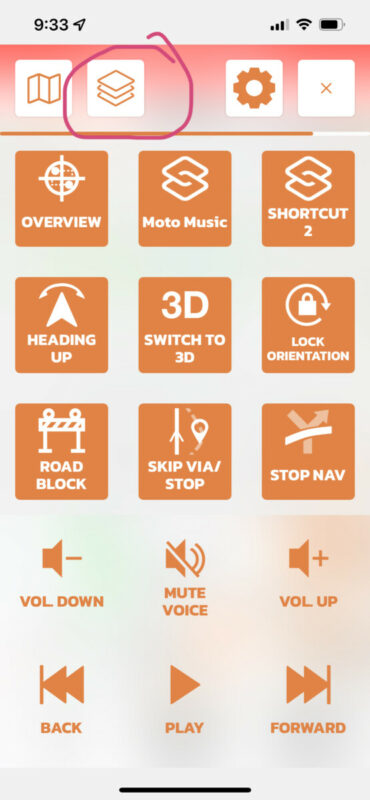
To set the layers you want to see while navigating, use this button in the navigation menu:
The layers you see when not navigating can be different from the layers you see when navigating. I realize this can be a bit confusing. I did this on purpose though because sometimes you want to see different layers during planning than during navigation.
To set the layers you want to see while navigating, use this button in the navigation menu: