
Loading BDR GPX and Secondary Tracks

Quote from eric.novinscak on 16.11.2022, 12:09Hi,
I'm not sure this is supported or perhaps I don't know how to do it properly. I ride the US Backcountry Discovery Routes, they provide the GPX files for download and can be found here: https://ridebdr.com/download-tracks/
I can load the Tracks into Scenic, but I cannot seem to easily load the bypass routes, or find a way to show them (and their description) when the main route is selected.
Is there a certain way to do this? I try to solve this today by loading the main routes into a folder, NEBDR, then I load all the bypass routes into a NEBDR_Bypass folder. When navigating the route, I then have it overlay the Bypass folder.
Couple issues when I do this:
- It would be nice to see these bypasses as a different colour (Red for example)
- If you touch the bypass route it would be ideal to see its description. Reason is that sometimes the bypass route is harder, or easier and there is no easy way to check once on the trail. This is a huge issue when riding a big adventure bike as some routes are too challenging.
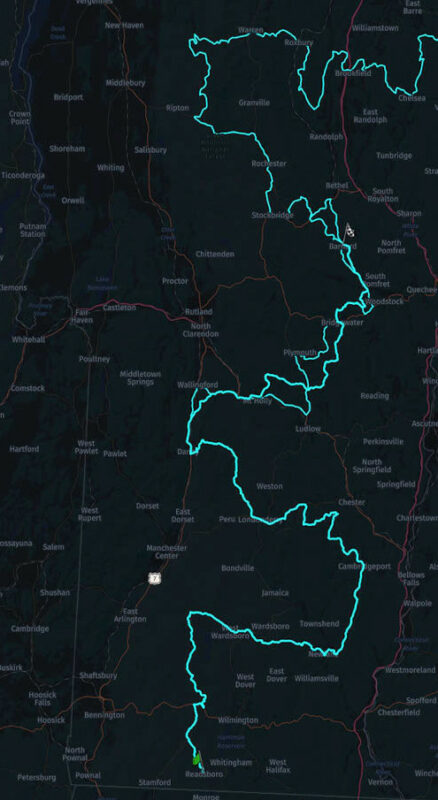
See photo below of the issue
Hi,
I'm not sure this is supported or perhaps I don't know how to do it properly. I ride the US Backcountry Discovery Routes, they provide the GPX files for download and can be found here: https://ridebdr.com/download-tracks/
I can load the Tracks into Scenic, but I cannot seem to easily load the bypass routes, or find a way to show them (and their description) when the main route is selected.
Is there a certain way to do this? I try to solve this today by loading the main routes into a folder, NEBDR, then I load all the bypass routes into a NEBDR_Bypass folder. When navigating the route, I then have it overlay the Bypass folder.
Couple issues when I do this:
- It would be nice to see these bypasses as a different colour (Red for example)
- If you touch the bypass route it would be ideal to see its description. Reason is that sometimes the bypass route is harder, or easier and there is no easy way to check once on the trail. This is a huge issue when riding a big adventure bike as some routes are too challenging.
See photo below of the issue

Quote from Guido on 16.11.2022, 12:23Hi Eric,
Indeed different colors for folders is not yet supported. Neither is touching the tracks/routes to bring up an info bubble. The custom folder color was already on the feature request list. I will add the touch/info bubble feature to the list as well. Both seem like very useful features when riding BDR's and other routes as well.
I'm migrating Scenic to the new HERE map framework over winter. If I find the time I'll at least add the color feature while I'm at it. The touch might have to wait a little longer.
Meanwhile there is a way to see the difference between the main track (the one you'd prefer to follow) and the bypass routes. To do this, select the main track for navigation and then tap the 'start navigation' button. The main track will be a lot wider than the other tracks activated through the 'show on map' dialog.
Best regards,
Guido
Hi Eric,
Indeed different colors for folders is not yet supported. Neither is touching the tracks/routes to bring up an info bubble. The custom folder color was already on the feature request list. I will add the touch/info bubble feature to the list as well. Both seem like very useful features when riding BDR's and other routes as well.
I'm migrating Scenic to the new HERE map framework over winter. If I find the time I'll at least add the color feature while I'm at it. The touch might have to wait a little longer.
Meanwhile there is a way to see the difference between the main track (the one you'd prefer to follow) and the bypass routes. To do this, select the main track for navigation and then tap the 'start navigation' button. The main track will be a lot wider than the other tracks activated through the 'show on map' dialog.
Best regards,
Guido
Quote from eric.novinscak on 16.11.2022, 13:27Thanks Guido!
Keep up the great work, I love the App and recommend it to everyone I run into.
Thanks Guido!
Keep up the great work, I love the App and recommend it to everyone I run into.


