
La aplicación web ya no está operativa?? NO me deja entrar

Quote from CHEJULIO on 21.08.2024, 03:11Me he perdido algo??
Quisiera importar una ruta con la url de google maps. Pero pongo mi mail y contraseña pero no hace nada, no me deja pasar.
Gracias
Me he perdido algo??
Quisiera importar una ruta con la url de google maps. Pero pongo mi mail y contraseña pero no hace nada, no me deja pasar.
Gracias
Quote from CHEJULIO on 21.08.2024, 03:38Yo respondo a mi mismo. Con Chrome no puedo pero con EDGE si. ¿No es compatible con CHROME?
Yo respondo a mi mismo. Con Chrome no puedo pero con EDGE si. ¿No es compatible con CHROME?

Quote from Guido on 21.08.2024, 11:57Eso es extraño. Acabo de probar con Chrome (en Mac) y pude iniciar sesión sin problemas.
*** English ***
That's strange. I just tried with Chrome (on Mac), and I could login without problems.
Eso es extraño. Acabo de probar con Chrome (en Mac) y pude iniciar sesión sin problemas.
*** English ***
That's strange. I just tried with Chrome (on Mac), and I could login without problems.
Quote from Dae on 21.08.2024, 13:07He intentado importar una ruta de Google usando Safari.
Usando mi iPad, no hay problema. Usando mi iPhone no funciona. Después de poner mi contraseña, el URL, nombre y descripción recibo un mensaje que dice “an origin and destination is required”. He usado el mismo URL para las dos pruebas.
I have tried to import the same Google URL route on my iPad and my iPhone using Safari. The iPad works fine. The iPhone lets me enter the username and password, URL, description and name for the route but then gives the error “an origin and destination is required”.
He intentado importar una ruta de Google usando Safari.
Usando mi iPad, no hay problema. Usando mi iPhone no funciona. Después de poner mi contraseña, el URL, nombre y descripción recibo un mensaje que dice “an origin and destination is required”. He usado el mismo URL para las dos pruebas.
I have tried to import the same Google URL route on my iPad and my iPhone using Safari. The iPad works fine. The iPhone lets me enter the username and password, URL, description and name for the route but then gives the error “an origin and destination is required”.
Quote from Guido on 21.08.2024, 13:15I have tried to import the same Google URL route on my iPad and my iPhone using Safari. The iPad works fine. The iPhone lets me enter the username and password, URL, description and name for the route but then gives the error “an origin and destination is required”.
Does this message pop-up in Safari already, or in Scenic when you try to finalize the import?
If Safari, could you share the Google URL?Same iOS version and same Scenic version on iPad and iPhone?
I have tried to import the same Google URL route on my iPad and my iPhone using Safari. The iPad works fine. The iPhone lets me enter the username and password, URL, description and name for the route but then gives the error “an origin and destination is required”.
Does this message pop-up in Safari already, or in Scenic when you try to finalize the import?
If Safari, could you share the Google URL?
Same iOS version and same Scenic version on iPad and iPhone?
Quote from Dae on 21.08.2024, 13:22iPad and iPhone are both up to date with latest OS, but obviously one is iPadOS and the other iOS, and Scenic is latest beta on both.
The message is displayed in Safari:
The URL is below, but it’s done it with multiple ones that I’ve tried.
https://www.google.com/maps/dir/Europoort+Rotterdam,+Europort,+Netherlands/Chimay,+Belgium/Hotell+Kyriad,+Place+Jacques+Bozzi,+Charleville-Mézières,+France/@50.8563194,4.4416365,6z/data=!4m11!4m10!1m2!1m1!1s0x47c452ce20903ec9:0x57a3520db61f9786!1m2!1m1!1s0x47c205ba65f6f361:0xbf7fb84c56b9cd57!1m2!1m1!1s0x47ea0e120428a86d:0xc07b7498fbdee44e!3e0
iPad and iPhone are both up to date with latest OS, but obviously one is iPadOS and the other iOS, and Scenic is latest beta on both.
The message is displayed in Safari:
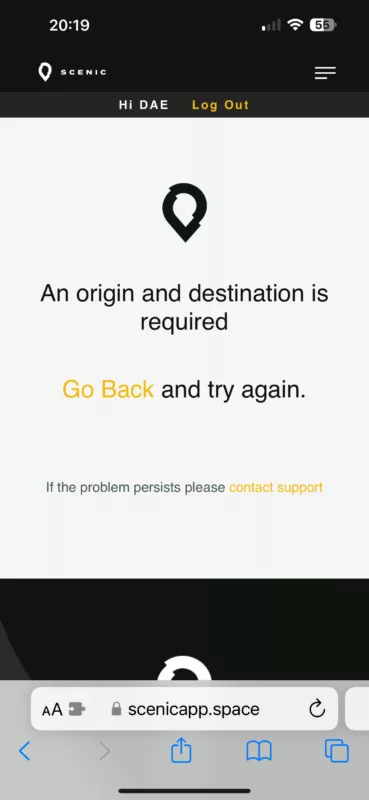
The URL is below, but it’s done it with multiple ones that I’ve tried.
Quote from Guido on 21.08.2024, 16:24If I paste this exact link in the webapp on my desktop I get the same error message. I think this is not the complete link.
Could this be a copy/paste issue when copying/pasting from the Safari address bar on the iPhone?It's not impossible, but unlikely this is an error in the Scenic WebApp. The logic to process a link is exactly the same regardless of the device being used.
If I paste this exact link in the webapp on my desktop I get the same error message. I think this is not the complete link.
Could this be a copy/paste issue when copying/pasting from the Safari address bar on the iPhone?
It's not impossible, but unlikely this is an error in the Scenic WebApp. The logic to process a link is exactly the same regardless of the device being used.
Quote from Dae on 21.08.2024, 23:44Whilst what you are saying makes sense, if I open the link using any of my devices or browsers the route is correct and has all 3 points in it (start, mid and destination).
I've also tried entering the same 3 points in Chrome on my iPhone and copying the URL. Same result.
Whilst what you are saying makes sense, if I open the link using any of my devices or browsers the route is correct and has all 3 points in it (start, mid and destination).
I've also tried entering the same 3 points in Chrome on my iPhone and copying the URL. Same result.


