
Key- or Short Cut Mapper

Quote from SuperGraupe on 12.07.2023, 09:20Hi,
is it possible to integrate an internal Key Mapper to Scenic.
I'm using a cheap Bluetooth Key Transmitter for the Rally Roadbook Reader.
Work's fine.It would be nice to control Scenic with this or any other Key Transmitter.
May as Key Mapper which could be programmed in the configuration part.
Or maybe as programmable Short Cut entry.
For example:
Overview - button up
skip Via - button right
road closed and so onIt's easier to handle.
With gloves and maybe in an outdoor case the direct touch on the phone will not allways work.Greetings,
Michael
Hi,
is it possible to integrate an internal Key Mapper to Scenic.
I'm using a cheap Bluetooth Key Transmitter for the Rally Roadbook Reader.
Work's fine.
It would be nice to control Scenic with this or any other Key Transmitter.
May as Key Mapper which could be programmed in the configuration part.
Or maybe as programmable Short Cut entry.
For example:
Overview - button up
skip Via - button right
road closed and so on
It's easier to handle.
With gloves and maybe in an outdoor case the direct touch on the phone will not allways work.
Greetings,
Michael

Quote from Guido on 12.07.2023, 09:50Hi Michael,
If you can change the peripheral name of the Key Mapper then it should probably work in the beta version of Scenic. Have a look here: https://scenic.app/forum/topic/bluetooth-remote-keymap-to-function/#postid-5095
The beta version can be installed through TestFlight. That's an app from Apple to distribute beta versions. But I need to give you access, so please send me an email (use 'email me' button at bottom of help page), if you'd like that.
Please note: You can't have the beta and the App Store version on the same phone at the same time. The beta overwrites the normal App Store version. You can always delete the beta and download the App Store version from the App Store again. Your data syncs with the same database so your account data should be safe.Also note: the current beta version has quite some bugs around detour behaviour, skipping via points and navigation in general. As I release new beta versions these will be resolved one by one.
Hi Michael,
If you can change the peripheral name of the Key Mapper then it should probably work in the beta version of Scenic. Have a look here: https://scenic.app/forum/topic/bluetooth-remote-keymap-to-function/#postid-5095
The beta version can be installed through TestFlight. That's an app from Apple to distribute beta versions. But I need to give you access, so please send me an email (use 'email me' button at bottom of help page), if you'd like that.
Quote from SuperGraupe on 13.07.2023, 04:41Hi Guido,
I installed the beta version.
Really impressive. Like the look and the features.For using the Keymapper you have a different approch.
Your have 4 fixed Keys (left, right, up, down) and then you assign the action.I would use a more universal approach.
Take a list with possible actions and assign a free key (just press it) to the action.To make it easier to handle you can use different profiles (Wunderlinq, BarButton, Custom)
Then you have no limitations.
My Keyboard has 5 Keys (left, right, vol up, vol down, phone)
In your usage I coudn't use it.
In my usage I would assign it free to the action.
May an alternative option.
Greetings,
Michael
Hi Guido,
I installed the beta version.
Really impressive. Like the look and the features.
For using the Keymapper you have a different approch.
Your have 4 fixed Keys (left, right, up, down) and then you assign the action.
I would use a more universal approach.
Take a list with possible actions and assign a free key (just press it) to the action.
To make it easier to handle you can use different profiles (Wunderlinq, BarButton, Custom)
Then you have no limitations.
My Keyboard has 5 Keys (left, right, vol up, vol down, phone)
In your usage I coudn't use it.
In my usage I would assign it free to the action.
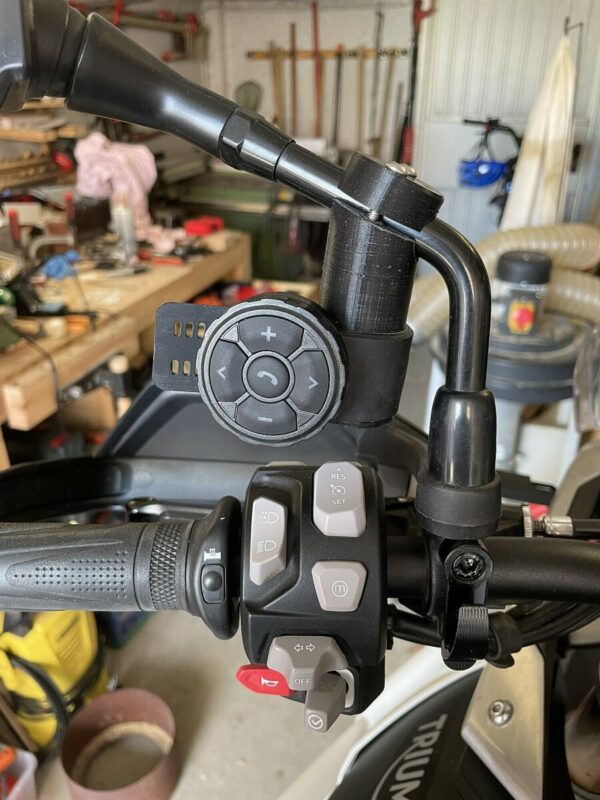
May an alternative option.
Greetings,
Michael
Quote from Guido on 13.07.2023, 06:30Hi Michael,
I think I misunderstood what your keymapper is. I assumed you could assign/map keyboard presses to your buttons. For example I thought you could assign the ‘enter’ keyboard press to the middle button, the arrow-up key to the top button, etc. Is that not the case?
what is the original purpose of your remote control? It looks like it’s to control basic functions of music control and answering phone? Similar to the buttons you would find on, for example, a Bluetooth headset.
Your idea is interesting, but I’m not sure it would work with this remote (if it’s indeed a controller like I describe above), because these volume up, volume down, next track, previous track signals are very specific control functions. The iPhone picks up on those regardless of the active app. And Apple won’t allow apps to ‘steal’ those signals for use in their own app.
Am I misunderstanding?
Best regards,
Guido
Hi Michael,
I think I misunderstood what your keymapper is. I assumed you could assign/map keyboard presses to your buttons. For example I thought you could assign the ‘enter’ keyboard press to the middle button, the arrow-up key to the top button, etc. Is that not the case?
what is the original purpose of your remote control? It looks like it’s to control basic functions of music control and answering phone? Similar to the buttons you would find on, for example, a Bluetooth headset.
Your idea is interesting, but I’m not sure it would work with this remote (if it’s indeed a controller like I describe above), because these volume up, volume down, next track, previous track signals are very specific control functions. The iPhone picks up on those regardless of the active app. And Apple won’t allow apps to ‘steal’ those signals for use in their own app.
Am I misunderstanding?
Best regards,
Guido
Quote from SuperGraupe on 13.07.2023, 06:53As I mentioned before, I use this cheap Bluetooth Key Transmitter for the Rally Roadbook Reader App.
They 'steal' those inputs to navigate the Roadbook.
Right -> Scroll down
Left -> Scroll upVol + -> Increase (Adjust) Kilometers
Vol - -> Decrease (Adjust) KilometersI add a short video to demonstrate the function.
Hope it works.Would be nice to use it with Scenic too.
Greetings,
Michael
As I mentioned before, I use this cheap Bluetooth Key Transmitter for the Rally Roadbook Reader App.
They 'steal' those inputs to navigate the Roadbook.
Right -> Scroll down
Left -> Scroll up
Vol + -> Increase (Adjust) Kilometers
Vol - -> Decrease (Adjust) Kilometers
I add a short video to demonstrate the function.
Hope it works.
Would be nice to use it with Scenic too.
Greetings,
Michael
Quote from Guido on 13.07.2023, 07:23OK. I just looked at the website of Roadbook navigator.
The controllers they support are actually meant for music playback control. In other words, controllers that use the volume up, volume down, previous track, next track and pause/resume buttons. These are the buttons you also find on, for example, a Cardo and senna headsets.
Scenic indeed doesn’t support these controllers. Scenic supports controllers that emulate keyboards, specifically the arrow-up, arrow-down, arrow-left, arrow-right, enter and escape keyboard presses.
It’s interesting though. If this doesn’t have any side effects I could add it to Scenic too.
Would you mind testing something for me:
- Close the Roadbook app completely- Play some music with your favorite music app (Apple Music, Spotify, etc), and then close that app but leave the music playing.
- Now, with the iPhone homescreen visible, try to use your remote controller to go to the next track, previous track, etc. Does it work?
- Now open the Roadbook app while the music is still playing.
- Now try to scroll the Roadbook like in your video. Is the music also affected?
OK. I just looked at the website of Roadbook navigator.
The controllers they support are actually meant for music playback control. In other words, controllers that use the volume up, volume down, previous track, next track and pause/resume buttons. These are the buttons you also find on, for example, a Cardo and senna headsets.
Scenic indeed doesn’t support these controllers. Scenic supports controllers that emulate keyboards, specifically the arrow-up, arrow-down, arrow-left, arrow-right, enter and escape keyboard presses.
It’s interesting though. If this doesn’t have any side effects I could add it to Scenic too.
Would you mind testing something for me:
- Close the Roadbook app completely
- Play some music with your favorite music app (Apple Music, Spotify, etc), and then close that app but leave the music playing.
- Now, with the iPhone homescreen visible, try to use your remote controller to go to the next track, previous track, etc. Does it work?
- Now open the Roadbook app while the music is still playing.
- Now try to scroll the Roadbook like in your video. Is the music also affected?
Quote from SuperGraupe on 13.07.2023, 07:37They also use 'real' controller like BarButtons.
https://jaxeadv.com/barbuttons/
Just tried it with my remote control.
- Close the Roadbook app completely
- Play some music with your favorite music app (Apple Music, Spotify, etc), and then close that app but leave the music playing.
- Now, with the iPhone homescreen visible, try to use your remote controller to go to the next track, previous track, etc. Does it work?Music plays and my remote controller works fine. Volume up/down , next/previous track
- Now open the Roadbook app while the music is still playing.
Music stops immediatly (Pause)
- Now try to scroll the Roadbook like in your video. Is the music also affected?
Remote control works fine
When I closed the Roadbook App I can start Music again (Play)
Remote works in the normal way.
Greetings,
Michael
They also use 'real' controller like BarButtons.
Just tried it with my remote control.
- Close the Roadbook app completely
- Play some music with your favorite music app (Apple Music, Spotify, etc), and then close that app but leave the music playing.
- Now, with the iPhone homescreen visible, try to use your remote controller to go to the next track, previous track, etc. Does it work?
Music plays and my remote controller works fine. Volume up/down , next/previous track
- Now open the Roadbook app while the music is still playing.
Music stops immediatly (Pause)
- Now try to scroll the Roadbook like in your video. Is the music also affected?
Remote control works fine
When I closed the Roadbook App I can start Music again (Play)
Remote works in the normal way.
Greetings,
Michael
Quote from Guido on 13.07.2023, 07:58Ok. What I think they are doing is that they are pretending to be an audio app. That’s why, when you open the Roadbook app, the music stops. I understand why this would not be a problem with a Roadbook app such as this, because when you are riding a rally, typically you don’t listen to music.
However in Scenic a lot of user want to listen to and control music as well while navigating.
The BarButtons is a very smart device. It has several key mappings. It can emulate a music controller. Or, perhaps the Roadbook app also listens to other keyboard commands. I’m actually working with BarButtons now. BarButtons will work with Scenic as well in the future.
I will add it to the feature request list to make Scenic compatible with these universal music controllers. I will make it optional / a setting, because it can only be used by people that don’t want to listen to music while using Scenic. Will take quite some time before I have time for this though. Hope you understand.
Ok. What I think they are doing is that they are pretending to be an audio app. That’s why, when you open the Roadbook app, the music stops. I understand why this would not be a problem with a Roadbook app such as this, because when you are riding a rally, typically you don’t listen to music.
However in Scenic a lot of user want to listen to and control music as well while navigating.
The BarButtons is a very smart device. It has several key mappings. It can emulate a music controller. Or, perhaps the Roadbook app also listens to other keyboard commands. I’m actually working with BarButtons now. BarButtons will work with Scenic as well in the future.
I will add it to the feature request list to make Scenic compatible with these universal music controllers. I will make it optional / a setting, because it can only be used by people that don’t want to listen to music while using Scenic. Will take quite some time before I have time for this though. Hope you understand.
Quote from SuperGraupe on 13.07.2023, 08:09That would be nice.
BarButtons is an option.
I will try to print and assembly one BarButtons DIY.
Thanks,
Michael
That would be nice.
BarButtons is an option.
I will try to print and assembly one BarButtons DIY.
Thanks,
Michael
Quote from Guido on 13.07.2023, 08:16I’m sure it acts as an audio app now:
Please note that BarButtons does not yet work with Scenic beta. But it will take a small change to make the beta work with it.
I’m sure it acts as an audio app now:
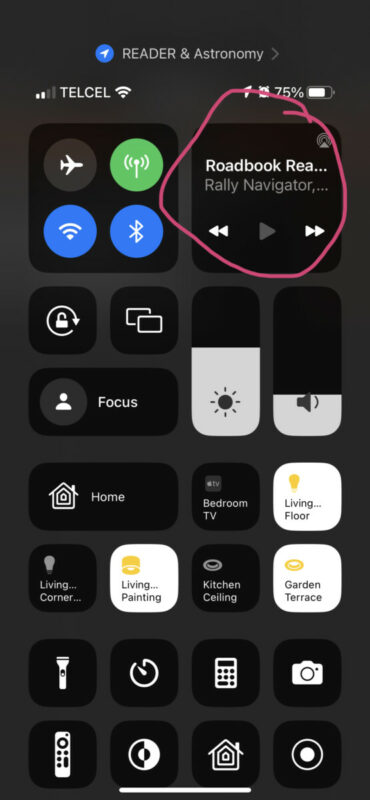
Please note that BarButtons does not yet work with Scenic beta. But it will take a small change to make the beta work with it.

Quote from 196 on 09.08.2023, 06:18@guidomm
Would really like to see support for BarButtons!
Do you think it’s possible to support:
- start/stop navigation
- skip via
- road block
- shortcut 1
- show POIs
- and maybe a bookmark of the current position
appreciate your app and effort. Thanks
Would really like to see support for BarButtons!
Do you think it’s possible to support:
- start/stop navigation
- skip via
- road block
- shortcut 1
- show POIs
- and maybe a bookmark of the current position
appreciate your app and effort. Thanks
Quote from Guido on 09.08.2023, 06:26Joost at BarButtons sent me a unit. Will add support but will take a while.
Joost at BarButtons sent me a unit. Will add support but will take a while.
Quote from SuperGraupe on 09.08.2023, 09:07Nice.
I‘ve seen the Wunderlinq Integration.
Would be perfect like that only with 8 buttons and barbutton mapping 1 or 3.
This are the most common.
Michael
Nice.
I‘ve seen the Wunderlinq Integration.
Would be perfect like that only with 8 buttons and barbutton mapping 1 or 3.
This are the most common.
Michael


