
Is there a route simulation mode?

Quote from Barkinmadd on 01.03.2024, 08:35May seem like an odd question but I wondered if there is a way to playback your route to check for oddities in things like odd directions through roundabouts or other route challenges? I noticed that the Harley route planner has this feature and it is actually quite useful for checking portions of the route. Didn't see mention of it in Scenic - would anyone else find this useful? TIA
May seem like an odd question but I wondered if there is a way to playback your route to check for oddities in things like odd directions through roundabouts or other route challenges? I noticed that the Harley route planner has this feature and it is actually quite useful for checking portions of the route. Didn't see mention of it in Scenic - would anyone else find this useful? TIA

Quote from johansw on 01.03.2024, 08:46There is a Route Simulation mode:
Settings / double click version number at the bottom of the menu / click "Debug/Develop/Create" / choose "Route Simulation mode"
There is a Route Simulation mode:
Settings / double click version number at the bottom of the menu / click "Debug/Develop/Create" / choose "Route Simulation mode"
Quote from Barkinmadd on 01.03.2024, 08:55Holy smokes! Very cool. Thanks again, johansw 🙂
Holy smokes! Very cool. Thanks again, johansw 🙂

Quote from Brainsprain1 on 04.03.2024, 15:44Don't get it. I did what you said, opened a route, and nothing happened. I tried creating a new map and nothing. What happens after
There is a Route Simulation mode:
Settings / double click version number at the bottom of the menu / click "Debug/Develop/Create" / choose "Route Simulation mode"
How do I get a simulation of my route?
Don't get it. I did what you said, opened a route, and nothing happened. I tried creating a new map and nothing. What happens after
There is a Route Simulation mode:
Settings / double click version number at the bottom of the menu / click "Debug/Develop/Create" / choose "Route Simulation mode"
How do I get a simulation of my route?
Quote from Barkinmadd on 04.03.2024, 15:55First, did you activate the option under 'Debug/Develop/Create' / 'Route Simulation Mode'?
If so then open a route you've previously designed and click on the 'Navigate' button - you can start the ride from there and it will simulate your route by moving along the route and calling out the directions as if you were riding it. Useful to get a sense for how tricky portions of the route will be called out by Scenic.
Does that help?
First, did you activate the option under 'Debug/Develop/Create' / 'Route Simulation Mode'?
If so then open a route you've previously designed and click on the 'Navigate' button - you can start the ride from there and it will simulate your route by moving along the route and calling out the directions as if you were riding it. Useful to get a sense for how tricky portions of the route will be called out by Scenic.
Does that help?
Quote from Brainsprain1 on 04.03.2024, 17:08Thanks for your help But this only works on iPhone not MacBook Air. I can understand why as I can't use my computer on the bike, however, making sure the route is good is easier on the Mac. I'll live with it.
Thanks for your help But this only works on iPhone not MacBook Air. I can understand why as I can't use my computer on the bike, however, making sure the route is good is easier on the Mac. I'll live with it.

Quote from Guido on 04.03.2024, 22:21It should also work on your Mac. I've just tried and it's working here on my end. Please note that the "Route Simulation Mode" setting is not synced between devices. So, you need to turn it on on your Mac as well.
It should also work on your Mac. I've just tried and it's working here on my end. Please note that the "Route Simulation Mode" setting is not synced between devices. So, you need to turn it on on your Mac as well.

Quote from massi on 05.03.2024, 03:33Nice, works on my Mac and my Phone, one question, is there a possibility to speed the simulation up?
Nice, works on my Mac and my Phone, one question, is there a possibility to speed the simulation up?
Quote from Guido on 05.03.2024, 05:59Yes, but I did not make that available as a setting. Will add it to the feature request list.
Yes, but I did not make that available as a setting. Will add it to the feature request list.
Quote from Brainsprain1 on 05.03.2024, 09:22On my iPhone with simulation on I click navigate and it starts. On my Mac I see no way to get it started. No navigation option. I don't see another option that would make sense. Complete directions for both platforms would be helpful. Thanks.
On my iPhone with simulation on I click navigate and it starts. On my Mac I see no way to get it started. No navigation option. I don't see another option that would make sense. Complete directions for both platforms would be helpful. Thanks.
Quote from Guido on 05.03.2024, 09:26Not sure what's going on for you. Do you have the latest version on your Mac (check Mac App Store for an update) https://apps.apple.com/app/id1089668246
, and is "Route Simulation Mode" ON on your Mac?
Then, select a route or destination, and tap "Navigate".
Not sure what's going on for you. Do you have the latest version on your Mac (check Mac App Store for an update) https://apps.apple.com/app/id1089668246
, and is "Route Simulation Mode" ON on your Mac?
Then, select a route or destination, and tap "Navigate".
Quote from Guido on 05.03.2024, 09:32Just to be clear about this simulation mode and the other options availabe in this "hidden" section... these are primarily meant for debugging purposes, and are known to be a bit buggy, and can sometimes even cause crashes. It was never my intention for these to be widely used (that's why they are hidden 🙂), so support for these features will also be limited / have less priority. Hope you understand.
Just to be clear about this simulation mode and the other options availabe in this "hidden" section... these are primarily meant for debugging purposes, and are known to be a bit buggy, and can sometimes even cause crashes. It was never my intention for these to be widely used (that's why they are hidden 🙂), so support for these features will also be limited / have less priority. Hope you understand.
Quote from Brainsprain1 on 05.03.2024, 14:22I have 3.54 and when I select a route it does not have a navigate button anywhere. I understand your last note Guido. Maybe mine just won't work for that.
I have 3.54 and when I select a route it does not have a navigate button anywhere. I understand your last note Guido. Maybe mine just won't work for that.
Quote from Guido on 05.03.2024, 14:26I think there is a misunderstanding. I meant the "Start Navigation" button. The same one you use to start a normal navigation.
And make sure simulation mode is on:
I think there is a misunderstanding. I meant the "Start Navigation" button. The same one you use to start a normal navigation.
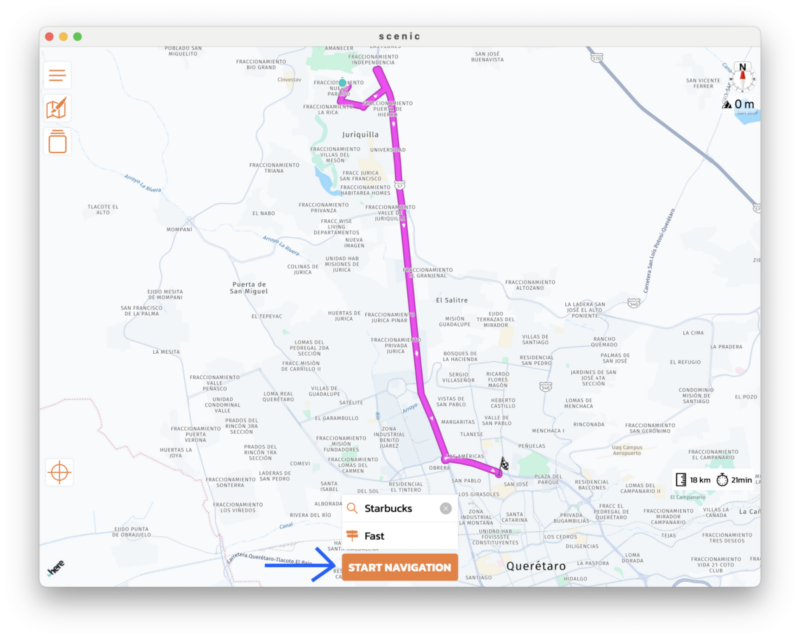
And make sure simulation mode is on:
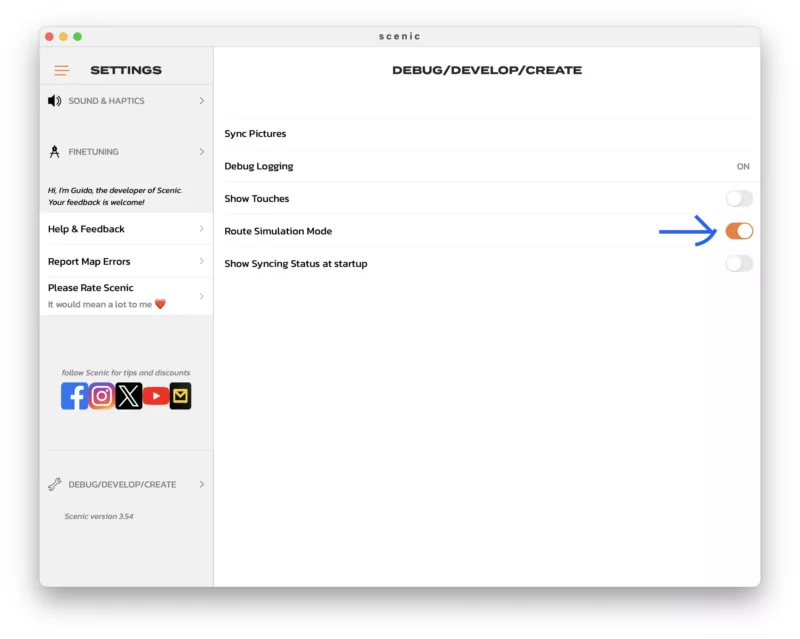
Quote from Brainsprain1 on 05.03.2024, 16:04Simulation mode is on. I do not have that button. I'm working on a MacBook Air. I don't know if that means anything. I seee the "here" symbol on the left corner, whatever that is about, but no navigation button. Thanks for trying.
Simulation mode is on. I do not have that button. I'm working on a MacBook Air. I don't know if that means anything. I seee the "here" symbol on the left corner, whatever that is about, but no navigation button. Thanks for trying.
Quote from Guido on 05.03.2024, 16:06Can you send me a screenshot of what you do see?
Can you send me a screenshot of what you do see?

Quote from Paul on 12.03.2024, 14:26Hi Guido,
Tried this on my MAC and the simulation could be a really nice tool to pre-test routes. Agree with massi that a speed regulator (and may be even a reverse function to ride certain portions backwards) could come in handy. I fully understand that this has lower priority compared to other stuff in your development pipeline.
Lets hear what other people think....
Hi Guido,
Tried this on my MAC and the simulation could be a really nice tool to pre-test routes. Agree with massi that a speed regulator (and may be even a reverse function to ride certain portions backwards) could come in handy. I fully understand that this has lower priority compared to other stuff in your development pipeline.
Lets hear what other people think....

Quote from GHJ on 23.03.2024, 08:13Brilliant tool, that simulator. Is it also possible to jump to a point on the route to explore it?
Greetings, Geert-Henk
Brilliant tool, that simulator. Is it also possible to jump to a point on the route to explore it?
Greetings, Geert-Henk
Quote from Guido on 23.03.2024, 08:53At the moment not. It will always start at the beginning.
At the moment not. It will always start at the beginning.
Quote from MartinRL on 28.10.2024, 03:30Resurrecting an older thread rather than start a new one because it seems better to keep all in a single place.
All the previous posts relate to the older version of Scenic but now we're on the new v4.
Is there a route simulation mode in v4? Following the method I used to use in the old version (double tap in Settings) no longer works. Or am I missing something? I always find route simulation to be very useful.
Resurrecting an older thread rather than start a new one because it seems better to keep all in a single place.
All the previous posts relate to the older version of Scenic but now we're on the new v4.
Is there a route simulation mode in v4? Following the method I used to use in the old version (double tap in Settings) no longer works. Or am I missing something? I always find route simulation to be very useful.
Quote from Guido on 28.10.2024, 06:03Might add it back in the future but will take a while as more important urgent things on the list.
Might add it back in the future but will take a while as more important urgent things on the list.


