
Is it me or is it 3D

Quote from GB on 03.12.2024, 01:44Haven’t used the app since I discovered this but will browsing the map I went to scroll up and must have caught it as the map view went 3D is this just in planning or does the app now do this, I did see it update the other day?
Haven’t used the app since I discovered this but will browsing the map I went to scroll up and must have caught it as the map view went 3D is this just in planning or does the app now do this, I did see it update the other day?

Quote from Guido on 03.12.2024, 04:113D has nog been added yet. It must have been some weird glitch.
3D has nog been added yet. It must have been some weird glitch.
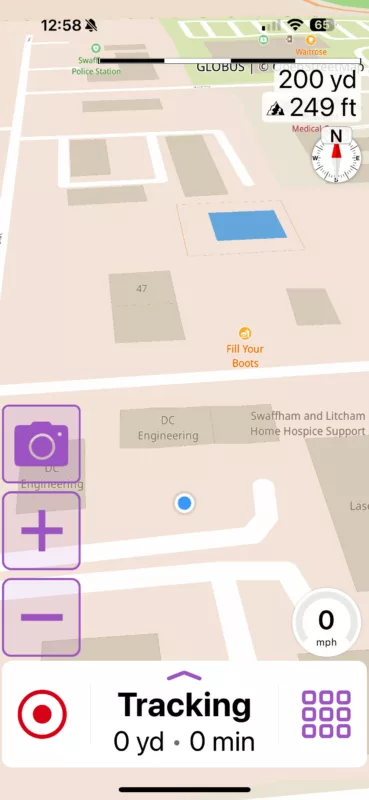 Haven’t tried it moving but will tonight.
Quote from Guido on 03.12.2024, 08:23😮
I implemented a new (patch version) of the map framework in Scenic 4.06, to be able to place the route below road names. The map provider did not tell me that they implemented 3D.
I’ll ask them what the status is, and of course implement if it’s ready for production.
Thanks for pointing my attention to this!
😮
I implemented a new (patch version) of the map framework in Scenic 4.06, to be able to place the route below road names. The map provider did not tell me that they implemented 3D.
I’ll ask them what the status is, and of course implement if it’s ready for production.
Thanks for pointing my attention to this!
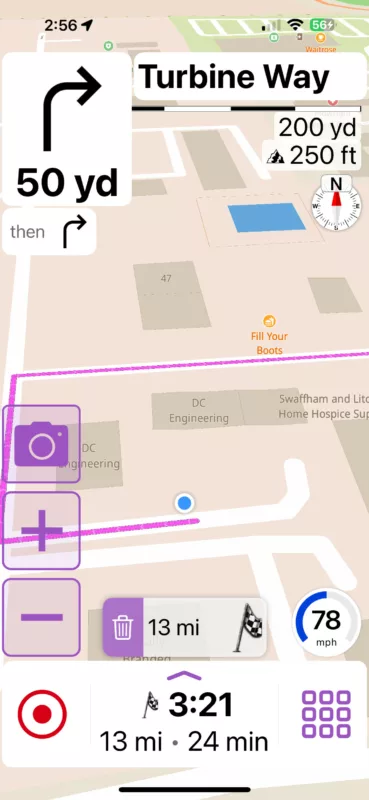
Quote from Guido on 03.12.2024, 08:26Swiping up/down with two fingers changes the 3D angle
Swiping up/down with two fingers changes the 3D angle

Quote from Guido on 03.12.2024, 08:41maybe the framework version was updated in 4.07 (happens automatically without notification). v4.07 is currently in beta test. @gb, are you a beta tester?
maybe the framework version was updated in 4.07 (happens automatically without notification). v4.07 is currently in beta test. @gb, are you a beta tester?
Quote from GB on 03.12.2024, 08:51Quote from Guido on 03.12.2024, 08:26Swiping up/down with two fingers changes the 3D angle
thats correct just like the majority of maps on iOS will put a route in and see what happens
Quote from Guido on 03.12.2024, 08:26Swiping up/down with two fingers changes the 3D angle
thats correct just like the majority of maps on iOS will put a route in and see what happens
Quote from GB on 03.12.2024, 08:52Quote from Guido on 03.12.2024, 08:41maybe the framework version was updated in 4.07 (happens automatically without notification). v4.07 is currently in beta test. @gb, are you a beta tester?
Not a beta tester, be happy too if you wanted.
Quote from Guido on 03.12.2024, 08:41maybe the framework version was updated in 4.07 (happens automatically without notification). v4.07 is currently in beta test. @gb, are you a beta tester?
Not a beta tester, be happy too if you wanted.
Quote from Guido on 03.12.2024, 09:10Just to emphasize that I did not test/try this yet myself so I don’t know if this is bug free.
Just to emphasize that I did not test/try this yet myself so I don’t know if this is bug free.
Quote from Karlchen on 03.12.2024, 09:26Also ich bin gerade gefahren.
Auf dem iPhone geht es doch auch bei mir.
beide Finger müssen nur nebeneinander und nicht untereinander sein.
Allerdings wird es nicht in CarPlay übernommen und bei jeden Neustart ist es wieder 2D.
Aber top, darauf lässt es sich aufbauen 👍👍👍
Also ich bin gerade gefahren.
Auf dem iPhone geht es doch auch bei mir.
beide Finger müssen nur nebeneinander und nicht untereinander sein.
Allerdings wird es nicht in CarPlay übernommen und bei jeden Neustart ist es wieder 2D.
Aber top, darauf lässt es sich aufbauen 👍👍👍
Quote from GB on 03.12.2024, 09:47Let’s not get carried away here as this is not proper 3D angle in my opinion, it’s still a very steep angle. Will test on the way home from work and see if it stays in the direction of travel. All I did was swipe two fingers so I doubt it would create a bug as such, will report back this evening
Let’s not get carried away here as this is not proper 3D angle in my opinion, it’s still a very steep angle. Will test on the way home from work and see if it stays in the direction of travel. All I did was swipe two fingers so I doubt it would create a bug as such, will report back this evening
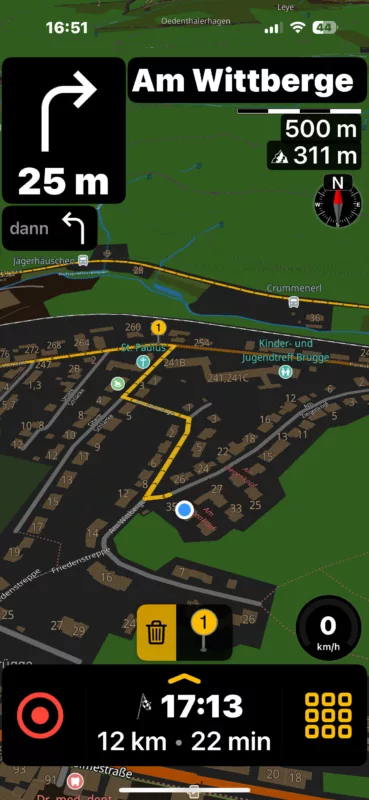
Quote from Karlchen on 03.12.2024, 09:53Mir gefällt der Winkel besser als bei 3.5.
Nur der Zoom muss noch angepasst werden.
👍
Mir gefällt der Winkel besser als bei 3.5.
Nur der Zoom muss noch angepasst werden.
👍
Quote from Karlchen on 03.12.2024, 11:03Durch Wischen mit zwei Fingern nach oben/unten ändert sich der 3D-Winkel
das ist richtig, genauso wie bei den meisten Karten auf iOS. Sie geben eine Route ein und schauen, was passiert.
Stimmt, bei Google Maps klappt das auch.
Durch Wischen mit zwei Fingern nach oben/unten ändert sich der 3D-Winkel
das ist richtig, genauso wie bei den meisten Karten auf iOS. Sie geben eine Route ein und schauen, was passiert.
Stimmt, bei Google Maps klappt das auch.
Quote from GB on 03.12.2024, 11:35Ok, just put a 20km route home into scenic and dragged the fingers to the lowest and I could and drove home. It stays the same angle all the way ok but you cannot change back to 2d while moving by swiping your fingers again, it just takes you to route over view edit mode. So in reality it’s not right but works just as any other mapping system on iOS but this is not an option created by a scenic update unless Guido tells me otherwise.
Ok, just put a 20km route home into scenic and dragged the fingers to the lowest and I could and drove home. It stays the same angle all the way ok but you cannot change back to 2d while moving by swiping your fingers again, it just takes you to route over view edit mode. So in reality it’s not right but works just as any other mapping system on iOS but this is not an option created by a scenic update unless Guido tells me otherwise.
Quote from Guido on 03.12.2024, 12:13Yes... the previosu version had an option to switch to 2D and 3D throught a button in the navigation menu. That button will return. I need to do some testing myself. Am going on a motorcycle trip tomorrow until monday, so will have some good testing time ahead of me.
Yes... the previosu version had an option to switch to 2D and 3D throught a button in the navigation menu. That button will return. I need to do some testing myself. Am going on a motorcycle trip tomorrow until monday, so will have some good testing time ahead of me.
Quote from Guido on 14.12.2024, 12:33Yes. In planning. But now the ‘perspective’ button is back in the navigation menu during navigation. It’s now like it was in Scenic 3.5.
Yes. In planning. But now the ‘perspective’ button is back in the navigation menu during navigation. It’s now like it was in Scenic 3.5.

Quote from blackhawk1618 on 15.12.2024, 23:48Quote from Guido on 14.12.2024, 12:33Yes. In planning. But now the ‘perspective’ button is back in the navigation menu during navigation. It’s now like it was in Scenic 3.5.
Hello Guido,
Can you please bring back 3D mode in planning using two fingers swipe up like Google and Apple maps.
Thanks
Quote from Guido on 14.12.2024, 12:33Yes. In planning. But now the ‘perspective’ button is back in the navigation menu during navigation. It’s now like it was in Scenic 3.5.
Hello Guido,
Can you please bring back 3D mode in planning using two fingers swipe up like Google and Apple maps.
Thanks
Quote from Guido on 16.12.2024, 03:25If you don’t mind me asking…. why would you need/want 3D mode during planning?
I removed it because (1) I don’t see any benefit on having it during planning, and, more importantly, (2) I like to prevent having ‘hidden’ features... I want to prevent people accidentally putting the map in 3D mode not knowing how to go back to 2D mode.
If you don’t mind me asking…. why would you need/want 3D mode during planning?
I removed it because (1) I don’t see any benefit on having it during planning, and, more importantly, (2) I like to prevent having ‘hidden’ features... I want to prevent people accidentally putting the map in 3D mode not knowing how to go back to 2D mode.
Quote from blackhawk1618 on 16.12.2024, 08:10Quote from Guido on 16.12.2024, 03:25If you don’t mind me asking…. why would you need/want 3D mode during planning?
I removed it because (1) I don’t see any benefit on having it during planning, and, more importantly, (2) I like to prevent having ‘hidden’ features... I want to prevent people accidentally putting the map in 3D mode not knowing how to go back to 2D mode.
Hello Guido,
Having 3D mode during planning provides valuable terrain visualization and maintains the same perspective as navigation, making it easier to anticipate what’s ahead without constantly zooming or panning.
While I understand your concern about accidental activation by some people who does not know the two fingers swipe up, a simple toggle with a tooltip in Settings could make this feature intuitive and user-friendly. I can manage with 2D for now, but I truly hope you will reconsider adding this functionality to enhance the planning experience.
Best Regards
Quote from Guido on 16.12.2024, 03:25If you don’t mind me asking…. why would you need/want 3D mode during planning?
I removed it because (1) I don’t see any benefit on having it during planning, and, more importantly, (2) I like to prevent having ‘hidden’ features... I want to prevent people accidentally putting the map in 3D mode not knowing how to go back to 2D mode.
Hello Guido,
Having 3D mode during planning provides valuable terrain visualization and maintains the same perspective as navigation, making it easier to anticipate what’s ahead without constantly zooming or panning.
While I understand your concern about accidental activation by some people who does not know the two fingers swipe up, a simple toggle with a tooltip in Settings could make this feature intuitive and user-friendly. I can manage with 2D for now, but I truly hope you will reconsider adding this functionality to enhance the planning experience.
Best Regards
Quote from GB on 16.12.2024, 08:23How detailed is the terrain, I live in a totally flat area so it all looks the same? Is it like basecamp in 3d?
How detailed is the terrain, I live in a totally flat area so it all looks the same? Is it like basecamp in 3d?

Quote from Marts on 16.12.2024, 18:00Interesting topic, this 3D one. I've noticed that sometimes the map will display in 3D mode and other times it is in 2D.
Next time I go for a ride I'll note when each mode is displayed (planned route, tracking, etc.).
3D does present better, I reckon, especially on smaller screens such as the Chigee AIO-5 Lite.
Interesting topic, this 3D one. I've noticed that sometimes the map will display in 3D mode and other times it is in 2D.
Next time I go for a ride I'll note when each mode is displayed (planned route, tracking, etc.).
3D does present better, I reckon, especially on smaller screens such as the Chigee AIO-5 Lite.


