
iPhone SE screen real estate issues

Quote from mattsz on 16.10.2024, 05:06I was going to just email Guido about this, but then I thought I'd post it publicly so that other users with similar issues might post as well - in the spirit of helping Guido to keep improving Scenic should he choose to address these issues...
I know I'm probably in a small minority of users with the small-screen iPhone SE... the latest updates introduced some issues with fitting everything on the screen.
The first one, "introduced" in 4.01, doesn't really affect the app usage at all, so I'm not really bothered by it... but Guido might be! Note the text of the "Ride" button...
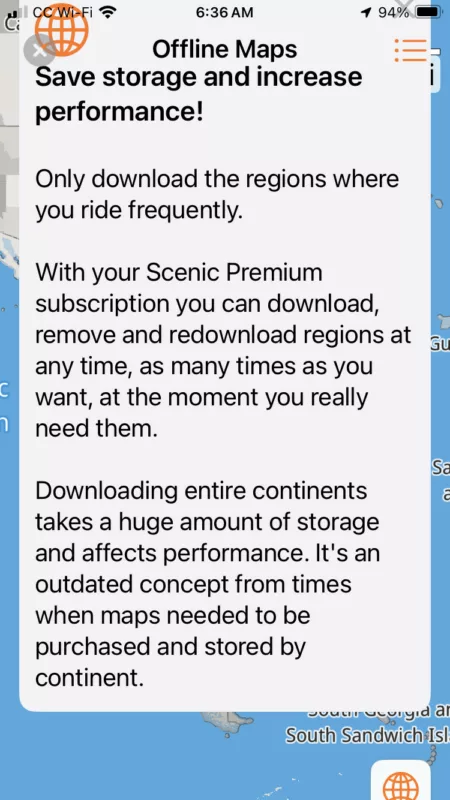
The second issue is more problematic: the (new, I think, with v4.02) offline map download "warning" (about only downloading frequently used regions) blocks the selection map, and I cannot access the "x" button to clear the warning. In both portrait and landscape orientations, the buttons overlap, or are partially obscured "off the screen" so I can't access the selection map at all (any screen tap anywhere near the grey X button just returns the screen to the "home" map view):
I can still access the maps I need using the "other regions" area of the Offline Maps List, but the selection map is nice and I'm sure Guido would at least like to know about these issues...
Anyone having any other SE screen size issues?
I was going to just email Guido about this, but then I thought I'd post it publicly so that other users with similar issues might post as well - in the spirit of helping Guido to keep improving Scenic should he choose to address these issues...
I know I'm probably in a small minority of users with the small-screen iPhone SE... the latest updates introduced some issues with fitting everything on the screen.
The first one, "introduced" in 4.01, doesn't really affect the app usage at all, so I'm not really bothered by it... but Guido might be! Note the text of the "Ride" button...
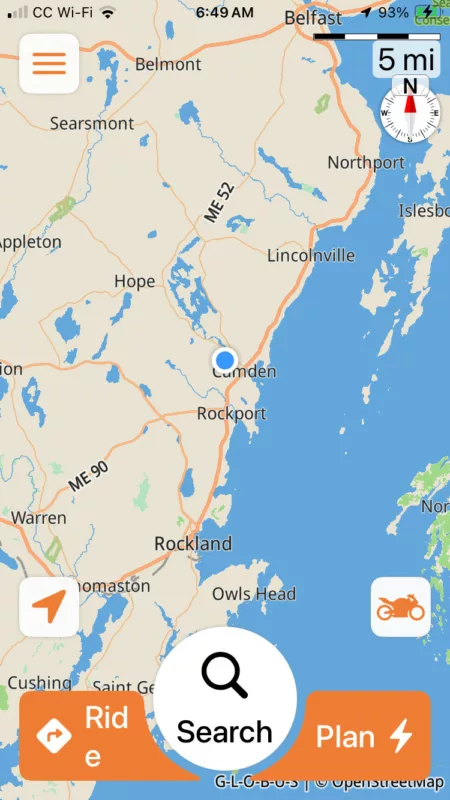
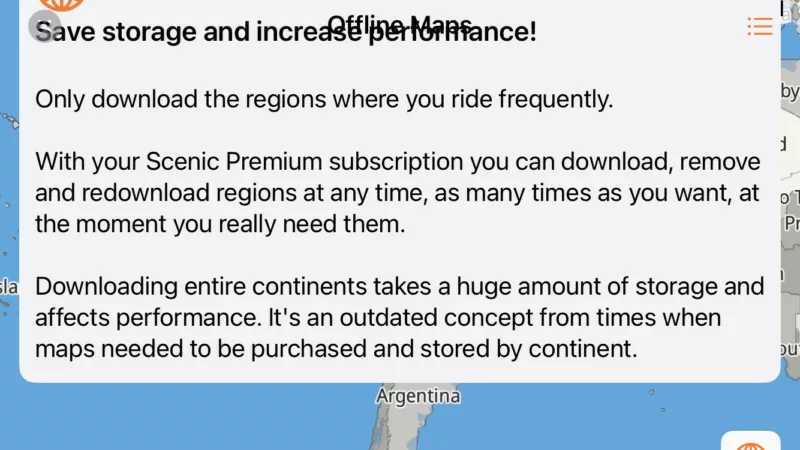
The second issue is more problematic: the (new, I think, with v4.02) offline map download "warning" (about only downloading frequently used regions) blocks the selection map, and I cannot access the "x" button to clear the warning. In both portrait and landscape orientations, the buttons overlap, or are partially obscured "off the screen" so I can't access the selection map at all (any screen tap anywhere near the grey X button just returns the screen to the "home" map view):
I can still access the maps I need using the "other regions" area of the Offline Maps List, but the selection map is nice and I'm sure Guido would at least like to know about these issues...
Anyone having any other SE screen size issues?

Quote from Guido on 16.10.2024, 10:25Will be addressed in next verion.
Will be addressed in next verion.
Quote from mattsz on 16.10.2024, 10:28Quote from Guido on 16.10.2024, 10:25Will be addressed in next verion.
Cool! No hurry for me, I know what the "ride" button does regardless, and I can download the offline maps I want without the selection map...
Quote from Guido on 16.10.2024, 10:25Will be addressed in next verion.
Cool! No hurry for me, I know what the "ride" button does regardless, and I can download the offline maps I want without the selection map...
Quote from Guido on 16.10.2024, 10:33A workaround is to download through the list view (tap button top right three dots / three lines).
A workaround is to download through the list view (tap button top right three dots / three lines).
Quote from mattsz on 16.10.2024, 10:35Quote from Guido on 16.10.2024, 10:33A workaround is to download through the list view (tap button top right three dots / three lines).
Thanks! I actually mentioned that in my post... but good to get a clearer description of how to find it!
Quote from Guido on 16.10.2024, 10:33A workaround is to download through the list view (tap button top right three dots / three lines).
Thanks! I actually mentioned that in my post... but good to get a clearer description of how to find it!

Quote from Karlchen on 16.10.2024, 10:39In 4.00 konnte man auf der Landkarte Bundesländer anklicken. Warum geht das nicht mehr? Das war viel angenehmer wie eine Liste wenn man nicht sieht wo sich das Bundesland befindet?
Beste Grüße
In 4.00 konnte man auf der Landkarte Bundesländer anklicken. Warum geht das nicht mehr? Das war viel angenehmer wie eine Liste wenn man nicht sieht wo sich das Bundesland befindet?
Beste Grüße


