
iphone 13 camera turns on while using Scenic app

Quote from Deleted user on 09.06.2022, 13:37my iphone13 camera randomly turns on while navigating a route using Scenic. My camera does not act this way at any other time. This leads me to believe there's a correlation between the two. Has anybody else experienced this issue? It's annoying because my phone screen goes from viewing the map/route to opening the camera, and then it's difficult to get back to the Scenic app route while underway.
my iphone13 camera randomly turns on while navigating a route using Scenic. My camera does not act this way at any other time. This leads me to believe there's a correlation between the two. Has anybody else experienced this issue? It's annoying because my phone screen goes from viewing the map/route to opening the camera, and then it's difficult to get back to the Scenic app route while underway.

Quote from Guido on 09.06.2022, 14:00Hi @whaynswo. I'm almost certain this is not caused by Scenic. The camera can only be activated by user interaction. More importantly, I've not had any other feedback regarding this. What I could imagine is that perhaps there is something in your navigation setup that initiates the camera activation. I could only be guessing what this is.
Perhaps it's your iPhone case somehow activating screen touches? (Do you have the quick pic button enabled? (Scenic Settings > Navigation & Tracking)
Perhaps the lock (on/off) button is pressed by your mount (on lockscreen a swipe left will open the camera)?
Perhaps you have another accessory paired/connected to your iPhone that can enable the camera?
You can check if the camera is activated inside Scenic or by something else (which might help you narrow down the problem / find the cause of this).
The Scenic camera screen looks like this:
Note you can not select any other media types. Just 'photo'. Also there is only one button at the top to turn on/off the flash. And the aspect ratio is fixed to 4:3 or 3:4.
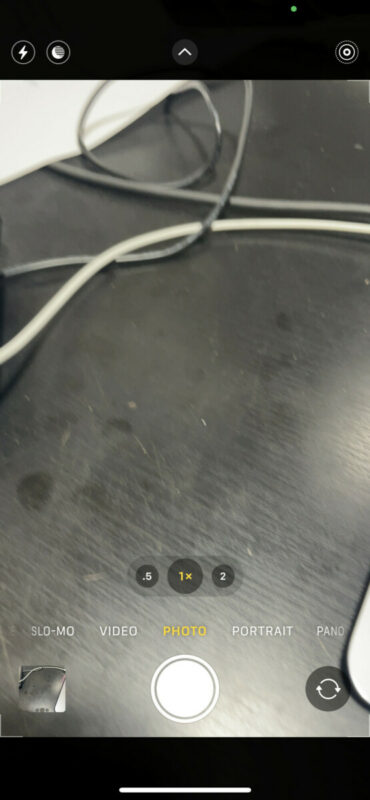
While the built in normal iOS camera app looks like this:
Hi @whaynswo. I'm almost certain this is not caused by Scenic. The camera can only be activated by user interaction. More importantly, I've not had any other feedback regarding this. What I could imagine is that perhaps there is something in your navigation setup that initiates the camera activation. I could only be guessing what this is.
Perhaps it's your iPhone case somehow activating screen touches? (Do you have the quick pic button enabled? (Scenic Settings > Navigation & Tracking)
Perhaps the lock (on/off) button is pressed by your mount (on lockscreen a swipe left will open the camera)?
Perhaps you have another accessory paired/connected to your iPhone that can enable the camera?
You can check if the camera is activated inside Scenic or by something else (which might help you narrow down the problem / find the cause of this).
The Scenic camera screen looks like this:
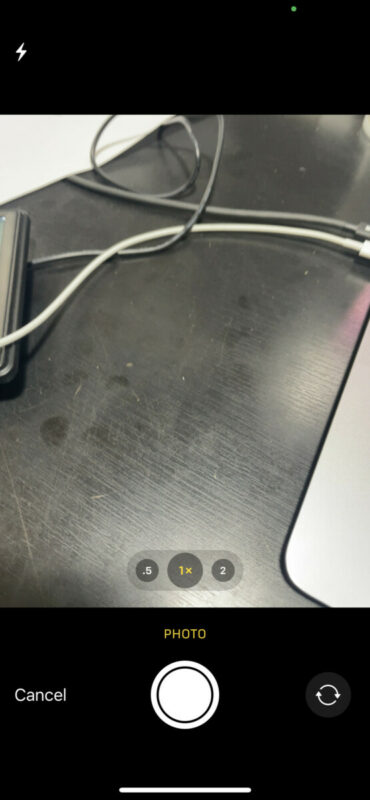
Note you can not select any other media types. Just 'photo'. Also there is only one button at the top to turn on/off the flash. And the aspect ratio is fixed to 4:3 or 3:4.
While the built in normal iOS camera app looks like this:
Quote from Deleted user on 09.06.2022, 15:24Hello Guido,
Thank you for the reply.
My phone case is a Quadlock with a vibration dampener. Prior to the Quadlock, I was using a RAM mount. The same issue occurred.
I have the Quick Pic button disabled because I thought that was the issue. But it still happens.
other accessories: I'm not paired to my GS. I am paired to my Cardo Pactalk Bold.
I have not noticed if the camera is activated from inside Scenic or from the normal iOS camera app. That is a good lead. My next ride (tomorrow, yay!) I will look for which it is.
Thanks for your speedy response.
Bill
Hello Guido,
Thank you for the reply.
My phone case is a Quadlock with a vibration dampener. Prior to the Quadlock, I was using a RAM mount. The same issue occurred.
I have the Quick Pic button disabled because I thought that was the issue. But it still happens.
other accessories: I'm not paired to my GS. I am paired to my Cardo Pactalk Bold.
I have not noticed if the camera is activated from inside Scenic or from the normal iOS camera app. That is a good lead. My next ride (tomorrow, yay!) I will look for which it is.
Thanks for your speedy response.
Bill

Quote from theigi on 09.06.2022, 16:22Do you have "tapping" enabled?
For example, tapping the back three times opens the camera, or something similarWhen driving over bumps or potholes/gravel, it can happen that the iPhone recognizes this as "tapping".
Sorry, I have the iPhone in German, no idea what the function is called in English
Do you have "tapping" enabled?
For example, tapping the back three times opens the camera, or something similar
When driving over bumps or potholes/gravel, it can happen that the iPhone recognizes this as "tapping".
Sorry, I have the iPhone in German, no idea what the function is called in English
Quote from Guido on 09.06.2022, 16:32I didn't know that function existed, but indeed it does, and could explain this:
https://support.apple.com/guide/iphone/back-tap-iphaa57e7885/ios
I didn't know that function existed, but indeed it does, and could explain this:
https://support.apple.com/guide/iphone/back-tap-iphaa57e7885/ios
Quote from Deleted user on 09.06.2022, 16:56Quote from theigi on 09.06.2022, 16:22Do you have "tapping" enabled?
For example, tapping the back three times opens the camera, or something similarWhen driving over bumps or potholes/gravel, it can happen that the iPhone recognizes this as "tapping".
Sorry, I have the iPhone in German, no idea what the function is called in English
Awesome! haha.. I do have tapping enabled (double tap for camera) and just turned it off! I'm confident this will solve the problem. Thank you!!
Quote from theigi on 09.06.2022, 16:22Do you have "tapping" enabled?
For example, tapping the back three times opens the camera, or something similarWhen driving over bumps or potholes/gravel, it can happen that the iPhone recognizes this as "tapping".
Sorry, I have the iPhone in German, no idea what the function is called in English
Awesome! haha.. I do have tapping enabled (double tap for camera) and just turned it off! I'm confident this will solve the problem. Thank you!!
Quote from theigi on 09.06.2022, 19:02is 99.9999% the error
For example, I had set the flashlight to double tap and wondered why my battery always drained so quickly when using scenic.
It was only on a night drive that I noticed that the flashlight kept activating.Now, I no longer need a power bank for rides of up to 6 hours 😎
is 99.9999% the error
For example, I had set the flashlight to double tap and wondered why my battery always drained so quickly when using scenic.
It was only on a night drive that I noticed that the flashlight kept activating.
Now, I no longer need a power bank for rides of up to 6 hours 😎
Quote from Deleted user on 09.06.2022, 19:29Yes, exactly! Always to do with the user. 🙂 I should've asked for help on this forum a couple of months ago. I would have many more rides with Scenic navigation always on screen.
Yes, exactly! Always to do with the user. 🙂 I should've asked for help on this forum a couple of months ago. I would have many more rides with Scenic navigation always on screen.
Quote from Deleted user on 20.06.2022, 13:50follow up report: Since turning off the iPhone camera's "Tapping" feature, my issue with the camera randomly turning on has stopped. Thank for the help!
follow up report: Since turning off the iPhone camera's "Tapping" feature, my issue with the camera randomly turning on has stopped. Thank for the help!


