
Importing gpx

Quote from nick123123 on 07.07.2024, 14:29Hi, couple of points -
1. When I import a friends route created in TomTom as a GPX file the route is sightly different. This can cause problems with riders taking unexpected turns. Any ideas why?
2. when importing a GPX file from TomTom I see to import options , each creates a different map. Why two? See image .
Hi, couple of points -
1. When I import a friends route created in TomTom as a GPX file the route is sightly different. This can cause problems with riders taking unexpected turns. Any ideas why?
2. when importing a GPX file from TomTom I see to import options , each creates a different map. Why two? See image . 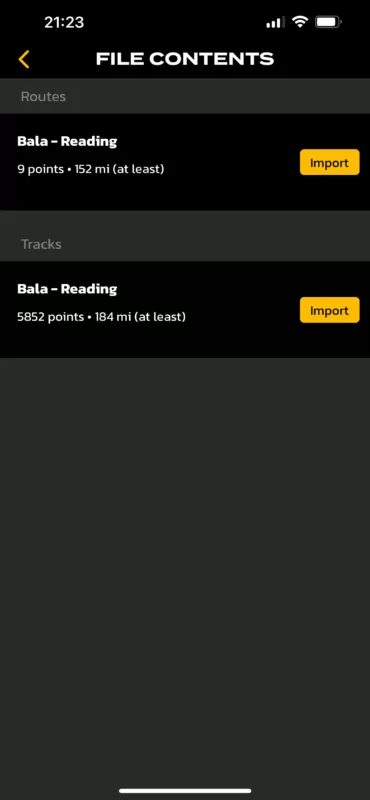

Quote from Guido on 07.07.2024, 19:531) Because Scenic uses different maps and a different routing algorithm. This means it’s possible that Scenic chooses different roads to get from one point to the next. If you’d like to prevent that, importing the track (see below link).
2) This GPX contains a track and a route. This is not something that Scenic does. The GPX as you received it, contains these two elements. Here’s more info: https://scenic.app/help/routes-vs-tracks-and-save-blue-line-as-track-during-import/
1) Because Scenic uses different maps and a different routing algorithm. This means it’s possible that Scenic chooses different roads to get from one point to the next. If you’d like to prevent that, importing the track (see below link).
2) This GPX contains a track and a route. This is not something that Scenic does. The GPX as you received it, contains these two elements. Here’s more info: https://scenic.app/help/routes-vs-tracks-and-save-blue-line-as-track-during-import/


