
Imported Route from Google - questions re tracks and routes and why it did what it did (route is wrong)?

Quote from Marts on 25.08.2024, 02:30Hey Guido.
I'm planning a trip for next week. I punched the route into the Google Maps Machine, then logged into Scenic web and imported it via the Google Maps paste function.
The usual happened. Got a route with a few points and a track with over a hundred of them.
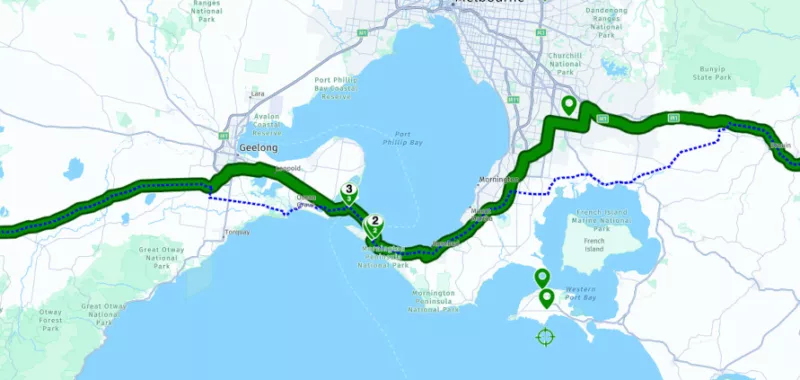
Importing the route has the green route line then at two spots along the route, blue dotted lines.
The plotted route that Scenic imported isn't correct, but the blue dotted lines show the route that I planned in Google.
Just wondering why Scenic did this and what are those blue dotted lines?
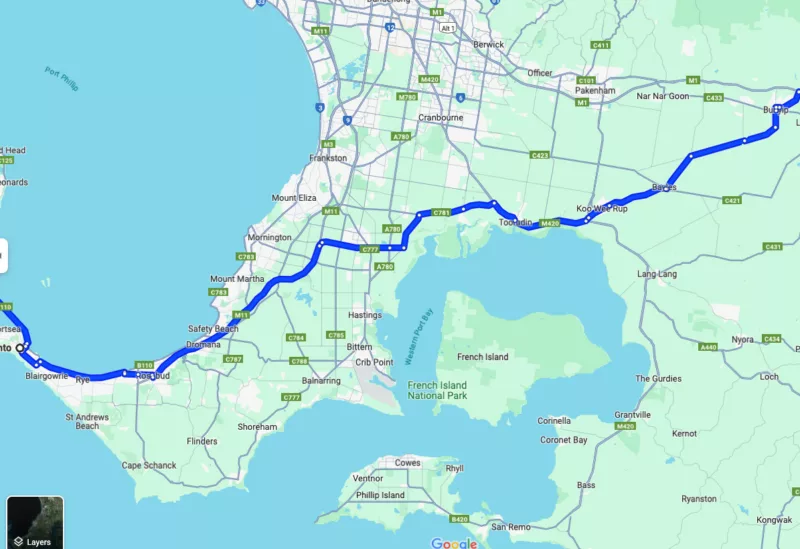
The top image is the route that Scenic imported and generated, the bottom one is what Google produced and the actual route that I'll be following.
The "track" version that Scenic imported has the correct routing.
Before I finalise what route that I'll use I'll wait to see what your explanation is. I can go with the track which imported 251 points, I guess.
I don't know why Scenic imported the wrong routing (or generated the wrong routing). It takes me through the south eastern suburbs of Melbourne where the traffic is horrendous. The other way that I want to go bypasses all of that.
Hey Guido.
I'm planning a trip for next week. I punched the route into the Google Maps Machine, then logged into Scenic web and imported it via the Google Maps paste function.
The usual happened. Got a route with a few points and a track with over a hundred of them.
Importing the route has the green route line then at two spots along the route, blue dotted lines.
The plotted route that Scenic imported isn't correct, but the blue dotted lines show the route that I planned in Google.
Just wondering why Scenic did this and what are those blue dotted lines?
The top image is the route that Scenic imported and generated, the bottom one is what Google produced and the actual route that I'll be following.
The "track" version that Scenic imported has the correct routing.
Before I finalise what route that I'll use I'll wait to see what your explanation is. I can go with the track which imported 251 points, I guess.
I don't know why Scenic imported the wrong routing (or generated the wrong routing). It takes me through the south eastern suburbs of Melbourne where the traffic is horrendous. The other way that I want to go bypasses all of that.

Quote from Guido on 25.08.2024, 07:16Hi Marts,
The blue dotted line is the exact route as it was calculated by Google Maps. It's simply a list of many coordinates connected with a line.
The green line is the line that Scenic calculates. Because Scenic and Google Maps have different map data and a different routing algoritm, this can be different that what Google Maps calculates.
I recommend to import the route and then try and make the green line match the blue dotted line by adding a few via points.
Hope this explains a bit more.
Best regards and ride safe,
Guido
Hi Marts,
The blue dotted line is the exact route as it was calculated by Google Maps. It's simply a list of many coordinates connected with a line.
The green line is the line that Scenic calculates. Because Scenic and Google Maps have different map data and a different routing algoritm, this can be different that what Google Maps calculates.
I recommend to import the route and then try and make the green line match the blue dotted line by adding a few via points.
Hope this explains a bit more.
Best regards and ride safe,
Guido
Quote from Marts on 25.08.2024, 18:16Quote from Guido on 25.08.2024, 07:16I recommend to import the route and then try and make the green line match the blue dotted line by adding a few via points.
Thanks mate. I'll have a play with the routing.
Quote from Guido on 25.08.2024, 07:16I recommend to import the route and then try and make the green line match the blue dotted line by adding a few via points.
Thanks mate. I'll have a play with the routing.
Quote from Marts on 25.08.2024, 18:22I ended up creating the route in Power Planner on the Mac (I so love that I can do that). I added a couple of vias to get it to go where I want.
Thing is, what I love about Scenic is if you plan a route then deviate from it, other than it recalculating the route it also records exactly where you go and you can save that for future use, thus ensuring an exact and correct way to get to where you're going.
I ended up creating the route in Power Planner on the Mac (I so love that I can do that). I added a couple of vias to get it to go where I want.
Thing is, what I love about Scenic is if you plan a route then deviate from it, other than it recalculating the route it also records exactly where you go and you can save that for future use, thus ensuring an exact and correct way to get to where you're going.


