
Import from kurviger not working in iOS

Quote from Meikel123 on 08.05.2024, 03:04I plan with kurviger.de at an iPad, have newest version of scenic app and new imported offline map data.
a) When I use in kurviger.de (Chrome browser at iPad) button export to scenic, a new tab opens (scenicapp.space/api/openScenic...) and it is posted:
"Have Scenic on your device? / Tap and Hold here" -> I have Scenic App active, but when I tap an the yellow "Tap and hold here" nothing happens. Scenic will not open and if I open manually, import queue is empty.b) if I export in kurviger (file) and try to open gpx file in scenic (import), an error message appears: "unzureichende Offline-Kartendaten und keine Internetverbindung", but this is wrong. The solution I found, is not to use shaping points in kurviger, then this error does not occur.
I plan with kurviger.de at an iPad, have newest version of scenic app and new imported offline map data.
a) When I use in kurviger.de (Chrome browser at iPad) button export to scenic, a new tab opens (scenicapp.space/api/openScenic...) and it is posted:
"Have Scenic on your device? / Tap and Hold here" -> I have Scenic App active, but when I tap an the yellow "Tap and hold here" nothing happens. Scenic will not open and if I open manually, import queue is empty.
b) if I export in kurviger (file) and try to open gpx file in scenic (import), an error message appears: "unzureichende Offline-Kartendaten und keine Internetverbindung", but this is wrong. The solution I found, is not to use shaping points in kurviger, then this error does not occur.

Quote from Guido on 08.05.2024, 05:47When you hold the yellow button long enough an iOS panel should appear. Here is a screenshot on iPhone. It should be similar on iPad.
If I choose “open in Scenic” in this panel Scenic opens with the route ready to be imported.
Pwrhaps Chrome is blocking the iOS panel. Could you give it a try with safari?
I don’t recommend going the GPX route at then you loose valuable routing information of the route.
When you hold the yellow button long enough an iOS panel should appear. Here is a screenshot on iPhone. It should be similar on iPad.
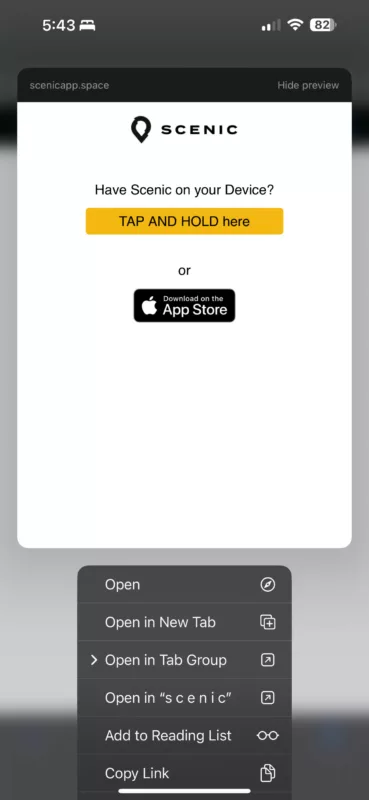
If I choose “open in Scenic” in this panel Scenic opens with the route ready to be imported.
Pwrhaps Chrome is blocking the iOS panel. Could you give it a try with safari?
I don’t recommend going the GPX route at then you loose valuable routing information of the route.
Quote from Meikel123 on 08.05.2024, 06:51the "Open in Scenic" context menu is not available: see file
also not in Edge, Firefox
this is a split screen on ipad, scenic is available and open
the "Open in Scenic" context menu is not available: see file
also not in Edge, Firefox
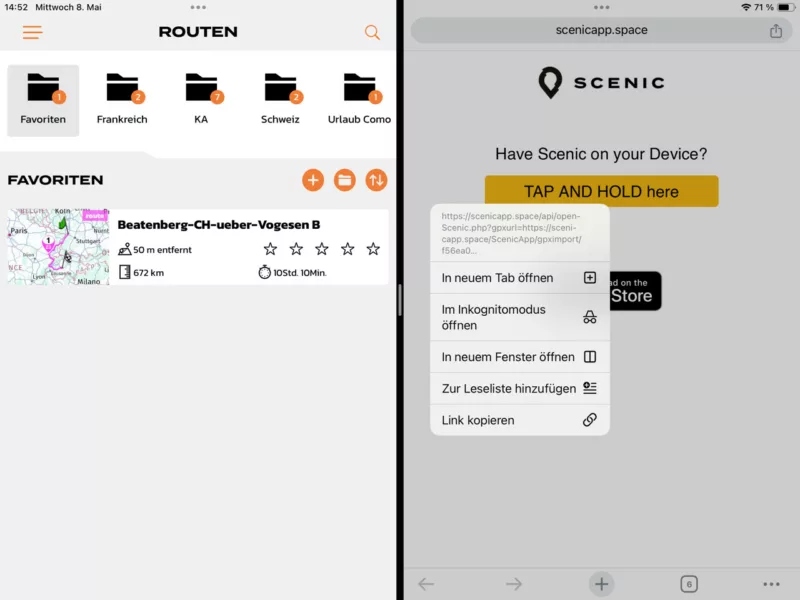
this is a split screen on ipad, scenic is available and open
Quote from Guido on 08.05.2024, 06:59Looks like iOS doesn't know that this link can be opened by the Scenic app. I've learned that the registration of which app can open what links sometimes goes wrong on iOS. Two things you can try:
- Try shutting down your iPad completely, and then turn it back on.
- If that doesn't help try removing Scenic completely and reinstalling through the App Store.
Let me know how it goes.
Looks like iOS doesn't know that this link can be opened by the Scenic app. I've learned that the registration of which app can open what links sometimes goes wrong on iOS. Two things you can try:
- Try shutting down your iPad completely, and then turn it back on.
- If that doesn't help try removing Scenic completely and reinstalling through the App Store.
Let me know how it goes.
Quote from Meikel123 on 08.05.2024, 07:04Ha, in Safari it works, not in chrome, firefox, edge
but it's a little bit different, I have to do a new scenic login at safari, then the route is transferred to scenic import queue
Ha, in Safari it works, not in chrome, firefox, edge
but it's a little bit different, I have to do a new scenic login at safari, then the route is transferred to scenic import queue


