
How to use CarPlay in 4.02

Quote from HyperMulti on 14.10.2024, 16:47First, keep the updates coming. I see the progress with each .0x update!
Based on the release notes and others' posts, I see basic CarPlay functionality should work, but I can't get it to work.
I've tried starting a route (previously planned in 4.x) from the phone before connecting to CP, after (once connected), stopping/restarting, etc. But the route will never appear on the CP device (tried motorcycle and car CarPlay devices). How are others getting the route to show up on the CP? I can hear the routing direction, and can see the routing on the phone but not the CP device. Hmmm.
See screenshots of the phone and CP device....
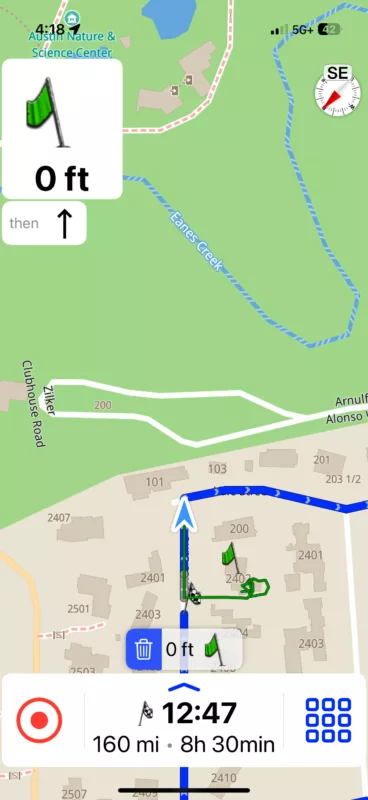
ps. think there's something off with the hours/min calc 😀 shouldn't be 8.5 hrs for 160miles
First, keep the updates coming. I see the progress with each .0x update!
Based on the release notes and others' posts, I see basic CarPlay functionality should work, but I can't get it to work.
I've tried starting a route (previously planned in 4.x) from the phone before connecting to CP, after (once connected), stopping/restarting, etc. But the route will never appear on the CP device (tried motorcycle and car CarPlay devices). How are others getting the route to show up on the CP? I can hear the routing direction, and can see the routing on the phone but not the CP device. Hmmm.
See screenshots of the phone and CP device....
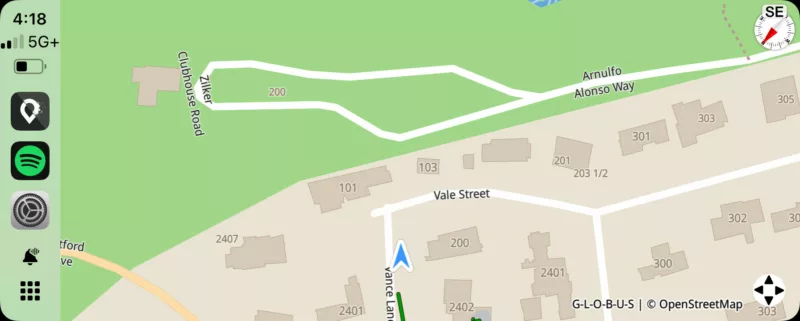
ps. think there's something off with the hours/min calc 😀 shouldn't be 8.5 hrs for 160miles

Quote from Guido on 14.10.2024, 17:09Basic means
- only viewing the map
- the map will follow you
- tracking will start
- You can toggle zoom modes
- You can toggle between heading up and north upSome people found a "hack" by starting a navigation on iPhone and then connecting to CarPlay... the route will show... but this is not supported yet.
Basic means
- only viewing the map
- the map will follow you
- tracking will start
- You can toggle zoom modes
- You can toggle between heading up and north up
Some people found a "hack" by starting a navigation on iPhone and then connecting to CarPlay... the route will show... but this is not supported yet.
Quote from HyperMulti on 14.10.2024, 17:35Quote from Guido on 14.10.2024, 17:09Basic means
- only viewing the map
- the map will follow you
- tracking will start
- You can toggle zoom modes
- You can toggle between heading up and north upSome people found a "hack" by starting a navigation on iPhone and then connecting to CarPlay... the route will show... but this is not supported yet.
Makes sense. TY!
Quote from Guido on 14.10.2024, 17:09Basic means
- only viewing the map
- the map will follow you
- tracking will start
- You can toggle zoom modes
- You can toggle between heading up and north upSome people found a "hack" by starting a navigation on iPhone and then connecting to CarPlay... the route will show... but this is not supported yet.
Makes sense. TY!

Quote from johnsondvr on 15.10.2024, 00:38I have been able to use navigation on CarPlay but once you stop wireless/unplug for CarPlay, you have to close the app on the iPhone completely and restart the navigation as new. As Guido has said, this is not supported yet but you can force some limited nav from the phone through CarPlay.
I have been able to use navigation on CarPlay but once you stop wireless/unplug for CarPlay, you have to close the app on the iPhone completely and restart the navigation as new. As Guido has said, this is not supported yet but you can force some limited nav from the phone through CarPlay.


