
how to send a gpx track/file to Scenic?

Quote from Ricardo Costa on 07.11.2024, 03:37Hi, i used to send the gpx files from wathsapp to the app scennic.
I can´t figured out how to send the gpx file to the scenic app with this new version.
Hi, i used to send the gpx files from wathsapp to the app scennic.
I can´t figured out how to send the gpx file to the scenic app with this new version.

Quote from Dae on 07.11.2024, 04:14It's the same as before. However, @guidomm - there is a bug in that the "import screen" for me disappears after a few seconds if I don't click any of the import buttons. It also doesn't always appear at all when I choose to open a GPX in Scenic, but I can't determine the specific circumstances.
You should be able to "share" the file from WhatsApp directly to Scenic, as I do from other apps to Scenic, but I've found iOS doesn't always give you the option. If that's the case then save the file from WhatsApp to your device, then do the following:
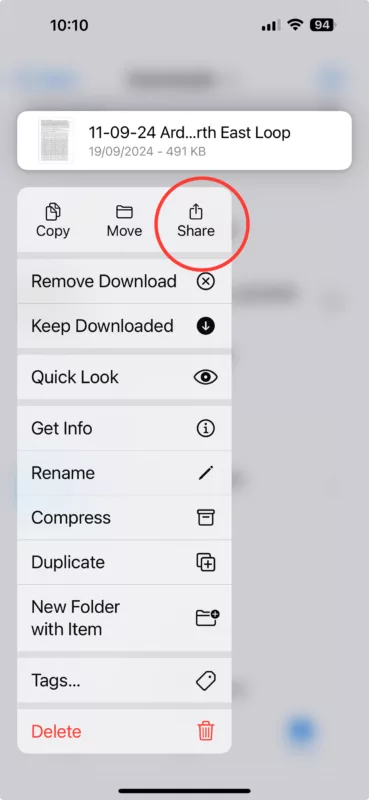
- In the "Files" app, press and hold on the GPX file until the menu pops up
- Click Share
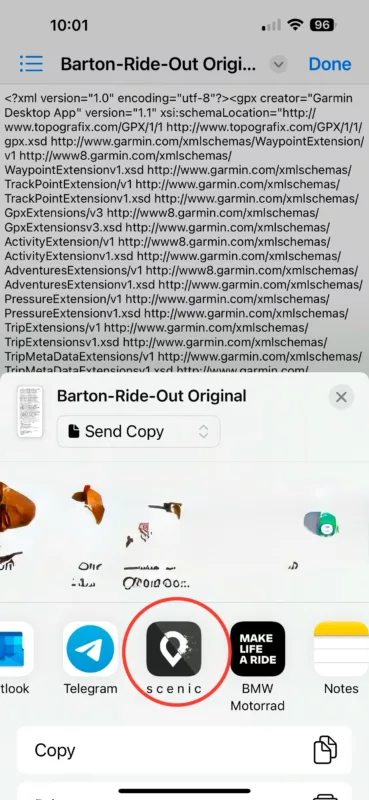
- Click Scenic
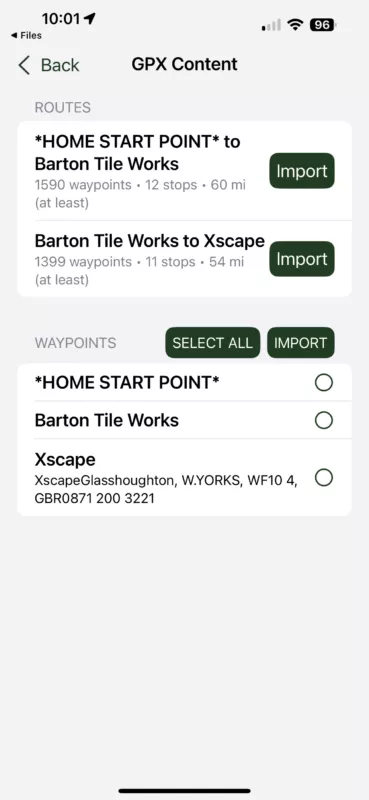
- Import the route
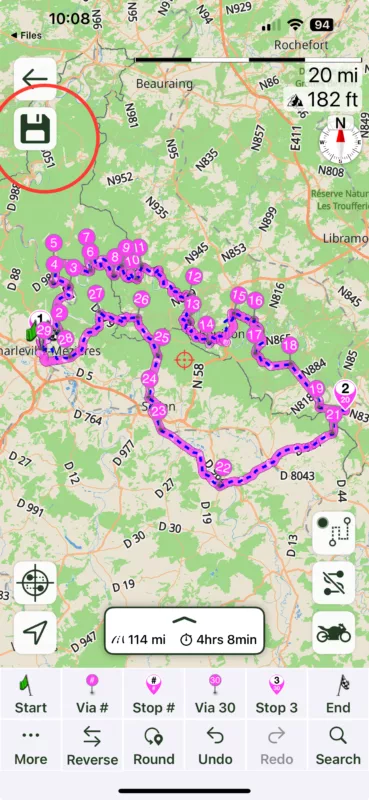
- Make any adjustments necessary to get the route that Scenic calculates (the purple line) to match the original route in the GPX file (the blue dashed line). By adding waypoints you can force Scenic to calculate the same route as the program used to create the GPX file
- Click Save to save the route in your library
It's the same as before. However, @guidomm - there is a bug in that the "import screen" for me disappears after a few seconds if I don't click any of the import buttons. It also doesn't always appear at all when I choose to open a GPX in Scenic, but I can't determine the specific circumstances.
You should be able to "share" the file from WhatsApp directly to Scenic, as I do from other apps to Scenic, but I've found iOS doesn't always give you the option. If that's the case then save the file from WhatsApp to your device, then do the following:
- In the "Files" app, press and hold on the GPX file until the menu pops up
- Click Share
- Click Scenic
- Import the route
- Make any adjustments necessary to get the route that Scenic calculates (the purple line) to match the original route in the GPX file (the blue dashed line). By adding waypoints you can force Scenic to calculate the same route as the program used to create the GPX file
- Click Save to save the route in your library
Quote from Ricardo Costa on 07.11.2024, 05:13Thank You Dae, know it works perceft.
Thank You Dae, know it works perceft.


