
How to join a route at the nearest location...

Quote from J. T. on 22.12.2024, 13:21When using my Garmin XT2 in conjunction with a route built with Scenic Motorcycle Navigation (read imported GPX file) it offers me the opportunity to join the route at the "nearest location." When I'm using Scenic Motorcycle Navigation as the "stand alone" navigation program, with either my iPhone and/or my iPhone, in conjunction with Apple CarPlay, if/when I select a route that begins at my home, for example, and I've already departed my home, is there a way to join the route at the "nearest location?" The way I'm currently accomplishing this, and it's probably wrong, is to select the route and then delete all points "behind" me, such as the Start point and any waypoints along the way up to my present location. Hope this makes sense.
Thanks!!!
When using my Garmin XT2 in conjunction with a route built with Scenic Motorcycle Navigation (read imported GPX file) it offers me the opportunity to join the route at the "nearest location." When I'm using Scenic Motorcycle Navigation as the "stand alone" navigation program, with either my iPhone and/or my iPhone, in conjunction with Apple CarPlay, if/when I select a route that begins at my home, for example, and I've already departed my home, is there a way to join the route at the "nearest location?" The way I'm currently accomplishing this, and it's probably wrong, is to select the route and then delete all points "behind" me, such as the Start point and any waypoints along the way up to my present location. Hope this makes sense.
Thanks!!!

Quote from Guido on 22.12.2024, 16:30Currently Scenic has 2 options. Include location from current location to route start, or not. You can toggle between these with this button:
If off (no guidance to route start) you will need to find your own way to the route. Once you reach the route (no matter where), Scenic will automatically assume you want to pick up the route from there (and remove all waypoints before the join point).
Currently Scenic has 2 options. Include location from current location to route start, or not. You can toggle between these with this button:

If off (no guidance to route start) you will need to find your own way to the route. Once you reach the route (no matter where), Scenic will automatically assume you want to pick up the route from there (and remove all waypoints before the join point).

Quote from Karlchen on 22.12.2024, 16:56Hallo Guido,
Wo finde ich diese Option?
Ich habe immer gedacht, dass ich mich hier einstellen muss?
Hallo Guido,
Wo finde ich diese Option?
Ich habe immer gedacht, dass ich mich hier einstellen muss?
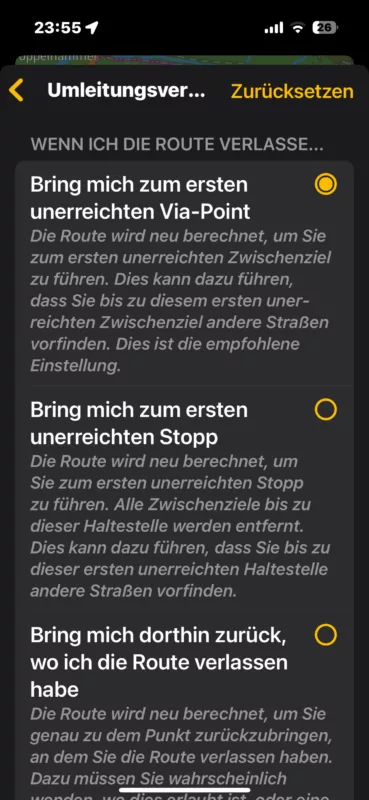
Quote from Guido on 22.12.2024, 17:03That button will appear on the main screen if you select a pre-saved route. This is specifically for starting the route.
Your screenshot is of the detour behavior settings, and determines how Scenic should react if you deviate from the route.
That button will appear on the main screen if you select a pre-saved route. This is specifically for starting the route.
Your screenshot is of the detour behavior settings, and determines how Scenic should react if you deviate from the route.
Quote from Karlchen on 23.12.2024, 08:20Funktioniert diese Funktion auch mit CarPlay?
Hier habe ich oft das Problem, dass bei Fortsetzungen einer Tour nichts angezeigt wird. Ich hatte gedacht, wenn ich immer am iPhone starte, ist das nicht. Aber leider habe ich das auch schon gehabt, das nicht weiter navigiert wurde.
Ich weiß nicht, ob das an mir liegt, oder ob hier ein Fehler vorliegt.
Ich hoffe das in den Griff zu bekommen. Wenn das eine Alternative ist, wäre das zumindest eine Möglichkeit. Ich bin hier für jeden Tipp dankbar, da ich Sorge habe, immer wieder geplante Touren nach Pausen von vorne beginnen zu müssen.
Beste Grüße und allen ein schönes Weihnachtsfest
Karlchen
Funktioniert diese Funktion auch mit CarPlay?
Hier habe ich oft das Problem, dass bei Fortsetzungen einer Tour nichts angezeigt wird. Ich hatte gedacht, wenn ich immer am iPhone starte, ist das nicht. Aber leider habe ich das auch schon gehabt, das nicht weiter navigiert wurde.
Ich weiß nicht, ob das an mir liegt, oder ob hier ein Fehler vorliegt.
Ich hoffe das in den Griff zu bekommen. Wenn das eine Alternative ist, wäre das zumindest eine Möglichkeit. Ich bin hier für jeden Tipp dankbar, da ich Sorge habe, immer wieder geplante Touren nach Pausen von vorne beginnen zu müssen.
Beste Grüße und allen ein schönes Weihnachtsfest
Karlchen
Quote from Guido on 23.12.2024, 20:03Hier habe ich oft das Problem, dass bei Fortsetzungen einer Tour nichts angezeigt wird.
This is a bug I need to resolve. Will be for after the holidays.
Funktioniert diese Funktion auch mit CarPlay?
Yes, but it works a bit different. If you select a pre-saved route in CarPlay, you will get a dialog asking you to choose to include navigation to the route start or not.
Hier habe ich oft das Problem, dass bei Fortsetzungen einer Tour nichts angezeigt wird.
This is a bug I need to resolve. Will be for after the holidays.
Funktioniert diese Funktion auch mit CarPlay?
Yes, but it works a bit different. If you select a pre-saved route in CarPlay, you will get a dialog asking you to choose to include navigation to the route start or not.


