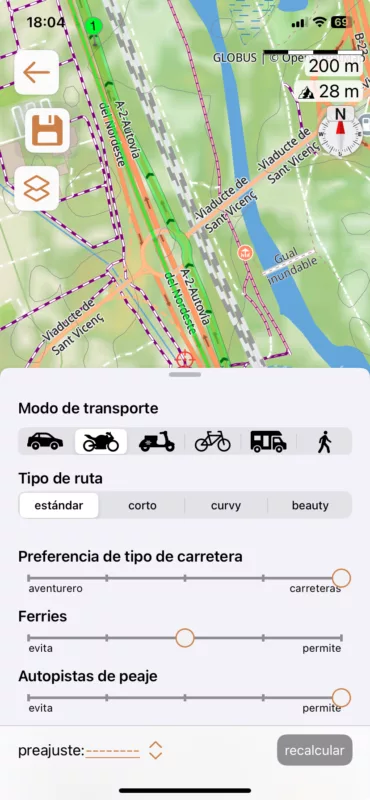
How to avoid this crazy behaviour?

Quote from cgriell on 30.03.2025, 03:24
Scenic 4 does this and I have not found how to avoid it. It seems that there is an "avoid Highways" somewhere, this is not even a tolled Highway. This is one example, but often Scenic makes me to leave the Highway, to route me through twisty street mazes and long detours full of traffic lights and turnarounds to make me enter again the Highway, some times on the same entry I've exited, some times in the next entry. It may be my fault, of course, but I did not find the "Route options" setting
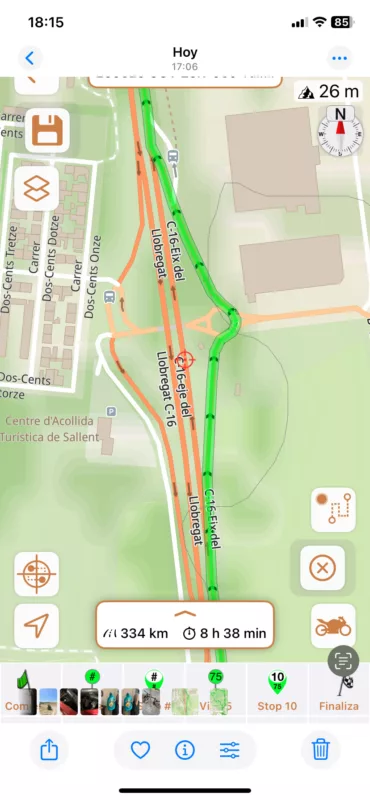
Scenic 4 does this and I have not found how to avoid it. It seems that there is an "avoid Highways" somewhere, this is not even a tolled Highway. This is one example, but often Scenic makes me to leave the Highway, to route me through twisty street mazes and long detours full of traffic lights and turnarounds to make me enter again the Highway, some times on the same entry I've exited, some times in the next entry. It may be my fault, of course, but I did not find the "Route options" setting

Quote from Guido on 30.03.2025, 04:59I added something to reduce this behavior in a previous version. Maybe not enough. What Scenic version are you using, and can you give me the coordinate of the location of the screenshot? (long press on map > copy coordinates > DEC coordinates. )
I added something to reduce this behavior in a previous version. Maybe not enough. What Scenic version are you using, and can you give me the coordinate of the location of the screenshot? (long press on map > copy coordinates > DEC coordinates. )

Quote from MjK on 30.03.2025, 05:45Hi Guido,
saw this on the FB forum and responded there:
tried to replicate the behavior with my current version I did set a start south of your screenshot location on C-16 and an end quite north of it - most likely either an old version or usage of wrong settings in the routing parameters - I was not able to replicate the situation neither in standard nor in curvy routing
the location must be : 41.805081,1.897745
cheers, Markus
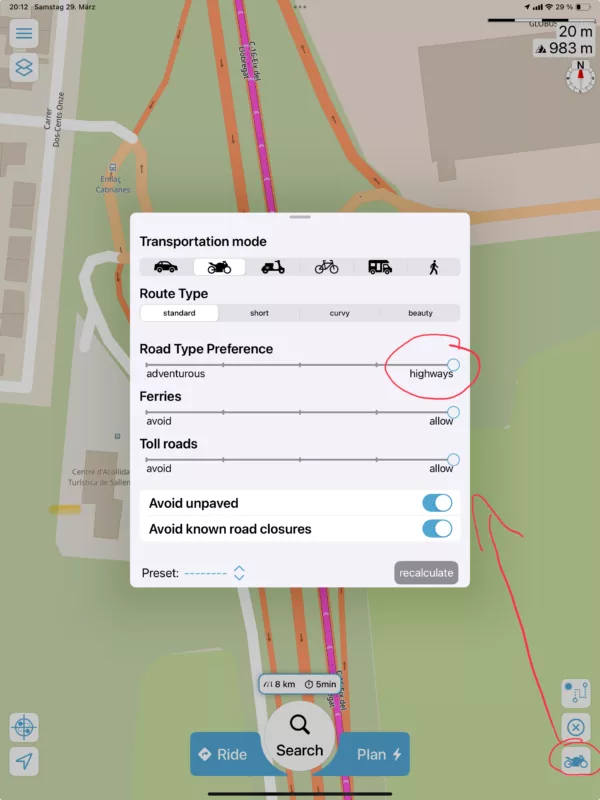
Hi Guido,
saw this on the FB forum and responded there:
tried to replicate the behavior with my current version I did set a start south of your screenshot location on C-16 and an end quite north of it - most likely either an old version or usage of wrong settings in the routing parameters - I was not able to replicate the situation neither in standard nor in curvy routing
the location must be : 41.805081,1.897745
cheers, Markus
Quote from cgriell on 30.03.2025, 07:14Quote from Guido on 30.03.2025, 04:59I added something to reduce this behavior in a previous version. Maybe not enough. What Scenic version are you using, and can you give me the coordinate of the location of the screenshot? (long press on map > copy coordinates > DEC coordinates. )
Version 4.16 (in Spanish).
Settings
Mjk. gives you the coordinates. In any case, I repost my FB post, because it explains the problem that I have be cause I live in a coastal town, so all traffic must use only 180º to enter/exit the city.
in bold and red a feature that may be useful for people radiating always from the same place :
Scenic when planning a route does rather funny things on motorways... I need to use motorways to enter and exit my city. Barcelona is 2 M people living in a seaside city which means that only 180 º are available for roads and streets. Moreover, it is surrounded by mountains, so, the only way to enter and exit the city are either Highways or narrow streets. When I plan a route using the highway, Scenic makes me exit through each one of the exits of the highway, sometimes it reinjects me (see photo) on the nearest ramp, sometimes it sends me through a maze of streets. It seems that there is (or should be) a setting "avoid Highways" set to on, but I had been unable to find it. Someone in the group knows how to fix that ? The only way I've found is to edit the route, adding a waypoint on each exit and moving it to the center of the road, but it 30 km I may have 15 situations like this. And I need to do it for each one of the routes that I define (two or three each week) BTW, It would be nice to have a way to aggregate routes, so I need to do this painful task only once. I would define a route "Home to Wpt N" where Waypoint North will be some point in the Highway, where the actual route starts, and another "Wpt N to Home" and I would define may complete route as "Home to Wpt N" + actual route + "Wpt N to Home"
Quote from Guido on 30.03.2025, 04:59I added something to reduce this behavior in a previous version. Maybe not enough. What Scenic version are you using, and can you give me the coordinate of the location of the screenshot? (long press on map > copy coordinates > DEC coordinates. )
Version 4.16 (in Spanish).
Settings
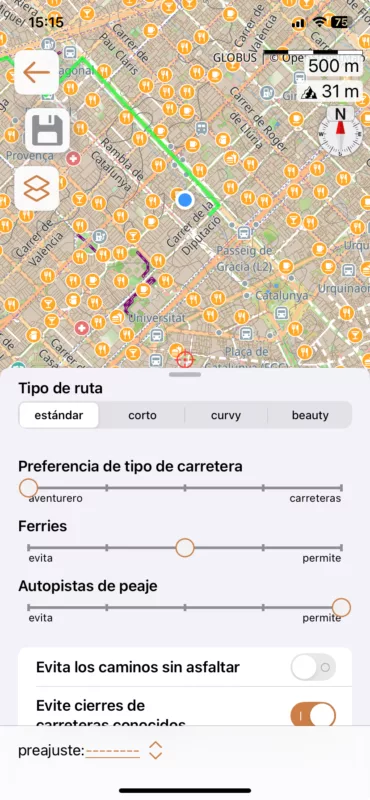
Mjk. gives you the coordinates. In any case, I repost my FB post, because it explains the problem that I have be cause I live in a coastal town, so all traffic must use only 180º to enter/exit the city.
in bold and red a feature that may be useful for people radiating always from the same place :
Scenic when planning a route does rather funny things on motorways... I need to use motorways to enter and exit my city. Barcelona is 2 M people living in a seaside city which means that only 180 º are available for roads and streets. Moreover, it is surrounded by mountains, so, the only way to enter and exit the city are either Highways or narrow streets. When I plan a route using the highway, Scenic makes me exit through each one of the exits of the highway, sometimes it reinjects me (see photo) on the nearest ramp, sometimes it sends me through a maze of streets. It seems that there is (or should be) a setting "avoid Highways" set to on, but I had been unable to find it. Someone in the group knows how to fix that ? The only way I've found is to edit the route, adding a waypoint on each exit and moving it to the center of the road, but it 30 km I may have 15 situations like this. And I need to do it for each one of the routes that I define (two or three each week) BTW, It would be nice to have a way to aggregate routes, so I need to do this painful task only once. I would define a route "Home to Wpt N" where Waypoint North will be some point in the Highway, where the actual route starts, and another "Wpt N to Home" and I would define may complete route as "Home to Wpt N" + actual route + "Wpt N to Home"
Quote from MjK on 30.03.2025, 07:36Ola, Carlos,
looking at your screenshot you have selected aventuero - swipe over to carreteras and let scenic recalculate .. I am pretty sure you will see the route will go straight along the highway …
Adventure not necessarily happen on a straight highway - not even in the lovely city and region of Barcelona.
regarding the aggregation of routes, here is what I do - it’s not inside scenic, but super easy and can be done all from one device : https://scenic.app/forum/topic/putting-routes-together/#postid-11690
Que tenga un buen domingo, Markus
Ola, Carlos,
looking at your screenshot you have selected aventuero - swipe over to carreteras and let scenic recalculate .. I am pretty sure you will see the route will go straight along the highway …
Adventure not necessarily happen on a straight highway - not even in the lovely city and region of Barcelona.
regarding the aggregation of routes, here is what I do - it’s not inside scenic, but super easy and can be done all from one device : https://scenic.app/forum/topic/putting-routes-together/#postid-11690
Que tenga un buen domingo, Markus
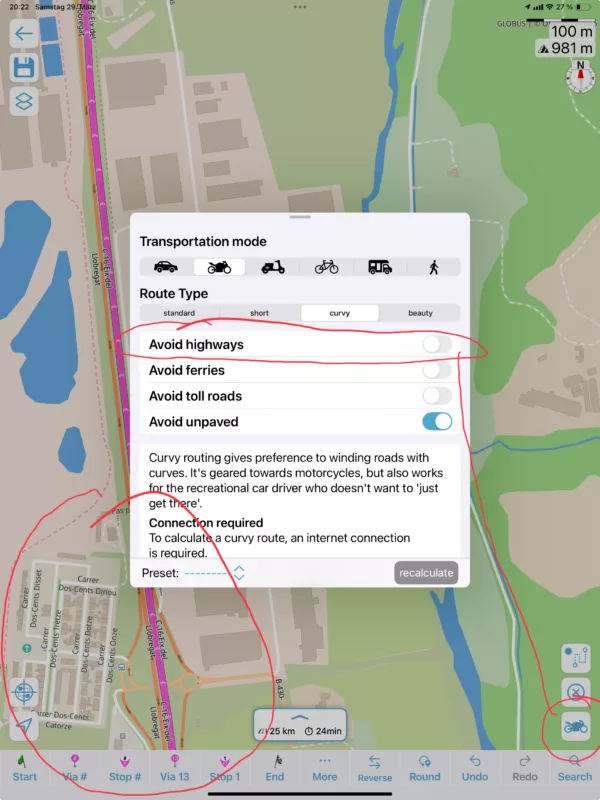
Quote from cgriell on 30.03.2025, 10:50Hi, Markus, I have already answered in FB but I add here my screen captures (adventure and road) for Guido. I will definitively look how to aggregate routes, this will solve my weekly issues (aka. for trips that start and end at home), and for longer routes I'll do what I need to do for version 4.0, which is to review the whole route after planning and storing it. I understand the issues that Guido has, and I appreciate the strenuous work he's doing, but Scenic V4 is still far away of V3. Other than to review the route after storing it, the navigation calls for a stop if a waypoint has been missed because I need to manually delete it, and I need to calculate route time by hand because Scenic calculated time is far off actual time.
Un saludo!!
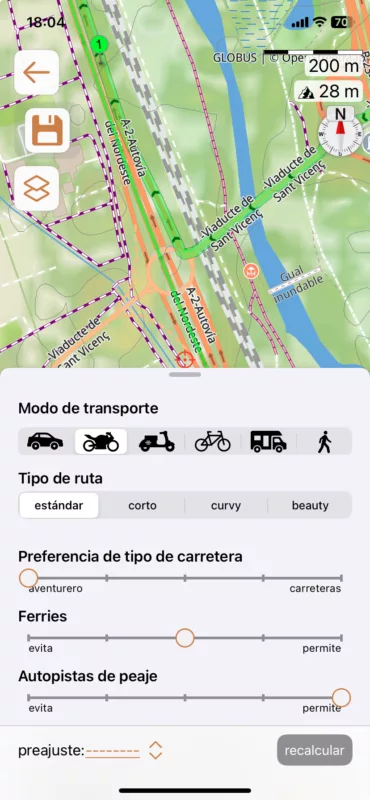
Hi, Markus, I have already answered in FB but I add here my screen captures (adventure and road) for Guido. I will definitively look how to aggregate routes, this will solve my weekly issues (aka. for trips that start and end at home), and for longer routes I'll do what I need to do for version 4.0, which is to review the whole route after planning and storing it. I understand the issues that Guido has, and I appreciate the strenuous work he's doing, but Scenic V4 is still far away of V3. Other than to review the route after storing it, the navigation calls for a stop if a waypoint has been missed because I need to manually delete it, and I need to calculate route time by hand because Scenic calculated time is far off actual time.
Un saludo!!