
GPX export name

Quote from Lbnyc on 07.05.2024, 05:41Hi
i create the route and export the GPX to my Zumo XT via their Drive app.
this works very well for me but Scenic add dates and number to the route name.
how can I avoid this because it is very long and not practical to correct kster.
Tganks
Hi
i create the route and export the GPX to my Zumo XT via their Drive app.
this works very well for me but Scenic add dates and number to the route name.
how can I avoid this because it is very long and not practical to correct kster.
Tganks

Quote from Guido on 07.05.2024, 11:24Hi @lbnyc,
Scenic doesn't add dates and numbers to the route name in the GPX file. So maybe it's your Garmin or the Drive app that does this? Not sure. You can check this yourself by opening the export GPX from Scenic into a text editor. There you will see that no numbers or dates are added.
If you have any further questions, please let me know.
Best regards,
Guido
Hi @lbnyc,
Scenic doesn't add dates and numbers to the route name in the GPX file. So maybe it's your Garmin or the Drive app that does this? Not sure. You can check this yourself by opening the export GPX from Scenic into a text editor. There you will see that no numbers or dates are added.
If you have any further questions, please let me know.
Best regards,
Guido
Quote from Lbnyc on 07.05.2024, 11:40In Scenic i just clicked export GPX and this is what I get. This is before I make any selection to Anything
so there is a few numbers added
In Scenic i just clicked export GPX and this is what I get. This is before I make any selection to Anything
so there is a few numbers added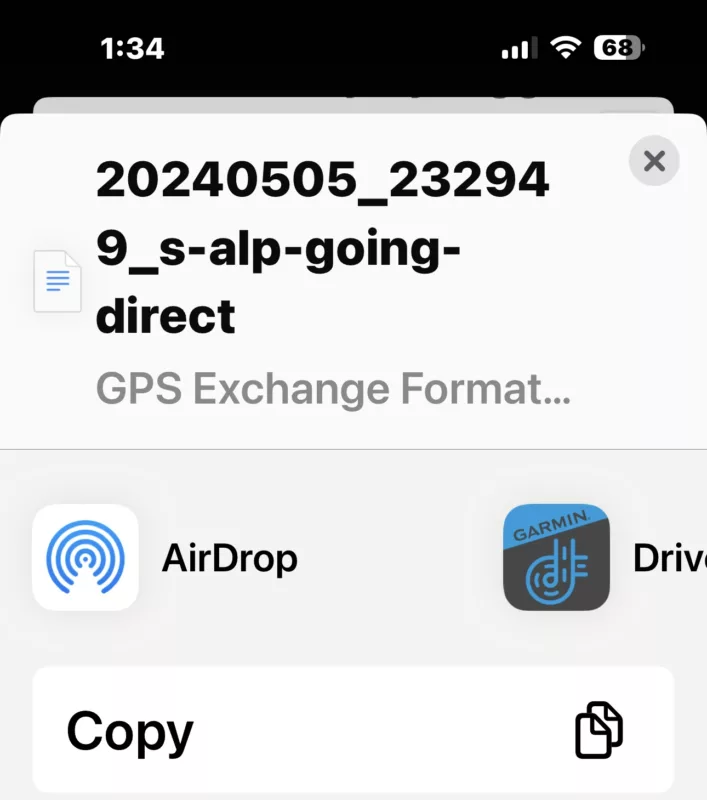
Quote from Guido on 07.05.2024, 11:44OK. Yes. This is the date and time in yyyymmdd_hhmmss.
This is however not the name of the route in the GPX. This is the filename.
Standard behaviour is that devices / apps / software that import GPX files take the route name from the GPX Contents, not from the filename. I would expect your Garmin and/or the Drive app to do that too. Is it not doing that?
OK. Yes. This is the date and time in yyyymmdd_hhmmss.
This is however not the name of the route in the GPX. This is the filename.
Standard behaviour is that devices / apps / software that import GPX files take the route name from the GPX Contents, not from the filename. I would expect your Garmin and/or the Drive app to do that too. Is it not doing that?
Quote from Lbnyc on 07.05.2024, 12:06I never export from the XT so I wouldn’t know. But that’s a problem .
i guess I have to find a way to reduce name of the file to be able to view and read the file nsme.let me look at it
Thsnks
I never export from the XT so I wouldn’t know. But that’s a problem .
i guess I have to find a way to reduce name of the file to be able to view and read the file nsme.
let me look at it
Thsnks


